
1. Inleiding
Thank you for choosing the GenMachine Mini PC. This compact yet powerful computer is designed to deliver exceptional performance for a variety of tasks, including gaming, office productivity, and creative design. Equipped with an AMD Ryzen 7 3750H processor, ample memory, and fast storage, it offers a seamless computing experience. This manual provides essential information for setting up, operating, maintaining, and troubleshooting your new Mini PC.
2. Wat is in die boks
Please verify that all items are present and in good condition upon unboxing.
- 1 x GenMachine Mini PC
- 1 x HDMI-kabel
- 1 x kragadapter
- 1 x Gebruikershandleiding (hierdie dokument)
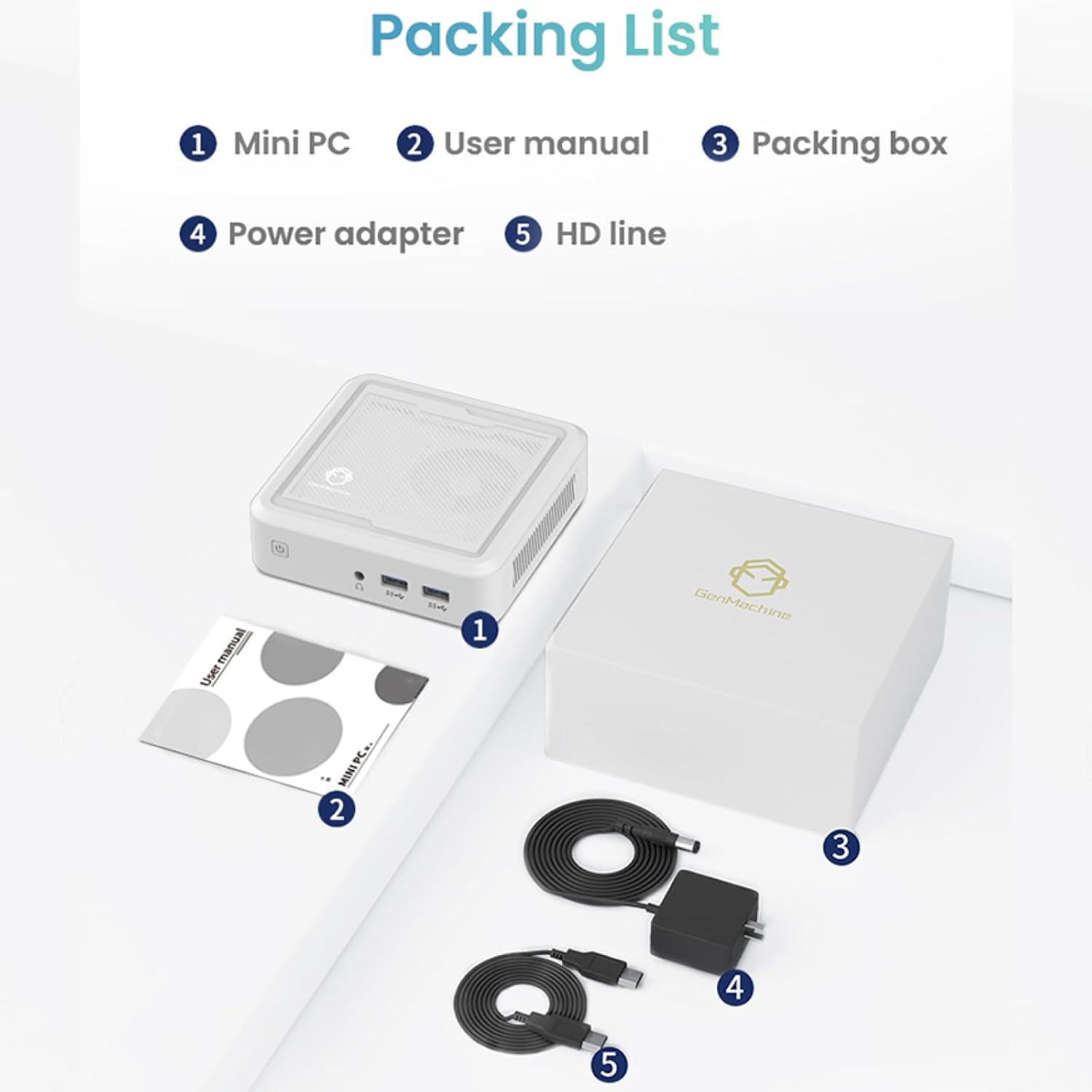
Figure 2.1: Packaging contents of the GenMachine Mini PC.
3. Produkkenmerke
The GenMachine Mini PC is engineered with features to enhance your computing experience:
- Kragtige prestasie: Equipped with an AMD Ryzen 7 3750H processor, delivering speeds up to 4.0GHz with 4 cores and 8 threads for demanding tasks.
- AmpGeheue en berging: Features 8GB of DDR4 RAM and a 256GB SSD with M.2 NVMe support for seamless multitasking and quick file toegang.
- Veelsydige verbindings: Advanced WiFi 6 and Bluetooth 5.2 capabilities ensure high-speed internet and smooth device pairing.
- Kompakte ontwerp: A sleek, small form factor that fits easily into any workspace or gaming setup.
- Veelvuldige vertoonopsies: HDMI and DisplayPort outputs support dual 4K displays for expanded productivity and immersive visuals.

Figuur 3.1: Voorkant view of the GenMachine Mini PC.
3.1 Rich Interface for Easy Connection
The Mini PC offers a comprehensive set of ports to meet various connectivity needs:
- USB 3.0 x 4
- HDMIx1
- DisplayPort (DP) x 1
- LAN (Ethernet) x 1
- 3.5mm-klankaansluiting x 1
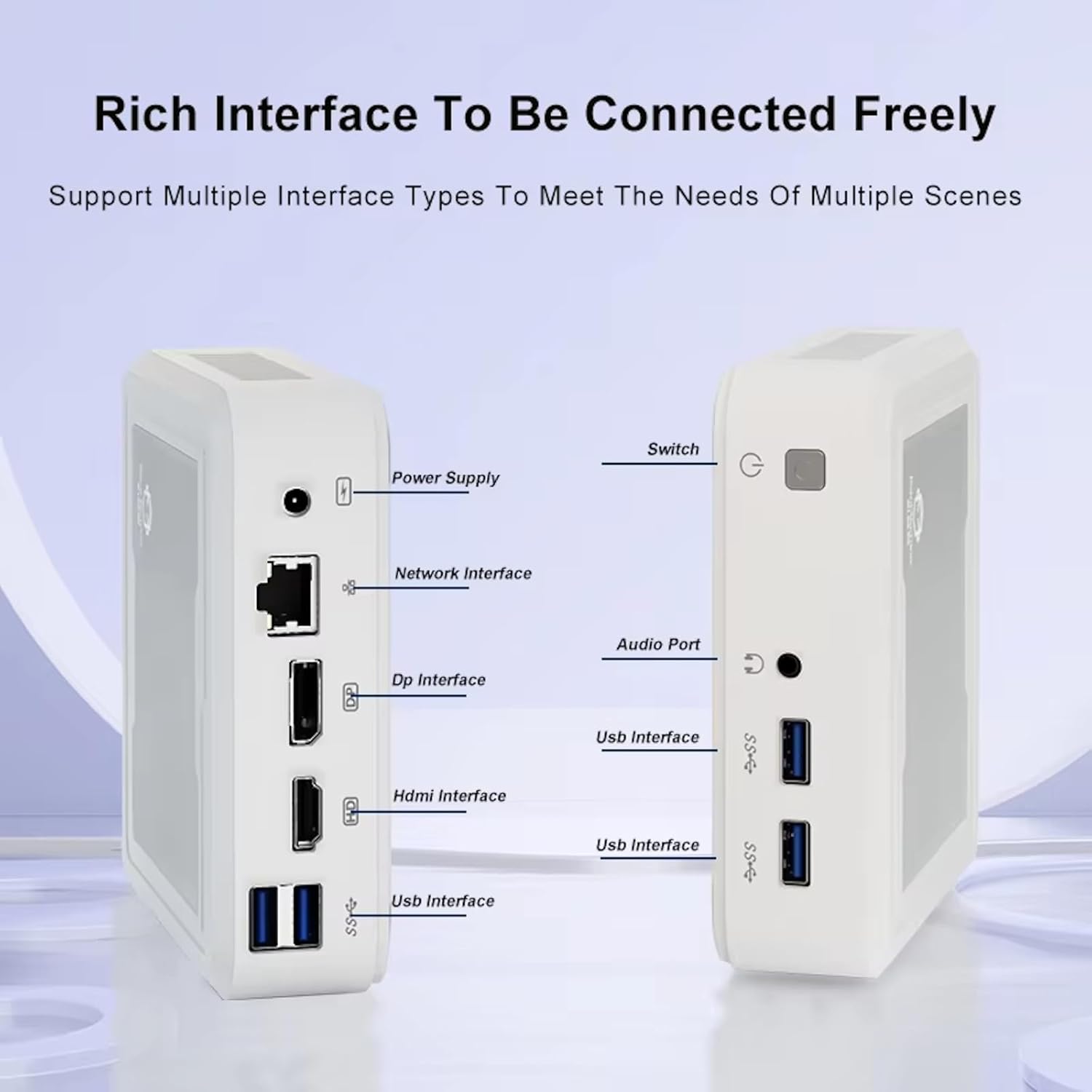
Figure 3.2: Available ports on the GenMachine Mini PC.
3.2 Dual Monitor Support
Enhance your productivity or gaming experience by connecting up to two 4K displays simultaneously using the HDMI and DisplayPort outputs.

Figure 3.3: Dual 4K display setup with the GenMachine Mini PC.
Video 3.1: Demonstration of the GenMachine Mini PC supporting two monitors simultaneously.
3.3 Energie-doeltreffendheid en stil werking
Designed for low noise operation, the Mini PC maintains a quiet environment, making it suitable for various settings.

Figure 3.4: Noise level comparison of the GenMachine Mini PC.
3.4 Compact and Durable Design
The Mini PC features an ultra-durable, lightweight metal casing, making it space-saving and robust for any work environment.
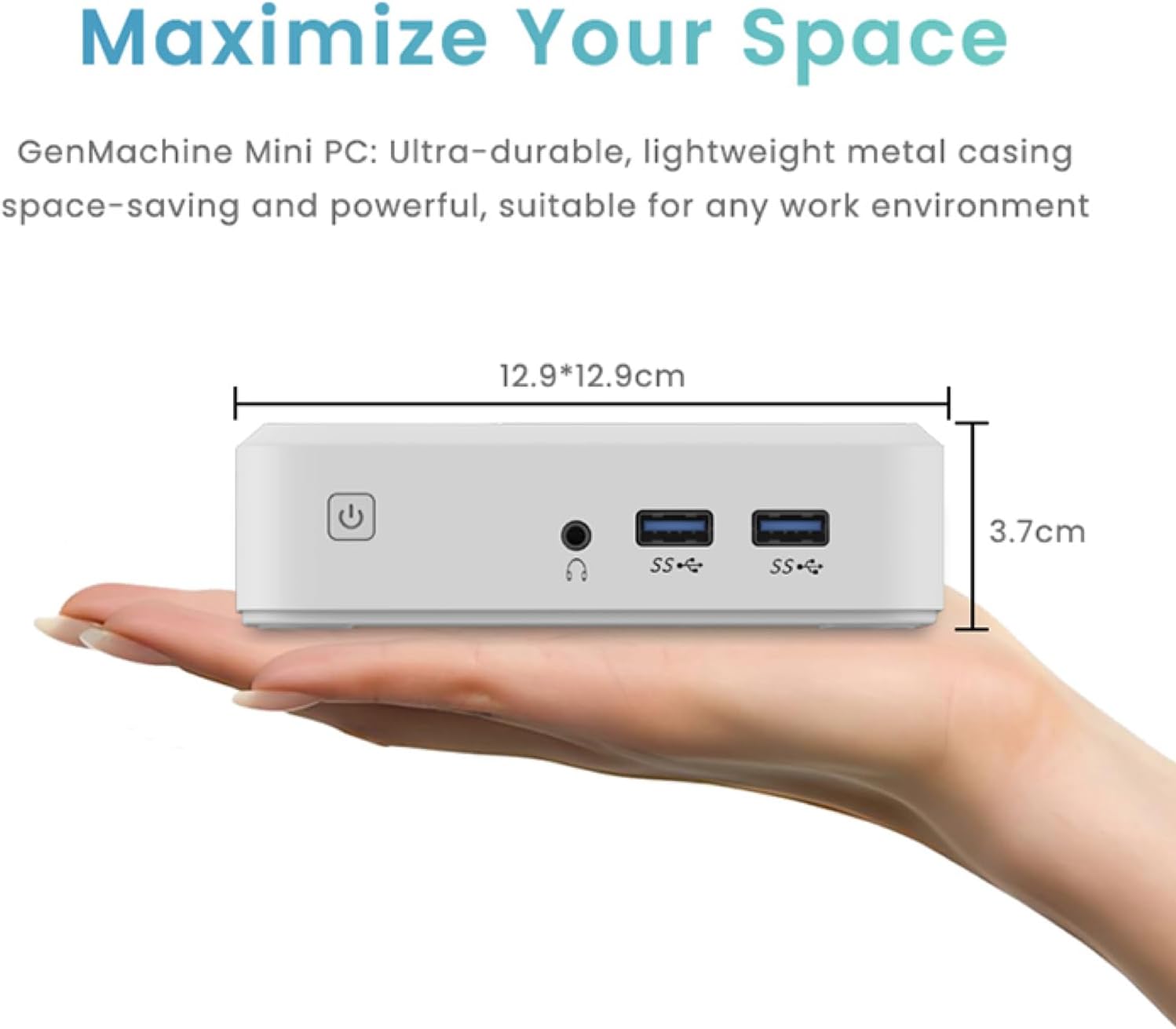
Figure 3.5: Compact size of the GenMachine Mini PC.
Video 3.2: Oorview of the GenMachine Mini PC's features and compact design.
4. Opstelgids
Follow these steps to set up your GenMachine Mini PC:
- Pak die Mini-rekenaar uit: Verwyder alle komponente versigtig uit die verpakking.
- Koppel aan 'n skerm: Use the provided HDMI cable to connect the Mini PC to your monitor or TV. If using a DisplayPort monitor, use a compatible DP cable (not included).
- Koppel randapparatuur: Plug in your keyboard, mouse, and any other USB devices into the available USB 3.0 ports.
- Koppel aan netwerk (opsioneel): For a wired internet connection, connect an Ethernet cable to the LAN port. For wireless, ensure your WiFi network is available during initial setup.
- Koppel krag: Steek die kragadapter in die GS-in-poort op die Mini-rekenaar, en steek dan die adapter in 'n kragaansluiting.
- Krag aan: Press the power button on the front of the Mini PC. The system should boot up.
5. Bedryfsinstruksies
5.1 Aanvanklike opstart en bedryfstelselopstelling
Upon first power-on, the Mini PC will guide you through the operating system setup process. Follow the on-screen prompts to configure language, region, user accounts, and network settings.
5.2 Kragbestuur
- Krag aan: Druk een keer die kragknoppie.
- Sluit af: Access the power options through the operating system's start menu and select 'Shut down'.
- Herbegin: Access the power options through the operating system's start menu and select 'Restart'.
- Slaap stelling: Access the power options through the operating system's start menu and select 'Sleep'.
5.3 Verbinding met Wi-Fi en Bluetooth
To connect to a wireless network or Bluetooth device, use the respective settings within your operating system. The Mini PC supports WiFi 6 and Bluetooth 5.2 for fast and reliable connections.
6. Onderhoud
Gereelde onderhoud help om die lang lewensduur en optimale werkverrigting van jou Mini-rekenaar te verseker:
- Skoonmaak: Use a soft, dry cloth to clean the exterior. For dust in vents, use compressed air. Ensure the device is powered off and unplugged before cleaning.
- Ventilasie: Ensure the Mini PC is placed in a well-ventilated area. Do not block the air vents.
- Sagteware-opdaterings: Regularly update your operating system, drivers, and applications to ensure security and performance.
- Data-rugsteun: Rugsteun gereeld belangrike data na 'n eksterne skyf of wolkberging.
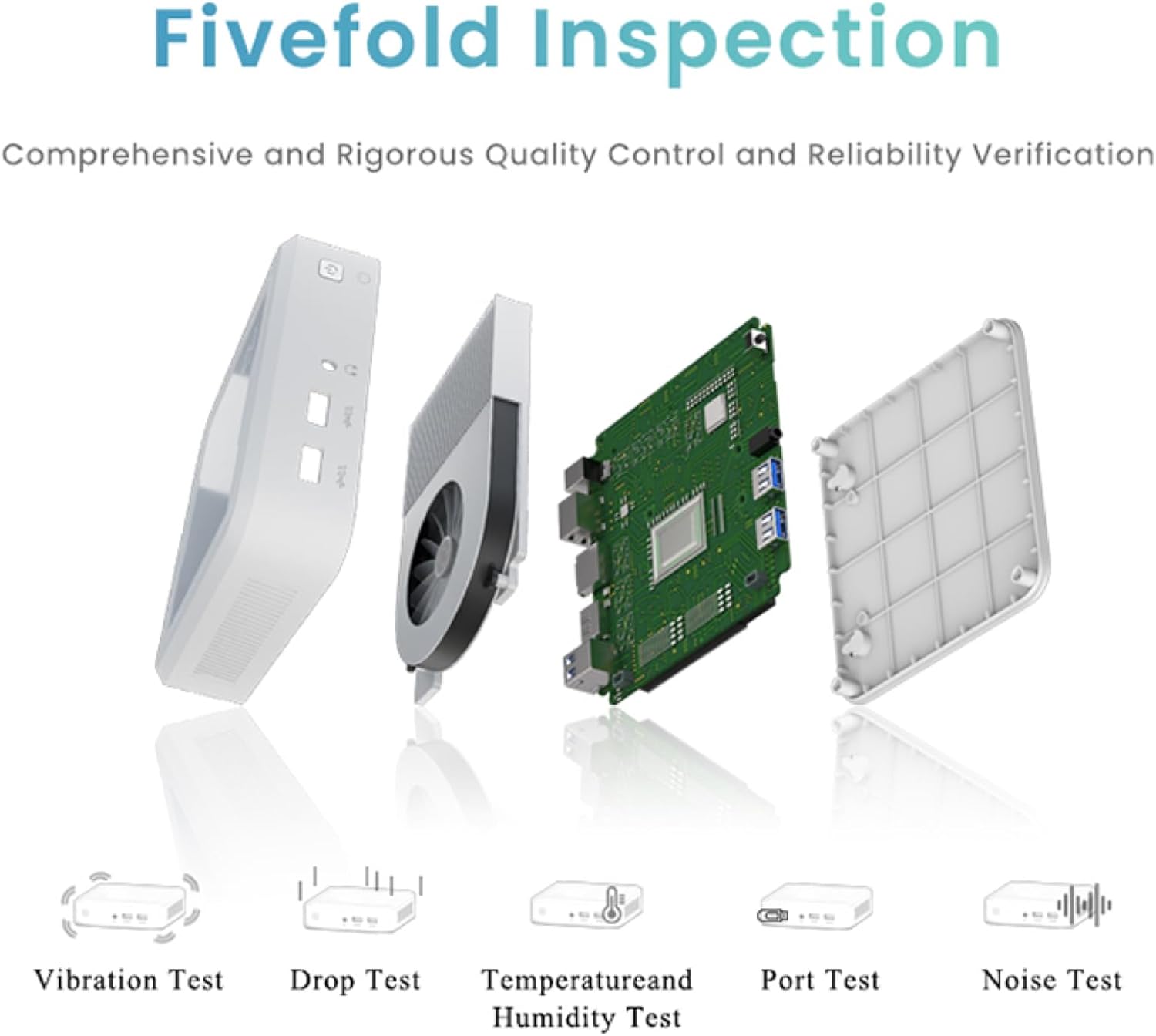
Figure 6.1: GenMachine's Fivefold Inspection process for quality control.
7. Probleemoplossing
Indien u probleme met u Mini-rekenaar ondervind, raadpleeg die volgende algemene probleme en oplossings:
- Geen krag:
- Maak seker dat die kragadapter stewig aan beide die Mini-rekenaar en 'n werkende kragaansluiting gekoppel is.
- Probeer 'n ander kragpunt.
- Geen skerm:
- Verify that the HDMI or DisplayPort cable is securely connected to both the Mini PC and the monitor.
- Maak seker dat die monitor aangeskakel is en op die korrekte invoerbron gestel is.
- Probeer 'n ander skermkabel of monitor indien moontlik.
- Stelsel vries of reageer nie:
- Perform a hard reset by holding the power button for 5-10 seconds until the device powers off, then restart.
- Ensure the operating system and drivers are up to date.
- Kontroleer vir oorverhitting; verseker behoorlike ventilasie.
- Run a system diagnostic or memory test if the issue persists.
- Geen internetverbinding nie:
- Vir bedrade verbindings, kontroleer die status van die Ethernet-kabel en router.
- For Wi-Fi, ensure Wi-Fi is enabled in the operating system and you are connected to the correct network with the correct password.
- Herbegin jou router/modem.
8. Spesifikasies
| Kenmerk | Spesifikasie |
|---|---|
| Verwerker | AMD Ryzen 7 3750H (4 cores, 8 threads, up to 4.0GHz) |
| RAM | 8GB DDR4 |
| Berging | 256GB SSD (with M.2 NVMe support) |
| Grafiese medeverwerker | AMD Radeon Vega 10-grafika |
| Maksimum skermresolusie | 3840 x 2160 piksels (4K) |
| Draadlose tipe | 802.11ac (WiFi 6), Bluetooth 5.2 |
| USB-poorte | 4 x USB 3.0 |
| Video-uitsette | HDMI, DisplayPort |
| Bedryfstelsel | OS (vooraf geïnstalleer) |
| Item gewig | 2.1 pond |
| Produk afmetings | 4.9 x 4.9 x 1.4 duim |
| Kleur | Swart |
9. Waarborg en Ondersteuning
For warranty information and technical support, please refer to the warranty card included with your product or visit the official GenMachine webwebwerf. Bewaar u aankoopbewys as bewys van aankoop vir waarborgeise.
If you require further assistance, please contact GenMachine customer support through the channels provided on their official webwebwerf.