
Inleiding
This manual provides essential information for the safe and efficient use of your ADEQWAT Magnetic Wall Charger with USB-C Cable. Please read these instructions carefully before using the product and retain them for future reference.
Veiligheidsinligting
- Moenie die laaier aan water, vog of uiterste temperature blootstel nie.
- Do not attempt to disassemble, repair, or modify the charger. This may void the warranty and pose safety risks.
- Hou buite bereik van kinders.
- Ensure the charger is plugged into a compatible power outlet.
- Disconnect the charger from the power outlet when not in use or during electrical storms.
- Vermy om die laaier te laat val of aan harde impakte bloot te stel.
Pakketinhoud
Verifieer dat alle items in die pakket teenwoordig is:
- ADEQWAT Magnetic Wall Charger
- Geïntegreerde USB-C-kabel
- Additional Metallic Plate (for magnetic attachment)
Opstelling
- Vou die prop oop: Gently pull out the retractable plug from the back of the charger until it locks into place.

Beeld: Agterkant view of the charger with the retractable plug extended.
- Koppel aan kraguitlaat: Insert the charger's plug into a standard wall power outlet.

Image: The charger plugged into a wall outlet, demonstrating its use with a smartphone and tablet.
- Optional: Attach Metallic Plate: If you wish to use the magnetic feature with a device that is not inherently magnetic, attach the provided metallic plate to the back of your smartphone or its case. Ensure the plate is securely positioned.
Bedryf
- Charging with USB-C Cable: Connect the integrated USB-C cable to your compatible device's USB-C port. Charging will begin automatically.
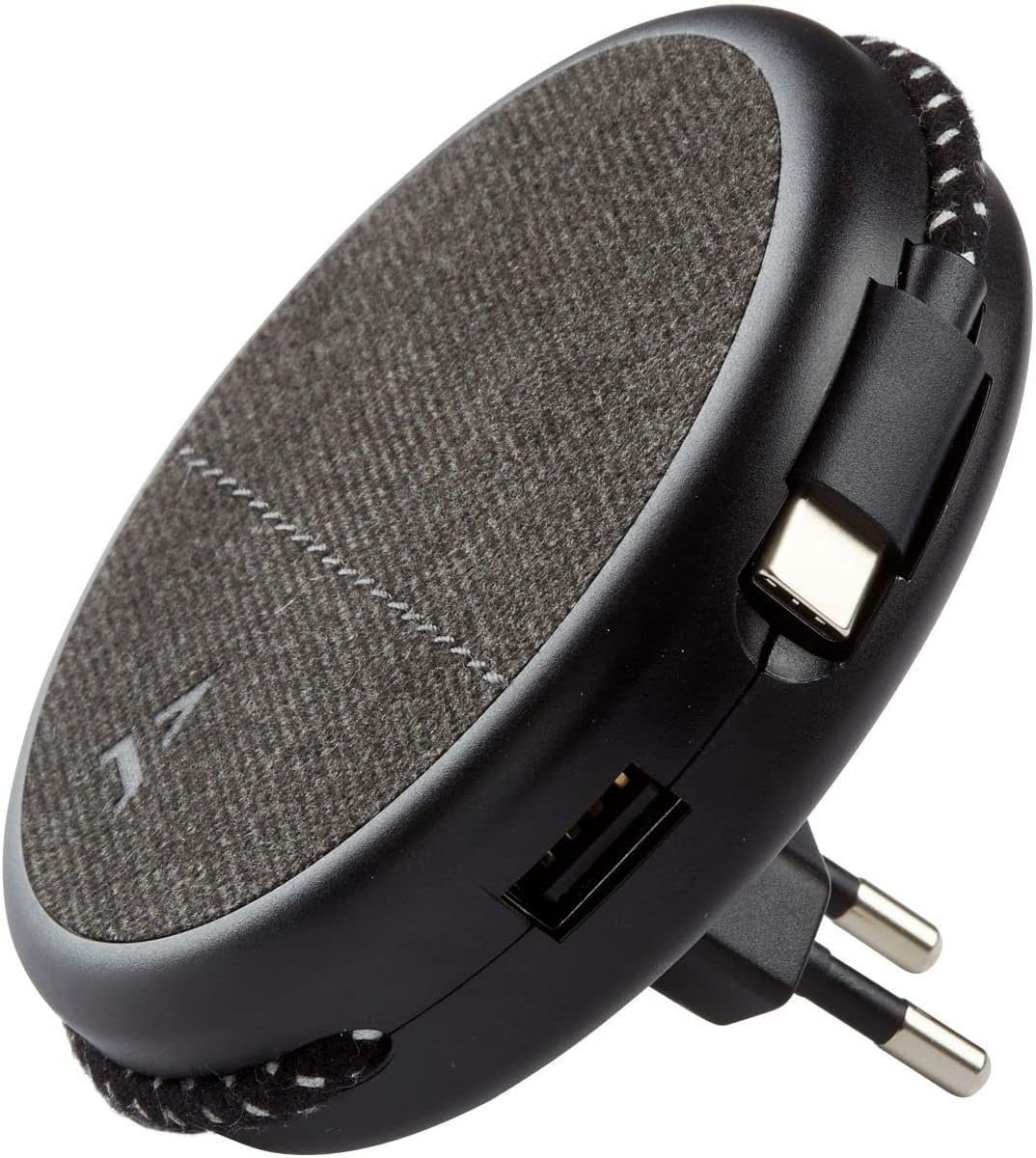
Image: Close-up of the charger, highlighting the integrated USB-C cable and an additional USB-A port.
- Charging with USB-A Port: For devices requiring a USB-A connection, use your own USB-A cable and plug it into the USB-A port on the charger.
- Gebruik die magnetiese kenmerk: Once the charger is plugged into a wall outlet, you can magnetically attach your smartphone (with or without the metallic plate) to the charger's surface for convenient holding while charging.
Onderhoud
- Skoonmaak: Disconnect the charger from the power outlet before cleaning. Use a soft, dry cloth to wipe the surface. Do not use liquid cleaners or abrasive materials.
- Berging: When not in use, store the charger in a cool, dry place, away from direct sunlight and extreme temperatures. The retractable plug can be folded back into the charger for compact storage.
Probleemoplossing
| Probleem | Moontlike oorsaak | Oplossing |
|---|---|---|
| Toestel laai nie. | Laaier nie behoorlik ingeprop nie. Toestelkabel foutief. Device incompatible. | Maak seker dat die laaier volledig in die muursok geplaas is. Probeer 'n ander kabel. Verify device compatibility with USB charging standards. |
| Magnetiese aanhegting is swak. | Device not magnetic. Metallic plate not properly attached. | Ensure your device has a magnetic back or use the provided metallic plate. Re-position or re-attach the metallic plate securely. |
| Die laaier voel warm. | Normale werking. Oorlading. | A slight warmth during charging is normal. If it becomes excessively hot, disconnect immediately and contact support. Avoid charging multiple high-power devices simultaneously if it causes overheating. |
Spesifikasies
| Handelsmerk | ADEQWAT |
| Modelnommer | 8005668 |
| Kleur | Swart |
| Verbindings | USB (Integrated USB-C Cable, 1x USB-A Port) |
| Spesiale kenmerk | Magneties |
| Totale USB-poorte | 1 (USB-A) + 1 (Integrated USB-C) |
| Versoenbare toestelle | Cellular Phones, Tablets |
| Kraguitset | 17 Watt |
| Aantal items | 2 (Charger + Metallic Plate) |
| Kragbron | Elektries met koord |
| Draagbaar | Ja |
Waarborg en Ondersteuning
For warranty information or technical support, please refer to the documentation provided with your purchase or visit the official ADEQWAT webwebwerf. Bewaar u bewys van aankoop vir waarborgeise.