
1. Inleiding
This manual provides comprehensive instructions for the Maxcom Fit FW55 Aurum Pro Smartwatch. It covers essential information regarding product setup, operation, maintenance, and troubleshooting to ensure optimal performance and user experience. Please read this manual carefully before using your device.
2. Pakketinhoud
Verifieer asseblief dat al die items wat hieronder gelys word, in u produkpakket teenwoordig is:
- Maxcom Fit FW55 Aurum Pro Smartwatch
- Laai kabel
- Gebruikershandleiding (hierdie dokument)
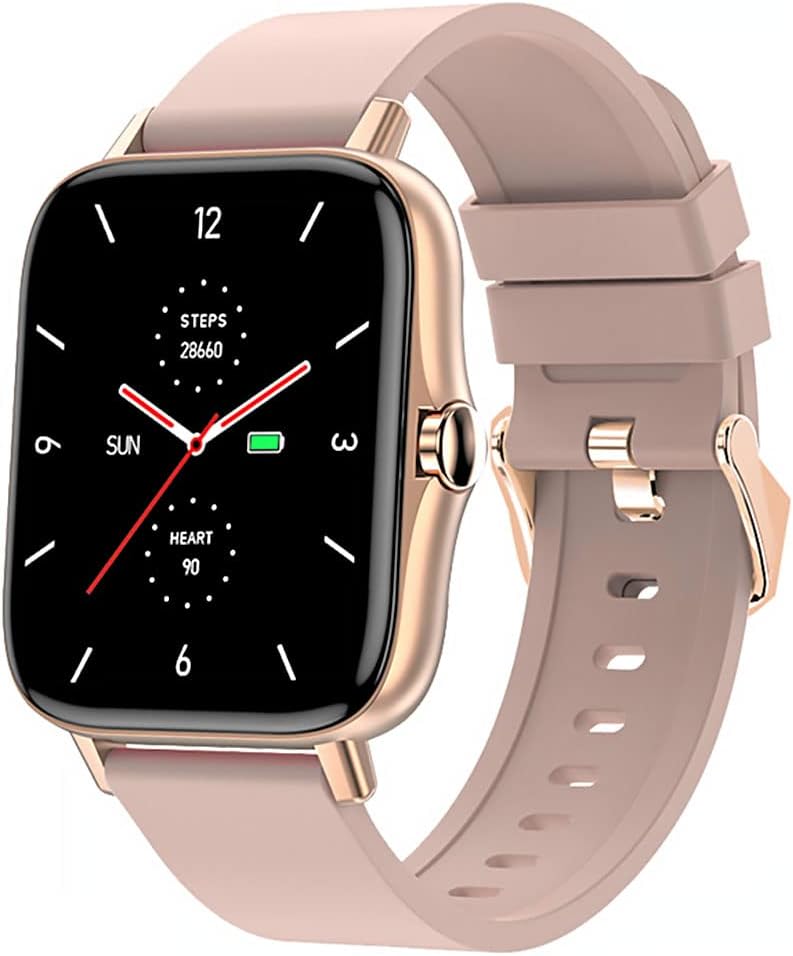
Image 1: Maxcom Fit FW55 Aurum Pro Smartwatch with a pink silicone band. The watch face displays steps, heart rate, and time.
3. Opstelling
3.1. Laai die slimhorlosie
Before initial use, fully charge your Maxcom Fit FW55 Aurum Pro Smartwatch. Connect the provided charging cable to the charging port on the back of the smartwatch and plug the other end into a standard USB power adapter (not included) or a computer's USB port. The watch display will indicate charging status.
- Ensure the charging pins are clean and properly aligned with the watch's charging contacts.
- 'n Volle lading neem gewoonlik ongeveer 2 uur.
3.2. Koppel met jou slimfoon
To unlock the full functionality of your smartwatch, you need to pair it with your smartphone via Bluetooth.
- Laai die toepassing af: Soek vir the official Maxcom Fit application in your smartphone's app store (iOS App Store or Google Play Store) and install it.
- Aktiveer Bluetooth: Maak seker dat Bluetooth op jou slimfoon geaktiveer is.
- Maak die toepassing oop: Launch the Maxcom Fit application on your smartphone.
- Voeg toestel by: Follow the in-app instructions to add a new device. Select "FW55 Aurum Pro" from the list of available devices.
- Bevestig saambinding: 'n Paringsversoek kan op beide jou slimfoon en slimhorlosie verskyn. Bevestig die paring op beide toestelle.
Once successfully paired, the smartwatch will synchronize data with your phone, and you can customize settings through the app.
4. Bediening van die slimhorlosie
4.1. Skakel aan/af
- Krag aan: Press and hold the side button for a few seconds until the Maxcom logo appears.
- Skakel af: From the watch face, swipe down to access quick settings, or navigate to the 'Settings' menu. Select 'Power Off' and confirm. Alternatively, press and hold the side button and select 'Power Off'.
4.2. Basiese navigasie
- Raakskerm: The FW55 Aurum Pro features a 1.7-inch touch screen for intuitive interaction.
- Swiep op/af: Scroll through notifications, menus, or quick settings.
- Swiep links/regs: Access different widgets or main functions (e.g., heart rate, activity data).
- Tik: Kies 'n item of bevestig 'n aksie.
- Syknoppie: Press to return to the watch face or wake the screen. A long press may access power options.
4.3. Sleutel kenmerke
The Maxcom Fit FW55 Aurum Pro Smartwatch offers a range of features to support your daily activities and health monitoring:
- Aktiwiteitnasporing: Monitor stappe geneem, afstand afgelê en kalorieë verbrand.
- Hartslagmonitering: Verskaf intydse hartklopdata.
- Slaapmonitering: Hou slaappatrone en -kwaliteit dop.
- Kennisgewings: Ontvang waarskuwings vir oproepe, boodskappe en app-kennisgewings vanaf jou gekoppelde slimfoon.
- GPS: Integrated GPS for accurate outdoor activity tracking.
- Pasmaakbare horlosies: Personalize your watch face through the companion app.

Image 2: Maxcom Fit FW55 Aurum Pro Smartwatch featuring a gold metal mesh band. The watch face displays digital time, steps, and heart rate.
5. Onderhoud
Proper care and maintenance will extend the lifespan of your smartwatch.
- Skoonmaak: Regularly wipe the watch screen and body with a soft, dry, lint-free cloth. For stubborn dirt, slightly dampMaak die lap met water skoon. Vermy die gebruik van harde chemikalieë of skuurmiddels.
- Bandversorging: Clean the watch strap according to its material. Silicone straps can be washed with mild soap and water. Metal straps may require specific cleaning agents.
- Vermy uiterste toestande: Do not expose the smartwatch to extreme temperatures, direct sunlight for prolonged periods, or corrosive liquids.
- Waterweerstand: While the watch may have some water resistance, it is not suitable for diving or high-pressure water activities. Refer to the product specifications for detailed water resistance ratings.
6. Probleemoplossing
If you encounter issues with your Maxcom Fit FW55 Aurum Pro Smartwatch, try the following solutions:
- Horlosie skakel nie aan nie: Maak seker dat die horlosie volledig gelaai is. Koppel dit vir ten minste 30 minute aan die laaier.
- Kan nie met slimfoon koppel nie:
- Maak seker dat Bluetooth op jou foon en die horlosie geaktiveer is.
- Maak seker dat die horlosie binne Bluetooth-bereik van jou foon is.
- Herbegin beide jou foon en slimhorlosie.
- Probeer om die toestel deur die toepassing te ontkoppel en weer te koppel.
- Onakkurate data (treë, hartklop):
- Maak seker dat die horlosie styf om jou pols gedra word, ongeveer een vingerbreedte bokant jou polsbeen.
- Maak die sensor aan die agterkant van die horlosie skoon.
- Dateer die metgesel-app op na die nuutste weergawe.
- Kennisgewings nie ontvang nie:
- Check notification settings in the Maxcom Fit app.
- Maak seker dat jou foon se kennisgewingtoestemmings aan die toepassing toegestaan is.
- Verify that the watch is successfully paired and connected to your phone.
If problems persist, consult the Maxcom support webwebwerf of kontak kliëntediens.
7. Spesifikasies
Below are the technical specifications for the Maxcom Fit FW55 Aurum Pro Smartwatch:
| Kenmerk | Detail |
|---|---|
| Handelsmerk | Maxcom |
| Modelnommer | FW55 Aurum Pro |
| Skerm grootte | 1.7 duim |
| Verbindingstegnologie | Bluetooth |
| Draadlose kommunikasie standaard | Bluetooth |
| Versoenbare toestelle | Slimfoon |
| GPS | Geïntegreerde GPS |
| Vorm | Vierkantig |
| Teikengehoor | Adult Unisex |
| Ingesluit komponente | Lader |

Beeld 3: Voorkant view of the Maxcom Fit FW55 Aurum Pro Smartwatch with a pink silicone band, highlighting the square display.
8. Waarborg en Ondersteuning
For warranty information and customer support, please refer to the documentation included with your purchase or visit the official Maxcom webwebwerf. Bewaar u bewys van aankoop vir waarborgeise.
For technical assistance or further inquiries, please contact Maxcom customer service through their official channels.