
1. Inleiding
This user manual provides essential information for the safe and efficient operation of your HYCHIKA 3.6V Cordless Electric Rechargeable Screwdriver Drill Set. Please read this manual thoroughly before first use and keep it for future reference.
The HYCHIKA 3.6V Cordless Electric Screwdriver is designed for various screwing and light drilling tasks around the home. It features a maximum torque of 6 N-m, a 6.35 mm quick-change chuck, and a versatile design that allows for both pistol and straight grip configurations.
2. Veiligheidsinstruksies
Neem altyd basiese veiligheidsmaatreëls in ag wanneer u elektriese gereedskap gebruik om die risiko van brand, elektriese skok en persoonlike besering te verminder.
- Werksarea veiligheid: Hou jou werkarea skoon en goed belig. Oorvol of donker areas nooi ongelukke uit. Moenie elektriese gereedskap in plofbare atmosfere gebruik nie, soos in die teenwoordigheid van vlambare vloeistowwe, gasse of stof.
- Elektriese veiligheid: Vermy liggaamskontak met geaarde oppervlaktes soos pype, verkoelers, stowe en yskaste. Moenie elektriese gereedskap aan reën of nat toestande blootstel nie.
- Persoonlike veiligheid: Always wear eye protection. Use safety glasses, goggles, or a face shield. Wear hearing protection when operating noisy tools. Dress properly; avoid loose clothing or jewelry.
- Gereedskap gebruik en versorging: Moenie die kraggereedskap forseer nie. Gebruik die korrekte kraggereedskap vir u toepassing. Ontkoppel die prop van die kragbron en/of verwyder die batterypak voordat u enige aanpassings maak, bykomstighede verander of kraggereedskap bêre.
- Gebruik en versorging van die batterypak: Recharge only with the charger specified by the manufacturer. Do not use battery packs with any other power tools. When battery pack is not in use, keep it away from other metal objects.
3. Pakketinhoud
Verifieer dat al die items wat hieronder gelys word in u pakket ingesluit is. Indien enige items ontbreek of beskadig is, kontak asseblief kliëntediens.
- 1 x HYCHIKA 3.6V Cordless Screwdriver
- 19 x skroewedraaier stukkies
- 1 x verlengbalk
- 1 x Laaiadapter
- 1 x Gebruikershandleiding

Figure 3.1: Contents of the HYCHIKA 3.6V Cordless Screwdriver package, including the screwdriver, various bits, and charging adapter.
4. Produkkenmerke en -komponente
Familiarize yourself with the different parts of your cordless screwdriver.

Figure 4.1: Key components of the screwdriver, including the magnetic chuck, PUSH button, front LED light, On/Off switch, LED charger indicator, 3.5mm charger port, and forward & reverse button.
- Magnetic Chuck: 1/4 inch (6.35mm) quick-change chuck for easy bit installation and removal.
- Voorste LED-lig: Illuminates the work area for improved visibility in dark environments.
- Aan/af skakelaar: Activates and deactivates the screwdriver.
- Forward & Reverse Button: Beheer die rotasierigting vir skroefwerk en losskroefwerk.
- LED Charger Indicator: Provides status of battery charging.
- 3.5mm Charger Port: Connection point for the charging adapter.
- DRUK knoppie: Used to adjust the grip configuration from pistol to straight.
5. Opstelling
5.1 Laai die battery
The screwdriver is powered by a 3.6V 2000 mAh Lithium-Ion battery. Before first use, fully charge the battery.
- Connect the charging adapter to the 3.5mm charger port on the screwdriver.
- Plug the charging adapter into a standard electrical outlet.
- The LED charger indicator will illuminate during charging. Once fully charged, the indicator may change color or turn off depending on the model.
- Ontkoppel die laaier sodra die laai voltooi is.

Figure 5.1: The screwdriver connected to its charging adapter, indicating a full charge.
The screwdriver is designed to maintain full power output even when the battery is low, ensuring consistent performance until the battery is depleted.
5.2 Installering van Skroewedraaierpunte
The screwdriver features a 1/4 inch (6.35mm) magnetic quick-change chuck for easy bit installation.
- Kies die toepaslike skroewedraaier vir jou taak.
- Insert the bit into the magnetic chuck until it is securely seated. The magnetic chuck will hold the bit firmly in place.
- To remove a bit, simply pull it out of the chuck. Bits with grooves are designed for easier removal.

Figure 5.2: Visual guide for inserting a bit into the magnetic chuck and removing it.
6. Bedryfsinstruksies
6.1 Adjusting Grip Configuration
The screwdriver can be used in two grip configurations: pistol grip or straight grip, for enhanced versatility and comfort.
- To change the grip, press and hold the "PUSH" button located at the top of the screwdriver.
- While holding the button, rotate the handle ninety degrees to switch between pistol and straight configurations.
- Release the "PUSH" button once the desired configuration is achieved. The handle will lock into place.
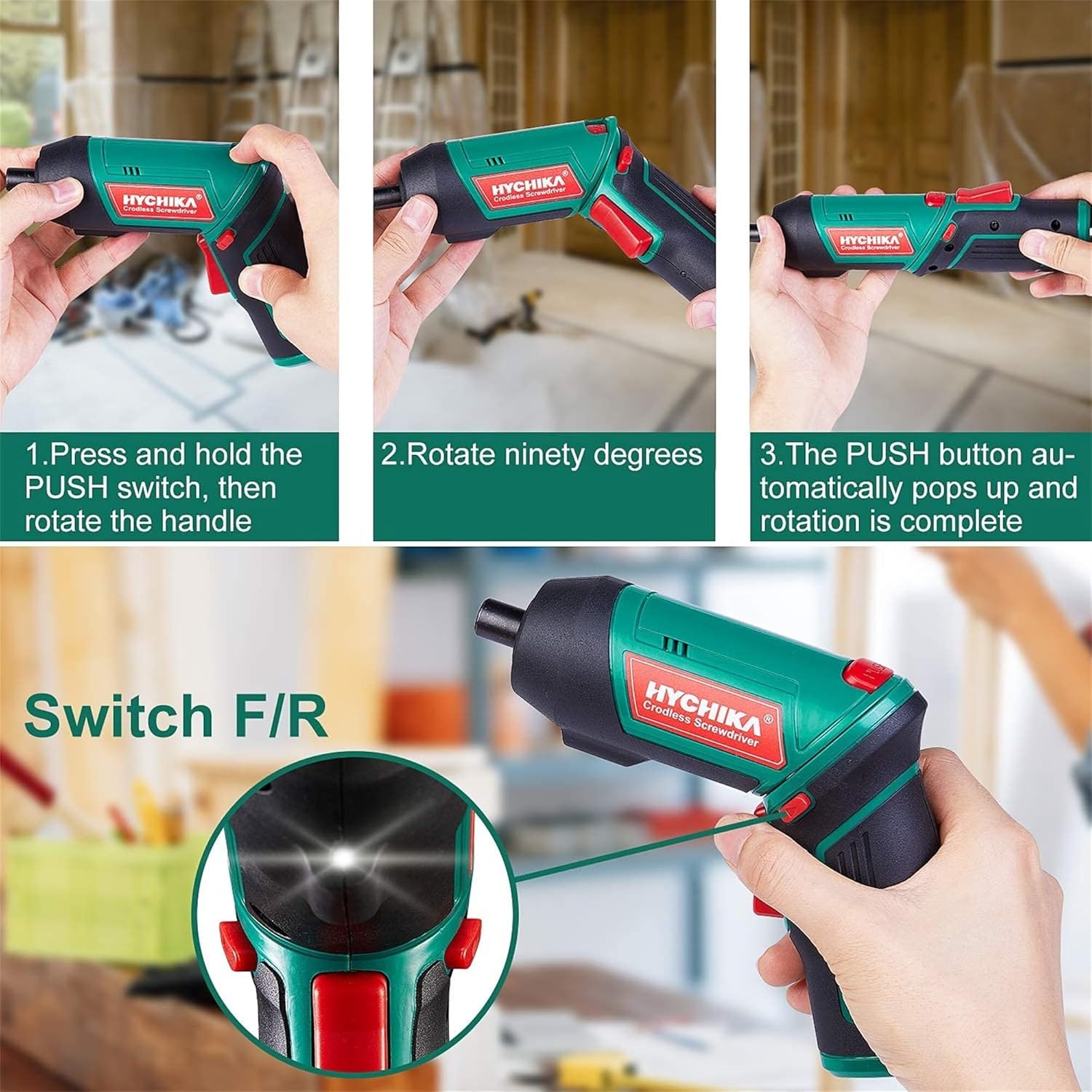
Figure 6.1: Demonstrates the process of transforming the screwdriver's grip by pressing the PUSH button and rotating the handle.
6.2 Voorwaartse en agterwaartse werking
The forward/reverse button controls the direction of rotation for screwing and unscrewing.
- To drive screws (forward rotation), push the forward/reverse button to the left (when viewed vanaf die agterkant van die gereedskap).
- To remove screws (reverse rotation), push the forward/reverse button to the right.
- When the button is in the center position, the tool is locked, preventing accidental activation.
6.3 Gebruik van die LED-werklig
The built-in LED light automatically illuminates when the screwdriver is in operation, providing visibility in dimly lit areas.

Figure 6.2: The integrated LED light provides clear illumination for working in dark environments.
7. Onderhoud
Regular maintenance ensures the longevity and optimal performance of your screwdriver.
- Skoonmaak: Keep the ventilation openings clean and free from dust. Use a soft, damp lap om die gereedskap skoon te maak casing. Moenie harde chemikalieë of skuurmiddels gebruik nie.
- Bitversorging: Clean screwdriver bits after use. Store them in the provided case to prevent loss and damage.
- Battery berging: If storing the tool for an extended period, ensure the battery is partially charged (around 50%) and store it in a cool, dry place. Recharge the battery every 3-6 months to maintain its health.
- Algemene inspeksie: Periodically check for any loose screws, damaged cords, or worn parts. Do not use the tool if any damage is observed.
8. Probleemoplossing
This section addresses common issues you might encounter with your screwdriver.
| Probleem | Moontlike oorsaak | Oplossing |
|---|---|---|
| Skroewedraaier skakel nie aan nie. | Battery is leeg. Forward/Reverse switch is in the center (locked) position. | Laai die battery vol. Druk die vorentoe/tertoe skakelaar na links of regs. |
| Skroewedraaier verloor vinnig krag. | Battery nie ten volle gelaai nie. Battery life degraded. | Maak seker dat die battery volledig gelaai is voor gebruik. If battery life is significantly reduced, contact customer support for replacement options. |
| Bits are not held securely in the chuck. | Bit is not fully inserted. Chuck is dirty or damaged. | Push the bit firmly into the chuck until it clicks into place. Clean the chuck area. If damage is visible, contact customer support. |
Indien die probleem voortduur nadat u hierdie oplossings probeer het, kontak asseblief kliëntediens.
9. Spesifikasies
| Kenmerk | Spesifikasie |
|---|---|
| Handelsmerk | Overstock (HYCHIKA) |
| Modelnommer | c131a012-0da9-4306-aeab-b1d9ff5cd4b7 |
| Voltage | 3.6 Volt |
| Kragbron | Battery aangedrewe |
| Spoed | 180 RPM |
| Item Wringkrag | 6 Newton Meters (6 N-m) |
| Battery Tipe | Litiumioon |
| Battery kapasiteit | 2000 mAh |
| Chuck Grootte | 1/4 duim (6.35 mm) |
| Materiaal | Plastiek, rubber |
| Kleur | Groen |
| UPC | 616859793583 |
10. Waarborg en Ondersteuning
Overstock offers lifetime after-sales service for this product. For any questions, concerns, or technical assistance, please contact our customer support team.
Please have your model number (c131a012-0da9-4306-aeab-b1d9ff5cd4b7) and purchase information ready when contacting support.