
Inleiding
This manual provides detailed instructions for the assembly, configuration, and maintenance of your LIAN LI V3000 Plus White Full Tower EATX Gaming Computer Case. Please read this manual thoroughly before beginning installation to ensure proper setup and optimal performance.
The V3000 Plus is a versatile full tower chassis designed for high-performance computing, offering extensive compatibility for components and cooling solutions. It supports multiple configurations, including standard, rotated, and dual-system setups.

Image: The LIAN LI V3000 Plus White GGF Edition case, showcasing its spacious interior and design.
Sleutel kenmerke
- Full tower chassis with three configurable modes: Standard, Rotated, and Dual-System.
- Supports Standard EEB/E-ATX/ATX/Micro-ATX/Mini-ITX motherboards for System 1, and Mini-ITX for System 2 in dual-system mode.
- Extensive cooling support: up to 4x 480mm + 1x 360mm radiators and a maximum of 17 fans.
- Two dedicated reservoir plates for large D5/DDC pumps.
- Accommodates up to 16 storage drives (SSDs or HDDs) via drive cages and trays.
- Constructed from aluminum and steel with tempered glass panels.

Beeld: 'n Oorview of the LIAN LI V3000 Plus case, detailing its full aluminum exterior, mesh panels, hinged glass panels, and toolless SSD mounting.
Setup and Component Installation
1. Uitpak en aanvanklike inspeksie
Carefully remove the chassis from its packaging. Inspect for any signs of damage during transit. Retain all packaging materials for future transport or warranty claims.
2. Toegang tot die binnekant
The V3000 Plus features hinged tempered glass side panels. Gently open these panels to access the interior for component installation. The panels can be removed by lifting them off their hinges when fully open.
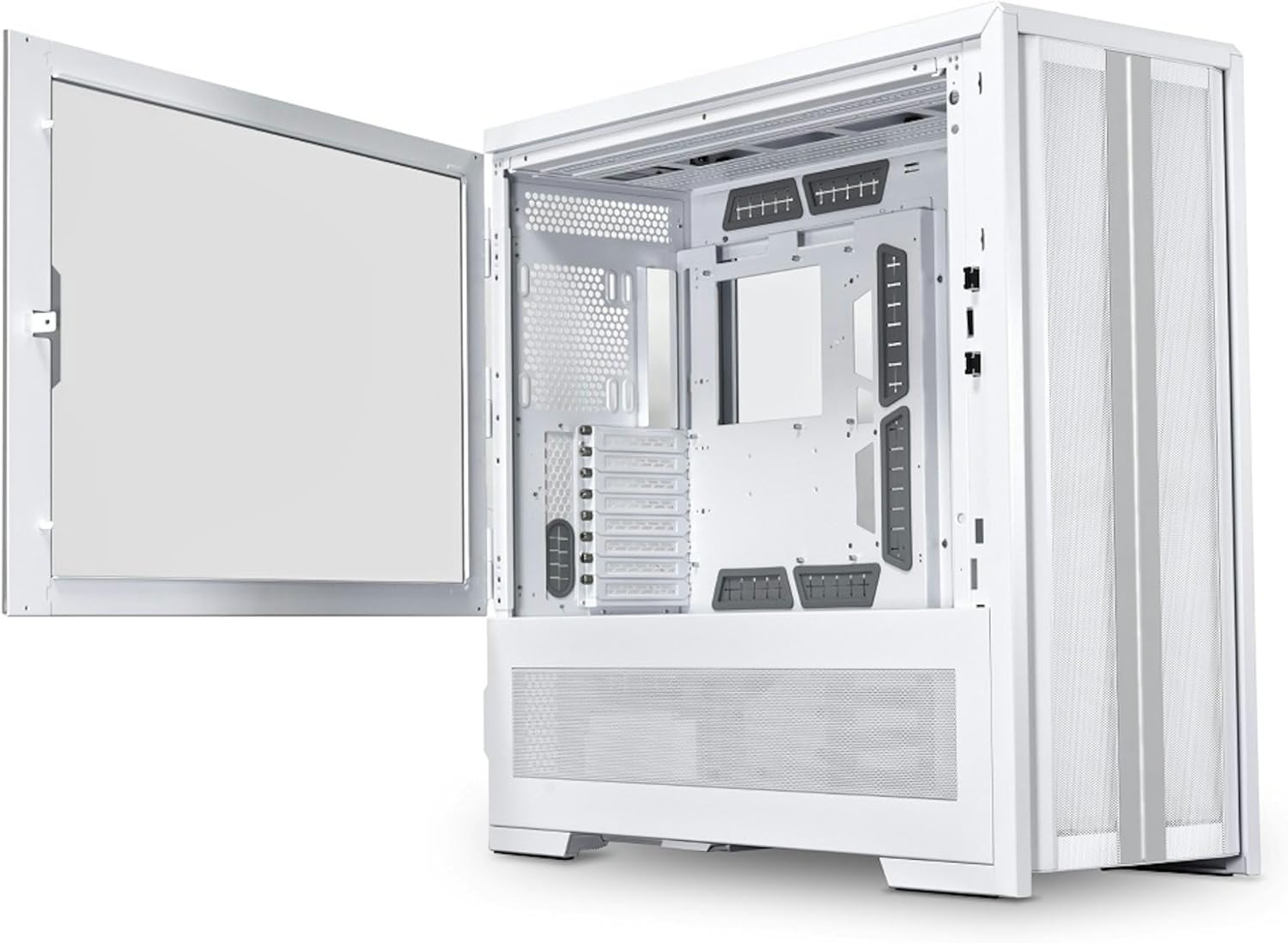
Image: The LIAN LI V3000 Plus White case with its left tempered glass panel swung open, revealing the main interior compartment.
3. Moederbord Installasie
The V3000 Plus supports Standard EEB/E-ATX/ATX/Micro-ATX/Mini-ITX motherboards. The motherboard tray is removable for easier installation. Secure the motherboard using the provided standoffs and screws.

Beeld: 'n Interne view of the LIAN LI V3000 Plus White case, highlighting the spacious motherboard tray and various fan mounting points.
4. Installasie van kragtoevoer
The case supports ATX power supplies for System 1 and SFX-L/SFX power supplies for System 2 (in dual-system mode). Install the power supply(s) in their designated compartments and secure them with screws.
5. Installasie van stoorskyf
The V3000 Plus offers extensive storage options:
- Drive Cage: Supports 8 x 2.5” SSDs or 8 x 3.5” HDDs.
- Side Mounts: 4 x 2.5” SSDs.
- Behind MB Tray: 4 x 2.5” SSDs.
Utilize the toolless SSD drive trays and modular drive bays for easy installation.

Beeld: 'n Ontplofte view diagram showing the various locations for installing SSDs and HDDs within the V3000 Plus chassis, including drive cages and toolless trays.
6. Cooling System Installation (Fans & Radiators)
The case supports a wide range of fan and radiator configurations. Refer to the specifications section for detailed compatibility based on your chosen operating mode.

Image: A diagram illustrating the extensive fan and radiator mounting options within the LIAN LI V3000 Plus case, including support for multiple 480mm and 420mm radiators.
7. Front I/O Panel Connections
Connect the front I/O cables (USB 3.0, USB Type-C, Audio, Power, Reset, Light Color, Light Mode) to the corresponding headers on your motherboard. Ensure correct polarity for power and reset switches.

Beeld: 'n Gedetailleerde view of the top-mounted I/O panel on the LIAN LI V3000 Plus White case, showing USB 3.0, USB Type-C, audio jacks, and control buttons.
Bedryfsmodusse
The V3000 Plus offers three distinct operating modes, configurable via its removable motherboard tray and adaptable PSU shroud compartment:
- Standaardmodus: A spacious configuration for housing large components and extensive water cooling setups.
- Rotated Mode: Benefits GPU cooling with direct airflow, offering a unique internal layout.
- Dual System Mode: Accommodates two full systems simultaneously, with System 1 supporting EEB/E-ATX/ATX/Micro-ATX/Mini-ITX and System 2 supporting Mini-ITX.

Image: Visual representation of the three configurable modes: Standard, Rotated, and Dual System, illustrating how the internal layout changes to support different build types.
Spesifikasies
| Kenmerk | Detail |
|---|---|
| Model | V3000PW |
| Afmetings (D x B x H) | 678.5mm x 279mm x 674mm (26.71"D x 10.98"W x 26.54"H) |
| Kleur | Wit |
| Materiaal | Aluminum, Steel, 4.0mm Dark Tinted Tempered Glass (right side), 4.0mm Tinted Tempered Glass (left side) |
| Moederbord ondersteuning | Standard EEB/E-ATX/ATX/Micro-ATX/Mini-ITX; Rotated EEB/E-ATX/ATX/Micro-ATX/Mini-ITX; Dual System (System 1: EEB/E-ATX/ATX/Micro-ATX/Mini-ITX, System 2: Mini-ITX) |
| Aanhangerondersteuning (Maksimum) | Up to 17 fans (various sizes depending on configuration) |
| Radiatorondersteuning (Maks) | Up to 4x 480mm or 420mm, 1x 360mm or 280mm (depending on configuration) |
| PSU Ondersteuning | System 1: ATX (Max 220mm); System 2: SFX-L/SFX |
| GPU Lengte Opruiming | Standard: Max 589mm; Rotated: Max 358mm; Dual System 1: Max 589mm; Dual System 2: Max 320mm (Width max 125mm) |
| Hoogte-vryhoogte van die CPU-koeler | System 1: Max 198mm; System 2: Max 80mm |
| Drive Ondersteuning | Drive Cage: 8 x 2.5” SSD or 8 x 3.5” HDD; Side: 4 x 2.5” SSD; Behind MB tray: 4 x 2.5” SSD (Total up to 16 drives) |
| Uitbreidingsgleuwe | System 1: 8; System 2: 3 (at PSU shroud, with optional riser cable) |
| I/O Ports (System 1) | 1x Power Button, 1x Reset Button, 1x Light Color Button (C), 1x Light Mode Button (M), 2x USB 3.0, 1x USB Type C, 1x Audio |
| I/O Ports (System 2) | 1x Power Button, 1x Reset Button, 2x USB 3.0, 1x USB Type C, 1x Audio |
| Stoffilter | 1x onderkant |
| Item gewig | 33 kilogram |
Onderhoud
1. Cleaning the Chassis
Use a soft, dry cloth to wipe down the exterior surfaces of the case. For tempered glass panels, a glass cleaner can be used with a microfiber cloth. Avoid abrasive cleaners or solvents that may damage the finish.
2. Dust Filter Maintenance
The V3000 Plus includes a removable dust filter at the bottom. Regularly remove and clean this filter to maintain optimal airflow and prevent dust buildup inside the system. Wash with water and allow to dry completely before reinstallation.
3. Interne skoonmaak
Periodically open the side panels and use compressed air to remove dust from internal components, fans, and radiator fins. Ensure the system is powered off and unplugged before performing internal cleaning.
Probleemoplossing
1. System Not Powering On
- Verify all power cables are securely connected to the power supply, motherboard, and components.
- Ensure the power switch on the PSU is in the 'ON' position.
- Check front panel power switch connections to the motherboard.
2. Oorverhittingsprobleme
- Confirm all case fans are spinning and correctly oriented for optimal airflow.
- Maak stoffilters en interne komponente skoon soos beskryf in die Onderhoud-afdeling.
- Ensure CPU cooler and GPU fans are functioning properly.
3. Front I/O Ports Not Functioning
- Kontroleer of die voorste I/O-kabels korrek aan die moederbord se headers gekoppel is.
- Ensure motherboard drivers for USB and audio are installed and up to date.
Amptelike Produkvideo
Video: 'n Amptelike oorwinningview of the LIAN LI V3000 Plus full tower case, demonstrating its features and various configurations.
Waarborg en Ondersteuning
Waarborg inligting
The LIAN LI V3000 Plus White Full Tower EATX Gaming Computer Case comes with a 1 jaar waarborg vanaf die aankoopdatum. Hierdie waarborg dek vervaardigingsdefekte en materiaalfoute onder normale gebruik. Bewaar asseblief u bewys van aankoop vir waarborgeise.
Kliënte ondersteuning
For technical assistance, troubleshooting, or warranty inquiries, please visit the official Lian Li website or contact their customer support directly. You can find contact information on the Lian Li webwebwerf of deur jou kleinhandelaar.
Vir bykomende hulpbronne en produkinligting, besoek die Lian Li Winkel op Amazon.

