
Flashpoint R2 XPro II
Flashpoint R2 XPro II 2.4GHz TTL Draadlose Flits-Sneller vir Sony-kameras Gebruikershandleiding
Model: R2 XPro II
1. Inleiding
This manual provides comprehensive instructions for the safe and effective use of the Flashpoint R2 XPro II 2.4GHz TTL Wireless Flash Trigger for Sony Cameras. This device is designed to provide reliable wireless control over compatible flash units, offering advanced features such as TTL, Manual, and Multi-flash modes, High-Speed Sync (HSS), and a robust 2.4GHz radio system.
Please read this manual thoroughly before operating the device to ensure proper functionality and to prevent damage.
2. Veiligheidsmaatreëls
- Do not disassemble or modify the device. Unauthorized modifications can lead to malfunction or electric shock.
- Hou die toestel droog. Moenie dit aan reën, vog of hoë humiditeit blootstel nie.
- Avoid strong impacts or vibrations. Dropping the device may cause internal damage.
- Hou buite bereik van kinders.
- Use only specified batteries. Incorrect battery types may cause leakage or explosion.
- Do not operate in environments with flammable gases or liquids.
- Turn off the device when not in use or during cleaning.
3. Produkkomponente en -kontroles
The Flashpoint R2 XPro II features an intuitive layout for easy operation. Familiarize yourself with the various parts and controls:
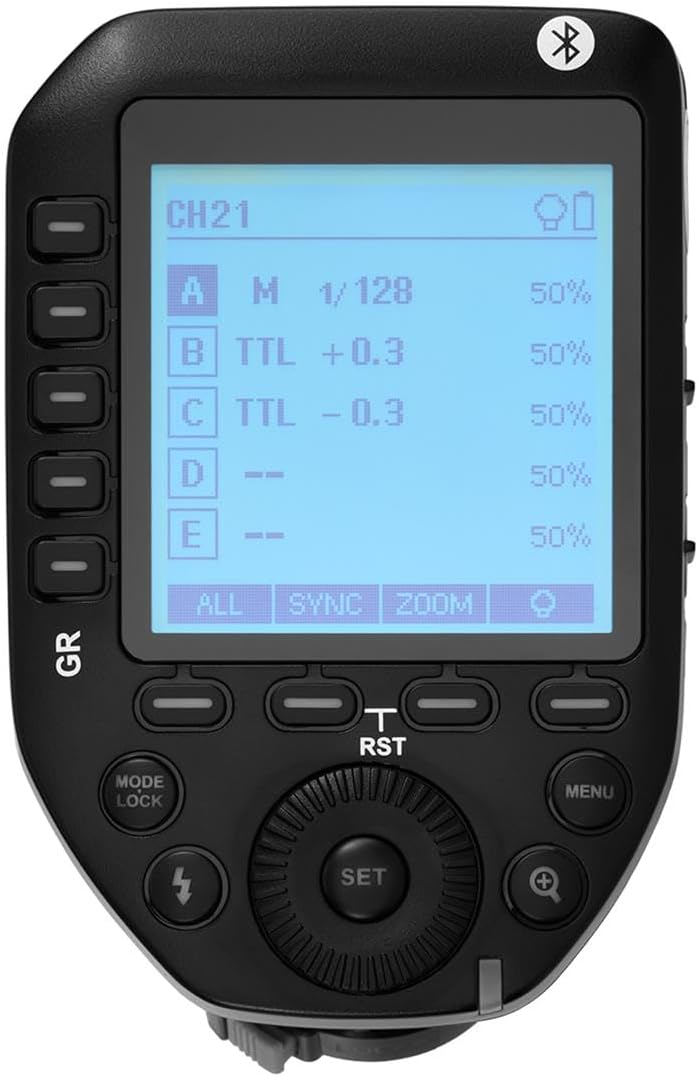
Figuur 3.1: Bo view of the Flashpoint R2 XPro II, highlighting the large dot matrix LCD display and various control buttons including Group (GR), Mode/Lock, Set, Menu, and Zoom.

Figuur 3.2: Hoekig view of the Flashpoint R2 XPro II, illustrating the hot shoe mount for camera attachment and the power ON/OFF switch located on the side.
Sleutelkontroles:
- LCD-skerm: Large dot matrix display with adjustable backlight for clear visibility of settings.
- Group (GR) Buttons: Control individual flash groups (A, B, C, D, E).
- Mode/Lock Button: Switches between flash modes (TTL, Manual, Multi) and locks settings.
- Stel knoppie: Confirms selections and enters sub-menus.
- Kieslys-knoppie: Accesses system settings and advanced options.
- Zoem knoppie: Adjusts flash zoom settings for specific groups.
- Skakel: Navigeer deur spyskaarte en pas waardes aan.
- Krag skakelaar: Skakel die eenheid AAN/UIT.
- Flitsskoenmontering: Connects the trigger securely to your camera's hot shoe.
4. Opstelling en installering
4.1 Battery installasie
The R2 XPro II uses two AA batteries (not included). Ensure correct polarity when inserting.

Figure 4.1: The battery compartment of the Flashpoint R2 XPro II, with the cover removed, illustrating the correct orientation for inserting AA batteries.
- Vind die batteryklepdeksel aan die onderkant van die eenheid.
- Skuif die deksel oop.
- Insert two AA batteries, matching the positive (+) and negative (-) indicators inside the compartment.
- Maak die batterykompartement se deksel stewig toe.
4.2 Montering op kamera
Attach the trigger to your Sony camera's hot shoe for seamless integration.

Figuur 4.2: Onder view of the Flashpoint R2 XPro II, displaying the hot shoe mount and the instant flip locking mechanism designed for secure camera connection.
- Ensure the trigger is turned OFF.
- Slide the hot shoe mount of the R2 XPro II into your camera's hot shoe.
- Secure the trigger by engaging the locking mechanism (typically a lever or dial) on the hot shoe mount.
- Turn on the trigger and your camera.
5. Bedryfsinstruksies
The R2 XPro II offers various modes and settings for precise flash control.
5.1 Aan-/afskakel
Use the ON/OFF switch located on the side of the unit to power the trigger.
5.2 Basic Screen Navigation
The large LCD display shows current settings for channels, groups, and flash modes. Use the dial to navigate and adjust values, and the SET button to confirm.
5.3 Flash Modes (TTL / M / Multi)
Druk die Modus/Slot knoppie om deur die beskikbare flitsmodusse te blaai:
- TTL (Deur-die-lens): Automatic exposure control. The trigger communicates with the camera to determine optimal flash output.
- M (Handmatig): Allows manual adjustment of flash power output (e.g., 1/1 to 1/128).
- Multi (Stroboskopies): Fires a series of rapid flashes for creative effects.
The R2 XPro II also features TCM (TTL Converted to Manual) fusion, which allows you to capture an exposure in TTL mode and then convert that exposure value to a manual setting for consistent repeat shots.
5.4 Channel and Group Management
The trigger supports 32 channels and multiple groups (A, B, C, D, E) for managing complex lighting setups.
- Gebruik die GR (Group) buttons to select and adjust individual flash groups.
- Access the menu to change the wireless channel to avoid interference.
5.5 Hoëspoed-sinchronisasie (HSS)
The R2 XPro II supports High-Speed Sync up to 1/8000s, enabling you to use flash with fast shutter speeds, ideal for overpowering ambient light or freezing fast motion.
5.6 Smartphone APP Control (Bluetooth)
The built-in Bluetooth allows for smartphone app control of flash functions. Download the compatible Flashpoint R2 app to manage settings remotely.

Figure 5.1: Illustration of the R2 Wireless System, demonstrating the Flashpoint R2 XPro II's ability to work with a complete family of Flashpoint speedlights, monolights, and strobe lights, and transmit atop any Sony DSLR, MSLR, or M Series body.
6. Onderhoud en versorging
- Skoonmaak: Use a soft, dry cloth to clean the exterior of the unit. Do not use solvents or abrasive cleaners.
- Berging: Wanneer dit nie vir lang tye gebruik word nie, verwyder die batterye om lekkasie te voorkom. Bêre die toestel op 'n koel, droë plek, weg van direkte sonlig en uiterste temperature.
- Firmware -opdaterings: Kontroleer die vervaardiger se gereeld website for available firmware updates to ensure optimal performance and compatibility. The unit is Mac and PC firmware updatable.
7. Probleemoplossing
If you encounter issues with your Flashpoint R2 XPro II, refer to the following common problems and solutions:
| Probleem | Moontlike oorsaak | Oplossing |
|---|---|---|
| Toestel skakel nie aan nie. | Batterye is pap of verkeerd geplaas. | Vervang batterye of maak seker dat die polariteit korrek is. |
| Flash unit does not fire. | Incorrect channel/group settings; flash unit not compatible; trigger not securely mounted. | Verify channel and group settings on both trigger and flash; ensure flash is compatible with R2 system; re-mount trigger securely. |
| Inconsistent flash firing. | Interference from other wireless devices; low battery. | Change to a different wireless channel; replace batteries. |
| TTL exposure is inaccurate. | Environmental factors; flash unit limitations. | Adjust flash exposure compensation on the trigger or camera; consider switching to Manual mode. |
8. Spesifikasies
| Kenmerk | Detail |
|---|---|
| Model | R2 XPro II |
| Draadlose stelsel | Flashpoint R2 / Godox X - 2.4GHz Radio System |
| Verenigbaarheid | Sony Cameras (TTL support) |
| Versendingsreeks | 300-400 voet (ongeveer 90-120 meter) |
| Kanale | 32 |
| Groepe | 5 (A, B, C, D, E) |
| Flitsmodusse | TTL, Handmatig, Multi |
| Hoëspoed-sinchronisasie (HSS) | Tot 1/8000s |
| Vertoon | Large Dot Matrix LCD with Adjustable Backlight |
| Konnektiwiteit | Built-in Bluetooth for Smartphone APP Control |
| Firmware-opdatering | Mac and PC Updatable via USB-C port |
| Kragbron | 2 x AA-batterye |
| Produk afmetings | 5.15 x 4 x 2.8 duim |
| Item gewig | 8.8 onse |
9. Waarborginligting
Flashpoint products are designed and manufactured to the highest quality standards. For specific warranty terms and conditions, please refer to the warranty card included with your product or visit the official Flashpoint webwebwerf. Bewaar u aankoopbewys as bewys van aankoop vir waarborgeise.
10. Kliëntediens
For technical assistance, troubleshooting, or service inquiries, please contact Flashpoint customer support. You can find contact information on the official Flashpoint webwebwerf of deur jou kleinhandelaar.
Aanlyn hulpbronne: Flashpoint Official Store on Amazon