
1. Inleiding
This manual provides detailed instructions for the installation, operation, and maintenance of your VIMIN VM-GS1620 18-Port Gigabit Ethernet Switch. Please read this manual thoroughly before using the device to ensure proper setup and optimal performance. Keep this manual for future reference.
2. Produk verbyview
The VIMIN VM-GS1620 is an unmanaged 18-port Gigabit Ethernet switch designed for high-speed network expansion. It features 16 Gigabit Ethernet ports (10/100/1000 Mbps) and 2 dedicated 1000Mbps uplink ports. The switch supports IEEE802.3af/at standards and includes a One Key VLAN function for enhanced network security and bandwidth management. Its durable metal housing allows for versatile desktop or rack-mount installation.
2.1 Voor- en agterpanele

Figuur 1: Front and Rear Panels of the VIMIN VM-GS1620 Switch. The front panel displays 16 Gigabit ports (1-16), 2 Uplink ports (17-18), LED indicators for Power and Data, and a VLAN switch. The rear panel shows the AC power input.
Kenmerke van die voorpaneel:
- Poorts 1-16: 10/100/1000 Mbps Gigabit Ethernet ports for connecting network devices.
- Ports 17-18 (Uplink): Dedicated 1000 Mbps Gigabit uplink ports for connecting to a router or main network.
- Krag LED: Dui kragstatus aan.
- Data/Link/Act LEDs: Indicate data activity and link status for each port.
- VLAN Switch: Toggles the One Key VLAN function on or off.
Kenmerke van die agterpaneel:
- Wisselstroominset: Connects to the provided power cord (AC/IN 100-240V).
2.2 Sleutelkenmerke
- Hoëspoedverbinding: 16 Gigabit Ethernet ports and 2 Gigabit uplink ports for fast data transfer.
- One Key VLAN: Enhances network security by isolating ports 1-16 while allowing communication with uplink ports.
- Robuuste beskerming: Features 4KV lightning protection for device and network safety.
- Duursame ontwerp: Sturdy metal housing ensures longevity and efficient heat dissipation.
- Waaierlose werking: Provides quiet operation, suitable for various environments.
- Plug and Play: No complex configuration required for basic network setup.
Figuur 2: The VIMIN VM-GS1620 features a fanless, quiet design within a durable metal case for reliable performance.
3. Pakketinhoud
Please verify the contents of your package. If any items are missing or damaged, contact VIMIN support immediately.
- VIMIN VM-GS1620 18-Port Gigabit Ethernet Switch
- AC kragkabel
- Rack-Mount Kits (for 19-inch rack installation)
- Gebruikershandleiding (hierdie dokument)
4. Opstelinstruksies
4.1 Fisiese installasie
The VIMIN VM-GS1620 switch can be installed on a desktop or mounted in a 19-inch rack.
Werkskermplasing:
- Plaas die skakelaar op 'n plat, stabiele oppervlak.
- Verseker voldoende ventilasie rondom die toestel. Moenie die ventilasiegate blokkeer nie.
- Keep the switch away from heat sources, direct sunlight, and excessive moisture.
Rak-monteer installasie:
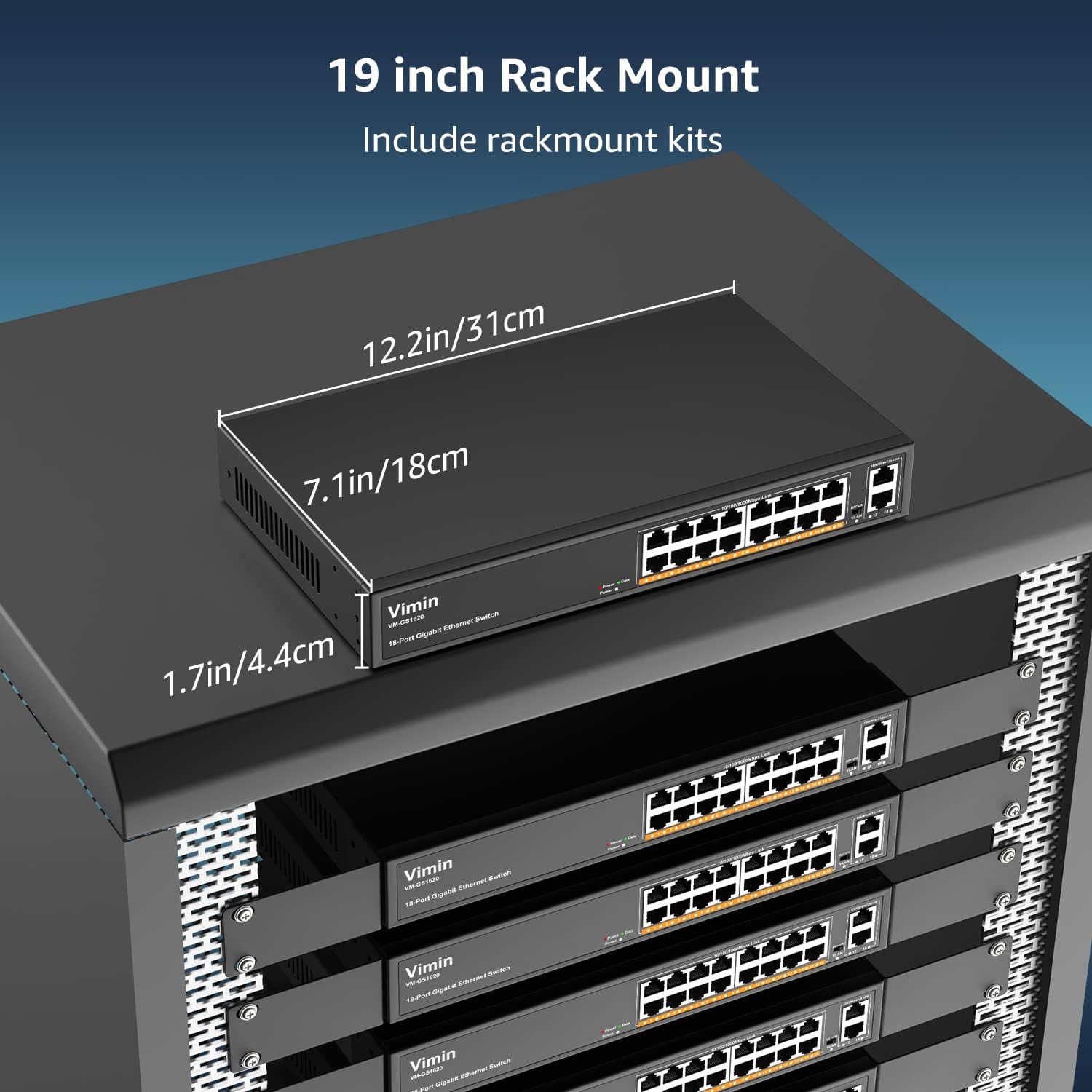
- Attach the provided rack-mount brackets to the sides of the switch using the included screws.
- Secure the switch into a standard 19-inch equipment rack using appropriate rack screws (not included).
- Ensure proper airflow within the rack to prevent overheating.

Figuur 3: The VIMIN VM-GS1620 switch can be installed in a 19-inch rack using the included rack-mount kits. Dimensions are approximately 12.2in (31cm) wide, 7.1in (18cm) deep, and 1.7in (4.4cm) high.
4.2 Kragverbinding
- Connect one end of the AC power cord to the power input on the rear panel of the switch.
- Plug the other end of the power cord into a standard electrical outlet (AC 100-240V).
- Die krag-LED op die voorpaneel behoort te brand, wat aandui dat die skakelaar krag ontvang.
4.3 Netwerkverbindings
The VIMIN VM-GS1620 is a Plug and Play device, requiring no software configuration for basic operation.
- Connect your network devices (e.g., computers, printers, IP cameras, access points) to any of the Gigabit Ports 1-16 using standard Ethernet cables.
- Connect your router or main network backbone to one of the Uplink Ports 17-18.
- Once a device is connected and powered on, the corresponding Link/Act LED for that port will illuminate, indicating a successful connection and activity.

Figuur 4: Simple Plug and Play connection. Insert an Ethernet cable into any available port.

Figuur 5: Connection diagram illustrating power connection, device connections to the switch, and the resulting network functionality.
5. Bedryfsinstruksies
5.1 Basiese werking
Once the switch is powered on and devices are connected, the VIMIN VM-GS1620 operates automatically. It functions as an unmanaged switch, forwarding data packets between connected devices at Gigabit speeds without requiring any user configuration.
5.2 One Key VLAN Mode
The switch features a physical VLAN switch on the front panel. This function allows you to quickly enable or disable VLAN isolation.
- VLAN OFF (Default): All ports (1-18) operate as a standard switch, allowing all connected devices to communicate with each other.
- VLAN ON: When the VLAN switch is set to ON, ports 1-16 are isolated from each other. Devices connected to ports 1-16 can only communicate with the uplink ports (17-18) and not directly with other devices on ports 1-16. This enhances network security and can improve bandwidth utilization by preventing broadcast storms within the isolated segments.

Figuur 6: The One Key VLAN switch isolates ports 1-16 from each other, allowing them to communicate only with the uplink ports (17-18). This setup is useful for segmenting a network for security or performance.
6. Onderhoud
The VIMIN VM-GS1620 switch is designed for minimal maintenance. Follow these guidelines to ensure its longevity:
- Skoonmaak: Gebruik 'n sagte, droë lap om die buitekant van die skakelaar skoon te maak. Moenie vloeibare of aërosol skoonmaakmiddels gebruik nie.
- Ventilasie: Ensure that the ventilation holes are not obstructed to allow for proper heat dissipation.
- Omgewing: Operate the switch within its specified environmental conditions (temperature, humidity).
- Kabelbestuur: Hou netwerkkabels georganiseerd en vry van kinkels of oormatige buigings om seinverswakking te voorkom.
7. Probleemoplossing
If you encounter issues with your VIMIN VM-GS1620 switch, refer to the following common troubleshooting steps:
- Geen krag:
- Kontroleer of die kragkabel stewig aan beide die skakelaar en die elektriese aansluiting gekoppel is.
- Verify that the electrical outlet is functional.
- Maak seker dat die krag-LED op die voorpaneel brand.
- Geen skakel/aktiwiteit op 'n poort nie:
- Maak seker dat die Ethernet-kabel stewig aan beide die skakelaarpoort en die gekoppelde toestel gekoppel is.
- Probeer 'n ander Ethernet-kabel om 'n foutiewe kabel uit te sluit.
- Koppel die toestel aan 'n ander poort op die skakelaar.
- Verifieer dat die gekoppelde toestel aangeskakel is en korrek funksioneer.
- Stadige netwerkspoed:
- Maak seker dat alle gekoppelde toestelle en kabels Gigabit Ethernet (Cat5e of hoër) ondersteun.
- Kontroleer vir oormatige netwerkverkeer of bandwydte-intensiewe toepassings.
- Consider enabling VLAN mode if network segmentation is desired to reduce broadcast domains.
- Devices Cannot Communicate (VLAN ON):
- If the VLAN switch is ON, devices on ports 1-16 are isolated from each other and can only communicate with uplink ports. This is expected behavior.
- If you require direct communication between all devices, ensure the VLAN switch is set to OFF.
If the problem persists after trying these steps, please contact VIMIN technical support.
8. Spesifikasies
| Kenmerk | Beskrywing |
|---|---|
| Model | VM-GS1620 |
| Hawens | 16 x 10/100/1000Mbps RJ45 Ports, 2 x 1000Mbps Uplink RJ45 Ports |
| Data-oordragtempo | 1000 Megabits Per Sekonde (Gigabit) |
| Skakelkapasiteit | 36 Gbps |
| Standaarde | IEEE 802.3, IEEE 802.3u, IEEE 802.3ab, IEEE 802.3x, IEEE 802.3af/at |
| VLAN Ondersteuning | One Key VLAN (Port Isolation) |
| Weerligbeskerming | 4KV |
| Krag Invoer | AC 100-240V |
| Materiaal van die saak | Metaal |
| Installasie | Desktop, 19-inch Rack-Mount |
| Afmetings (Toestel) | Ongeveer. 12.2 x 7.1 x 1.7 duim (31 x 18 x 4.4 cm) |
| Item gewig | 3.85 pond (1.75 kg) |
| Versoenbare toestelle | Desktop, Gaming Console, Laptop, Printer, IP Camera, Access Point |
9. Waarborg en Ondersteuning
VIMIN stands behind the quality and reliability of its products.
9.1 Waarborginligting
This VIMIN VM-GS1620 switch comes with a een jaar waarborg vanaf die aankoopdatum. Hierdie waarborg dek vervaardigingsdefekte en wanfunksies onder normale gebruik. Dit dek nie skade wat veroorsaak word deur misbruik, ongelukke, ongemagtigde wysigings of natuurrampe nie.
9.2 Tegniese Ondersteuning
VIMIN provides leeftyd tegniese ondersteuning for this product. If you have any questions, require assistance with installation, or encounter any issues not covered in the troubleshooting section, please contact our professional technical team.

Figuur 7: VIMIN offers dedicated customer support.
Kontakinligting:
- E-pos: support@vimintech.com
- Our support team is available to provide 24-hour high-quality service.