
1. Inleiding en oorview
This manual provides detailed instructions for the installation, operation, and maintenance of your Yansoo 3-Channel Dash Cam. Please read this manual thoroughly before using the device to ensure proper functionality and safety.
Produkkenmerke:
- 3-kanaal opname: Simultaneously captures video from the front (170° wide-angle), rear (165°), and inside (140°) of your vehicle.
- Hoëdefinisie-video: Supports 1080P Front video + AHD-720P Rear video + AHD-720P Inside video.
- Verbeterde Nagvisie: Features 4 unique infrared LED fill lights, F1.8 aperture, and WDR technology for optimal performance in low light.
- Noodslot (G-sensor): Automatically detects sudden shocks or collisions and locks the current video footage om oorskryf te voorkom.
- Loop opname: Continuously records and automatically overwrites the oldest unlocked video files wanneer die geheuekaart vol is.
- Parkeermonitor: Activates recording when motion or shocking is detected while parked (requires separate hardwire kit for 24/7 monitoring).
- Adjustable Interior Camera: The interior lens can be rotated 60° for flexible positioning.
Pakketinhoud:
- Yansoo 3-Channel Dash Cam Unit
- Agterste kamera met kabel
- Suigbeker-berg
- Motorlaaier (Tipe-C)
- USB-datakabel
- Gebruikershandleiding
- Mounting Hardware for Rear Camera
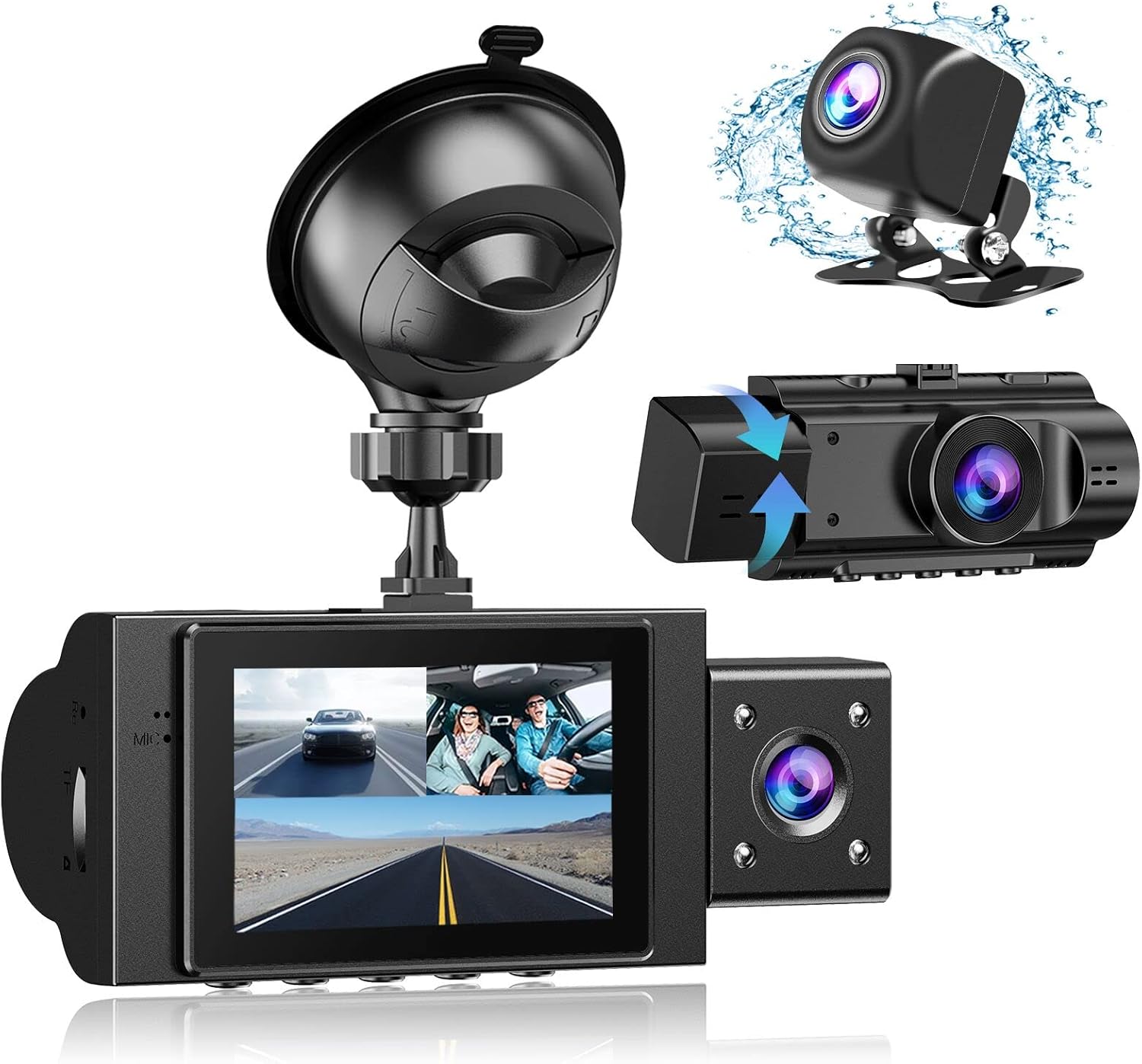
Image: The Yansoo 3-Channel Dash Cam unit with its suction cup mount and the separate rear camera, illustrating the complete package.
2. Opstelling
2.1 Plaas die geheue kaart
The dash cam supports Micro Memory cards up to 64GB (Class 10 or above recommended, not included). Please format the card in the camera menu before first use.
- Locate the memory card slot on the side of the dash cam.
- Insert the Micro Memory card into the slot until it clicks into place.
- Om te verwyder, druk die kaart liggies totdat dit uitspring.

Image: A four-panel illustration showing the steps to insert a Micro SD card into the dash cam's slot.
2.2 Montering van die Dash Cam
Mount the main dash cam unit to your windshield using the provided suction cup mount. Choose a location that does not obstruct your view terwyl jy bestuur.
- Maak die gekose area op jou voorruit deeglik skoon.
- Attach the suction cup mount to the dash cam unit.
- Druk die suigdop stewig teen die voorruit en draai die hefboom om dit vas te maak.
- Pas die kamerahoek aan om 'n duidelike view van die pad vorentoe.

Image: The Yansoo 3-Channel Dash Cam mounted on a car's windshield, showing its position relative to the driver's view.
2.3 Installering van die agterste kamera
The rear camera provides a view of the vehicle's rear. It can be installed inside the rear window or externally above the license plate.
- Connect the rear camera cable to the main dash cam unit.
- Route the cable neatly along the vehicle's interior trim to the rear.
- Mount the rear camera in the desired location, ensuring a clear view.

Image: A diagram illustrating the recommended cable routing path for the dash cam and rear camera within a car's interior.
2.4 Kragverbinding
Connect the dash cam to your vehicle's cigarette lighter socket using the provided car charger. The camera will automatically power on and begin recording when the vehicle starts.

Image: The Yansoo 3-Channel Dash Cam connected to a power source, indicating its readiness for operation.
3. Bedryfsinstruksies
3.1 Basiese werking
- Krag aan/af: The camera powers on/off automatically with your vehicle's ignition. You can also manually power on/off by pressing and holding the power button.
- Begin/stop opname: Recording starts automatically when the camera powers on. Press the "OK" button to manually stop or start recording.
- Skakel skerm Views: Press the "Up" button to cycle through different display modes (Front, Inside, Rear, Picture-in-Picture combinations).
Video: Demonstration of the Yansoo X88 Dash Cam's recording capabilities, showcasing its ability to capture clear video footage.
Video: Footage from the Yansoo X88 Dash Cam demonstrating its clear day and night recording capabilities.
Video: A demonstration of the Yansoo X88 Dash Cam's 1080P Full HD recording quality.
3.2 Kieslysinstellings
To access the menu settings, stop recording (if active) by pressing the "OK" button, then press the "M" button twice.
- Resolusie: Adjust video resolution for front, inside, and rear cameras.
- Loop opname: Set the duration of video segments (e.g., 1, 3, 5 minutes).
- G-sensor sensitiwiteit: Adjust the sensitivity of the emergency lock feature.
- Parkeermonitor: Enable or disable the parking monitoring function.
- Datum/Tyd: Stel die korrekte datum en tyd vir akkurate tydamps op opnames.
- Taal: Select your preferred language for the menu.
Video: A step-by-step guide on how to set the date and time on the Yansoo Dash Cam.
4. Onderhoud
- Gewone formatering: Format the memory card regularly (e.g., once a month) to prevent data corruption and ensure optimal recording performance.
- Lens skoonmaak: Keep the camera lenses clean using a soft, lint-free cloth. Avoid abrasive materials that could scratch the lens.
- Firmware -opdaterings: Check the official Yansoo webwebwerf vir enige beskikbare firmware-opdaterings om werkverrigting te verbeter en nuwe funksies by te voeg.
- Temperatuuroorwegings: Vermy die blootstelling van die paneelbordkamera aan uiterste temperature vir lang tye.
5. Probleemoplossing
| Probleem | Moontlike oorsaak | Oplossing |
|---|---|---|
| Kamera skakel nie aan nie. | Geen krag van sigaretaansteker nie; los konneksie. | Check car charger connection; ensure vehicle ignition is on. |
| Opname stop onverwags. | Memory card full or corrupted; G-Sensor triggered. | Format memory card; adjust G-Sensor sensitivity. |
| Video footage is vaag. | Protective film on lens; dirty lens. | Remove protective film; clean lenses with a soft cloth. |
| Date/Time is incorrect. | Date/Time not set or battery low. | Set Date/Time in menu; ensure continuous power supply. |
| Camera freezes or malfunctions. | Sagtewarefout. | Use a needle to press the "RE" (Reset) button. |
6. Spesifikasies
| Kenmerk | Detail |
|---|---|
| Produk afmetings | 4.13 x 1.57 x 1.77 duim |
| Item gewig | 1.23 pond |
| Video-opname-resolusie | 1080p (Front), 720p (Inside & Rear) |
| Veld van View | 170° (Front), 140° (Inside), 165° (Rear) |
| Verbindingstegnologie | USB |
| Spesiale kenmerk | G-Sensor, Loop Recording, Parking Monitor, Night Vision |
| Montage tipe | Suig Mount |
| Vervaardiger | Yansoo |
7. Waarborg en Ondersteuning
Yansoo offers comprehensive after-sales support for your dash cam.
- Waarborg: 1-YEAR warranty from the date of purchase.
- Tegniese Diens: 7*24 hours technical service is available.
- Kontak: For any questions or issues, please contact our customer service team via Amazon or the after-sales email provided in the original product packaging.
- Gebruikershandleiding (PDF): A digital version of the user manual is available for download hier.