
Inleiding
Thank you for choosing the Hodozzy 9310W 2 Din Car Stereo. This manual provides detailed instructions for installation, operation, maintenance, and troubleshooting to ensure optimal performance and user experience. Please read this manual thoroughly before using the device and keep it for future reference.
Pakketinhoud
Maak asseblief seker dat al die items wat hieronder gelys word, teenwoordig en in 'n goeie toestand is wanneer u dit uitpak:
- 1 x Hodozzy 9310W Car MP5 Player
- 1 x Kragkabel
- 1 x USB-kabel
- 1 x Antenna Head
- 1 x afstandbeheer
- 1 x 2 Din Frame
- 1 x Gebruikershandleiding
- 1 x Montagebeugel
- 4 x skroewe
- 1 x mikrofoon
- 1 x Omkeerkamera
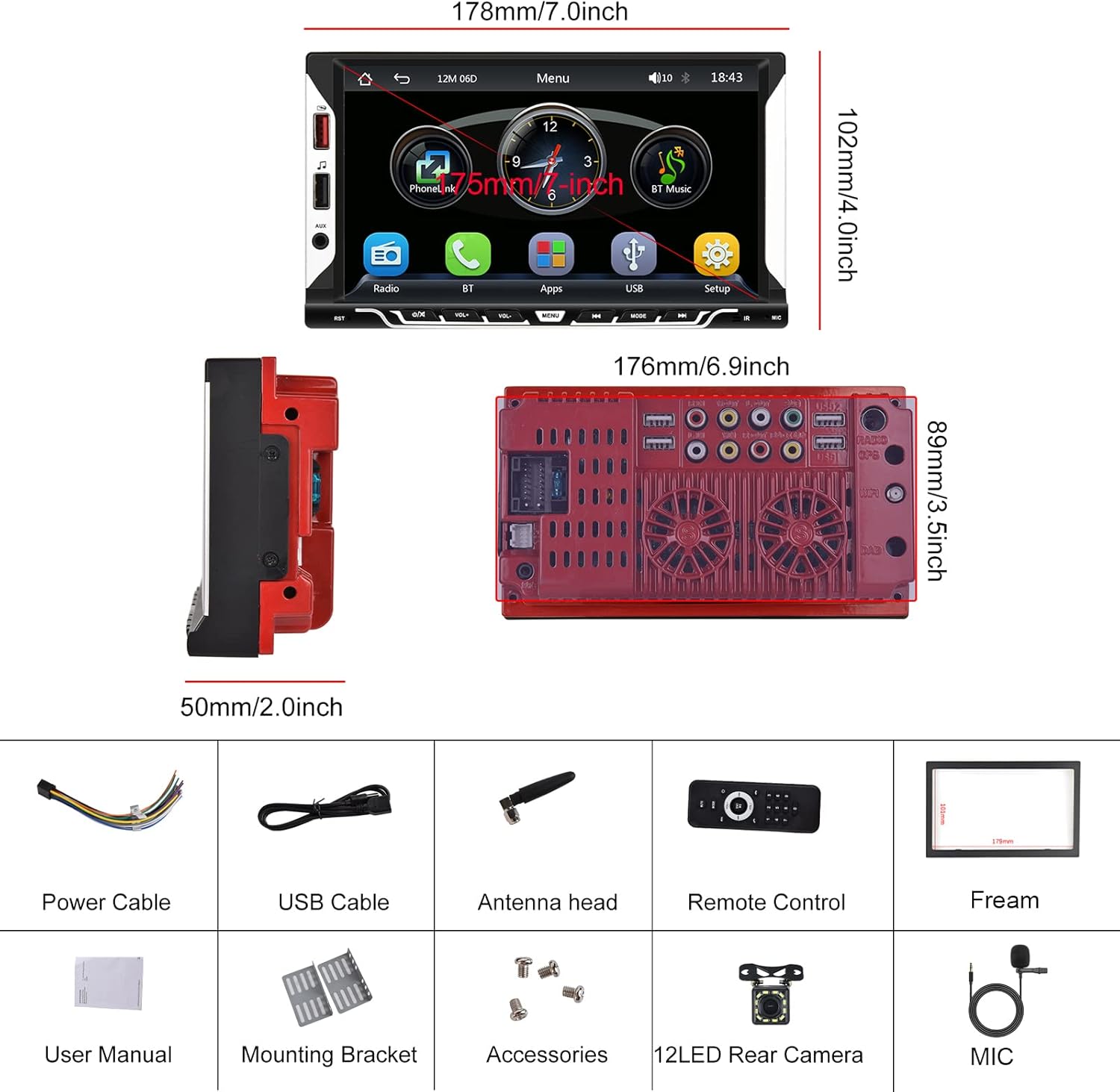
Image: Hodozzy 9310W Car Stereo package contents, showing the main unit, power cable, USB cable, antenna, remote control, frame, user manual, mounting bracket, screws, microphone, and reversing camera.
Opstelling en installasie
Bedradingsdiagram
Refer to the following diagram for proper wiring connections. Incorrect wiring can damage the device or your vehicle's electrical system. If you are unsure, consult a professional installer.
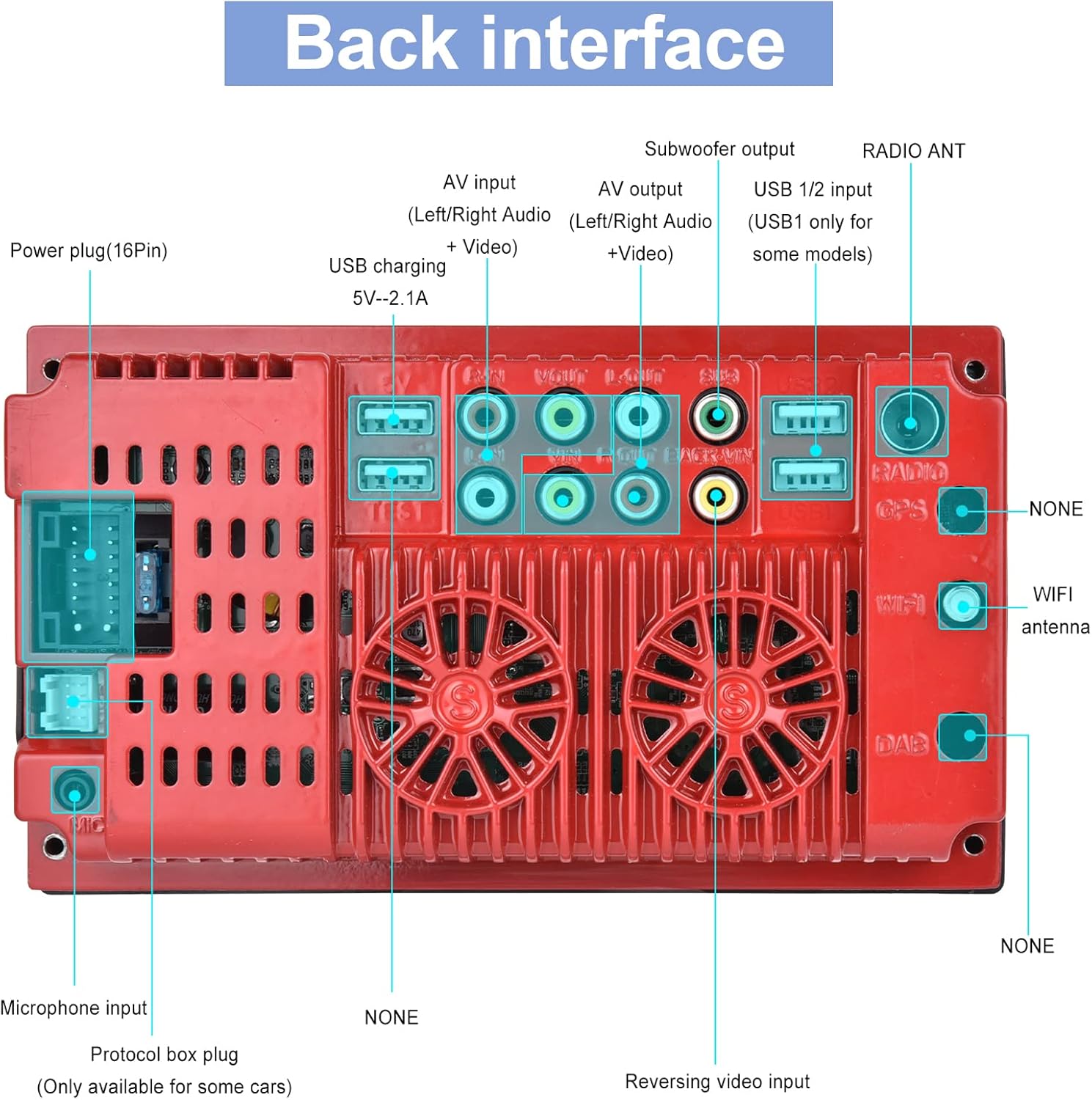
Image: Back interface of the Hodozzy 9310W Car Stereo, detailing connections for power (16-pin), AV input/output, subwoofer output, USB 1/2, radio antenna, microphone input, protocol box plug, and reversing video input.
- Krag kabel: Connect the yellow wire to the constant 12V power supply, the red wire to the accessory (ACC) 12V power supply, and the black wire to ground.
- Luidsprekerdrade: Connect the speaker wires to your vehicle's speakers, ensuring correct polarity for each channel (Front Left, Front Right, Rear Left, Rear Right).
- Invoer vir agteruitkykkamera: Connect the reversing camera's video output to the 'Reversing Video Input' port. Connect the camera's power to the vehicle's reverse light circuit.
- USB-poorte: Use the USB 2.0 ports for media playback, smartphone charging, or connecting a designated USB DVR.
- AUX-invoer: Connect external audio devices via the AUX input.
- Mikrofoon: Connect the external microphone for improved call quality during hands-free operation.
- Radio antenna: Connect your vehicle's radio antenna to the 'RADIO ANT' port.
Montering
Install the mounting brackets to the sides of the car stereo using the provided screws. Slide the unit into the 2 Din opening in your vehicle's dashboard until it clicks into place. Secure the unit using the mounting frame and screws.
Bedryfsinstruksies
Basiese bewerkings
- Krag aan/af: Druk die aan/uit-knoppie op die voorpaneel of afstandbeheer.
- Volumebeheer: Use the volume knob or buttons on the front panel/remote to adjust the sound level.
- Raakskerm: Navigate through menus and functions by touching the 7-inch display.
Draadlose CarPlay en Android Auto
This unit supports wireless CarPlay for iPhone and wireless Android Auto for Android phones, allowing seamless integration of your smartphone's features.
- Maak seker dat Bluetooth op jou slimfoon geaktiveer is.
- On the car stereo, go to the CarPlay/Android Auto application.
- Soek vir and select your car stereo's Bluetooth name on your phone.
- Bevestig die paringskode op beide toestelle.
- Once connected, CarPlay or Android Auto will launch automatically.
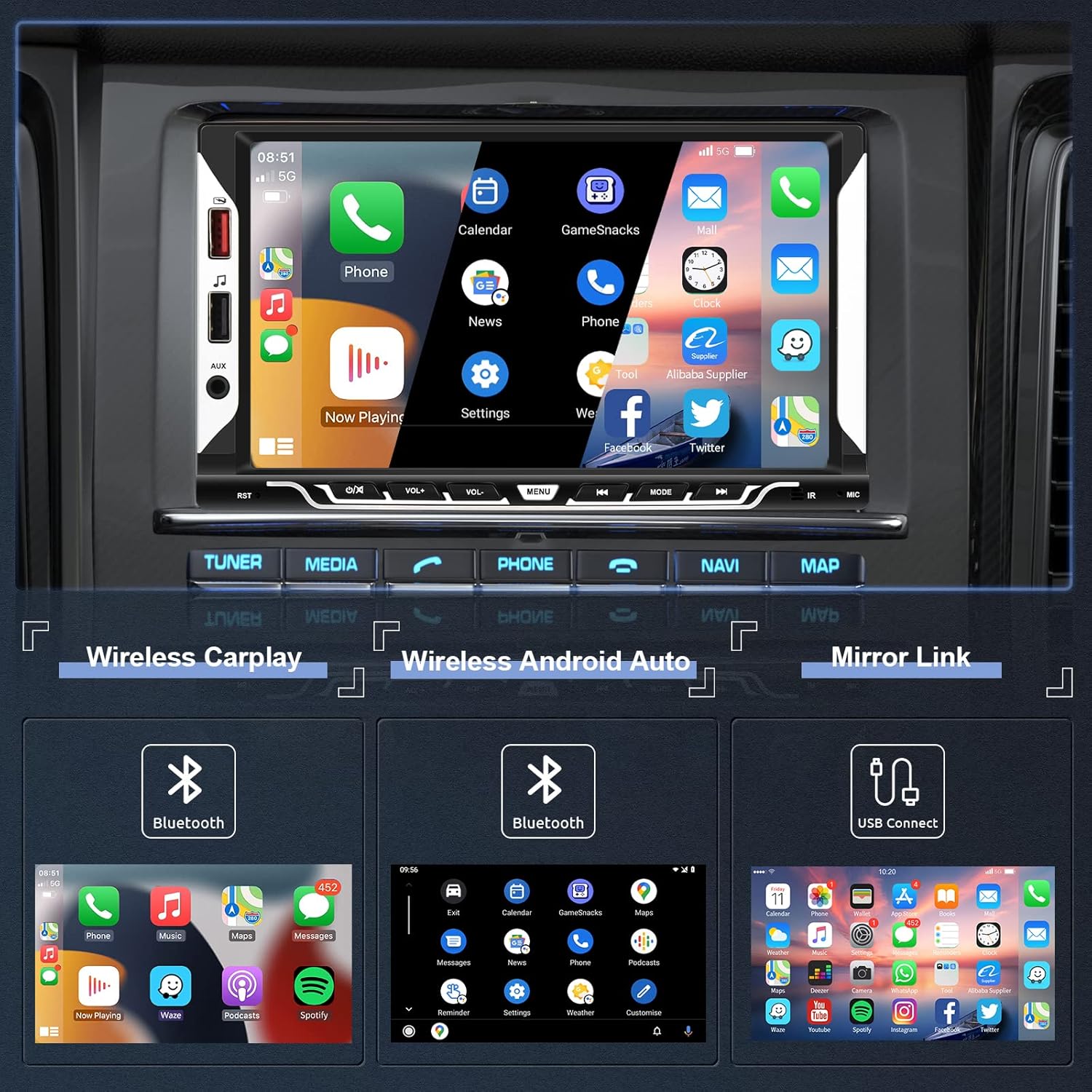
Image: The car stereo screen showing the main interface with options for Wireless CarPlay, Wireless Android Auto, and Mirror Link. Below, examples of CarPlay, Android Auto, and Mirror Link interfaces are displayed.
Spieëlskakelfunksie
Mirror Link allows you to display your smartphone's screen directly on the car stereo's display via a USB cable.
- Connect your smartphone to the car stereo using an original USB cable.
- Follow the on-screen prompts on both your phone and the car stereo to enable screen mirroring.
Bluetooth-verbinding
The integrated Bluetooth 5.1 module enables hands-free calling and wireless audio streaming.
- Aktiveer Bluetooth op jou slimfoon.
- On the car stereo, navigate to the Bluetooth menu.
- Soek vir available devices and select the car stereo's Bluetooth name.
- Confirm the pairing. You can now make/receive calls and play music wirelessly.

Image: The top section shows the Bluetooth interface for pairing devices, making calls, and accessing music and address book. The bottom section displays the EQ System settings with a 10-band equalizer and preset sound modes like Jazz, Classic, Rock, Pop, and User.
FM Radio
Access FM radio stations with clear reception and 18 preset memory slots.
- Outo -skandering: The unit can automatically scan and save strong FM stations.
- Handmatige instelling: Manually tune to desired frequencies.
- Vooraf ingestelde stasies: Save your favorite stations to the 18 preset buttons for quick access.

Image: The top section illustrates the FM Radio interface, showing frequency display (87.50 MHz), signal strength, and preset station buttons (P1-P6). The bottom section shows the Steering Wheel Control (SWC) setup menu, allowing users to program various functions to their vehicle's steering wheel buttons.
Steering Wheel Controls (SWC)
If your vehicle supports steering wheel controls, you can configure them to operate the car stereo for convenience and safety.
- Access the 'Steering Wheel Controls' settings menu.
- Follow the on-screen instructions to map your steering wheel buttons to specific functions (e.g., volume up/down, next/previous track, mode).
Reversing Camera Function
The included reversing camera provides a clear view of the area behind your vehicle, enhancing safety during parking and reversing maneuvers.
- When the vehicle is shifted into reverse gear, the car stereo will automatically display the camera feed on the screen.
- The display includes parking guidelines to assist with precise maneuvering.
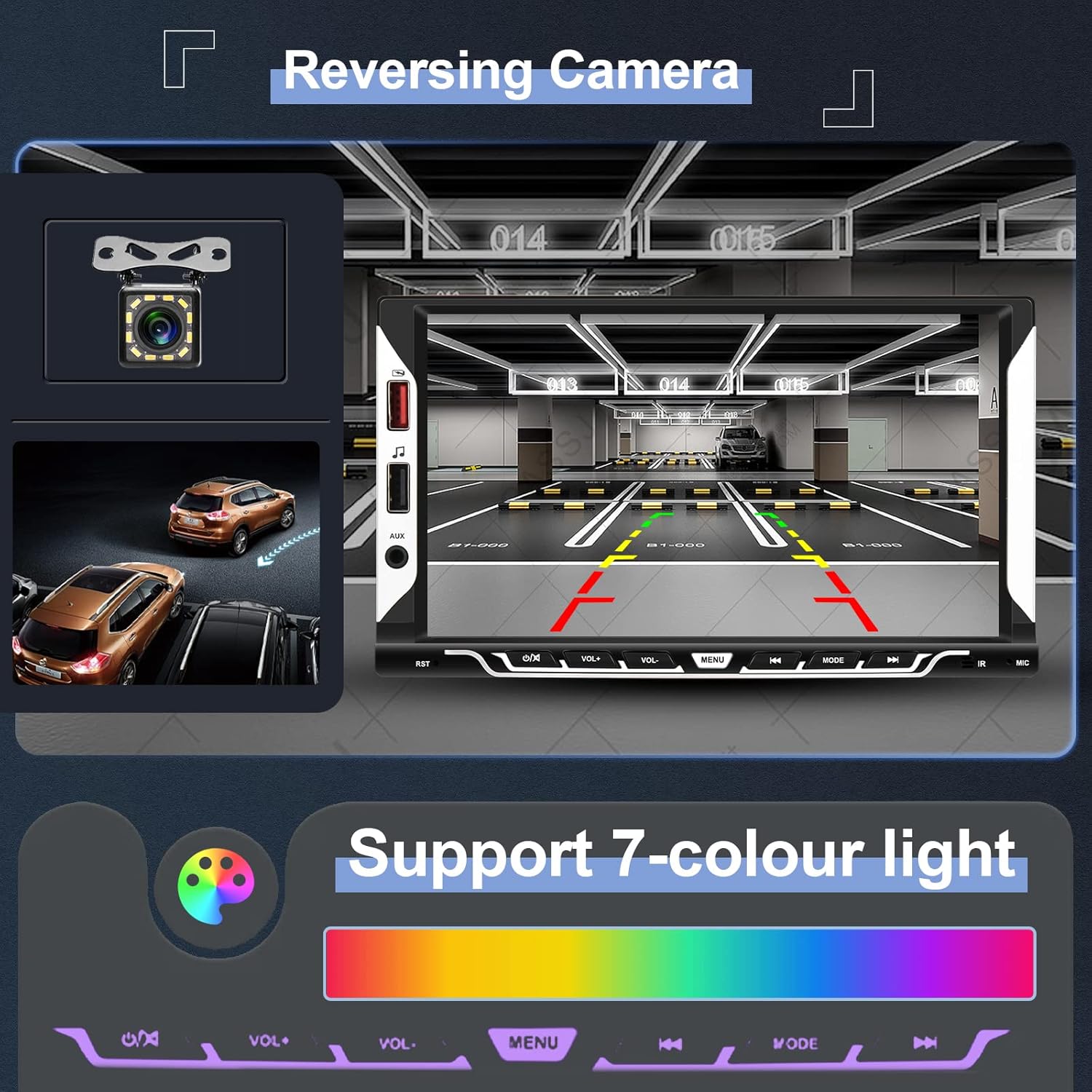
Image: The top section shows the reversing camera view on the car stereo screen, complete with parking guidelines and a clear image of the rear environment. The bottom section illustrates the 7-color light support, allowing users to customize the button illumination colors.
EQ System
Adjust the audio output to your preference using the built-in 10-band equalizer and various preset sound effects (Jazz, Classic, Rock, Pop, User).
UI Customization
Personalize your car stereo's appearance:
- Agterliginstellings: Choose from 7 different button illumination colors or set them to cycle automatically.
- Agtergronde: Select from various themed UI wallpapers.
Onderhoud
- Skerm skoonmaak: Use a soft, lint-free cloth to gently wipe the touchscreen. Avoid abrasive cleaners or solvents.
- Algemene sorg: Keep the unit free from dust and moisture. Do not expose it to extreme temperatures.
- Sagteware-opdaterings: Check the official Hodozzy webwebwerf vir enige beskikbare sagteware-opdaterings om optimale werkverrigting en nuwe funksies te verseker.
Probleemoplossing
| Probleem | Moontlike oorsaak | Oplossing |
|---|---|---|
| Geen krag nie | Incorrect power wiring; Blown fuse; Vehicle battery low. | Check power cable connections (yellow, red, black). Inspect vehicle fuses. Ensure vehicle battery is charged. |
| Geen klank nie | Luidsprekerdrade ontkoppel; Volume te laag; Dempfunksie aktief. | Verify speaker wire connections. Increase volume. Check if the unit is muted. |
| Bluetooth verbind nie | Bluetooth not enabled on phone/stereo; Incorrect pairing process. | Ensure Bluetooth is active on both devices. Restart Bluetooth on both devices. Re-attempt pairing. |
| CarPlay/Android Auto begin nie | Incorrect Bluetooth connection; Phone software issue; USB cable issue for Mirror Link. | Ensure stable Bluetooth connection for wireless. For Mirror Link, use an original USB cable. Restart phone and stereo. |
| Reversing camera not displaying | Camera wiring incorrect; Camera power issue; Reverse trigger wire not connected. | Kontroleer die kamera se video-inset en kragverbindings. Maak seker dat die draad van die trurat-sneller korrek aan die voertuig se truratlig gekoppel is. |
| Unit freezes or is unresponsive | Tydelike sagtewarefout. | Press the reset button (usually a small hole requiring a pin) or disconnect power for a few minutes and reconnect. |
Spesifikasies
| Model | 9310 W |
| Stelsel | F133 |
| Skerm grootte | 7.0 duim |
| Skermresolusie | 1024*600 |
| Voltage | 12 V |
| Oudio Amplewendiger | 7388 |
| Uitset krag | 4*45W |
| Bluetooth weergawe | 5.1 |
| USB-koppelvlak | USB 2.0 |
| Omkeer-invoer | CVBS |
| Radio reeks | FM 87.5-108.0MHZ (Europe) |
| Bedryfstemperatuur | -20℃ ~ 70℃ |
| Ondersteunde oudioformate | MP3 / WMA / WAV / APE / FLAC |
| Ondersteunde videoformate | MKV/AVI/TS/TP/MP4/M4V (Max bitrate 50-80Mbps) |
| Spesiale kenmerke | Wireless Apple CarPlay, Wireless Android Auto, Mirror Link, Bluetooth, FM Radio, Reversing Camera Input, Steering Wheel Control |
Afmetings
Image: Diagram showing the dimensions of the Hodozzy 9310W car stereo. The front panel measures 178mm (7.0 inches) in width and 102mm (4.0 inches) in height. The main body has a width of 176mm (6.9 inches), a height of 89mm (3.5 inches), and a depth of 50mm (2.0 inches).
Waarborg inligting
The Hodozzy 9310W Car Stereo comes with a 2-year replacement warranty. This warranty covers manufacturing defects and ensures that your product will be replaced if it fails due to such issues within two years from the date of purchase. Please retain your proof of purchase for warranty claims.
Kliënte ondersteuning
For any questions, technical assistance, or warranty claims, please contact Hodozzy customer support. We offer lifetime support for our products.
- E-pos: hodozzyofficial@163.com
- Reaksie Tyd: We aim to respond to inquiries within 18 hours.