
Inleiding
Thank you for choosing the Genai True Wireless Earphones. This manual provides detailed instructions on how to set up, operate, maintain, and troubleshoot your new earphones. Please read this manual carefully before use to ensure optimal performance and longevity of your device.
Produk verbyview
The Genai True Wireless Earphones feature a digital intelligence LED display on the charging case, tap control for easy operation, and Bluetooth 5.0 for stable connectivity. They are designed for comfortable in-ear wear and deliver clear stereo sound.
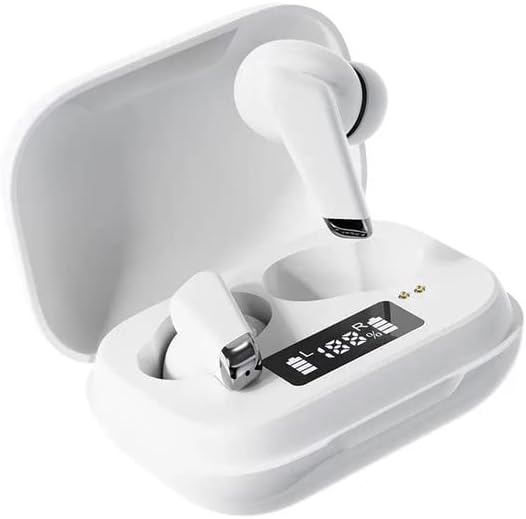
Image: Genai True Wireless Earphones in their charging case, showcasing the digital LED display indicating battery levels.
Sleutel kenmerke:
- Ware draadlose stereo (TWS): Seamless audio experience without cables.
- Tik Beheer: Intuitive touch-sensitive controls for music and calls.
- Digital Intelligence LED Display: Shows real-time battery status of earbuds and charging case.
- Bluetooth 5.0: Verseker stabiele en doeltreffende draadlose verbinding.
- Ergonomiese In-Oor Ontwerp: Gerieflike en veilige pasvorm.
Opstelgids
1. Laai die oorfone en houer
- Aanvanklike heffing: Before first use, fully charge the charging case and earbuds. Place the earbuds into the charging case.
- Koppel laaier: Koppel die laaikas aan 'n kragbron met behulp van 'n versoenbare USB-kabel.
- Monitor LED-skerm: The digital LED display on the case will show the charging status and battery percentage. Ensure both earbuds and the case are fully charged before proceeding.

Image: The charging case with its digital LED display, indicating the charge level of both the case and the individual earbuds.
2. Koppeling met jou toestel
- Krag aan: Maak die laaikas oop. Die oorfone sal outomaties aanskakel en in paringsmodus gaan. Jy mag dalk 'n hoorbare aanwysing hoor.
- Aktiveer Bluetooth: On your smartphone or other Bluetooth-enabled device, go to the Bluetooth settings and enable Bluetooth.
- Kies Toestel: Look for "Genai Earphones" (or similar name) in the list of available devices and select it to connect.
- Bevestiging: Once successfully paired, you will hear a confirmation sound, and the earbuds will be ready for use.

Image: A visual representation of the Bluetooth 5.0 chipset, highlighting the stable wireless connection technology.
Bedryfsinstruksies
The Genai True Wireless Earphones feature intuitive tap controls. The specific functions may vary slightly, but common controls are listed below:
Krag aan/af
- Krag aan: Open the charging case, or long-press the touch area on both earbuds for a few seconds.
- Skakel af: Place the earbuds back into the charging case and close the lid, or long-press the touch area on both earbuds for several seconds until they power off.
Musiek afspeel
- Speel/pouse: Enkele tik op enige van die oordopjes.
- Volgende snit: Dubbeltik op die regteroorfone.
- Vorige snit: Dubbeltik op die linker oordopje.
Belbestuur
- Beantwoord/beëindig oproep: Tik een keer op enige oordopje tydens 'n inkomende oproep of aktiewe oproep.
- Verwerp oproep: Druk lank op enige oordopjes tydens 'n inkomende oproep.
Stemassistent
- Aktiveer stemassistent: Triple tap on either earbud (functionality may vary by device).

Image: An illustration showing an earbud comfortably and ergonomically fitted within the ear canal.
Onderhoud
Skoonmaak
- Gebruik 'n sagte, droë, pluisvrye lap om die oordopjes en laaikas skoon te maak.
- Moenie skuurmiddels, oplosmiddels of aërosolspuitmiddels gebruik nie.
- Gently clean the ear tips and speaker mesh to remove any earwax or debris.
Berging
- Bêre die oorfone in hul laaikassie wanneer dit nie gebruik word nie om hulle te beskerm en gelaai te hou.
- Avoid storing in extreme temperatures, direct sunlight, or high humidity.
Probleemoplossing
- Earbuds not pairing with each other or with device:
- Maak seker dat beide oordopjes gelaai is.
- Plaas albei oordopjes terug in die laaikas, maak die deksel toe, wag 'n paar sekondes en maak dan die deksel weer oop.
- On your device, forget/delete the "Genai Earphones" from the Bluetooth list and try pairing again.
- Geen geluid of lae volume:
- Kontroleer die volumevlak op beide jou toestel en die oordopjes.
- Maak seker dat die oorfone behoorlik aan jou toestel gekoppel is.
- Maak enige puin van die oorfone se luidsprekermaas skoon.
- Laai kwessies:
- Maak seker dat die laaikabel stewig aan beide die kas en die kragbron gekoppel is.
- Verifieer dat die kragbron aktief is.
- Maak die laaikontakte op beide die oordopjes en die omhulsel skoon.
Spesifikasies
| Kenmerk | Detail |
|---|---|
| Model | B0BX5G53VT |
| Verbindingstegnologie | Draadloos (Bluetooth 5.0) |
| Tipe oorkoppe | Half-oop |
| Aantal bestuurders | 2 |
| Laai metode | Laaikas |
| Materiaal van koptelefoonkussings | Silikoon |
| Bestuurder deursnee | 10 mm |
| Totale Harmoniese Vervorming | 0.02% |
| Impedansiereeks | Tot 32 Ω |
| Materiaal | Silikoon |
| Oorplasing | In Oor |
| Vormfaktor | Ware draadloos |
Waarborg en Ondersteuning
The Genai True Wireless Earphones come with a 12 maande waarborg from the date of purchase, covering manufacturing defects. For any quality problems or support inquiries, please contact the seller directly through your purchase platform.
We are committed to ensuring 100% customer satisfaction. If you encounter any issues, please do not hesitate to reach out for assistance, including full refunds or replacements as applicable.