
Axis Kommunikasie 02316-002
AXIS Q6225-LE PTZ kamera handleiding
Model: 02316-002
1. Inleiding
This user manual provides comprehensive instructions for the installation, operation, and maintenance of the Axis Communications AXIS Q6225-LE PTZ Camera. Please read this manual thoroughly before using the product to ensure proper functionality and safety. This camera is designed for robust outdoor surveillance in challenging conditions.
2. Veiligheidsinligting
Observe the following safety precautions to prevent damage to the product or injury to personnel:
- Installasie: Installation must be performed by qualified personnel in accordance with all local and national electrical and building codes.
- Kragtoevoer: Use only the specified power supply (60 watts) for this device. Ensure the power source is stable and meets the camera's requirements.
- Omgewing: The camera is designed for outdoor use. However, avoid exposing it to extreme conditions beyond its specified operating range.
- Skoonmaak: Ontkoppel die krag voor skoonmaak. Gebruik 'n sagte, droë lap. Moenie vloeibare of aërosol skoonmaakmiddels gebruik nie.
- Wysigings: Do not attempt to modify or disassemble the camera. This may void the warranty and pose safety risks.
3. Pakketinhoud
Verifieer dat alle items in die pakket teenwoordig is:
- AXIS Q6225-LE PTZ-kamera
- Installasiegids
- Bevestigingsbeugel en hardeware
- Network Cable Connector
- Documentation and Software CD (if applicable)
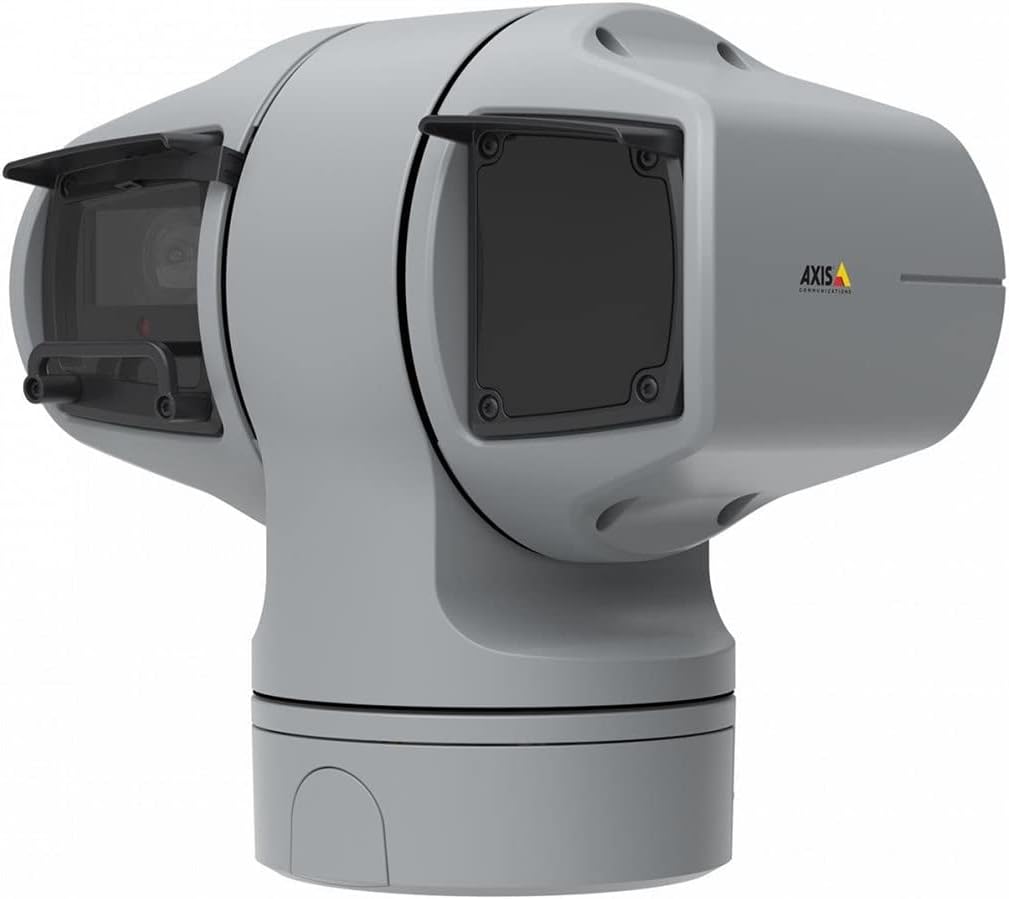
Figuur 1: AXIS Q6225-LE PTZ Camera. This image displays the grey-colored PTZ camera unit, highlighting its robust housing and integrated lens system, designed for outdoor surveillance.
4. Opstelling en installering
4.1 Montering van die kamera
The AXIS Q6225-LE is designed for wall mount installation. Ensure the mounting surface is strong enough to support the camera's weight and withstand environmental conditions.
- Kies 'n geskikte monteringsplek wat die verlangde veld bied view en is binne bereik van krag- en netwerkverbindings.
- Use the provided mounting template to mark drill holes on the wall.
- Drill pilot holes and secure the mounting bracket using appropriate screws and anchors.
- Attach the camera to the mounting bracket, ensuring it is firmly locked in place.
4.2 Krag- en netwerkverbinding
Connect the camera to power and network as follows:
- Krag: Connect the power cable to a 60-watt power source. Ensure the connection is secure and weatherproof.
- Netwerk: Connect an Ethernet cable from your network switch or router to the camera's network port. The camera supports Wi-Fi for wireless communication. Refer to the network configuration section for wireless setup.
4.3 Aanvanklike konfigurasie
After physical installation and connection, access the camera's web koppelvlak vir aanvanklike konfigurasie:
- Maak oop a web browser on a computer connected to the same network as the camera.
- Enter the camera's IP address in the browser's address bar. If the IP address is unknown, use the AXIS IP Utility tool to discover it.
- Follow the on-screen prompts to set up a new password for the administrator account.
- Configure basic network settings, date/time, and video stream settings.
5. Bedien die kamera
5.1 Pan-, Kantel- en Zoem- (PTZ) Beheer
The AXIS Q6225-LE camera features full PTZ capabilities, allowing remote adjustment of its viewing angle and zoom level. Control is typically performed via the camera's web interface or compatible video management software (VMS).
- pan: Rotate the camera horizontally to cover a wider area.
- Kantel: Adjust the camera vertically to view objects at different heights.
- Optiese zoom: Use the optical zoom feature to magnify distant objects without loss of image quality.
5.2 Bewegingsopsporing en waarskuwings
The camera supports motion-only alerts. Configure motion detection zones and sensitivity settings in the web interface to trigger recordings or notifications when movement is detected.
5.3 Infrared (IR) Illumination
Equipped with infrared light sources, the camera provides clear video surveillance in low-light or complete darkness. IR illumination activates automatically or can be manually controlled.
6. Onderhoud
6.1 Skoonmaak
Regular cleaning of the camera lens and housing is recommended to ensure optimal performance, especially in dusty or harsh environments.
- Gently wipe the lens with a soft, lint-free cloth. For stubborn dirt, use a lens cleaning solution specifically designed for optical surfaces.
- Maak die kamerabehuising skoon met advertensiemateriaalamp lap. Vermy skuurmiddels of oplosmiddels.
6.2 Firmware-opdaterings
Periodically check the Axis Communications website for firmware updates. Keeping the camera's firmware up-to-date ensures access to the latest features, security enhancements, and bug fixes.
7. Probleemoplossing
This section addresses common issues you might encounter with your AXIS Q6225-LE camera.
| Probleem | Moontlike oorsaak | Oplossing |
|---|---|---|
| Geen videostroom nie | Power disconnected, network issue, incorrect IP address. | Check power connection. Verify network cable or Wi-Fi connection. Confirm camera's IP address. |
| Swak beeldkwaliteit | Vuil lens, onbehoorlike fokus, swak ligtoestande. | Clean the lens. Adjust focus via web interface. Ensure adequate lighting or verify IR functionality. |
| PTZ-beheerders reageer nie | Network latency, software glitch, motor issue. | Check network connection. Restart the camera. If problem persists, contact support. |
8. Spesifikasies
| Kenmerk | Detail |
|---|---|
| Modelnommer | 02316-002 |
| Handelsmerk | As Kommunikasie |
| Montage tipe | Muurmontering |
| Kleur | Wit |
| Materiaal | Metaal |
| Wattage | 60 watt |
| Verbindingstegnologie | Draadloos, Wi-Fi |
| Binne/buiteluggebruik | Buitelug |
| Beheer metode | Afgeleë |
| Fotosensortegnologie | CMOS |
| Video-opname-formaat | MPEG-4 |
| Ligbrontipe | Infrarooi |
| Alerttipe | Slegs beweging |
| Zoem tipe | Optiese zoom |
| Item gewig | 0.01 kilogram (0.352 onse) |
| Ingesluit komponente | Kamera/bykomstighede |
9. Waarborg en Ondersteuning
For warranty information and technical support, please refer to the official Axis Communications webwebwerf of kontak u gemagtigde handelaar. Bewaar u aankoopbewys as bewys van aankoop.
Aanlyn hulpbronne: www.axis.com