
CHNADKS EM-101
EMF Meter User Manual
Model: EM-101 | Brand: CHNADKS
1. Inleiding
Thank you for choosing the CHNADKS EM-101 EMF Meter. This advanced 3-in-1 rechargeable electromagnetic field radiation detector is designed for precise measurement of electric field strength, radiation power, and magnetic field strength. It is an essential tool for home and office EMF inspections, and can also be used for detecting anomalous magnetic field fluctuations, making it suitable for various applications including ghost hunting.
This manual provides detailed instructions on how to set up, operate, and maintain your device to ensure optimal performance and longevity.

Figure 1.1: The CHNADKS EM-101 Electromagnetic Radiation Detector, showcasing sy kompakte ontwerp en duidelike skerm.
2. Produkkenmerke
- Versatile Precise Measurements: Measures electric field strength, radiation power, magnetic field strength, and polarity of static magnetic fields with an effective measurement range of 50MHz-3.5GHz. Provides numerical reference for anomalous magnetic field fluctuations.
- Maklik om te gebruik koppelvlak: Features a TFT 2.0 color screen with a graphical menu for intuitive operation. Includes sound and flash alerts with adjustable alarm thresholds. Supports electric and magnetic field waveform display modes.
- Draagbare ontwerp: Compact dimensions (4.64x 2x0.78 inches) and lightweight (67g) with an IP3X protection level, making it easy to carry and durable for various settings.
- Wye toepassing: Detects RF and measures electromagnetic radiation from household appliances, cell phone towers, and low-frequency appliances. Ideal for ghost hunting enthusiasts, office workers, pregnant women, and the elderly to limit exposure to potentially harmful radiation.
3. Pakketinhoud
Nadat u die pakkie oopgemaak het, maak asseblief seker dat al die volgende items ingesluit is:
- CHNADKS EM-101 EMF Meter (with built-in Li-ion battery)
- USB-laaikabel
- Draagbare band
- Gebruikershandleiding (hierdie dokument)
4. Toesteluitleg en komponente

Figuur 4.1: Voorkant view of the EM-101 EMF Meter, showing the LCD screen and control buttons.

Figuur 4.2: Gedetailleerd view of the EM-101, highlighting the USB interface, comfort buttons, buzzer hole, and LCD screen.
- LCD skerm: TFT 2.0 color display for showing measurement data, graphical menus, and settings.
- Beheerknoppies:
- Aan / uit-knoppie: Central button for turning the device on/off and confirming selections.
- Navigation Buttons (AVR, MAX, HOLD): Used for navigating menus, adjusting settings, and selecting measurement modes. The HOLD button freezes the current reading.
- USB-koppelvlak: Located on the side for charging the device.
- Buzzer Hole: Emits audible alerts for detected radiation levels.
- Sensors: Internal sensors for detecting electric fields, magnetic fields, and RF radiation. The magnetic sensor and RF antennas are indicated by markings on the case.
5. Opstelling
5.1 Aanvanklike laai
Before first use, ensure the device is fully charged. The EM-101 has a built-in high-performance lithium battery.
- Connect the provided USB charging cable to the USB interface on the side of the EMF meter.
- Koppel die ander kant van die USB-kabel aan 'n standaard USB-kragadapter (nie ingesluit nie) of 'n rekenaar se USB-poort.
- The battery indicator on the LCD screen will show charging status. Allow the device to charge until the battery icon indicates a full charge.

Figure 5.1: The EM-101 connected for USB charging, illustrating its convenient and durable charging method.
5.2 Attaching the Portable Strap
Attach the portable strap to the designated loop on the device for convenient carrying and to prevent accidental drops.
6. Bedryfsinstruksies
6.1 Aan-/afskakel
- Om aan te skakel: Press and hold the central Power/OK button until the LCD screen illuminates.
- Om af te skakel: Press and hold the central Power/OK button until the screen turns off.
6.2 Navigering deur die spyskaart
The device features a graphical menu for easy navigation. Use the navigation buttons (AVR, MAX, HOLD) around the central Power/OK button to move through options and make selections.
- Meet: Enter this mode to begin real-time EMF measurements.
- EF Wave: Displays the electric field waveform.
- MF Wave: Displays the magnetic field waveform.
- Alarm: Adjust alarm thresholds for different field types.
- Eenheid: Change measurement units (e.g., V/m, µW/cm²).
- Slaap: Configure auto-sleep settings to conserve battery.
- Taal: Kies die vertoontaal.
- Standaard: View or adjust measurement standards.
- Oor: View toestelinligting en firmware-weergawe.
6.3 Neem metings
Once powered on, select the "Measure" option from the main menu to enter the measurement interface. The device will display real-time readings for Electric Field, Radiated Power, and Magnetic Field.
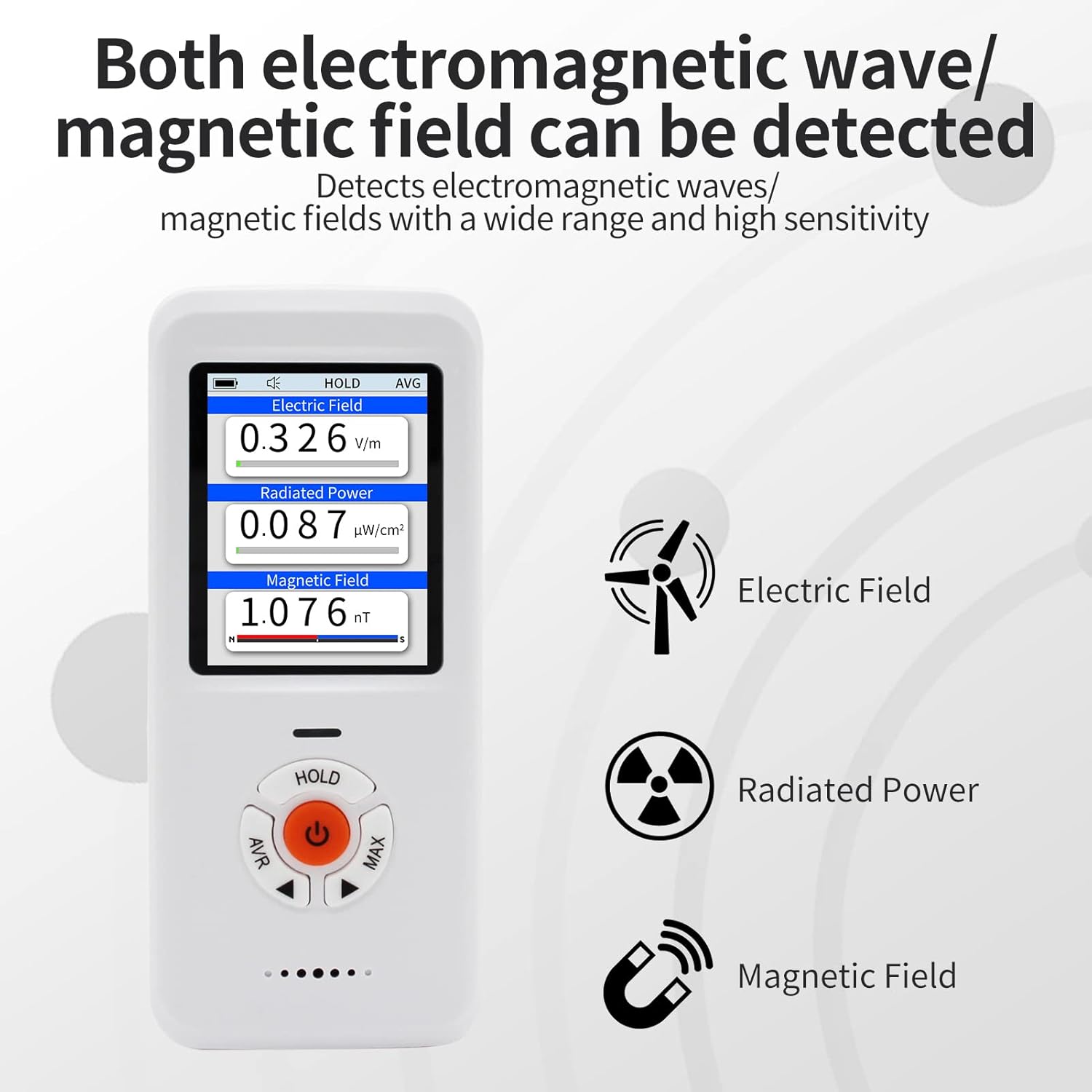
Figure 6.1: The EM-101 displaying simultaneous readings for Electric Field, Radiated Power, and Magnetic Field, along with their respective units.
- Electric Field (EF): Measures electric field strength in V/m.
- Radiated Power (RF): Measures radiation power in µW/cm².
- Magnetic Field (MF): Measures magnetic field strength in nT. The device also indicates N/S polarity for static magnetic fields.
- HOU funksie: Press the "HOLD" button to pause the current readings on the screen. Press again to resume real-time measurements.
- Alarm: If the detected radiation exceeds the set alarm threshold, the device will emit a sound and/or flash alert.
6.4 Practical Applications
The EM-101 can be used to test various sources of electromagnetic radiation:

Figure 6.2: The EM-101 being used to test common household appliances and devices for electromagnetic radiation, including a TV, microwave, WiFi router, and hairdryer.
- Huishoudelike toestelle: Test TVs, microwaves, refrigerators, washing machines, etc.
- Draadlose toestelle: Check radiation from WiFi routers, mobile phones, Bluetooth devices.
- Power Lines & Electrical Equipment: Measure fields near power outlets, cables, and large electrical machinery.
- Ghost Hunting: Detect anomalous magnetic field fluctuations.
7. Onderhoud
- Skoonmaak: Gebruik 'n sagte, droë lap om die toestel skoon te maak. Moenie skuurmiddels of oplosmiddels gebruik nie.
- Berging: Bêre die toestel op 'n koel, droë plek weg van direkte sonlig en uiterste temperature.
- Batterysorg: Vir optimale batterylewe, vermy om die battery gereeld heeltemal te ontlaai. Laai die toestel gereeld, selfs al word dit nie vir lang tye gebruik nie.
- Vermy impak: While durable, avoid dropping the device or subjecting it to strong impacts.
8. Probleemoplossing
| Probleem | Moontlike oorsaak | Oplossing |
|---|---|---|
| Toestel skakel nie aan nie. | Lae battery of toestelwanfunksie. | Charge the device fully. If the issue persists, contact customer service. |
| Onakkurate lesings. | Interference from other electronic devices; incorrect unit settings. | Move away from strong electromagnetic sources. Check and adjust unit settings in the menu. |
| Alarm klink nie. | Alarm threshold set too high; alarm function disabled. | Adjust the alarm threshold in the "Alarm" menu. Ensure the alarm function is enabled. |
If you encounter any issues not listed here or if the suggested solutions do not resolve the problem, please contact our customer service team for professional assistance.
9. Spesifikasies
| Eienskap | Waarde |
|---|---|
| Handelsmerk | CHNADKS |
| Modelnommer | EM-101 |
| Kragbron | Battery-aangedrewe (Ingeboude litiumioon) |
| Kleur | Wit |
| Item gewig | 67 gram |
| Afmetings | Ongeveer. 4.64 x 2 x 0.78 duim (11.78 x 5.08 x 1.98 cm) |
| Measurement Range (RF) | 50MHz-3.5GHz |
| Vertoon | TFT 2.0 Color LCD |
| Beskermingsvlak | IP3X |
| Ingesluit komponente | LCD, Li-ion battery |
| Sertifisering | CE |
| Land van oorsprong | VSA |
10. Waarborg en Ondersteuning
Your CHNADKS EM-101 EMF Meter is designed for reliability and performance. While specific warranty details are not provided in this manual, CHNADKS is committed to customer satisfaction.
If you have any questions, concerns, or require assistance with your device, please do not hesitate to contact our dedicated customer service team. We are here to provide professional and thoughtful support.
Please refer to the product packaging or the official CHNADKS webwebwerf vir die mees onlangse waarborginligting en kontakbesonderhede.
Ask a question about this manual
Ask about setup, troubleshooting, compatibility, parts, safety, or missing instructions. Manuals+ will review the question and use this page’s manual context to help answer it.