
Inleiding
The MASTER & DYNAMIC MC300 is a 2-in-1 device designed to provide both a stable display for your headphones and a convenient wireless charging solution for compatible devices. It features a premium aluminum stand and a machined aluminum charge pad for efficient power delivery and heat dissipation. The unit also includes an additional USB-C port for wired charging of other compatible devices.

Image: The MC300 Wireless Charge Pad and Headset Stand, showcasing sy slanke ontwerp.
Wat is in die boks
Pak die inhoud versigtig uit en maak seker dat alle items teenwoordig is:
- Draadlose laaipad
- 1m USB-C to USB-C Power Cable
- 20cm USB-C to USB-C Charging Cable
- Headphone Stand Attachment
- Magnetiese kabelhouer

Image: The individual components of the MC300, including the base, stand, and cables.
Opstel instruksies
1. Assembly of the Headphone Stand
- Locate the headphone stand attachment and the wireless charge pad base.
- Gently push down the collar located at the center of the charge pad base.
- Insert the bottom end of the headphone stand attachment into the opening in the charge pad base.
- Release the collar to secure the stand firmly in place. Ensure the stand is stable before proceeding.

Image: The underside of the MC300 base, showing the textured surface and connection points for the stand.
2. Kragverbinding
- Connect the 1m USB-C to USB-C power cable to the designated power input port on the MC300 charge pad.
- Connect the other end of the power cable to a suitable USB power adapter (not included) and plug it into a wall outlet.
- The MC300 is now ready for use.
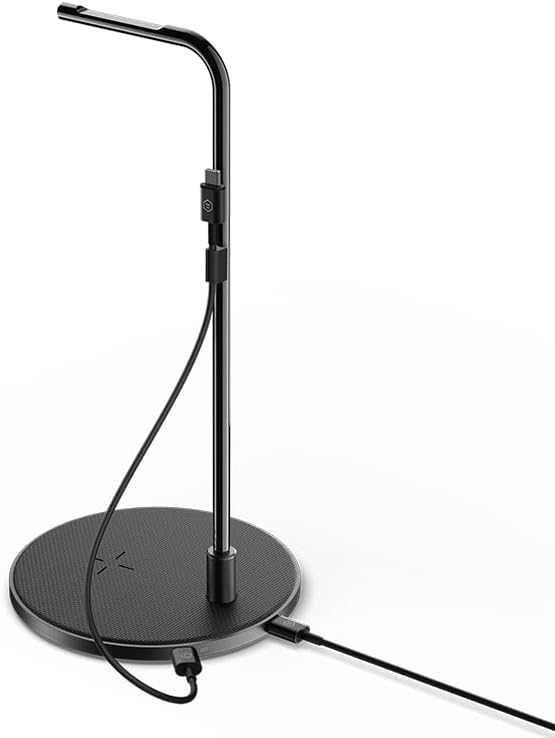
Image: The MC300 stand with the USB-C power cable connected to the base.
Bedryfsinstruksies
1. Headphone Stand Use
The MC300 provides a dedicated space to store and display your headphones.
- Carefully place your headphones over the top curved arm of the stand.
- Ensure the headphones are balanced and securely resting on the stand.

Image: A pair of headphones neatly displayed on the MC300 Headset Stand.
2. Draadlose laai
The charge pad supports wireless charging for compatible devices.
- Place your wireless charging compatible device (e.g., smartphone, earbuds case) onto the center of the charge pad.
- For MagSafe compatible devices, the charge pad offers an easy magnetic connection.
- Ensure the device is properly aligned for optimal charging. A charging indicator on your device should confirm charging has begun.
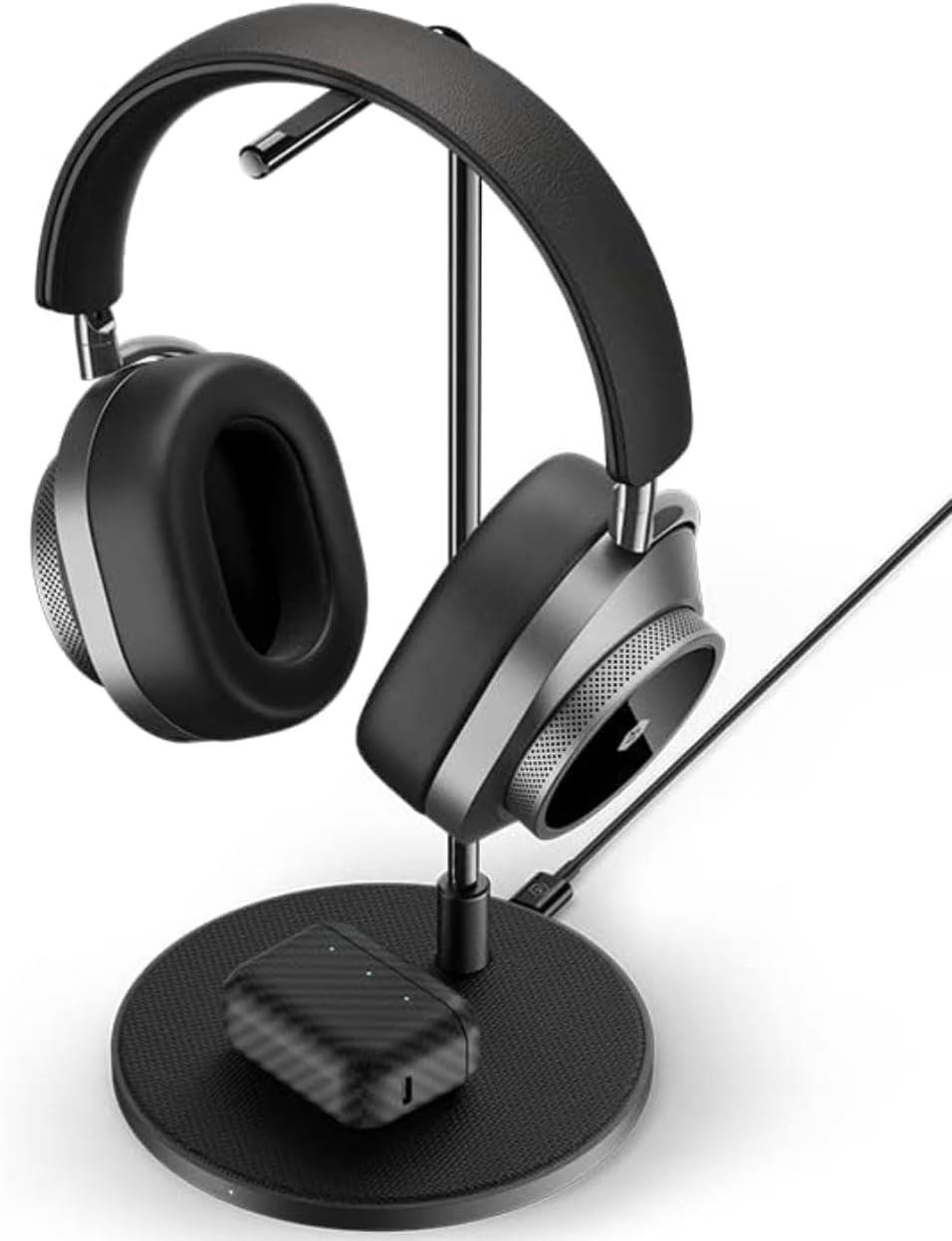
Image: Headphones on the stand, with a wireless earbud case charging on the base pad.
3. Additional Wired Charging
The MC300 includes a second USB-C port for wired charging.
- Connect the provided 20cm USB-C to USB-C charging cable to the secondary USB-C port on the MC300.
- Connect the other end of this cable to your headphones or other compatible devices that require wired charging.
Video: A short demonstration of the MC300 in a minimalist setup, showing its aesthetic integration and function as a base station for headphones and other items.
Verenigbaarheid
The MC300 Wireless Charge Pad and Headset Stand is compatible with:
- Master & Dynamic headphones.
- Other compatible headphones that fit the stand's dimensions.
- Wireless charging compatible devices, including iPhone 8 and newer mobile digital devices.
- MagSafe compatible devices for magnetic wireless charging.
Onderhoud
To ensure the longevity and optimal performance of your MC300, follow these maintenance guidelines:
- Skoonmaak: Use a soft, dry cloth to wipe down the aluminum surfaces and the coated canvas threading. Avoid abrasive cleaners or solvents that may damage the finish.
- Berging: When not in use for extended periods, store the MC300 in a cool, dry place.
- Hantering: Handle the stand with care to prevent scratches or damage to the aluminum components.
Probleemoplossing
If you encounter issues with your MC300, refer to the following common problems and solutions:
| Probleem | Oplossing |
|---|---|
| Device not wirelessly charging. |
|
| Headphone stand is unstable. |
|
| Bedrade laai werk nie. |
|
Spesifikasies
| Kenmerk | Detail |
|---|---|
| Produk afmetings | 5.51 x 5.51 x 11.18 duim |
| Item gewig | 15.9 onse |
| Modelnommer | MC300 |
| Handelsmerk | MASTER & DYNAMIC |
| Kleur | Black (Gunmetal/Black Canvas variant) |
| Versoenbare toestelle | Headphones, iPhone 8 and newer, MagSafe compatible devices |
Belangrike veiligheidsinligting
Lees asseblief hierdie veiligheidsriglyne en volg dit om skade aan die produk of besering aan uself te voorkom:
- Moenie die toestel aan water of oormatige vog blootstel nie.
- Vermy uiterste temperature.
- Moenie probeer om die toestel uitmekaar te haal of te wysig nie. Dit sal die waarborg ongeldig maak.
- Hou buite bereik van kinders.
- Use only the provided cables or certified compatible cables for power and charging.
Waarborg en Ondersteuning
MASTER & DYNAMIC products are designed for durability and performance. For specific warranty details, please refer to the warranty card included with your product or visit the official MASTER & DYNAMIC webwebwerf.
For technical support, troubleshooting assistance, or to inquire about replacement parts, please contact MASTER & DYNAMIC customer service through their official webwebwerf of die kontakinligting wat in u produkverpakking verskaf word.
Aanlyn ondersteuning: www.masterdynamic.com/support