
1. Inleiding
The HERCHR DT-2234C is a handheld digital photo tachometer designed for non-contact measurement of rotational speed (RPM). It utilizes a laser sensor to provide accurate and stable readings, making it suitable for various applications including motors, wheels, lathes, fans, and other rotating machinery. This manual provides detailed instructions for the safe and effective use of your device.

Figuur 1: Voorkant view of the HERCHR DT-2234C Digital Tachometer, displaying '60000' RPM on its LCD screen.
2. Veiligheidsmaatreëls
Lees en verstaan asseblief alle veiligheidsinstruksies voordat u die toestel gebruik. Versuim om hierdie instruksies te volg, kan lei tot besering of skade aan die toestel.
- Laserveiligheid: This device emits a Class II laser. Do not stare directly into the laser beam or direct it towards others. Avoid direct eye exposure.
- Batteryveiligheid: Ensure correct battery polarity when installing. Remove the battery if the device will not be used for an extended period to prevent leakage. Do not mix old and new batteries.
- Bedryfsomgewing: Use the device within the specified operating temperature range (0℃ to 50℃). Avoid exposure to extreme temperatures, humidity, dust, or strong electromagnetic fields.
- Onderhoud: Moenie probeer om die toestel uitmekaar te haal of te wysig nie. Verwys alle diens na gekwalifiseerde personeel.
3. Pakketinhoud
Verifieer dat alle items in die pakket teenwoordig is:
- 1 x HERCHR DT-2234C Digital Tachometer
- 1 x Blue Carrying Bag
- 3 x Reflective Tape Strips
- 1 x Gebruikershandleiding (Engels)

Figure 2: The complete package contents, including the tachometer, blue carrying bag, reflective tape, and user manual.
4. Produk verbyview
4.1 Komponente
- Laser-emitter/-ontvanger: Located at the top front, emits and receives the laser beam.
- LCD-skerm: 5-digit, 18mm (0.7") display for showing RPM readings.
- MEM-knoppie: Used to recall maximum, minimum, and last measured values.
- TOETS-knoppie: Activates the laser and initiates measurement.
- Battery kompartement: Located on the rear for 9V battery installation.

Figuur 3: Gedetailleerd view highlighting the laser sensor at the top and the 'MEM' and 'TEST' buttons on the front panel.
4.2 Sleutelkenmerke
- Non-contact measurement using laser technology.
- Wide measuring range: 2.5 RPM to 99,999 RPM.
- High resolution: 0.1 RPM (2.5-999.9 RPM) and 1 RPM (1000-99,999 RPM).
- High accuracy: ±(0.05% + 1 digit).
- Outomatiese reekskeuse.
- Data hou funksie.
- Memory function for maximum, minimum, and last measured values.
- Lae battery aanduiding.
5. Spesifikasies
| Parameter | Spesifikasie |
|---|---|
| Model | DT-2234C |
| Vertoon | 5-digit, 18mm (0.7") LCD |
| Meetreeks | 2.5 RPM - 99,999 RPM |
| Resolusie | 0.1 RPM (2.5-999.9 RPM), 1 RPM (1000-99,999 RPM) |
| Akkuraatheid | ±(0.05% + 1 syfer) |
| Meet afstand | 50-500 mm (2-20 duim) |
| Tydbasis | 6MHz Quartz Crystal Oscillator |
| Sampling Tyd | 0.8s (over 60 RPM) |
| Kragtoevoer | 1 x 9V 6F22 Battery (not included) |
| Kragverbruik | Ongeveer. 30mA |
| Werkstemperatuur | 0℃ ~ 50℃ (32℉ ~ 122℉) |
| Item Grootte | 130 x 68 x 26mm (5.1 x XUMX x 2.7 duim) |
| Item gewig | Ongeveer. 150 g (5.3 oz) |

Figure 4: Diagram illustrating the physical dimensions of the tachometer: 130mm (5.1in) length, 68mm (2.7in) width, and 26mm (1.0in) thickness.
6. Opstelling
6.1 Battery installasie
- Vind die batteryklepdeksel aan die agterkant van die toestel.
- Skuif die deksel afwaarts om oop te maak.
- Insert one 9V 6F22 battery, ensuring correct polarity (+/-).
- Plaas die batteryklepdeksel terug deur dit opwaarts te skuif totdat dit in plek klik.
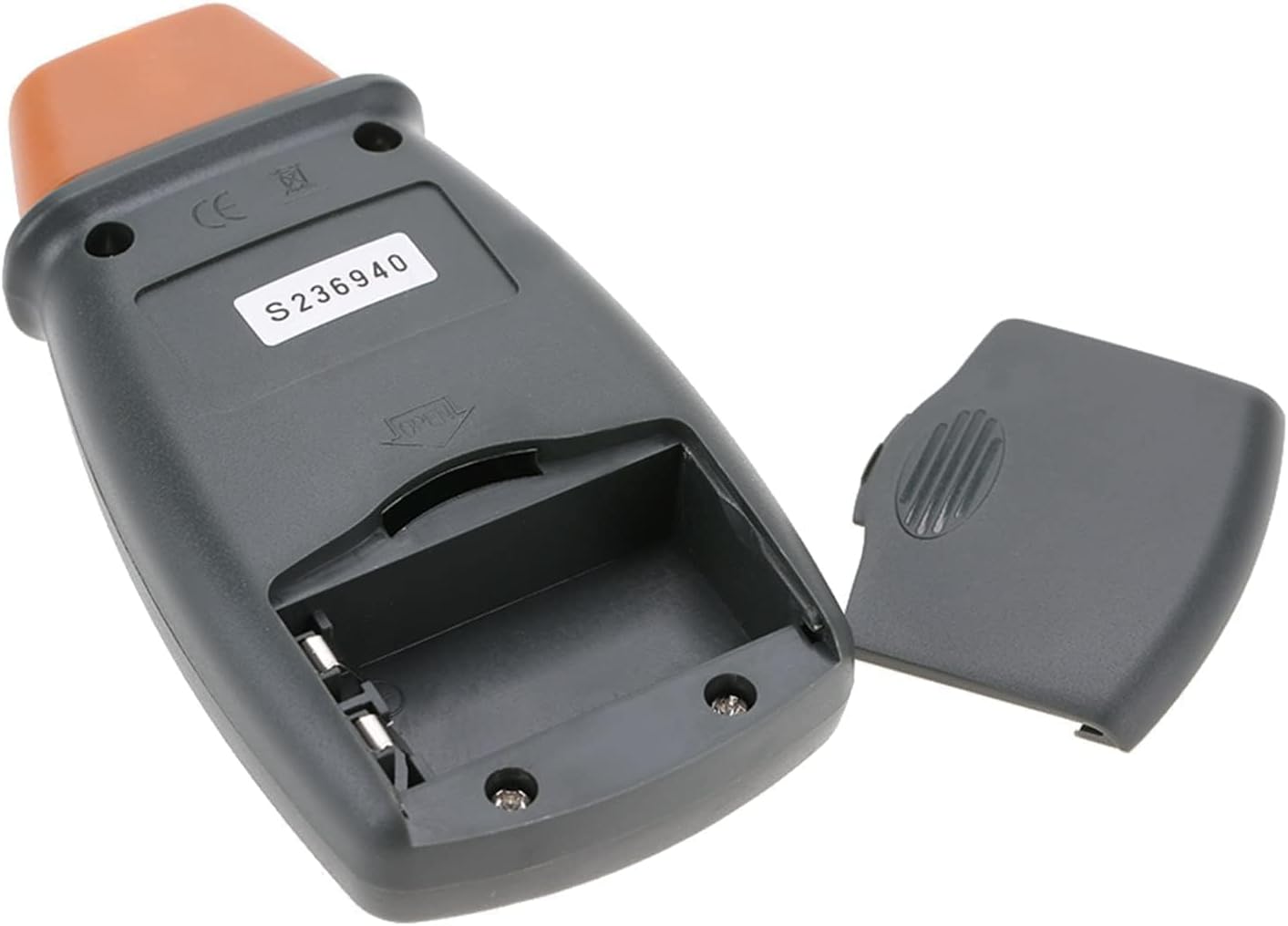
Figuur 5: Agter view of the tachometer with the battery compartment open, showing where to insert the 9V battery.
6.2 Reflective Tape Application
For accurate measurements, a piece of reflective tape must be applied to the rotating object.
- Clean the surface of the rotating object where the measurement will be taken.
- Cut a small piece of reflective tape (approximately 10-12mm or 0.4-0.5 inches).
- Firmly attach the reflective tape to the rotating shaft or disk. Ensure the tape is flat and securely adhered.
- For best results, apply the tape to a non-reflective background. If the object is highly reflective, cover the surrounding area with black tape or paint to prevent false readings.
7. Bedryfsinstruksies
7.1 Neem metings
- Hold the tachometer firmly in your hand.
- Point the laser beam towards the reflective tape on the rotating object. Ensure the measuring distance is between 50mm and 500mm (2 to 20 inches).
- Druk en hou die TOETS button. The laser will activate, and the RPM reading will appear on the LCD display.
- Adjust the angle and distance until a stable reading is obtained. The device automatically selects the appropriate range.
- Los die TOETS button to stop measuring. The last measured value will remain on the display.

Figure 6: A hand demonstrating how to hold the tachometer and point the laser towards a target for measurement.

Figure 7: A close-up image showing the tachometer's laser emitter active, projecting a red laser dot.
7.2 Geheuefunksies
Terwyl die TOETS button is pressed and a measurement is active, the device automatically records the maximum, minimum, and last values. To recall these values after releasing die TOETS knoppie:
- Druk die MEM button once to display the maximum (MAX) RPM value.
- Druk die MEM button again to display the minimum (MIN) RPM value.
- Druk die MEM button a third time to display the last measured (LAST) RPM value.
- Druk die MEM button again to return to the current measurement mode (if TEST is pressed) or to clear the memory (if TEST is not pressed).

Figuur 8: Examples of applications for the tachometer, including automobiles, washing machines, fans, and engines.

Figure 9: The tachometer in use, measuring the rotational speed of a washing machine drum, demonstrating its high sampling frequency, clear LCD display, and high measuring accuracy.
8. Onderhoud
- Skoonmaak: Vee die toestel af met 'n sagte, droë lap. Moenie skuurmiddels of oplosmiddels gebruik nie.
- Berging: Store the device in a cool, dry place away from direct sunlight. Remove the battery if storing for extended periods.
- Reflektiewe band: Ensure the reflective tape is clean and securely attached for accurate readings. Replace worn or damaged tape.
9. Probleemoplossing
| Probleem | Moontlike oorsaak | Oplossing |
|---|---|---|
| No display or weak display | Lae battery of verkeerde batteryinstallasie. | Replace the 9V battery or ensure it is installed with correct polarity. |
| Unstable or inaccurate readings |
|
|
| Laser straal nie uit nie | Battery issue or device malfunction. | Check battery. If the issue persists, contact customer support. |
10. Kliëntediens
If you encounter any problems with your HERCHR DT-2234C Digital Tachometer, please do not hesitate to contact us. Our customer support team is dedicated to providing a satisfactory solution to any issues you may experience.
For assistance, please refer to the contact information provided with your purchase or visit the HERCHR official webwebwerf.