
1. Belangrike veiligheidsinstruksies
Please read all instructions carefully before operating your television and retain them for future reference. Follow all warnings and instructions marked on the product.
- Do not block or cover the ventilation slots on the back cover.
- Moenie die TV op 'n onstabiele trollie, staander, driepoot, hakie of tafel plaas nie.
- Do not use the TV near water.
- Maak slegs skoon met 'n droë lap.
- Ontkoppel die TV tydens weerligstorms of wanneer dit vir lang tye nie gebruik word nie.
- Verwys alle diens na gekwalifiseerde dienspersoneel.
2. Pakketinhoud
Verifieer dat al die items wat hieronder gelys word, in jou pakket ingesluit is:
- Impecca 43-inch 1080P Frameless LED TV
- Full-function Remote Control (requires 2xAAA batteries, not included)
- 2x TV Stands
- 5ft. Power Cable
- Gebruikershandleiding (hierdie dokument)
3. Produk verbyview
The Impecca 43-inch Frameless LED TV offers a high-quality viewing experience with its 1080p HD resolution and 60Hz refresh rate. Designed for clarity and vibrant colors, this television features enhanced stereo speakers with Dolby Audio for an immersive sound experience. Its frameless design provides a sleek aesthetic suitable for any living space.

Voorkant view of the Impecca 43-inch Frameless LED TV.

The Impecca 43-inch TV integrated into a modern living room setting, showcasing sy raamlose ontwerp.
Sleutel kenmerke:
- 43-Inch Frameless LED Display: 1080p HDTV with 60Hz picture quality for high-quality entertainment.
- Dolby Audio & HQ Stereo Speakers: Integrated speakers with HQ resolution and Dolby Audio for crisp, clear sound.
- Veelvuldige verbindingsopsies: Includes 3xHDMI, 1xUSB, 1x A/V inputs, Earphone out, A/V Input, Component Y,Pb,Pr, and Wall Mounting Ports.
- Advanced Picture & Sound Settings: Features Adjustable Color temperature, Noise Reduction, Weak Signal Enhancement, Progressive Scan, Equalizers.
- Geriefsfunksies: On/Off Timer, Auto Sleep Mode, and a full-function remote control.
- Meertalige ondersteuning: Engels, Frans, Spaans.
4. Opstelling
4.1 Bevestiging van die TV-staanders
- Plaas die TV versigtig met die gesig na onder op 'n sagte, skoon oppervlak om skermskade te voorkom.
- Rig elke staander met die ooreenstemmende skroefgate aan die onderkant van die TV.
- Maak die staanplekke vas met die meegeleverde skroewe. Maak seker dat hulle stewig vas is.
4.2 Muurbevestiging (Opsioneel)
This TV is VESA compatible (M4 100 x 100). If you choose to wall mount your TV, please follow the instructions provided with your wall mount kit. Ensure the wall mount is suitable for the TV's weight and size.
4.3 Aansluitkrag
Connect the 5ft power cable to the TV's power input and then to a standard electrical outlet (AC 100-240V, 50/60Hz).
4.4 Aanvanklike aanskakeling
After connecting the power, press the Power button on the remote control or on the TV to turn it on. Follow the on-screen prompts for initial setup, including language selection and channel scanning.
5. Konnektiwiteit
The Impecca TV offers a variety of ports for connecting external devices:

Agter view of the TV highlighting the available input/output ports.
- HDMI (x3): Connect Blu-ray players, gaming consoles, cable/satellite boxes, and other HDMI-enabled devices.
- USB (x1): Vir die koppeling van USB-bergingstoestelle om media te speel files.
- A/V-invoer: For older devices using composite video and stereo audio cables.
- Component Y,Pb,Pr: Vir die koppeling van toestelle met behulp van komponentvideokabels.
- Oorfoon uit: Vir die koppeling van oorfone of eksterne klankstelsels.
- Antenne-/kabelinvoer: Vir die koppeling van 'n antenna- of kabeltelevisiesein.
Verbind toestelle:
- Ensure the TV and the external device are powered off.
- Connect the appropriate cable from the external device to the corresponding port on the TV.
- Power on the external device, then power on the TV.
- Press the 'SOURCE' button on the remote control to select the correct input source.
6. Afstandbeheer
The included full-function remote control allows you to operate all features of your Impecca TV.

The full-function remote control for the Impecca TV.
Battery installasie:
Open the battery compartment on the back of the remote control. Insert two AAA batteries, ensuring correct polarity (+/-). Close the compartment.
Sleutel funksies:
- Power (⑁): Skakel die TV aan of af.
- Stil (🔇): Mutes or restores sound.
- Getalknoppies (0-9): Kies kanale direk.
- Volume (+/-): Pas die volumevlak aan.
- Channel (▲/▼): Verander kanale opeenvolgend.
- Bron: Selects the input source (HDMI, USB, AV, etc.).
- Spyskaart: Kry toegang tot die hoofkieslys vir instellings.
- Navigation Buttons (◄/►/▲/▼): Navigeer deur spyskaarte en opsies.
- INSKRYWING: Bevestig keuses.
- UITGANG: Verlaat die huidige kieslys of funksie.
- CC: Aktiveer/deaktiveer Geslote Onderskrifte.
- EPG: Vertoon die elektroniese programgids.
- SLAAP: Stel die slaaptydteller.
7. Basiese werking
7.1 Krag aan/af
Druk die aan/af-knoppie op die afstandbeheerder of op die TV om die eenheid aan of af te skakel.
7.2 Kanaalkeuse
Use the number buttons on the remote to directly enter a channel number, or use the Channel Up/Down buttons to browse channels.
7.3 Volume-aanpassing
Use the Volume Up/Down buttons on the remote to increase or decrease the sound level. Press the Mute button to temporarily silence the audio.
7.4 Invoerbronkeuse
Press the 'SOURCE' button on the remote control to cycle through available input sources (e.g., HDMI 1, HDMI 2, USB, AV). Select the desired source using the navigation buttons and 'ENTER'.
7.5 Spyskaartnavigasie
Press the 'MENU' button to access the TV's main settings menu. Use the navigation arrows to move between options and 'ENTER' to select. Use 'EXIT' to close the menu.
8. Gevorderde kenmerke
Your Impecca TV includes several features to enhance your viewluister- en luisterervaring:
- Verstelbare kleurtemperatuur: Customize the color warmth or coolness of the display to your preference.
- Geraasvermindering: Reduces visual noise in the picture for a clearer image.
- Weak Signal Enhancement: Improves picture quality when receiving a weak broadcast signal.
- Progressiewe skandering: Enhances the clarity and stability of the image.
- Gelykmakers: Adjust audio frequencies to fine-tune the sound output.
- Aan/af timer: Set specific times for the TV to automatically turn on or off.
- Outo-slaapmodus: The TV can automatically enter standby mode after a period of inactivity.
- Dolby Audio: Provides enhanced sound quality for a more dynamic audio experience.
9. Probleemoplossing
As jy probleme met jou TV ondervind, raadpleeg die volgende algemene probleme en oplossings:
| Probleem | Moontlike Oplossing |
|---|---|
| Geen krag nie | Ensure the power cable is securely connected to the TV and a working electrical outlet. Check if the outlet has power. |
| Geen beeld nie, maar klank is teenwoordig | Check the input source selection. Ensure the external device is powered on and connected correctly. |
| Geen klank nie, maar beeld is teenwoordig | Check the volume level and ensure the TV is not muted. Verify audio cables are connected properly. |
| Afstandbeheer werk nie | Vervang die batterye in die afstandbeheerder. Maak seker daar is geen obstruksies tussen die afstandbeheerder en die TV se IR-sensor nie. |
| Swak beeldkwaliteit | Check antenna/cable connections. Adjust picture settings (brightness, contrast, sharpness, color temperature). If using an external device, check its output resolution. |
10. Spesifikasies
Detailed technical specifications for the Impecca 43-inch 1080P Frameless LED TV:
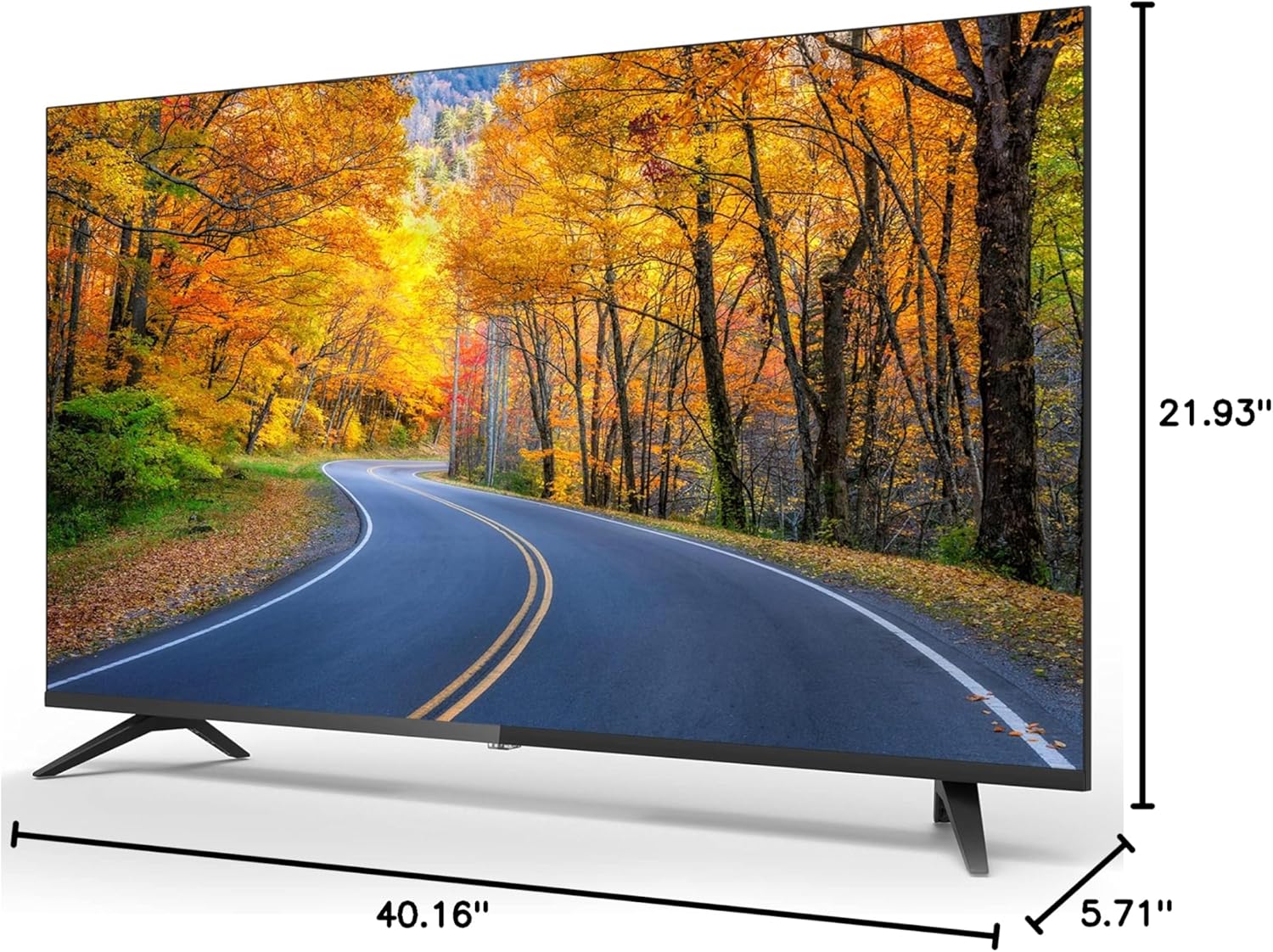
Dimensions of the Impecca 43-inch TV.
| Kenmerk | Spesifikasie |
|---|---|
| Skerm grootte | 43 duim |
| Vertoon tegnologie | LED |
| Resolusie | 1080p (1920x1080) |
| Herlaaitempo | 60 Hz |
| Aspekverhouding | 16:9 |
| Helderheid | 180 cd/m² |
| Kontrasverhouding | 1000:1 |
| Viewing Hoek | 178° x 178° |
| Reaksie Tyd | 5 ms |
| Ingeboude ontvanger | ATSC-ontvanger |
| Luidsprekers | 2 x 6-Watts Stereo Speakers |
| Kragverbruik | ≤40W (operational), ≤0.5W (Standby) |
| Kragvereiste | AC 100-240V, 50/60Hz |
| Produk Afmetings (D x B x H) | 5.71" x 40.16" x 21.93" |
| Item gewig | 13.09 pond |
| VESA-versoenbaarheid | M4 100 x 100 |
11. Onderhoud
11.1 Skoonmaak van die TV
Before cleaning, unplug the power cord from the electrical outlet. Use a soft, dry cloth to wipe the screen and other surfaces. Do not use liquid cleaners, aerosol cleaners, or harsh chemicals, as they may damage the TV.
11.2 Sorg en berging
Avoid exposing the TV to direct sunlight, extreme temperatures, or high humidity. When moving the TV, handle it carefully and ensure it is properly supported to prevent damage.
12. Waarborg en Ondersteuning
For warranty information or technical support, please refer to the warranty card included with your product or visit the official Impecca website. You may also contact Impecca customer service directly for assistance with product registration, troubleshooting, or service requests.
Aanlyn ondersteuning: www.impecca.com/support
Kontakinligting: Refer to your product packaging or the Impecca webwebwerf vir die mees onlangse kontakbesonderhede.