
1. Inleiding
This manual provides essential information for the safe installation, operation, and maintenance of your CREATE WIND CLEAR Ceiling Fan. Please read these instructions thoroughly before installation and retain them for future reference.
The CREATE WIND CLEAR Ceiling Fan is a quiet ceiling fan featuring a 40W DC brushless motor and a winter-summer reversal function. Its compact and versatile design includes retractable blades. It is suitable for small to medium-sized rooms and bedrooms, offering a built-in LED light with three adjustable color temperatures. The fan body is constructed from steel, and the blades are made of ABS. It provides 6 speed settings and a programmable timer up to 8 hours, all controllable via the included remote control and WiFi connectivity.
2. Veiligheidsinstruksies
- Ontkoppel altyd die krag by die hoofstroombreker voor installasie, onderhoud of skoonmaak.
- Installasie moet deur 'n gekwalifiseerde elektrisiën uitgevoer word in ooreenstemming met alle plaaslike en nasionale elektriese kodes.
- Ensure the mounting structure can support the weight of the fan (refer to specifications for weight).
- Moenie voorwerpe in die pad van die waaierblaaie plaas nie.
- Maak seker dat alle verbindings veilig en behoorlik geïsoleer is.
- Hierdie toestel is nie bedoel vir gebruik deur persone (insluitend kinders) met verminderde fisiese, sensoriese of geestelike vermoëns, of 'n gebrek aan ervaring en kennis nie, tensy hulle toesig of instruksies oor die gebruik van die toestel gegee is deur 'n persoon wat verantwoordelik is vir hul veiligheid.
3. Ingesluit komponente
Verifieer dat alle komponente teenwoordig is voordat u met die installasie begin:
- CREATE WIND CLEAR Ceiling Fan Unit
- Afstandbeheer
- Battery vir afstandbeheer
- Mounting Hardware (screws, brackets, etc. - specific items may vary)
- Instruksie Handleiding
For a visual reference of the product and its components, please see the image below:

4. Opstelling en installering
Professional installation is highly recommended for this ceiling fan. Ensure the power supply is disconnected before starting any installation work.
4.1 Fisiese installasie
- Montagebeugel: Securely attach the mounting bracket to a ceiling joist or a suitable electrical junction box rated for fan support.
- Bedrading: Connect the fan's electrical wires to the household wiring according to the wiring diagram provided in the full installation guide (not included in this summary). Ensure proper grounding.
- Fan Montage: Carefully lift and attach the fan motor assembly to the mounting bracket.
- Blade installasie: The fan features retractable blades that deploy automatically when the fan operates. No manual blade installation is typically required after the main unit is mounted.
- Ligstel installasie: Attach the LED light kit to the fan housing as per the detailed instructions.
Refer to the following images for visual guidance on the fan's appearance and dimensions:


4.2 WiFi Setup
The fan supports WiFi connectivity for control via a smartphone application. Refer to the specific instructions provided with the fan for pairing the device with your home WiFi network and the CREATE smart home app.
5. Bedryfsinstruksies
Your CREATE WIND CLEAR Ceiling Fan can be operated using the included remote control or via the dedicated smartphone application.
5.1 Afstandbeheerfunksies
- Krag aan/af: Druk die aan/af-knoppie om die waaier en lig aan of af te skakel.
- Fan Spoed: Adjust between 6 fan speeds using the designated speed buttons.
- Ligbeheer: Turn the LED light on/off and cycle through three adjustable color temperatures (warm, neutral, cold).
- Afteller: Stel die waaier om outomaties af te skakel na 1, 2, 4 of 8 uur.
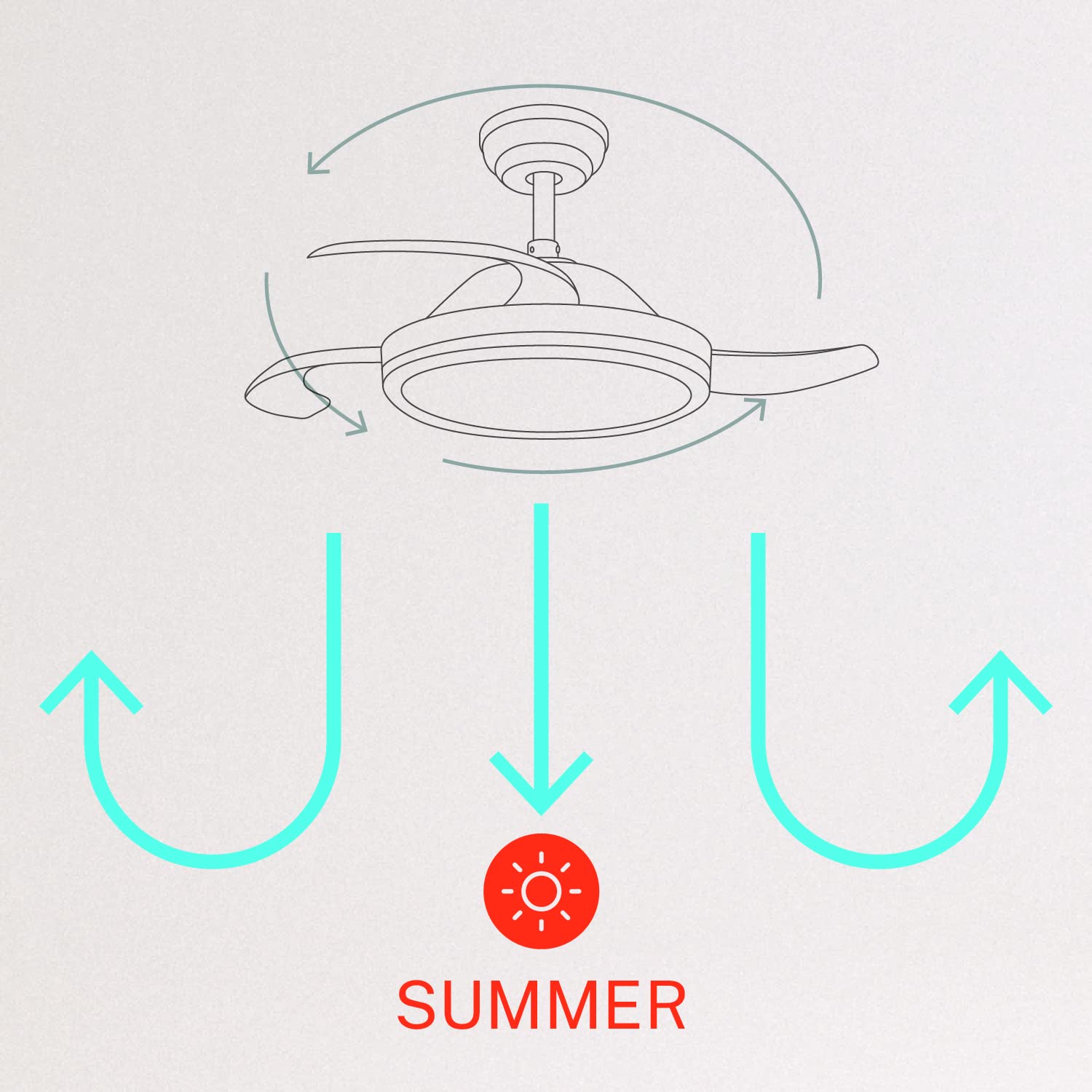
- Winter/Summer Mode: Switch between forward (summer) and reverse (winter) rotation modes.

5.2 Winter and Summer Modes
The fan features a reversible motor to optimize air circulation for different seasons:
- Somermodus (Teen die kloksgewyse rotasie): Die waaierlemme draai antikloksgewys en druk lug afwaarts om 'n verkoelende briesie te skep.
- Wintermodus (Kloksgewyse rotasie): The fan blades rotate clockwise, drawing air upwards to circulate warm air trapped near the ceiling, helping to distribute heat more evenly.

6. Onderhoud
Gereelde onderhoud verseker optimale werkverrigting en lang lewensduur van jou plafonwaaier.
- Skoonmaak: Maak die waaierblaaie en motorbehuising gereeld skoon met 'n sagte, damp cloth. Do not use abrasive cleaners or solvents. Ensure the fan is turned off and power is disconnected before cleaning.
- Draai skroewe: Check all mounting screws and blade attachment screws annually to ensure they are properly tightened.
- Ligbron: The LED light source is integrated. If it requires service, contact qualified personnel.
7. Probleemoplossing
As jy probleme met jou waaier ondervind, raadpleeg die volgende algemene probleme en oplossings:
| Probleem | Moontlike oorsaak | Oplossing |
|---|---|---|
| Waaier begin nie | No power supply; Loose wiring; Remote control battery depleted | Kontroleer stroombreker; Verifieer alle bedradingsverbindings; Vervang afstandbeheerbattery. |
| Fan wiebel | Loose mounting screws; Unbalanced blades | Ensure mounting bracket and fan assembly screws are tight; Check for any obstructions to blade movement. |
| Lig werk nie | Loose wiring; LED module fault | Kontroleer die bedrading van die ligstel; Kontak kliëntediens indien die LED-module foutief is. |
| Afstandbeheer werk nie | Depleted battery; Remote not paired | Replace remote control battery; Refer to pairing instructions in the full manual. |
| WiFi control issues | Poor WiFi signal; Incorrect app setup | Ensure strong WiFi signal; Reconfigure WiFi connection in the app. |
8. Spesifikasies
| Kenmerk | Detail |
|---|---|
| Handelsmerk | SKEP |
| Modelnommer | 120760_254772 |
| Kleur | Wit |
| Elektriese waaierontwerp | Plafonventilator |
| Kragbron | Elektries met koord |
| Styl | With WiFi |
| Produk afmetings | 107D x 107B x 39H Sentimeter |
| Soort kamer | Slaapkamer |
| Spesiale kenmerk | Afteller |
| Aanbevole gebruike | ventileer |
| Wattage | 40 Watt |
| Ingesluit komponente | Remote, Battery |
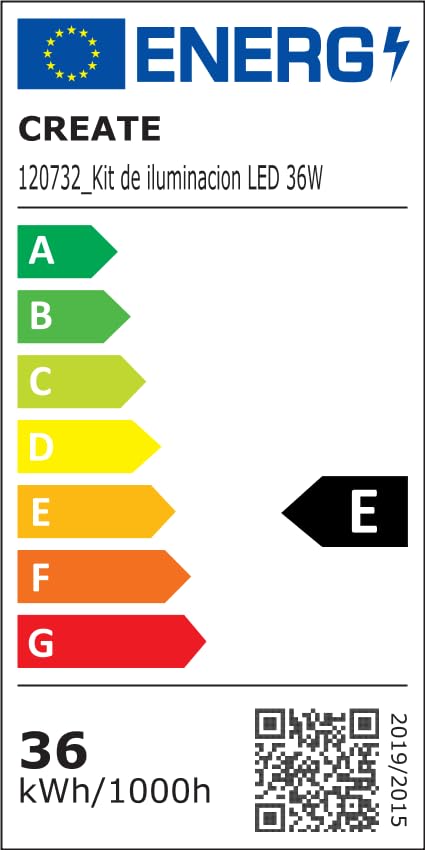
For detailed product data and energy efficiency information, please refer to the following documents:

9. Waarborg en Ondersteuning
For warranty information, technical support, or service inquiries, please contact CREATE customer service or refer to the official CREATE webwebwerf. Bewaar u aankoopbewys as bewys van aankoop.