
Inleiding
This manual provides essential instructions for the safe and efficient use of your Olympia 2298 foldable 4G mobile phone. Please read it thoroughly before operating the device and keep it for future reference.
1. Opstelling
1.1 Pakketinhoud
- Olympia 2298 Mobile Phone
- Battery (litium-ioon)
- USB-C-laaikabel
- Charging Cradle (if included)
- Gebruikershandleiding
1.2 Inserting the Battery and SIM Card
- Open the phone: Gently open the phone to access the battery compartment.
- Verwyder die agterblad: Verwyder die agterkant van die foon versigtig.
- Sit SIM-kaart in: Locate the SIM card slot(s). Insert your 4G compatible SIM card(s) into the designated slot(s) with the gold contacts facing down, ensuring it clicks into place.
- Plaas battery in: Place the Lithium-ion battery into the battery compartment, aligning the contacts.
- Replace back cover: Securely attach the back cover until it clicks.
 Beeld: Voorkant view of the Olympia 2298 foldable phone, showing the main display with time and date.
1.3 Laai die battery
Laai die foon se battery volledig voor die eerste gebruik.
- Connect charger: Plug the USB-C cable into the phone's USB-C port or place the phone in the charging cradle. Connect the other end of the cable to a suitable power adapter.
- Laai aanwyser: The phone will display a charging indicator on the screen.
- Volle lading: Allow the phone to charge until the battery indicator shows a full charge. This may take several hours for the initial charge.
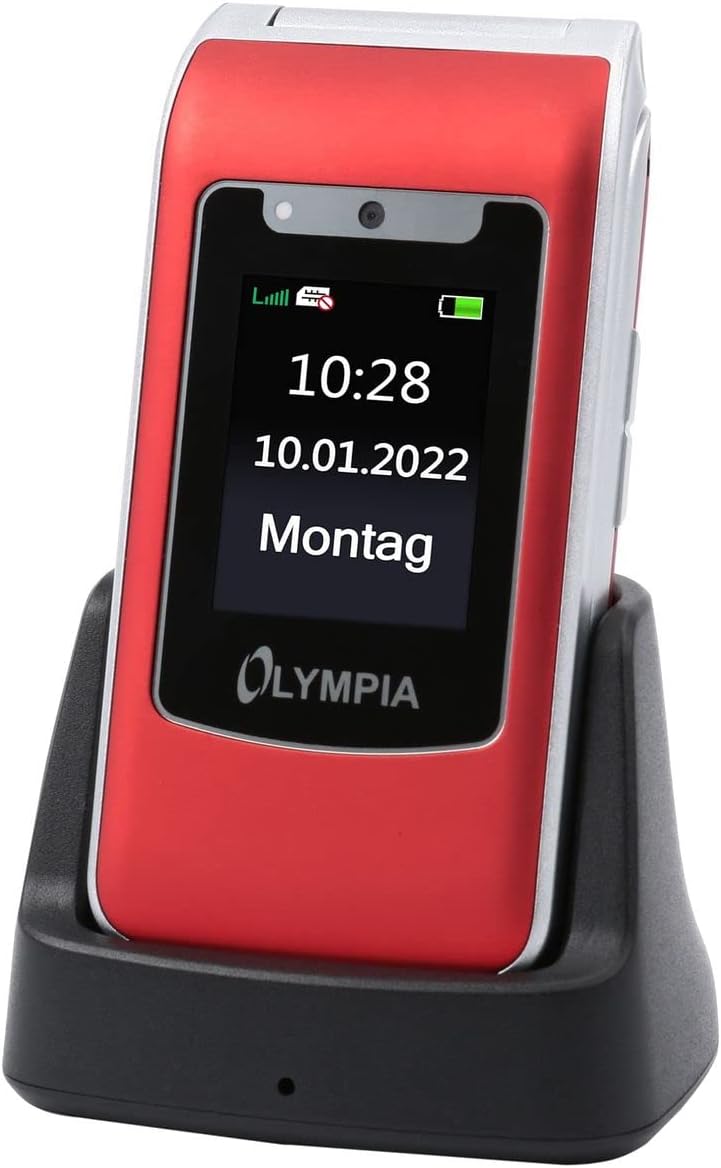 Image: The Olympia 2298 phone placed in its charging cradle, indicating ease of charging.
1.4 Aan-/afskakel
- Om aan te skakel: Druk en hou die Aan/Aan/Beëindig Oproep-knoppie in totdat die skerm aanskakel.
- Om af te skakel: Druk en hou die Aan/Af-/Beëindig Oproep-knoppie in, en kies dan "Skakel af" uit die opsies op die skerm.
2. Bedryfsinstruksies
2.1 Basiese oproepfunksies
- Maak 'n oproep: Dial the number using the keypad and press the Green Call button.
- Beantwoord 'n oproep: When the phone rings, press the Green Call button.
- Beëindig 'n oproep: Druk die Rooi Beëindig Oproep-knoppie.
- Verstel volume: Use the volume buttons on the side of the phone during a call.
2.2 Emergency Call Button (SOS)
The Olympia 2298 features a dedicated SOS button for emergencies.
 Beeld: Agter view of the Olympia 2298 phone, highlighting the prominent SOS emergency call button.
- Setup Emergency Contacts: Before using, configure up to 5 emergency contacts in the phone's settings. Refer to the "Settings" section in the menu for details.
- Aktivering van SOS: In an emergency, press and hold the SOS button on the back of the phone for several seconds.
- Automatic Dialing: The phone will automatically dial the pre-set emergency contacts one by one until a connection is made. It will also send an emergency SMS message to these contacts.
Belangrik: Ensure emergency contacts are regularly updated and aware they are listed as such.
2.3 Spyskaartnavigasie
Use the navigation keys (up, down, left, right) and the central "OK" button to browse the phone's menu. The "Back" button typically returns to the previous screen.
- Kontakte: Store and manage phone numbers.
- Boodskappe: Stuur en ontvang SMS-boodskappe.
- Oproeplys: View missed, dialed, and received calls.
- Instellings: Customize phone preferences, including sound, display, and emergency contacts.
- Kamera: Access the integrated camera.
- Gereedskap: Includes features like alarm, calendar, and calculator.
2.4 Stuur en ontvang van boodskappe
- To Send: Go to "Messages" -> "Write Message". Enter the recipient's number or select from contacts, type your message, and send.
- Om te ontvang: New messages will appear as a notification. Go to "Messages" -> "Inbox" to read them.
3. Onderhoud
3.1 Skoonmaak
- Gebruik 'n sagte, droë lap om die buitekant van die foon skoon te maak.
- Avoid using liquid cleaners, aerosols, or harsh chemicals.
- Keep the USB-C port free from dust and debris.
3.2 Batterysorg
- Moenie die battery aan uiterste temperature blootstel nie.
- Vermy om die battery gereeld heeltemal te ontlaai om sy lewensduur te verleng.
- As die foon nie vir 'n lang tydperk gebruik gaan word nie, laai dit tot ongeveer 50% voordat dit gebêre word.
4. Probleemoplossing
| Probleem | Moontlike oorsaak | Oplossing |
|---|---|---|
| Foon skakel nie aan nie. | Battery is discharged or not inserted correctly. | Laai die battery. Maak seker dat die battery korrek geplaas is. |
| Kan nie oproepe maak of ontvang nie. | Geen netwerksein, SIM-kaart nie ingesit nie, of SIM-kaartprobleem. | Kontroleer netwerkseinsterkte. Plaas die SIM-kaart weer in. Kontak jou diensverskaffer. |
| SOS-knoppie werk nie. | Emergency contacts not set up or incorrect. | Verify and update emergency contacts in settings. |
| Swak oproepkwaliteit. | Weak network signal or interference. | Beweeg na 'n area met beter sein. Vermy obstruksies. |
5. Spesifikasies
- Modelnommer: 2298
- Handelsmerk: OLIMPIA
- Skermgrootte: 2.4 duim
- Sellulêre Tegnologie: 4G (LTE)
- Verbindingstegnologie: USB (USB Type C)
- Draadlose diensverskaffer: Alle diensverskaffers
- Battery: 1 Litium-ioon (ingesluit)
- Item gewig: 105 gram
- Praat Tyd: 6 ure
- Afmetings: 5.3 x 2.1 x 10.5 sentimeter
6. Waarborg en Ondersteuning
For warranty information and technical support, please refer to the documentation provided with your purchase or visit the official OLYMPIA webwebwerf. Bewaar u bewys van aankoop vir waarborgeise.
Let wel: Spare parts availability and software update guarantees are not specified in the product information provided.