
Inleiding
This manual provides detailed instructions for the safe and effective use of your MEIKEE 15W RGBW Landscape Lights Controller. Please read this manual thoroughly before installation and operation, and retain it for future reference.
Veiligheidsinligting
- Ensure the power supply to the landscape lights is disconnected before installing or replacing the controller.
- This controller is designed for use with MEIKEE 15W RGBW landscape lights. Compatibility with other brands or wattages is not guaranteed.
- Do not expose the controller to extreme temperatures, direct sunlight for prolonged periods, or moisture.
- Hou batterye buite bereik van kinders. Indien ingesluk, soek onmiddellike mediese hulp.
- Gooi gebruikte batterye weg volgens plaaslike regulasies.
Opstelling
1. Battery Installasie
The MEIKEE RF Remote Control requires two (2) AAA batteries (not included) for operation.
- Vind die batterykompartement aan die agterkant van die afstandbeheer.
- Skuif die deksel van die batterykompartement oop.
- Plaas twee AAA-batterye in en maak seker dat die polariteit (+ en -) korrek is soos aangedui in die kompartement.
- Maak die batterykompartement se deksel stewig toe.

Image: MEIKEE RF Remote Control showing the back panel for battery installation.
2. Connecting to Landscape Lights
This RF remote control is designed to wirelessly control compatible MEIKEE 15W RGBW landscape lights. Ensure your landscape lights are properly installed and powered on. The remote operates via radio frequency, allowing control without direct line-of-sight, up to a maximum sensing distance of 12 meters (39.3 feet).
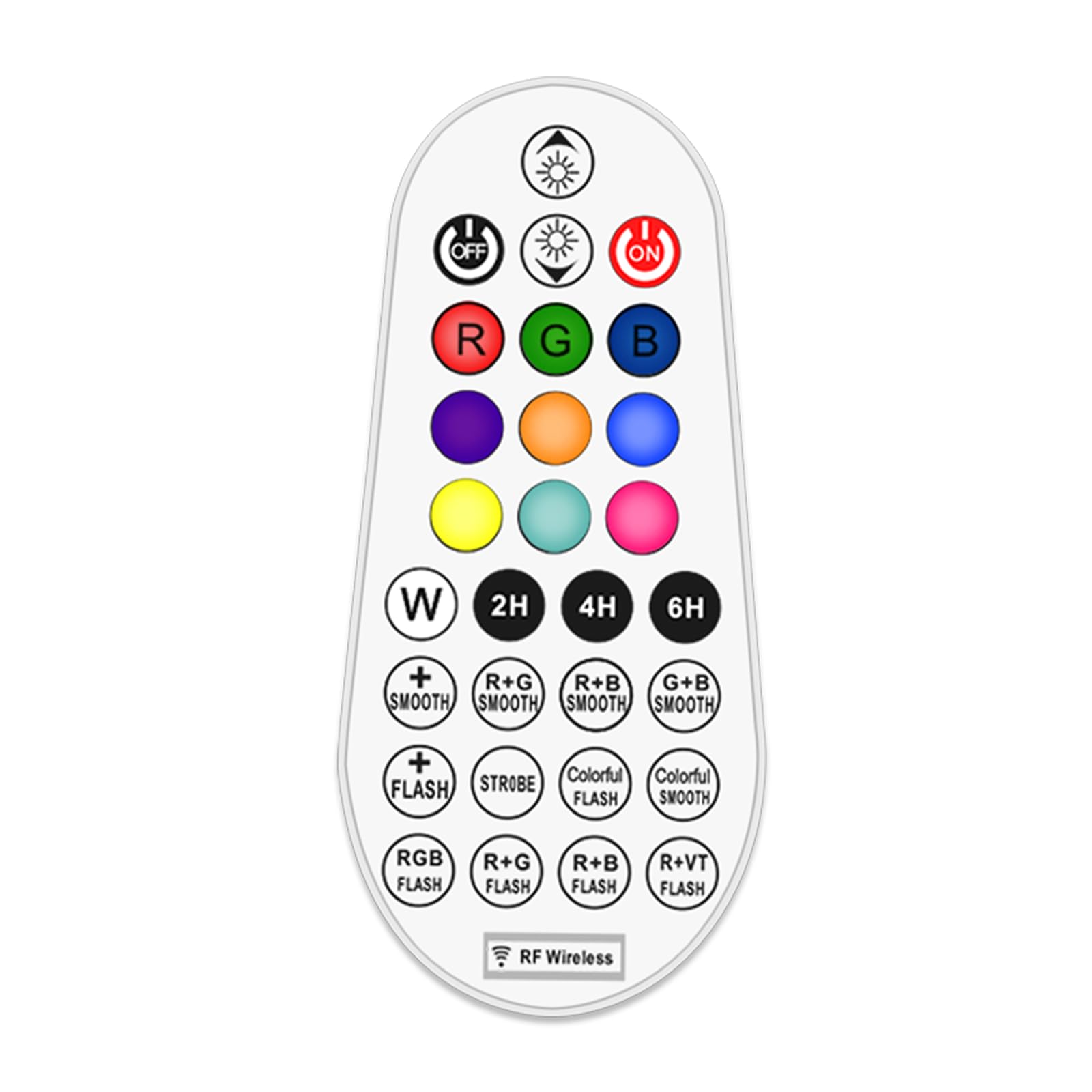
Image: Illustration of the remote control's effective range and application with landscape lights, showing a 360-degree signal.
Bedryfsinstruksies
The 29-key remote control allows for comprehensive management of your MEIKEE RGBW landscape lights. Familiarize yourself with the button layout and functions below.

Beeld: Gedetailleerde diagram van die afstandbeheerknoppies en hul ooreenstemmende funksies.
Afstandbeheer funksies:
- Krag AAN/AF: Druk die ON button to turn lights on, and AF button to turn lights off.
- Brightness/Speed Adjustment: Gebruik die Helderheid + en Helderheid - buttons to adjust light intensity. In dynamic modes, these buttons control the speed of the effect.
- Kleurkeuse:
- RGBW-knoppies: Druk R for Red, G for Green, B for Blue, and W for White.
- Vooraf ingestelde kleure: Select from 10 single colors including Cyan, Purple, Indigo, Orange, Yellow, and Magenta using the dedicated color buttons.
- Dinamiese modusse:
- Monochrome SMOOTH: Smooth transition for a single selected color.
- Monochrome FLASH: Flashing effect for a single selected color.
- 10 Automatic Color Changing Modes: Select from various pre-programmed color changing sequences with adjustable speed. These include R+G SMOOTH, R+B SMOOTH, G+B SMOOTH, STROBE, COLORFUL FLASH, COLORFUL SMOOTH, RGB FLASH, R+G FLASH, R+B FLASH, R+VT FLASH.
- Tydsberekening funksie: Set the lights to automatically turn off after a specified duration. Press 2H for 2 hours, 4H for 4 hours, or 6H vir 6 uur.
- Geheue funksie: The controller remembers your last light setting (color, brightness, mode) when turned off and will resume that setting when turned back on.

Image: Visual representation of the 10 single color modes and 10 automatic color changing modes available.

Beeld: Bvamples of 10 single color outputs and various brightness levels for the landscape spotlights.

Image: Visual explanation of the memory function (retains last setting) and timing function (auto-off after 2/4/6 hours).
Onderhoud
Battery vervanging
When the remote control's range decreases or buttons become unresponsive, it is likely time to replace the batteries. Follow the battery installation steps outlined in the "Setup" section.
- Vervang altyd albei AAA-batterye gelyktydig.
- Use new, high-quality AAA alkaline batteries for optimal performance.
- Moenie ou en nuwe batterye, of verskillende tipes batterye meng nie.
Skoonmaak
Wipe the remote control with a soft, dry cloth. Do not use abrasive cleaners or immerse the remote in water.
Probleemoplossing
| Probleem | Moontlike oorsaak | Oplossing |
|---|---|---|
| Afstandbeheer reageer nie. |
|
|
| Lights not changing color or mode. |
|
|
| Timing function not working. |
|
|
Spesifikasies
- Handelsmerk: MEIKEE
- Model: RF afstandbeheer
- Beheer metode: Remote Control (RF Wireless)
- Spesiale kenmerk: 29-key RGBW color changing
- Kragbron: Battery Powered (2 x AAA batteries, not included)
- Kleur: RGB (rooi, groen, blou)
- Itemafmetings (L x B x H): 2.36 x 0.91 x 2.84 duim
- Item gewig: 0.704 onse (0.02 kilogram)
- Max Sensing Distance: 12 meter (39.3 voet)
- Funksies: 10 single colors, 10 color changing modes, adjustable brightness, adjustable speed, timing function (2H/4H/6H), memory function.
- Eerste datum beskikbaar: 6 Januarie 2023
- Vervaardiger: MEIKEE
Waarborg en Ondersteuning
For warranty information or technical support, please contact MEIKEE customer service through the retailer where the product was purchased or visit the official MEIKEE website. Please have your product model number (RF Remote Control) and purchase date available when contacting support.