
1. Inleiding
Thank you for choosing the DELTACO Gaming PM80 Wireless Optical Gaming Mouse. This manual provides essential information for setting up, operating, and maintaining your new gaming mouse. Please read these instructions carefully before use to ensure optimal performance and longevity of your device.
2. Pakketinhoud
- DELTACO Gaming PM80 Wireless Optical Gaming Mouse
- Draadlose USB-ontvanger
- USB-laaikabel
- Gebruikershandleiding
3. Produk verbyview
The DELTACO Gaming PM80 is a high-performance wireless optical gaming mouse designed for precision and comfort. It features 7 programmable buttons, adjustable DPI up to 4800, and customizable illumination. The mouse is rechargeable, ensuring uninterrupted gaming sessions.
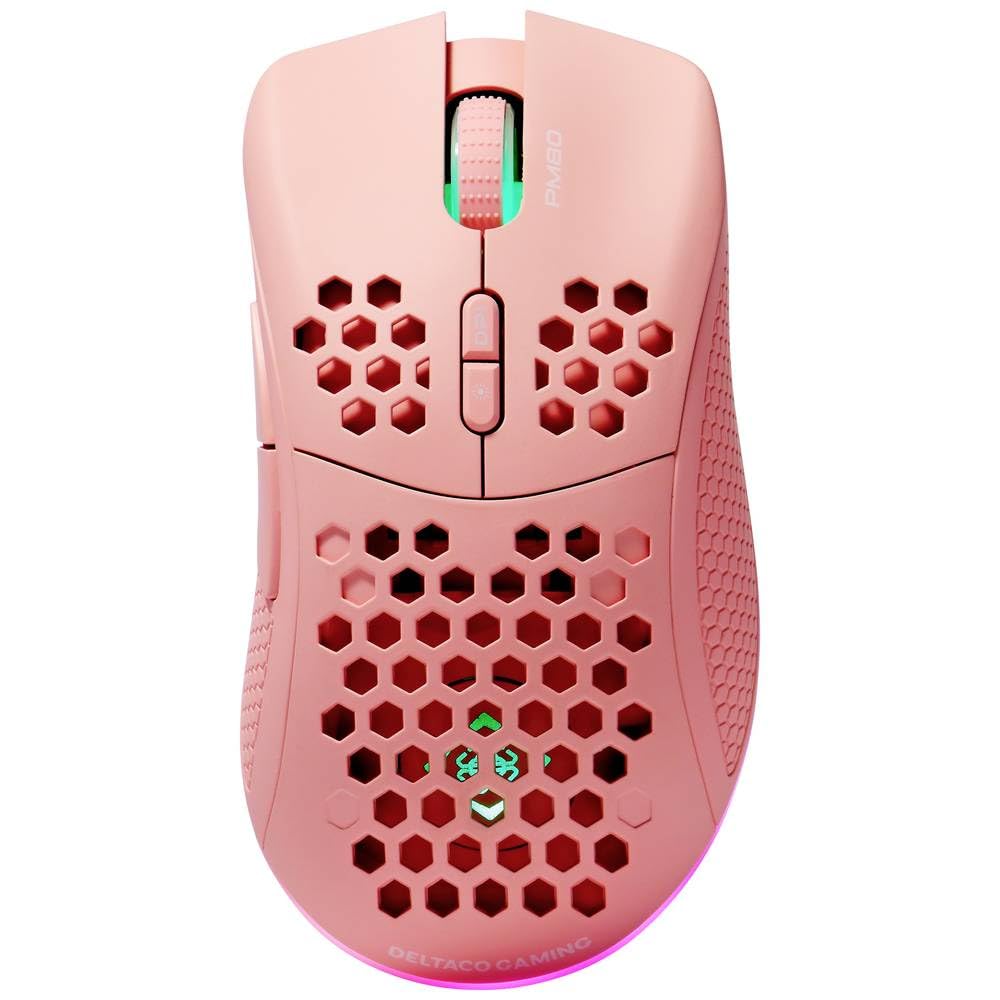
Image: DELTACO Gaming PM80 Wireless Optical Gaming Mouse. This image displays the mouse from a top-down perspective, highlighting its ergonomic design, the central scroll wheel, and the arrangement of its seven buttons.
Knoppie funksies:
- Linksklik-knoppie: Standaard primêre klikfunksie.
- Regskliekknoppie: Standaard sekondêre klikfunksie.
- Rolwiel: Blaai op/af en dien as 'n middelste klikknoppie.
- DPI-siklusknoppie: Changes the mouse's sensitivity (DPI).
- Aanstuur-knoppie: Navigeer vorentoe in web blaaiers of file ontdekkingsreisigers.
- Terug-knoppie: Navigeer agteruit in web blaaiers of file ontdekkingsreisigers.
- Illumination Mode Button: Cycles through different lighting effects or turns illumination on/off.
4. Opstelling
4.1. Laai die muis
- Connect the small end of the USB charging cable to the charging port on the front of the mouse.
- Connect the larger end of the USB charging cable to an available USB port on your computer or a USB wall adapter.
- The mouse's illumination will indicate charging status (e.g., breathing effect, specific color). A full charge typically takes 2-3 hours.
- Once fully charged, the illumination may change or turn off. Disconnect the charging cable.
4.2. Koppel die USB Draadlose Ontvanger
- Locate the USB wireless receiver, usually stored in a compartment on the underside of the mouse.
- Verwyder die ontvanger uit sy bergplek.
- Koppel die USB-draadlose ontvanger aan 'n beskikbare USB-poort op jou rekenaar.
- Jou rekenaar behoort outomaties die nodige drywers op te spoor en te installeer. Dit kan 'n paar oomblikke neem.
4.3. Skakel aan/af
- Vind die kragskakelaar aan die onderkant van die muis.
- Slide the switch to the 'ON' position to power on the mouse. The illumination will light up.
- To conserve battery life, slide the switch to the 'OFF' position when the mouse is not in use for extended periods.
5. Bedryfsinstruksies
5.1. Basiese gebruik
Once connected and powered on, the mouse is ready for use. Move the mouse on a flat surface to control the cursor on your screen. Use the left and right click buttons for primary and secondary actions, and the scroll wheel for navigation.
5.2. DPI-aanpassing
The DPI (Dots Per Inch) setting determines the sensitivity of your mouse. The DELTACO Gaming PM80 offers multiple DPI levels up to 4800 DPI. To adjust the DPI:
- Druk die DPI -siklusknoppie (typically located behind the scroll wheel).
- Each press will cycle through the available DPI settings. The mouse's illumination may change color or flash to indicate the current DPI level.
- Select the DPI setting that best suits your preference for gaming or general use.
5.3. Illumination Control
The DELTACO Gaming PM80 features customizable illumination. To change the lighting effects:
- Druk die Illumination Mode Button (refer to Product Overview vir ligging).
- Each press will cycle through different lighting modes, such as static colors, breathing effects, or off.
6. Onderhoud
6.1. Skoonmaak
- Maak seker dat die muis afgeskakel is voordat jy dit skoonmaak.
- Gebruik 'n sagte, droë, pluisvrye lap om die oppervlak van die muis af te vee.
- Vir hardnekkige vuiligheid, effens dampMaak die lap skoon met water of 'n sagte, nie-skurende skoonmaakmiddel. Vermy oormatige vog.
- Moenie harde chemikalieë, oplosmiddels of skuurmiddels gebruik nie, aangesien dit die muis se afwerking kan beskadig.
- Gebruik 'n wattestokkie of saamgeperste lug om die gleuwe rondom die rolwiel en knoppies skoon te maak.
6.2. Berging
When not in use for extended periods, store the mouse in a cool, dry place away from direct sunlight and extreme temperatures. Ensure the power switch is in the 'OFF' position to preserve battery life.
7. Probleemoplossing
- Muis reageer nie:
- Maak seker dat die muis aangeskakel is.
- Kontroleer of die USB-draadlose ontvanger stewig in 'n werkende USB-poort ingeprop is.
- Verify the mouse battery is charged. Connect the charging cable and try again.
- Probeer om die ontvanger in 'n ander USB-poort te koppel.
- Herbegin jou rekenaar.
- Vertraging of onderbroke verbinding:
- Ensure the mouse is within close proximity to the USB receiver (ideally within 10 meters).
- Avoid placing the receiver near other wireless devices or sources of interference (e.g., Wi-Fi routers, cordless phones).
- Maak seker dat die muis volledig gelaai is.
- Wyserbeweging is wisselvallig of onakkuraat:
- Maak die optiese sensor aan die onderkant van die muis skoon met 'n sagte, droë lap.
- Maak seker dat jy die muis op 'n geskikte oppervlak gebruik (bv. 'n muismat). Vermy hoogs weerkaatsende of deursigtige oppervlaktes.
- Adjust the DPI setting to a lower sensitivity if the cursor is too fast.
- Illumination not working:
- Maak seker dat die muis aangeskakel is.
- Press the Illumination Mode Button to cycle through modes, ensuring it's not set to 'off'.
- Check battery level; low battery might disable illumination.
8. Spesifikasies
| Kenmerk | Detail |
|---|---|
| Handelsmerk | DELTACO GAMING |
| Modelnommer | GAM-120-P |
| Konnektiwiteit | Draadloos (USB-ontvanger) |
| Soort sensor | Opties |
| DPI | Tot 4800 DPI (Verstelbaar) |
| Aantal knoppies | 7 |
| Hand Oriëntasie | Reg |
| Verligting | Ja |
| Herlaaibaar | Ja |
| Batterye benodig | Nee (Interne Herlaaibare) |
9. Waarborg en Ondersteuning
For warranty information and technical support, please refer to the warranty card included with your product or visit the official DELTACO Gaming webwebwerf. Bewaar u bewys van aankoop vir enige waarborgeise.