
1. Inleiding
Thank you for choosing the Cecotec TotalPure 2in1 MoonStyle Dark Fan and Air Purifier. This innovative appliance combines the functions of a powerful bladeless fan and an efficient air purifier, designed to enhance your indoor comfort and air quality. Featuring a DC motor, Wi-Fi control, an intuitive LED display, and multiple operating modes, this device offers a superior user experience. Please read this manual thoroughly before use to ensure proper operation, maintenance, and safety.

Image 1.1: The Cecotec TotalPure 2in1 MoonStyle Dark Fan and Air Purifier in a bedroom setting, showcasing sy slanke ontwerp.
2. Veiligheidsinstruksies
Om die risiko van brand, elektriese skok of besering te verminder, volg altyd hierdie basiese veiligheidsmaatreëls:
- Lees alle instruksies voordat u die toestel gebruik.
- Verseker die kragtoevoer voltage stem ooreen met die graderingsetiket op die toestel.
- Moenie die toestel, kragkabel of prop in water of ander vloeistowwe dompel nie.
- Ontkoppel die toestel van die kragtoevoer wanneer dit nie gebruik word nie, voor skoonmaak of voor enige onderhoud.
- Hou die toestel buite bereik van kinders en troeteldiere.
- Moenie die toestel gebruik met 'n beskadigde koord of prop, of nadat die toestel wanfunksioneer of op enige manier laat val of beskadig is nie.
- Do not block air openings or operate near curtains or other objects that could block air intake.
- Gebruik die toestel slegs vir die beoogde huishoudelike gebruik soos beskryf in hierdie handleiding.
- Do not attempt to repair or disassemble the appliance yourself. Contact authorized service personnel.
3. Produk verbyview en komponente
The Cecotec TotalPure 2in1 MoonStyle Dark is designed with user convenience and performance in mind. Below are the main components and key features of your device.

Figuur 3.1: Voorkant View

Figuur 3.2: Kant View
Sleutel kenmerke:
- Hoë krag (35W): Delivers strong airflow for effective cooling.
- Bladelose tegnologie: Provides a safe and elegant design, reducing noise and making cleaning easier.
- Hoë-doeltreffendheidsfilter: Ensures powerful air purification, capturing airborne particles.
- Wi-Fi beheer: Manage settings conveniently via your smartphone.
- LED-skerm: Displays all operational parameters and air quality information.
- Raakbeheer en afstandbeheer: Offers multiple ways to interact with the device.
- 120° Ossillasie: Distributes air evenly across the room.
- 9 Speeds & 4 Modes: Customize your experience for various needs and preferences.
- 8-uur timer: Set the device to automatically turn off after a specified period.

High Power 35W

Lemlose Ontwerp

Lugsuiwering
4. Opstelling
4.1 Uitpak en monteer
- Verwyder alle komponente versigtig uit die verpakking.
- Plaas die basis op 'n plat, stabiele oppervlak.
- Insert the main body of the fan/purifier into the base, ensuring it clicks securely into place.
- Connect the power cord to the appliance and then plug it into a suitable electrical outlet.
4.2 Wi-Fi-verbinding-opstelling
To utilize the smart features of your device, connect it to your home Wi-Fi network via the Cecotec smartphone application.
- Download the "Cecotec" app from your smartphone's app store (available for iOS and Android).
- Register or log in to your Cecotec account.
- Follow the in-app instructions to add your new device. This typically involves putting the device into pairing mode (refer to the LED screen for indicators) and connecting to its temporary Wi-Fi hotspot before linking it to your home network.
- Once connected, you can control the fan/purifier remotely and access additional features.
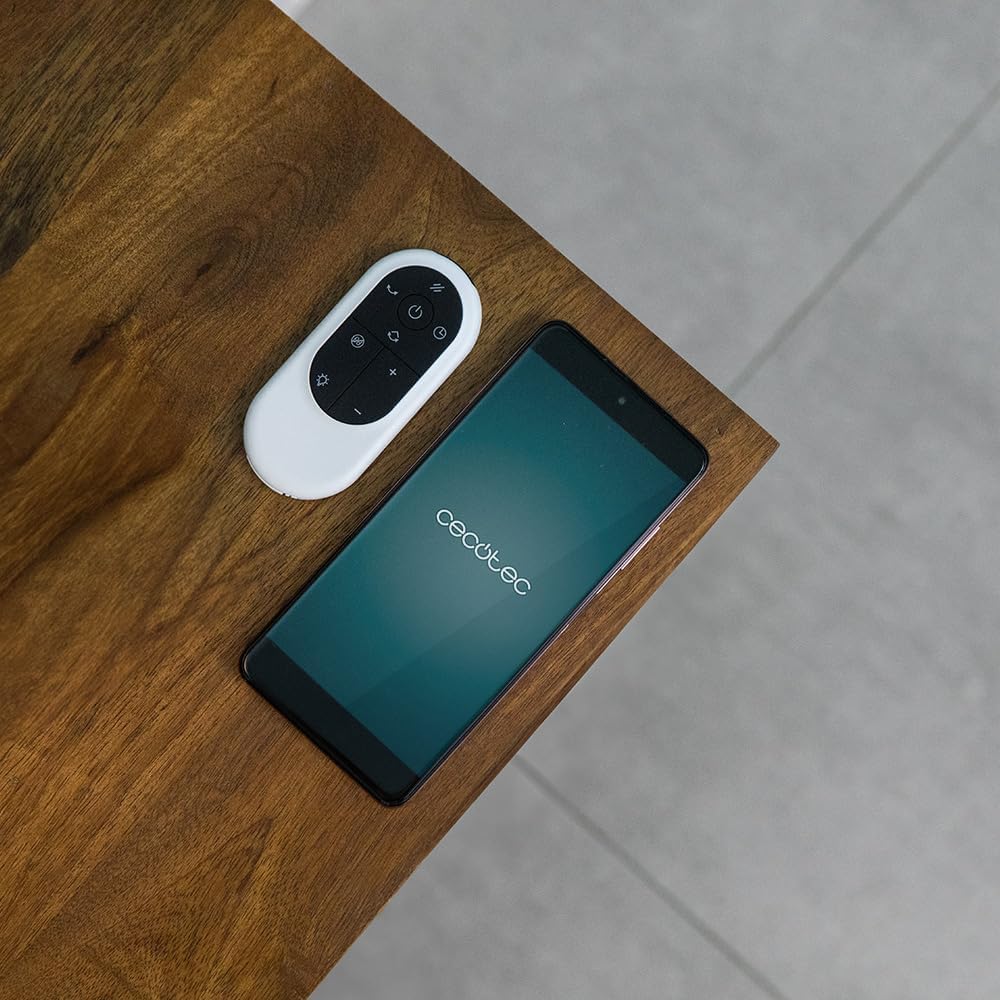
Image 4.1: The remote control and a smartphone displaying the Cecotec app, illustrating the control options.
5. Bedryfsinstruksies
5.1 Beheerpaneel en LED-skerm
The device features a touch-sensitive control panel and an LED display for easy operation. The LED screen shows current settings, air quality, and other relevant information.

Image 5.1: A hand interacting with the touch control panel on the device.

Beeld 5.2: 'n Nabyskoot view of the LED display, showing current settings.
5.2 Modes and Speeds
The fan/purifier offers 9 speed settings and 4 distinct operating modes:
- Normale modus: Constant airflow at your selected speed.
- Slaap stelling: Operates at a lower, quieter speed for undisturbed rest.
- Natuurlike modus: Simuleer natuurlike briesie deur waaierspoed te wissel.
- Outomatiese modus: Adjusts fan speed automatically based on detected air quality.

Figuur 5.3: oorview of 9 speeds, 4 modes, and 8-hour timer.
5.3 Ossillasiefunksie
Activate the oscillation function to distribute purified and cooled air across a wider area. The device can oscillate up to 120 degrees.

Image 5.4: The fan demonstrating its 120-degree oscillation capability.
5.4 Timer-funksie
Set the timer for up to 8 hours to automatically turn off the appliance, saving energy and providing convenience.
6. Onderhoud
Regular maintenance ensures the longevity and optimal performance of your Cecotec TotalPure 2in1 MoonStyle Dark.
6.1 Die skoonmaak van die toestel
- Ontkoppel altyd die toestel voordat dit skoongemaak word.
- Vee die buite-oppervlaktes af met 'n sagte, damp lap. Moenie skuur skoonmaakmiddels of oplosmiddels gebruik nie.
- Use a soft brush or vacuum cleaner with a brush attachment to gently clean the air intake and outlet grilles.
6.2 Filtervervanging
The air purification function relies on a high-efficiency filter. The filter needs to be replaced periodically to maintain purification effectiveness. The LED display may indicate when a filter change is due.

Image 6.1: The internal air filter of the Cecotec TotalPure 2in1 MoonStyle Dark.
- Ontkoppel die toestel.
- Locate the filter compartment, usually at the rear or side of the main unit.
- Open the compartment and carefully remove the old filter.
- Insert a new genuine Cecotec replacement filter, ensuring it is correctly oriented.
- Maak die filterkompartement stewig toe.
- Reset the filter life indicator on the device or via the app, if applicable.
Note: Availability of replacement filters may vary. Please contact Cecotec customer support or check their official webwebwerf vir aankoopasing vervangingsfilters.
7. Probleemoplossing
If you encounter any issues with your Cecotec TotalPure 2in1 MoonStyle Dark, please refer to the following common problems and solutions:
| Probleem | Moontlike oorsaak | Oplossing |
|---|---|---|
| Toestel skakel nie aan nie. | Nie ingeprop nie; kragaansluiting foutief; aan/uit-knoppie nie gedruk nie. | Ensure the power cord is securely plugged into a working outlet. Press the power button. |
| Swak lugvloei. | Low speed setting; blocked air intake/outlet; dirty filter. | Increase speed setting. Check for obstructions. Clean or replace the air filter. |
| Swak lugsuiwering. | Dirty or old filter. | Vervang die lugfilter volgens die onderhoudsinstruksies. |
| Wi-Fi-verbindingsprobleme. | Incorrect Wi-Fi password; device too far from router; app issues. | Re-enter Wi-Fi password. Move device closer to router. Restart app and device. |
| Ongewone geraas. | Obstruction inside; unstable surface. | Unplug and check for foreign objects. Place on a stable, flat surface. If noise persists, contact support. |
Indien die probleem voortduur nadat u hierdie oplossings probeer het, kontak asseblief Cecotec-kliëntediens.
8. Spesifikasies
Detailed technical specifications for the Cecotec TotalPure 2in1 MoonStyle Dark Fan and Air Purifier:
| Kenmerk | Spesifikasie |
|---|---|
| Handelsmerk | Cecotec |
| Modelnommer | 08249 |
| Kleur | Donker |
| Krag | 35 Watt |
| Voltage | 230 Volt |
| Materiaal | Metaal en plastiek |
| Aantal snelhede | 9 |
| Spesiale kenmerke | Timer, Wi-Fi Control, Bladeless Technology, LED Display, Oscillation |
| Item gewig | 8.7 kilogram |
| Produk afmetings | 10P x 10W x 10H millimeters (Approximate, based on provided data) |
| Aanbevole gebruike | Cooling, Air Purification |
| Montage tipe | Vloerberging |
9. Waarborg en Ondersteuning
Cecotec products are manufactured to the highest quality standards. This product comes with a standard manufacturer's warranty. For specific warranty terms and conditions, please refer to the warranty card included with your purchase or visit the official Cecotec webwebwerf.
For technical support, troubleshooting assistance, or to inquire about replacement parts (such as filters), please contact Cecotec customer service through their official channels. You can usually find contact information on the Cecotec webwebwerf of op u produkverpakking.
Aanlyn ondersteuning: www.cecotec.com