
Inleiding
This manual provides instructions for the Generic replacement infrared (IR) remote control, designed for use with various Devanti 4K UHD Smart LCD LED TV models. Compatible models include, but are not limited to, STV-668-UHD-55-BK, STV-668-UHD-50-BK, STV-668-UHD-65-BK, and STV-668-UHD-43-BK. This remote operates via infrared technology and typically requires no programming; simply insert batteries to begin use.
Belangrike nota: As a replacement item, this remote control may not support all functions present on the original television remote. Please verify compatibility with your specific TV model before use.
Opstelling
Battery installasie
Die afstandbeheerder benodig twee (2) AAA-batterye (nie ingesluit nie) vir werking. Volg hierdie stappe om die batterye te installeer:
- Vind die battery kompartement deksel op die agterkant van die afstandbeheer.
- Slide the cover downwards or press the latch (if present) and lift to remove it.
- Plaas twee AAA-batterye in en maak seker dat die positiewe (+) en negatiewe (-) terminale korrek in lyn is met die merke binne-in die kompartement.
- Plaas die batteryklepdeksel terug deur dit terug te skuif totdat dit stewig klik.

Image: Back of the remote control with the battery compartment open, illustrating the correct orientation for AAA battery insertion.
Once batteries are installed, the remote is ready for use. No additional programming is typically required.
Bedryfsinstruksies
To operate your television with this remote control, ensure there is a clear line of sight between the remote's infrared emitter and the TV's IR receiver. Point the remote directly at the television.
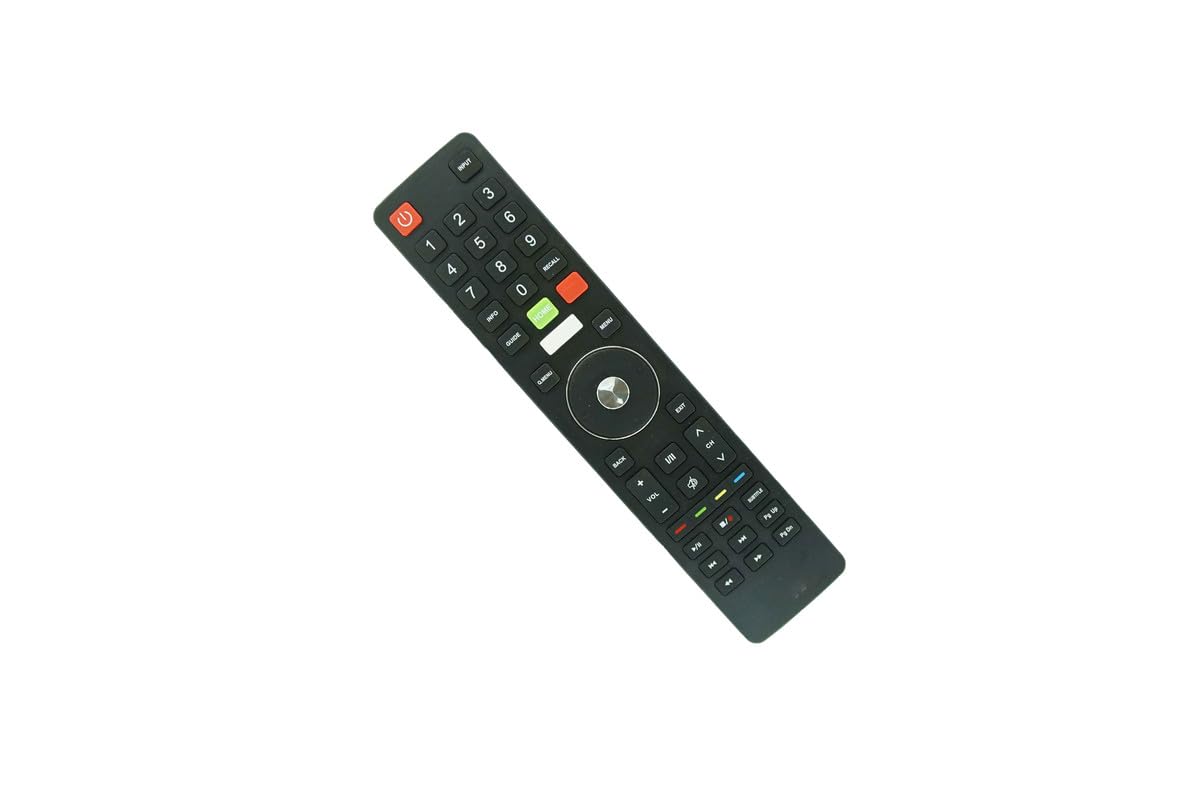
Beeld: Voorkant view of the remote control, displaying the layout of all functional buttons.
Basiese funksies
- Aan/uit-knoppie (rooi knoppie): Skakel die televisie aan of af.
- Invoer: Blaai deur beskikbare invoerbronne (HDMI, AV, ens.).
- Getalsleutels (0-9): Kies kanale direk.
- VOL +/-: Pas die volumevlak aan.
- CH ^/v: Verander die kanaal op of af.
- Demp: Silences the television audio.
Navigasie en spyskaart funksies
- Spyskaart: Kry toegang tot die televisie se hoofkieslys.
- Home (Green Button): Returns to the smart TV home screen.
- Navigasie-knoppie (Op/Af/Links/Regs/OK): Word gebruik om deur spyskaarte te navigeer en keuses te bevestig.
- Agter: Keer terug na die vorige skerm of spyskaart.
- Verlaat: Closes the current menu or application.
Afspeelkontroles
- Speel/pouse: Begin of onderbreek mediaterugspeel.
- stop: Stop mediaterugspeel.
- Snel vorentoe/terugspoel: Skips forward or backward in media.
- Vorige/Volgende Snit: Navigates between tracks or chapters.
Onderhoud
- Skoonmaak: Vee die afstandbeheerder af met 'n sagte, droë lap. Moenie vloeibare skoonmaakmiddels of skuurmiddels gebruik nie.
- Battery vervanging: Vervang batterye wanneer die afstandbeheerder se reaksie traag word of ophou werk. Vervang altyd albei batterye gelyktydig met nuwes.
- Berging: Indien die afstandbeheerder nie vir 'n lang tydperk gebruik gaan word nie, verwyder die batterye om lekkasie en potensiële skade te voorkom. Bêre op 'n koel, droë plek.
Probleemoplossing
- Afstandsbediening reageer nie:
- Ensure batteries are correctly installed and not depleted. Replace with fresh batteries if necessary.
- Kontroleer vir enige obstruksies tussen die afstandbeheerder en die TV se IR-ontvanger.
- Ensure you are pointing the remote directly at the television.
- Sommige funksies werk nie:
- This is a replacement remote. Certain advanced or specific functions of your original TV remote may not be supported.
- Refer to your television's original manual for specific function details.
Spesifikasies
- Handelsmerk: Generies
- Modelnommer: Makliktry16873
- Verbindingstegnologie: Infrarooi (IR)
- Versoenbare toestelle: Devanti 4K UHD Smart LCD LED Televisions (STV-668-UHD series)
- Maximum Number of Supported Devices: 1
- Kragbron: 2 x AAA-batterye (nie ingesluit nie)
- Maksimum reeks: 8 meter
- Vervaardiger: SZHKHXD
Waarborg en Ondersteuning
Waarborg inligting
This product typically comes with a 90-day warranty from the date of purchase. Please retain your proof of purchase for any warranty claims.
Kliënte ondersteuning
For questions regarding compatibility or if your specific TV model is not explicitly listed, please contact the seller or manufacturer for assistance. Provide your television's full model number when seeking support.


