
1. Inleiding
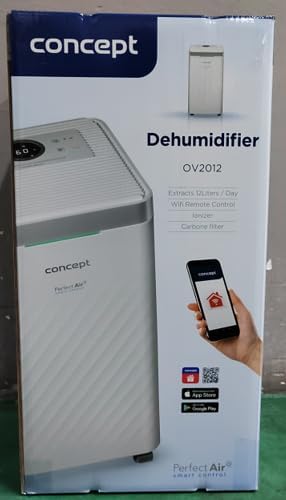
The Concept OV2012 is a versatile appliance designed to improve indoor air quality by combining dehumidification with air purification. This device effectively reduces excess humidity, which can contribute to mold growth and discomfort, while simultaneously filtering airborne pollutants. It features a triple filtration system, intuitive touch controls, and smart app connectivity for convenient operation.

Figuur 1: Voorkant view of the Concept OV2012 Dehumidifier.
2. Veiligheidsinligting
Lees asseblief alle veiligheidsinstruksies sorgvuldig deur voordat u die toestel gebruik. Versuim om hierdie instruksies te volg, kan lei tot elektriese skok, brand of ernstige besering.
- Verseker die kragtoevoer voltage stem ooreen met die graderingsetiket op die toestel.
- Moenie die eenheid met 'n beskadigde kragkoord of prop gebruik nie.
- Keep the appliance away from water and other liquids. Do not immerse it.
- Moenie luginlate of -uitlate blokkeer nie. Maak seker dat daar voldoende spasie rondom die eenheid is vir behoorlike lugvloei.
- Ontkoppel die eenheid voor skoonmaak, onderhoud of wanneer dit vir lang tye nie gebruik word nie.
- This appliance is not intended for use by persons (including children) with reduced physical, sensory, or mental capabilities, or lack of experience and knowledge, unless they have been given supervision or instruction.
- Moenie die toestel gebruik in gebiede waar vlambare gasse of dampe teenwoordig is nie.
3. Produkkomponente
Familiarize yourself with the main parts of your Concept OV2012 dehumidifier.
- Beheerpaneel: Touch-sensitive interface for setting modes and functions.
- Luguitlaat: Where processed air is released.
- Luginlaat/filterdeksel: Located at the rear, provides access to the air filters.
- Watertenk: Versamel kondenswater.
- Deurlopende Dreineringsuitlaat: Port for attaching a hose for continuous water drainage.
- 360° Rolling Wheels: Vir maklike beweging van die eenheid.

Figuur 2: Agter view of the dehumidifier, showing air intake and water tank.
4. Beheerpaneel en skerm
The OV2012 features an intuitive touch control panel with a digital display and LED indicators.
Figuur 3: Gedetailleerd view van die aanraakbeheerpaneel.
- Kragknoppie: Skakel die eenheid aan of af.
- Moduskeuse: Cycles through operating modes (Automatic, Continuous, Laundry Drying, Fan).
- Humidity Slider/Buttons: Pas die verlangde humiditeitsvlak aan.
- Timer-knoppie: Sets the delayed on/off time (up to 24 hours).
- Fan Spoed: Adjusts fan speed (usually two levels).
- Ioniseerderknoppie: Activates or deactivates the ionizer function.
- LED Humidity Indicator: Changes color based on current room humidity:
- Rooi: High humidity (RH > 70%)
- Groen: Satisfactory humidity (70% ≥ RH ≥ 50%)
- Blou: Low humidity (RH < 50%)
5. Aanvanklike Opstelling
- Uitpak: Verwyder die ontvochtiger versigtig uit sy verpakking. Bewaar die verpakking vir toekomstige berging of vervoer.
- Plasing: Place the unit on a firm, level surface. Ensure there is at least 20 cm of clear space around all sides for optimal airflow. The 360° rolling wheels allow for easy positioning.
- Kragverbinding: Steek die kragkabel in 'n geaarde elektriese aansluiting.
- Watertenk: Maak seker dat die watertenk korrek in die eenheid geplaas is.
6. Bedryfswyses
The OV2012 offers four distinct operating modes to suit various needs:
- Outomatiese modus: The dehumidifier automatically maintains the humidity level you select. The unit will cycle on and off to achieve and sustain the target humidity.
- Deurlopende werking: Ideal for long-term drying of very wet areas. In this mode, the unit runs continuously regardless of the ambient humidity. It is recommended to use the continuous drainage hose in this mode.
- Wasgoed droogmodus: Accelerates the drying of laundry and helps prevent moisture buildup in the room, reducing the risk of mold.
- Fan Mode (Air Purification without Dehumidification): In this mode, the compressor is off, and only the fan and filtration system operate to purify the air without removing moisture.
Using the Concept Home Mobile Application
The OV2012 can be controlled remotely via the Concept Home mobile application, available for iOS and Android devices. This app allows you to:
- Skakel die eenheid aan of af.
- Select desired operating modes.
- Check the current air status in the room.
- Create a precise operating schedule for the dehumidifier.

Figure 4: The Concept Home mobile application for remote control.
7. Water dreinering
Watertenk dreinering
When the 2.2-liter water tank is full, the unit will automatically shut off, and an indicator light will illuminate. Carefully remove the water tank, empty it, and reinsert it securely to resume operation.
Deurlopende dreinering
For continuous operation without needing to empty the water tank, attach the included hose to the continuous drainage outlet. Direct the hose to a suitable drain, ensuring it is sloped downwards for proper water flow. This allows the unit to operate uninterrupted.
8. Onderhoud en Skoonmaak
Gereelde onderhoud verseker optimale werkverrigting en lang lewensduur van u ontvochtiger.
Filter stelsel
The OV2012 features a triple filter system:
- Stoffilter: Captures coarse impurities like dust particles, hair, fur, and pollen. This filter should be cleaned regularly.
- Geaktiveerde koolstoffilter: Absorbs toxic, suffocating, and foul-smelling gases and vapors, such as formaldehyde, benzene, and cigarette smoke. This filter requires periodic replacement (Optional accessory: Carbon filter - 42394390).
- Ionisator: Refreshes and purifies the air by increasing negatively charged ions, neutralizing odors and absorbing positively charged particles, viruses, and bacteria.
To clean the dust filter, remove the rear filter cover, gently remove the filter, and clean it with a vacuum cleaner or rinse it with water. Ensure it is completely dry before reinserting. Replace the activated carbon filter as recommended by the manufacturer or when you notice a decrease in odor removal effectiveness.

Figure 5: Illustration of the triple filtration system.
Maak die watertenk skoon
Periodically clean the water tank with mild detergent and warm water to prevent mold and bacterial growth. Rinse thoroughly and dry before reinserting.
Buitenste skoonmaak
Vee die buitekant van die eenheid af met 'n sagte, damp lap. Moenie skuur skoonmaakmiddels of oplosmiddels gebruik nie.
9. Probleemoplossingsgids
Indien u probleme met u ontvochtiger ondervind, verwys na die volgende algemene probleme en oplossings:
| Probleem | Moontlike oorsaak | Oplossing |
|---|---|---|
| Eenheid skakel nie aan nie | Geen kragtoevoer nie; Watertenk vol of verkeerd geplaas. | Check power cord connection; Empty and reinsert water tank correctly. |
| Geen ontvochtiging nie | Room temperature too low; Air filters clogged; Humidity setting too high. | Ensure room temperature is above 5°C; Clean or replace filters; Lower the desired humidity setting. |
| Die eenheid is raserig | Eenheid nie op 'n gelyke oppervlak nie; Lugfilter verstop. | Place unit on a flat, stable surface; Clean or replace air filters. |
| Water tank full indicator remains on after emptying | Water tank not fully inserted; Sensor malfunction. | Push the water tank firmly into place; If problem persists, contact customer support. |
Indien die probleem voortduur nadat u hierdie oplossings probeer het, kontak asseblief kliëntediens.
10. Tegniese spesifikasies
| Kenmerk | Spesifikasie |
|---|---|
| Modelnommer | OV2012 |
| Dehumidification Performance (max) | 12 liters/day (at 30°C, 80% RH) |
| Watertenkvolume | 2.2 liter |
| Kragverbruik | 210 W (Note: Product description also mentions 245W, refer to product label for exact value) |
| Geraasvlak | ≤ 45 dB |
| Afmetings (B x D x H) | 250 x 250 x 460 mm (25 x 25 x 46 cm) |
| Item gewig | 10.82 kg |
| Kabellengte | 1.8 m |
| Bedryfsmodusse | 4 (Automatic, Continuous, Laundry Drying, Fan) |
| Filter stelsel | Dust filter, Activated Carbon filter, Ionizer |
| Beheer | Touch control, Mobile App (Concept Home) |
| Spesiale kenmerke | Automatic Shut-off, Timer, 360° wheels, LED Humidity Indicator |

Figuur 6: Produkdimensies.
11. Waarborg en Kliëntediens
For warranty information, please refer to the warranty card included with your product or contact your local Concept distributor. For technical support, spare parts, or service inquiries, please contact Concept customer service. Contact details may be found on the product packaging or the official Concept webwebwerf.
Example contact information from product packaging (may vary by region):
- CZ: Zavolejte nám +420 465 471 400, www.my-konsep.cz
- SK: Zavolajte nám +421 326 583 465, www.my-konsep.sk
- PL: Zadzwoń do nas +48 71 339 04 44, www.my-konsep.pl