
Inleiding
Thank you for choosing the Ledwood Apollo S TWS Earphones. This manual provides detailed instructions on how to set up, operate, maintain, and troubleshoot your new wireless earbuds. Please read this manual carefully before use to ensure optimal performance and longevity of your device.
Pakketinhoud
- Ledwood Apollo S TWS Earphones (Left and Right)
- Draadlose laaikas
- USB-laaikabel
- Gebruikershandleiding
Produk verbyview
The Ledwood Apollo S TWS Earphones feature a sleek design and provide a seamless wireless audio experience. The compact charging case not only protects your earbuds but also provides additional battery life on the go. The case includes a digital screen to display the current battery level.
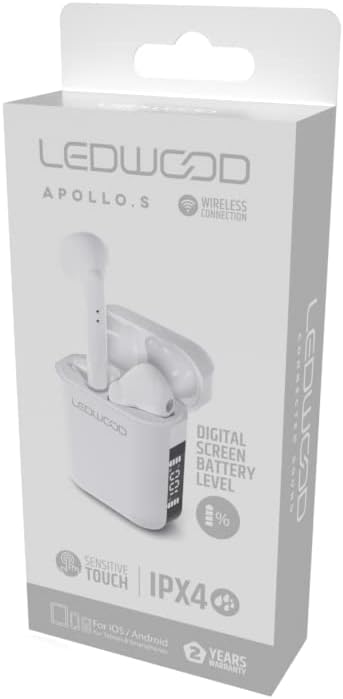
Image showing the Ledwood Apollo S TWS Earphones inside their charging case, highlighting the compact design and in-ear style.
Opstelling
1. Laai die oorfone en houer
- Place both earphones into the charging case. Ensure they are properly seated.
- Koppel die USB-laaikabel aan die laaipoort op die omhulsel en steek die ander kant in 'n USB-kragadapter (nie ingesluit nie) of 'n rekenaar se USB-poort.
- The digital screen on the charging case will display the current battery level during charging.
- Allow the earphones and case to fully charge before first use. The earphones will indicate full charge (e.g., LED indicator changes color or turns off).
2. Koppeling met jou toestel
- Maak seker dat die oorfone gelaai is en in die laaikas geplaas is.
- Open the charging case. The earphones will automatically enter pairing mode (indicated by flashing LED lights on the earbuds).
- Gaan na die Bluetooth-instellings op jou slimfoon of Bluetooth-geaktiveerde toestel.
- Soek vir available devices and select "Ledwood Apollo S" from the list.
- Once connected, the earphones will provide an audio confirmation, and the LED indicators will stop flashing.
- If pairing fails, turn off Bluetooth on your device, place the earphones back in the case, close the case, then repeat the steps.
Bedryfsinstruksies
The Ledwood Apollo S earphones feature sensitive touch controls for easy management of calls and music playback.
Raak kontroles
- Speel/pouse: Enkele tik op enige van die oordopjes.
- Volgende snit: Dubbeltik op die regteroorfone.
- Vorige snit: Dubbeltik op die linker oordopje.
- Beantwoord/beëindig oproep: Tik een keer op enige oordopje tydens 'n inkomende oproep of aktiewe oproep.
- Verwerp oproep: Druk en hou enige oordopjes vir 2 sekondes in tydens 'n inkomende oproep.
- Aktiveer stemassistent: Tik drie keer op enige oordopjes.
- Volume op: Druk en hou die regteroorfone in.
- Volume af: Druk en hou die linker oordopje in.
Onderhoud
Skoonmaak
- Maak die oorfone en laaikas gereeld skoon met 'n sagte, droë, pluisvrye lap.
- Moenie skuurmiddels, alkohol of chemiese oplosmiddels gebruik nie.
- Ensure charging contacts on both the earphones and the case are clean and free of debris to maintain proper charging.
Berging
- Wanneer dit nie gebruik word nie, bêre die oorfone in hul laaikassie om hulle te beskerm en gelaai te hou.
- Bêre die toestel op 'n koel, droë plek, weg van uiterste temperature en direkte sonlig.
Probleemoplossing
- Oorfone koppel nie: Ensure both earphones are charged. Place them back in the case, close it, then reopen to re-enter pairing mode. Check your device's Bluetooth settings.
- Geen geluid uit een oorfone nie: Try resetting the earphones by placing them in the case, closing it, and then taking them out again. Re-pair with your device.
- Laai kwessies: Clean the charging contacts on both the earphones and the case. Ensure the charging cable is securely connected and the power source is functional.
- Lae volume: Adjust the volume on both your connected device and using the earbud touch controls.
Spesifikasies
| Model Naam | Apollo S |
| Modelnommer | LD-APOLLO-S-BLK |
| Verbindingstegnologie | Draadloos (Bluetooth) |
| Beheer metode | Aanraking, Volumebeheer |
| Styl | In-oor |
| Waterweerstandvlak | IPX4 (Spatbestand) |
| Spesiale kenmerke | Fast Charging, Digital Screen Battery Level |
| Materiaal | Hout |
| Vervaardiger | Ledwood |
Waarborg en Ondersteuning
The Ledwood Apollo S TWS Earphones come with a 2 jaar waarborg vanaf die aankoopdatum, wat vervaardigingsfoute dek. Bewaar asseblief u bewys van aankoop vir waarborgeise.
For technical support, troubleshooting assistance, or warranty inquiries, please contact Ledwood customer service through their official webwebwerf of die kleinhandelaar waar die produk gekoop is.
For more information, visit the official Ledwood webwebwerf: www.ledwood.com (Let wel: Hierdie is 'n plekhouer URL as no specific support link was provided).