
Inleiding
Thank you for choosing the Ledwood Apollo S True Wireless Stereo (TWS) Earphones. This manual provides essential instructions for setting up, operating, and maintaining your earphones to ensure optimal performance and longevity. The Apollo S earphones feature a sleek design, sensitive touch controls, and a wireless charging case with a digital battery level display.
Pakketinhoud
- Ledwood Apollo S TWS Earphones (Left and Right)
- Draadlose laaikas
- USB-laaikabel
- Gebruikershandleiding
Note: Please check all items are present upon unboxing.
Opstelling
1. Laai die oorfone en houer
Before first use, fully charge the earphones and the charging case. The charging case features a digital screen that displays the battery level percentage.
- Laai die saak: Connect the provided USB charging cable to the charging port on the case and to a USB power adapter (not included). The digital display will show the charging progress.
- Laai die oorfone: Place the earphones into their respective slots in the charging case. Ensure they are correctly seated. The earphones will automatically begin charging. The case's digital display may indicate the charging status of the earphones.
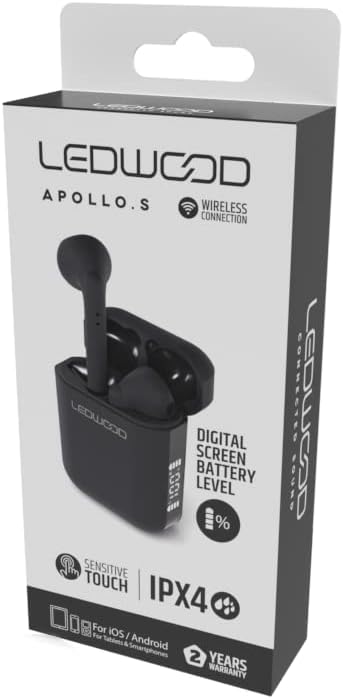
Image: Ledwood Apollo S TWS Earphones shown inside their open charging case. The earphones are black, and the case is also black with a sleek design. This image illustrates the product components.
2. Koppel met 'n Bluetooth-toestel
- Stap 1: Ensure the earphones are charged. Open the charging case. The earphones will automatically enter pairing mode, indicated by a flashing LED light on one or both earphones.
- Stap 2: On your mobile device (smartphone, tablet, etc.), go to the Bluetooth settings.
- Stap 3: Skakel Bluetooth aan. Soek vir beskikbare toestelle.
- Stap 4: Select "Ledwood Apollo S" from the list of available devices.
- Stap 5: Sodra dit gekoppel is, sal die LED-aanwyser op die oorfone ophou flikker, en jy sal 'n bevestigingstoon hoor.
- Let wel: Die oorfone sal outomaties weer aan die laaste gekoppelde toestel koppel wanneer dit uit die houer gehaal word, indien Bluetooth op die toestel geaktiveer is.
Bedryfsinstruksies
Dra die oorfone
Gently insert the earphones into your ears, ensuring a comfortable and secure fit. Adjust them slightly to achieve optimal sound quality and passive noise isolation.
Raak kontroles
The Ledwood Apollo S earphones feature sensitive touch controls on each earbud. The functions may vary slightly depending on your device and operating system.
- Speel/pouse: Enkele tik op enige van die oordopjes.
- Volgende snit: Dubbeltik op die regteroorfone.
- Vorige snit: Dubbeltik op die linker oordopje.
- Beantwoord/beëindig oproep: Tik een keer op enige oordopje tydens 'n inkomende oproep of aktiewe oproep.
- Verwerp oproep: Druk en hou enige oordopjes vir 2 sekondes in tydens 'n inkomende oproep.
- Aktiveer stemassistent: Tik drie keer op enige oordopjes (bv. Siri, Google Assistent).
- Krag aan/af: Earphones power on automatically when removed from the case and power off when placed back into the case. Manual power on/off may be available by pressing and holding the touch area for an extended period (refer to specific device behavior).
Onderhoud
- Skoonmaak: Gebruik 'n sagte, droë, pluisvrye lap om die oorfone en laaikas skoon te maak. Moenie skuurmiddels of oplosmiddels gebruik nie.
- Berging: Wanneer dit nie gebruik word nie, bêre die oorfone in hul laaikassie om hulle te beskerm en gelaai te hou.
- Waterweerstand: The earphones are rated IPX4, meaning they are resistant to splashing water from any direction. They are not waterproof and should not be submerged in water. Avoid exposure to heavy rain or sweat for extended periods.
- Temperatuur: Vermy die blootstelling van die oorfone aan uiterste temperature (warm of koud) of hoë humiditeit.
Probleemoplossing
- Oorfone koppel nie:
- Maak seker dat beide oorfone gelaai is.
- Skakel Bluetooth op jou toestel af en skakel dit weer aan.
- Forget "Ledwood Apollo S" from your device's Bluetooth list and try pairing again.
- Place earphones back in the case, close the lid, wait a few seconds, then open again to reset.
- Geen geluid uit een oorfone nie:
- Maak seker dat beide oordopjes gelaai is.
- Probeer om albei oordopjes terug in die houer te plaas en hulle weer uit te haal.
- Gaan jou toestel se klankbalansinstellings na.
- Laaikas laai nie:
- Maak seker dat die laaikabel stewig aan beide die kas en die kragbron gekoppel is.
- Probeer 'n ander USB-kabel of kragadapter.
- Aanraakkontroles reageer nie:
- Maak seker dat jou vingers skoon en droog is.
- Herbegin jou toestel en probeer weer.
Spesifikasies
| Handelsmerk | Ledwood |
| Model Naam | APOLLO S (LD-APOLLO-S-BLK) |
| Vormfaktor | In Oor |
| Verbindingstegnologie | Draadloos (Bluetooth) |
| Beheer metode | Raak |
| Waterweerstandgradering | IPX4 |
| Ingeboude media | Draadlose laaikas |
| Bykomende kenmerke | Vinnige laai |
| Materiaal | Plastiek |
| Kleur | Swart |
| Verenigbaarheid | For iOS / Android (Tablets & Smartphones) |
Waarborg en Ondersteuning
The Ledwood Apollo S TWS Earphones come with a 2 jaar waarborg vanaf die aankoopdatum. Hierdie waarborg dek vervaardigingsdefekte. Bewaar asseblief u bewys van aankoop vir waarborgeise.
For technical support or warranty inquiries, please contact your retailer or visit the official Ledwood website for customer service information. Ensure you have your model number (LD-APOLLO-S-BLK) and purchase details ready.