
1. Inleiding
This manual provides essential instructions for the setup, operation, maintenance, and troubleshooting of your White Shark GK-2102 LEGIONNAIRE-X RGB USB Keyboard. Please read this manual thoroughly before using the product to ensure proper functionality and longevity.

Beeld 1.1: Bo view of the White Shark GK-2102 LEGIONNAIRE-X RGB USB Keyboard, showcasing sy volle uitleg en RGB-beligting.
2. Opstelling
Follow these steps to connect your White Shark GK-2102 LEGIONNAIRE-X RGB USB Keyboard to your computer.
- Pak die sleutelbord uit: Carefully remove the keyboard and its USB cable from the packaging.
- Koppel die USB-kabel: Insert the USB connector of the keyboard into an available USB port on your computer.

Image 2.1: Close-up of the USB connector, which is used to connect the keyboard to a computer.
- Bestuurder installasie: The keyboard is plug-and-play. Your operating system should automatically detect and install the necessary drivers. No additional software installation is typically required.
- Verstel sleutelbordvoete: For ergonomic comfort, you may extend the adjustable feet located on the underside of the keyboard.

Prent 2.2: View of the adjustable feet on the keyboard's underside, allowing users to modify the typing angle.
3. Bedryfsinstruksies
The White Shark GK-2102 LEGIONNAIRE-X is a standard USB keyboard with RGB lighting features. Below are general operating guidelines.
3.1 Basiese sleutelbordfunksies
The keyboard functions as a standard QWERTY layout device. All keys perform their indicated character or function when pressed. Special function keys (F1-F12) may require the 'Fn' key to be held down simultaneously for their secondary functions, depending on your operating system and specific keyboard model configuration.
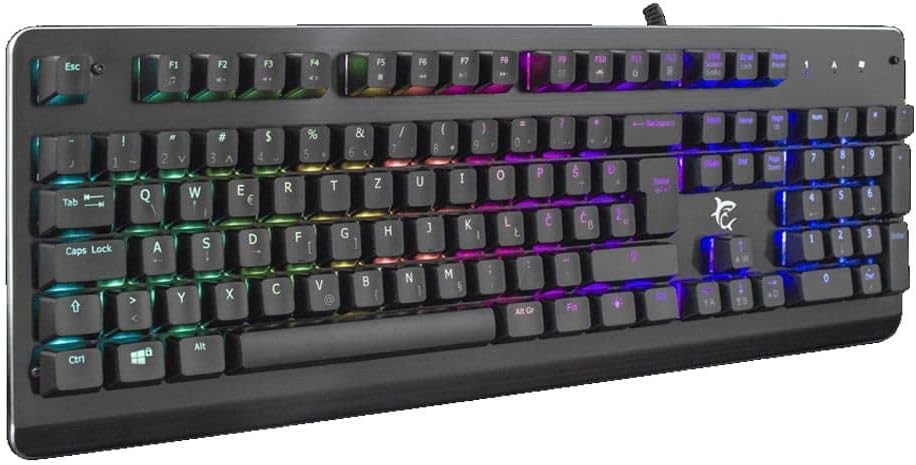
Beeld 3.1: Hoekig view of the keyboard, highlighting the key layout and illuminated RGB backlighting.
3.2 RGB-beligtingsbeheer
This keyboard features RGB lighting. Specific key combinations, often involving the 'Fn' key and other designated keys (e.g., arrow keys, Ins, Home, PgUp, Del, End, PgDn), are typically used to cycle through lighting modes, adjust brightness, or change colors. Refer to the quick start guide or manufacturer's website for detailed RGB control commands specific to this model.
4. Onderhoud
Behoorlike onderhoud verseker die lang lewensduur en werkverrigting van jou sleutelbord.
- Skoonmaak: Disconnect the keyboard from your computer before cleaning. Use a soft, dry cloth to wipe the surface. For stubborn dirt, a slightly damp cloth with mild soap can be used, ensuring no liquid enters the keyboard. Compressed air can be used to remove dust and debris from between the keys.
- Vermy vloeistowwe: Do not spill liquids on the keyboard. Liquid damage can cause permanent malfunction.
- Berging: Bêre die sleutelbord op 'n koel, droë plek weg van direkte sonlig en uiterste temperature wanneer dit nie vir lang tye gebruik word nie.
5. Probleemoplossing
As jy probleme met jou sleutelbord ondervind, probeer die volgende oplossings:
- Sleutelbord reageer nie:
- Maak seker dat die USB-kabel stewig aan beide die sleutelbord en die rekenaar gekoppel is.
- Probeer om die sleutelbord aan 'n ander USB-poort op jou rekenaar te koppel.
- Test the keyboard on another computer to determine if the issue is with the keyboard or the computer's port/drivers.
- Herbegin jou rekenaar.
- Sleutels werk nie:
- Check for any physical obstructions under the keycaps.
- Clean the keyboard as described in the Maintenance section.
- RGB-beligting werk nie/verkeerd:
- Maak seker dat die sleutelbord behoorlik gekoppel is en krag ontvang.
- Refer to the manufacturer's specific instructions for RGB control key combinations.
6. Spesifikasies
Below are the technical specifications for the White Shark GK-2102 LEGIONNAIRE-X RGB USB Keyboard:

Beeld 6.1: Syprofile of the keyboard, illustrating its physical dimensions and keycap height.
| Kenmerk | Detail |
|---|---|
| Handelsmerk | Wit Haai |
| Model | GK-2102 LEGIONNAIRE-X |
| Konnektiwiteit | USB |
| Produk afmetings | 50 x 50 x 28 cm |
| Gewig | 1.06 kg |
| Materiaal | Plastiek |
| Spesiale kenmerke | RGB beligting |
| Batterye benodig | Nee |
7. Waarborginligting
For detailed warranty information regarding your White Shark GK-2102 LEGIONNAIRE-X RGB USB Keyboard, please refer to the warranty card included with your product or visit the official White Shark webwebwerf. Waarborgbepalings en -voorwaardes kan per streek en kleinhandelaar verskil.
8. Ondersteuning
If you require further assistance or have questions not covered in this manual, please contact White Shark customer support through their official website or the contact information provided with your purchase. Please have your product model (GK-2102 LEGIONNAIRE-X) and purchase details ready when contacting support.