
Ctronics CTIPC-380C-5MP-BW
Ctronics Buitelug Wi-Fi Sekuriteitskamera Gebruikershandleiding
Handelsmerk: Ctronics
Model: CTIPC-380C-5MP-BW
1. Inleiding
Thank you for choosing the Ctronics Outdoor Wi-Fi Security Camera. This manual provides detailed instructions for setting up, operating, and maintaining your camera to ensure optimal performance and security. This advanced surveillance camera features 5MP Ultra HD resolution, dual-band 2.4GHz/5GHz Wi-Fi connectivity, intelligent human detection with auto-tracking, color night vision, two-way audio, and robust IP66 waterproof construction.

Figure 1: Ctronics Outdoor Wi-Fi Security Camera Overview
2. Sleutel kenmerke
- Dual-Band Wi-Fi & Enhanced Antenna: Supports both 2.4GHz and the latest 5GHz Wi-Fi for more stable, faster, and smoother data transmission with less interference. Equipped with a reinforced 5DBi antenna for improved signal stability, especially in outdoor environments.

Figure 2: Dual-band Wi-Fi and 5DBi antenna for stable connection.
- 5MP Ultra HD Resolution: Captures crystal-clear 5-megapixel video, allowing for precise identification of details like facial expressions, clothing, and accessories, crucial for evidence collection. Supports 4x digital zoom.

Figure 3: High-definition 5MP video capture.
- Advanced Night Vision & Two-Way Audio: Offers full-color night vision for clear identification of subjects even in low light. Features a high-quality built-in microphone and speaker for clear two-way communication without noise.

Figure 4: Color and Infrared night vision modes.
- 360° Pan-Tilt & Smart Detection: Provides a 360° surveillance range with Pan 350° and Tilt 90° capabilities. Equipped with intelligent human detection to minimize false alarms (over 95% accuracy) and an auto-tracking function that follows detected subjects and returns to the preset position after they leave the frame.

Figure 5: Pan-Tilt functionality for comprehensive coverage.

Figuur 6: Menslike opsporing en outomatiese opsporing in aksie.
- Durable Construction & Multiple Recording Options: Features a metal front cover for superior heat dissipation, fire resistance, and extended lifespan compared to plastic alternatives. IP66 waterproof and dustproof rating ensures reliable outdoor performance. Supports 24-hour continuous recording, motion-triggered recording, human detection recording, and schedule recording. Compatible with up to 128GB SD cards, ONVIF, NVR, and FTP.

Figure 7: Durable metal construction for longevity.

Figure 8: Multiple recording modes and storage options.
3. Opstelgids
3.1 Pakketinhoud
Before starting, please ensure all items are present in the package:
- Ctronics Outdoor Wi-Fi Security Camera
- Kragadapter
- Monteer skroewe en ankers
- LAN-kabel
- Waarskuwing plakker
- Gebruikershandleiding (hierdie dokument)
3.2 Aanvanklike opstelling
- Kragverbinding: Koppel die kamera aan 'n kragbron met die meegeleverde kragadapter.
- App aflaai: Download the "Ctronics" app from the App Store (iOS) or Google Play Store (Android).
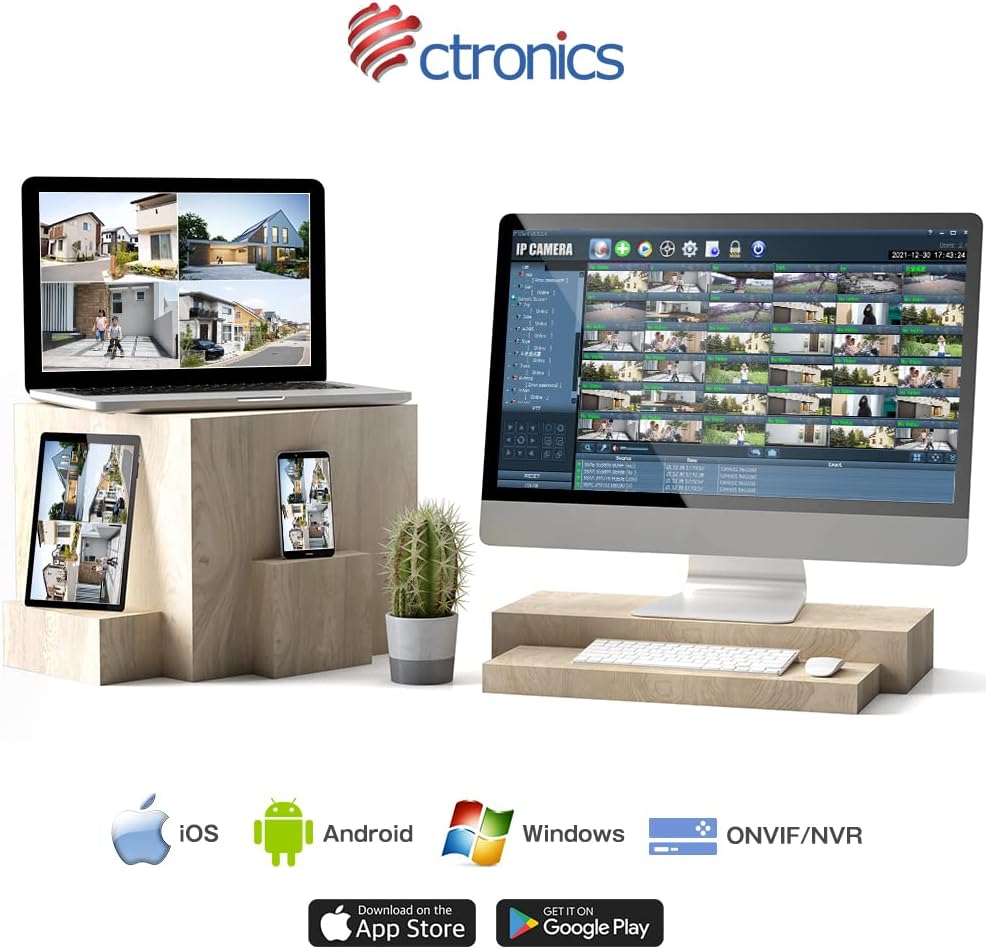
Figure 9: Ctronics App for mobile devices.
- Rekeningregistrasie: Maak die toepassing oop en registreer 'n nuwe rekening of meld aan as jy reeds een het.
- Voeg toestel by: Volg die instruksies in die program om jou kamera by te voeg. Dit behels gewoonlik die skandering van 'n QR-kode op die kamera of die handmatige invoer van die ID.
- Netwerkopstelling: Select your preferred Wi-Fi network (2.4GHz or 5GHz) and enter the password. Ensure your camera is within range of your Wi-Fi router. For initial setup, it is recommended to place the camera close to the router.
- Montering: Once configured, choose a suitable outdoor location for mounting. Use the provided screws and anchors to securely attach the camera. Ensure the camera has a clear view van die area wat jy wil monitor.
4. Bedryfsinstruksies
4.1 Lewendig View
Open the Ctronics app and select your camera from the device list to access the live video feed. You can view die intydse footage vanaf enige plek met 'n internetverbinding.
4.2 Pan- en kantelbeheer
Op die lewendige view screen, use the directional controls to remotely adjust the camera's pan (horizontal) and tilt (vertical) angles. The camera supports 350° pan and 90° tilt.
4.3 Opnamemodusse
The camera offers several recording options:
- 24-Hour Continuous Recording: Records continuously to the inserted SD card or connected NVR/FTP server.
- Bewegingsopname: Neem slegs op wanneer beweging bespeur word.
- Human Detection Recording: Records specifically when a human figure is detected, reducing false alarms.
- Skedule opname: Set specific times or days for recording.
Recordings can be stored on a microSD card (up to 128GB, not included), or via ONVIF/NVR/FTP for external storage solutions.
4.4 Tweerigting-klank
Tap the microphone icon in the app to speak through the camera's speaker. Tap the speaker icon to listen to audio from the camera's microphone.
4.5 Alarm and Notifications
When motion or human detection is triggered, the camera can:
- Send push notifications to your mobile device.
- Activate a sensor light to deter intruders.
- Trigger a customizable alarm sound.

Figure 10: Alarm and push notification system.
5. Onderhoud
- Skoonmaak: Maak die kameralens en behuising gereeld skoon met 'n sagte, damp cloth to ensure clear image quality. Do not use harsh chemicals or abrasive materials.
- Firmware -opdaterings: Gaan die Ctronics-app gereeld na vir firmware-opdaterings. Deur jou kamera se firmware op datum te hou, verseker jy optimale werkverrigting, sekuriteit en toegang tot nuwe funksies.
- Kragtoevoer: Maak seker dat die kragadapter en kabel nie beskadig is nie en stewig gekoppel is.
- Omgewingstoestande: While the camera is IP66 waterproof, avoid direct exposure to extreme weather conditions if possible, such as prolonged heavy rain or direct sunlight in very hot climates, to maximize its lifespan.

Figure 11: IP66 waterproof and wide operating temperature range.
6. Probleemoplossing
| Probleem | Moontlike oorsaak | Oplossing |
|---|---|---|
| Kamera vanlyn/Kan nie aan Wi-Fi koppel nie | Weak Wi-Fi signal; Incorrect Wi-Fi password; Router issues; Camera too far from router. | Ensure camera is within Wi-Fi range. Check Wi-Fi password. Restart router and camera. Try connecting to 2.4GHz if 5GHz is unstable, or vice versa. |
| Swak beeldkwaliteit | Dirty lens; Insufficient light; Network bandwidth issues. | Clean the lens. Ensure adequate lighting or enable night vision. Check network speed. |
| False alarms/Too many notifications | Motion detection sensitivity too high; Non-human objects triggering detection. | Adjust motion detection sensitivity in the app. Enable human detection only. Adjust detection zones. |
| SD-kaart neem nie op nie | SD card full or corrupted; Incorrect recording settings. | Format the SD card in the app. Check recording schedule and mode settings. Ensure SD card is inserted correctly. |
7. Spesifikasies
| Kenmerk | Detail |
|---|---|
| Handelsmerk | Ctronics |
| Modelnommer | CTIPC-380C-5MP-BW |
| Verbindingstegnologie | Wireless (2.4GHz & 5GHz Wi-Fi) |
| Video-opname-resolusie | 5 Megapixels (2560x1920) |
| Pan/kantel-reeks | Pan 350°, kantel 90° |
| Spesiale kenmerke | Human Detection, Auto Tracking, Color Night Vision, Two-Way Audio, Alarm Notification, IP66 Waterproof |
| Materiaal | Metal (front cover) |
| Kragbron | Elektries met koord |
| Wattage | 5 W |
| Ligbron | Infrared, White Light |
| Berging Ondersteuning | MicroSD card (up to 128GB), ONVIF/NVR/FTP |
| Bedryfstelselversoenbaarheid | iOS, Android, Windows, MAC |
| Item gewig | 800 g |
| Pakket afmetings | 21.1 x 20.3 x 13.7 cm |
8. Waarborg en Ondersteuning
Ctronics provides a two-year quality warranty vir hierdie produk.
If you encounter any malfunctions or issues with your security camera during the warranty period, you are eligible for a new product replacement, return, or refund.
For any inquiries or support, please feel free to contact our customer service team at: support.jp@ctronics.com
Ask a question about this manual
Ask about setup, troubleshooting, compatibility, parts, safety, or missing instructions. Manuals+ will review the question and use this page’s manual context to help answer it.