
1. Inleiding
This manual provides detailed instructions for the installation, operation, and maintenance of your ASUS TUF Gaming GeForce RTX 4080 OC Edition Graphics Card. Please read this manual thoroughly before using the product to ensure proper functionality and to prevent damage.
2. Veiligheidsinligting
WARNING: Always disconnect the power supply from your computer before installing or removing any components. Failure to do so may result in personal injury or damage to your system.
- Maak seker dat jou kragtoevoereenheid (PSU) aan die minimum watt voldoentage requirements for this graphics card.
- Hanteer die grafiese kaart aan die kante om sensitiewe komponente nie aan te raak nie.
- Dra 'n antistatiese polsbandjie of raak gereeld 'n geaarde metaalvoorwerp aan om statiese elektrisiteit te ontlaai.
- Install the graphics card in a well-ventilated computer case to prevent overheating.
3. Pakketinhoud
Verifieer dat alle items in u produkpakket teenwoordig is:
- ASUS TUF-RTX4080-O16G-GAMING Graphics card
- Collection card; TUF Velcro Hook & Loop
- TUF Graphics card holder; Speedsetup Manual
- Adapterkabel
- Dankie kaart
4. Produk verbyview
The ASUS TUF Gaming GeForce RTX 4080 OC Edition Graphics Card is designed for high-performance gaming and demanding applications. It features NVIDIA's Ada Lovelace architecture, offering significant improvements in performance and power efficiency.

Voorkant view of the ASUS TUF Gaming GeForce RTX 4080 OC Edition Graphics Card, showcasing its triple Axial-tech fan design.
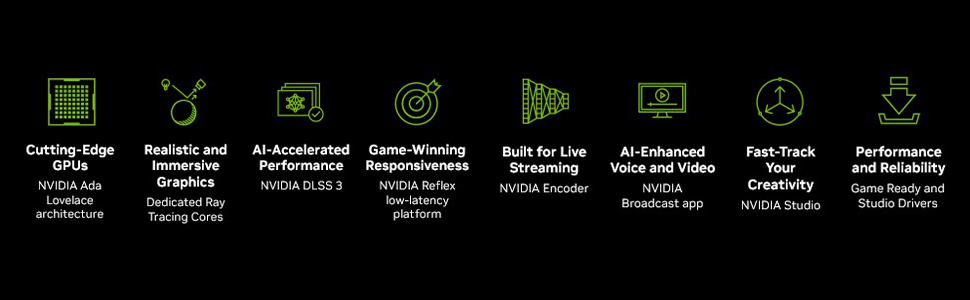
verbyview of NVIDIA Ada Lovelace architecture features, including streaming multiprocessors, Tensor Cores, and RT Cores.
Sleutel kenmerke:
- NVIDIA Ada Lovelace streaming multiverwerkers: Tot 2x werkverrigting en kragdoeltreffendheid.
- 4de Generasie Tensor-kerne: Tot 2X KI-prestasie.
- 3de Generasie RT-kerne: Tot 2X straalopsporingsprestasie.
- Aksiale-tegnologie waaiers: Opgeskaal vir 23% meer lugvloei.
- Dubbele balwaaierlaers: Hou tot twee keer so lank as konvensionele ontwerpe.
- Militêre-graad Kapasitors: Rated for 20K hours at 105C, enhancing GPU power rail durability.
- Metaal Eksoskelet: Adds structural rigidity and vents to increase heat dissipation.
- GPU Tweak III software: Provides intuitive performance tweaking, thermal controls, and system monitoring.

Agter view showing the display output interfaces, including DisplayPort and HDMI ports.
5. Installasie
Volg hierdie stappe om jou grafiese kaart te installeer:
- Berei jou stelsel voor: Skakel jou rekenaar af en ontkoppel die kragkabel. Maak jou rekenaarkas oop.
- Vind PCIe-gleuf: Find an available PCI Express x16 slot on your motherboard.
- Verwyder gleufdeksels: Remove the necessary expansion slot covers from your computer case. Note that this card is large (13.7"L x 5.9"W) and may require multiple slots.
- Installeer grafiese kaart: Carefully align the graphics card with the PCIe slot and press it down firmly until it is securely seated.
- Beveilig die kaart: Bevestig die grafiese kaart aan die kas met skroewe.
- Koppel krag: Connect the appropriate power cables from your power supply to the graphics card. Ensure all connections are secure.
- Sluit Saak: Close your computer case and reconnect the power cable.
- Verbind skerm: Koppel jou monitor(s) aan die grafiese kaart se DisplayPort- of HDMI-uitsette.
Video demonstrating the installation and features of the ASUS TUF Gaming RTX 4080 graphics card.
6. Software Installation & Configuration
After physical installation, install the necessary drivers and utility software:
- Bestuurder installasie: Download the latest NVIDIA GeForce drivers from the official NVIDIA webwerf (www.nvidia.com/driversVolg die instruksies op die skerm vir installasie.
- ASUS GPU Tweak III: Install the ASUS GPU Tweak III software from the ASUS support webwerf (www.asus.com/support/Download-Center/). This utility allows for performance tweaking, thermal control, and system monitoring.
7. Bediening van die grafiese kaart
Your ASUS TUF Gaming GeForce RTX 4080 OC Edition is designed for optimal performance and cooling. Here are some operational aspects:
Verkoelingstelsel:
The card features advanced cooling technologies to maintain stable temperatures during heavy loads.

Close-up of the Axial-tech fan, designed for increased airflow and reduced noise.

Illustration of optimized fan rotation for enhanced cooling efficiency.

View of the large heatsink, contributing to efficient heat dissipation.
RGB Lighting (Aura Sync):
The card features customizable ARGB lighting via ASUS Aura Sync. You can synchronize lighting effects with other Aura Sync compatible components in your system.

Example of customizable ARGB lighting on the graphics card.
AI Features and Technologies:
The NVIDIA GeForce RTX 4080 leverages AI for enhanced performance and new capabilities.
Videovertoningasing NVIDIA's AI technologies, including generative AI and DLSS, and their applications in gaming and creative workflows.
8. Onderhoud
Gereelde onderhoud help om die lang lewensduur en optimale werkverrigting van jou grafiese kaart te verseker:
- Stofverwydering: Periodically clean dust from the fans and heatsink using compressed air. Ensure the fans are not spinning during cleaning.
- Bestuurderopdaterings: Keep your graphics drivers updated to the latest version for performance improvements and bug fixes.
- Temperatuurmonitering: Use GPU Tweak III or other monitoring software to keep an eye on GPU temperatures, especially during intensive tasks.
9. Probleemoplossing
As jy probleme met jou grafiese kaart ondervind, probeer die volgende stappe vir probleemoplossing:
- Geen skermuitvoer:
- Maak seker dat die monitorkabel stewig aan beide die grafiese kaart en die monitor gekoppel is.
- Verifieer dat die grafiese kaart volledig in die PCIe-gleuf geplaas is.
- Check that all power connectors are properly attached to the graphics card.
- Toets met 'n ander skermkabel of monitor indien moontlik.
- Stelselonstabiliteit/Ineenstortings:
- Maak seker dat jou grafiese drywers op datum is.
- Monitor GPU-temperature. Oorverhitting kan onstabiliteit veroorsaak.
- Verify your power supply unit (PSU) is sufficient for the graphics card's power requirements.
- Swak prestasie:
- Maak seker dat jou grafiese drywers op datum is.
- Gaan die instellings in die spel na; verminder die grafiese kwaliteit indien nodig.
- Maak onnodige agtergrondtoepassings toe.
10. Spesifikasies
| Kenmerk | Spesifikasie |
|---|---|
| Grafiese medeverwerker | NVIDIA GeForce RTX 4080 |
| Handelsmerk | ASUS |
| Grafiese RAM-grootte | 16 GB |
| GPU-klokspoed | 4000 MHz |
| Video-uitset-koppelvlak | DisplayPort, HDMI |
| Grafiese RAM Tipe | GDDR6X |
| Versoenbare toestelle | PC |
| Maksimum vertoonresolusie | 7680x4320 |
| Grafiese kaart koppelvlak | PCI Express |
| Geheue Klokspoed | 4000 MHz |
| Aantal waaiers | 3 |
| Item afmetings L x B | 13.7"L x 5.9"B |
| Video verwerker | NVIDIA |
| Model Naam | Gaming GeForce RTX 4080 16GB GDDR6X OC Edition Graphic Card |
| Item gewig | 4.2 pond |
11. Waarborg en Ondersteuning
Your ASUS TUF Gaming GeForce RTX 4080 OC Edition Graphics Card comes with a 3-year warranty. For warranty claims, technical support, or further assistance, please visit the official ASUS support webwebwerf of kontak hul kliëntediens.
ASUS Ondersteuning Webwebwerf: www.asus.com/support/