
Logicool M550MGR
Logicool Signature M550MGR Silent Wireless Mouse User Manual
Model: M550MGR
1. Inleiding
The Logicool Signature M550MGR is a silent wireless mouse designed for comfort and productivity. It features the unique SmartWheel for versatile scrolling and SilentTouch technology for reduced click noise. This mouse offers dual connectivity options: Bluetooth Low Energy and the Logi Bolt USB receiver, ensuring stable performance across various operating systems.

Image: The Logicool Signature M550MGR mouse, highlighting its ergonomic design and advanced scrolling capabilities.
2. Pakketinhoud
- Logicool Signature M550MGR Wireless Mouse
- Logi Bolt USB-ontvanger
- 1 AA-battery (vooraf geïnstalleer)
- Gebruikersdokumentasie (hierdie handleiding)
3. Opstelling
3.1. Battery Installasie
- Vind die batterykompartement aan die onderkant van die muis.
- Maak die batteryvakdeksel oop.
- Ensure the AA battery is correctly oriented according to the polarity indicators (+/-).
- Maak die batterykompartement se deksel toe.
3.2. Koppel jou muis
The M550MGR offers two connection methods: Logi Bolt USB receiver or Bluetooth Low Energy.
3.2.1. Logi Bolt USB Receiver Connection
- Remove the Logi Bolt USB receiver from the battery compartment or packaging.
- Koppel die Logi Bolt USB-ontvanger aan 'n beskikbare USB-poort op jou rekenaar.
- The mouse should automatically connect. If not, ensure the mouse is powered on.
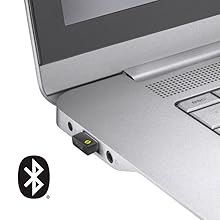
Image: The Logi Bolt USB receiver connected to a laptop, illustrating the wireless connection method.
3.2.2. Bluetooth Low Energy Connection
- Maak seker dat jou toestel se Bluetooth geaktiveer is.
- Skakel die muis aan.
- Press and hold the connect button on the underside of the mouse for 3 seconds until the LED indicator starts blinking rapidly.
- On your device, go to Bluetooth settings and select "Logicool M550MGR" from the list of available devices to pair.
- The LED indicator will turn solid for a few seconds, then turn off, indicating a successful connection.

Image: Visual representation of the two connectivity options: Bluetooth and the Logi Bolt USB receiver.
4. Bedryfsinstruksies
4.1. Basiese funksies
- Links klik: Primêre aksie, seleksie.
- Regs klik: Sekondêre aksie, kontekskieslyste.
- Rolwiel: Blaai op of af deur dokumente en web bladsye.
4.2. SmartWheel Scrolling
The SmartWheel automatically switches between two scrolling modes:
- Line-by-line Scrolling: For precise navigation, ideal for detailed work.
- Hyper-fast Scrolling: Spin the wheel quickly to effortlessly glide through long documents and web pages. The wheel will automatically switch to this mode when spun with momentum.

Beeld: 'n Nabyskoot view of the SmartWheel, demonstrating its design for efficient scrolling.
4.3. SilentTouch Technology
The M550MGR incorporates SilentTouch technology, which reduces click noise by 90% compared to traditional mice, while maintaining the familiar click feel. This creates a quieter work environment without compromising tactile feedback.

Image: A user operating the silent mouse in a calm environment, illustrating the benefit of SilentTouch technology.
5. Kenmerke
- SmartWheel: Automatic switching between precise line-by-line and hyper-fast scrolling.
- SilentTouch-tegnologie: 90% reduced click noise with retained click feel.
- Dubbele verbinding: Connect via Logi Bolt USB receiver or Bluetooth Low Energy.
- Ergonomiese ontwerp: Comfortable shape with rubber side grips for extended use.
- Lang batterylewe: Up to 24 months on a single AA battery.
- Multi-OS-versoenbaarheid: Supports Windows, macOS, Chrome OS, iPadOS, and Android.
6. Battery-inligting
- Battery tipe: 1 x AA alkaline battery.
- Batterylewe: Tot 24 maande, afhangende van gebruik.
- Battery vervanging: Replace the AA battery when the LED indicator on the mouse turns red or when performance degrades. Follow the installation steps in Section 3.1.
7. Verenigbaarheid
The Logicool Signature M550MGR mouse is compatible with the following operating systems:
- Logi Bolt Connection:
- Windows 10, 11 of later
- macOS 10.10 of later
- Chrome OS
- Bluetooth Lae Energie Verbinding:
- Windows 10, 11 of later
- macOS 10.15 of later
- Chrome OS
- iPadOS 13.4 of later
- Android 5.0 of later
Note: This mouse is not compatible with Logitech Unifying receivers.
8. Onderhoud
- Skoonmaak: Gebruik 'n sagte, pluisvrye lap om die muisoppervlak skoon te maak. Vir hardnekkige vuiligheid, vee dit effens af.ampMaak die lap met water skoon. Vermy harde chemikalieë of skuurmiddels.
- Sensor: Keep the optical sensor on the underside of the mouse clean and free from dust or debris for optimal tracking performance.
- Berging: When not in use for extended periods, turn off the mouse to conserve battery life. Store in a dry, cool place.
9. Probleemoplossing
9.1. Muis reageer nie
- Maak seker dat die muis aangeskakel is.
- Gaan die batteryvlak na en vervang indien nodig.
- For Logi Bolt connection: Ensure the receiver is securely plugged into a working USB port. Try a different USB port.
- For Bluetooth connection: Ensure Bluetooth is enabled on your device and the mouse is paired. Try re-pairing the mouse (refer to Section 3.2.2).
- Herbegin jou rekenaar of toestel.
9.2. Onreëlmatige wyserbeweging
- Maak die optiese sensor aan die onderkant van die muis skoon.
- Maak seker dat jy die muis op 'n geskikte oppervlak gebruik. Vermy hoogs weerkaatsende of deursigtige oppervlaktes.
- Move the mouse closer to the Logi Bolt receiver or your Bluetooth-enabled device to reduce interference.
9.3. SmartWheel Not Switching Modes
- Ensure the wheel is spun with enough momentum to activate hyper-fast scrolling.
- Check for any debris around the scroll wheel that might impede its movement.
10. Spesifikasies
| Handelsmerk | Logicool |
| Modelnommer | M550MGR |
| Kleur | Grafiet |
| Verbindingstegnologie | Bluetooth, Logi Bolt (USB) |
| Bewegingsopsporingstegnologie | Opties |
| Spesiale kenmerke | SilentTouch, Wireless |
| Produk afmetings | 6.1 x 10.82 x 3.88 cm |
| Item gewig | 97.4 g |
| Battery Tipe | 1 x AA-battery |
| Deurlopende gebruikstyd | Tot 24 maande |
11. Waarborg en Ondersteuning
The Logicool Signature M550MGR Wireless Mouse comes with a 2 jaar vervaardiger se waarborg vanaf die aankoopdatum.
For technical support, warranty claims, or additional information, please visit the official Logicool support webwebwerf of kontak hul kliëntediens. Bewaar u bewys van aankoop vir waarborgdoeleindes.
Official Logicool Support: www.logicool.co.jp
Ask a question about this manual
Ask about setup, troubleshooting, compatibility, parts, safety, or missing instructions. Manuals+ will review the question and use this page’s manual context to help answer it.