
RHYTHM 8RZ234SR04
RHYTHM D234 8RZ234SR04 Radio Alarm Clock User Manual
Model: 8RZ234SR04
1. Inleiding
Dankie vir die aankoopasing the RHYTHM D234 8RZ234SR04 Radio Alarm Clock. This digital alarm clock features a radio-controlled timekeeping function, an electronic sound alarm with snooze, a thermometer, a hygrometer, and a calendar display. Its compact design and clear LCD make it suitable for various indoor environments. Please read this manual thoroughly before use to ensure proper operation and to maximize the clock's features.
2. Veiligheidsinligting
- Moenie die eenheid blootstel aan uiterste temperature, direkte sonlig of hoë humiditeit nie.
- Vermy om die eenheid te laat val of dit aan harde impakte bloot te stel.
- Moenie probeer om die eenheid uitmekaar te haal of te wysig nie. Dit sal die waarborg ongeldig maak.
- Hou batterye buite bereik van kinders. Indien ingesluk, soek onmiddellike mediese hulp.
- Gooi gebruikte batterye weg volgens plaaslike regulasies.
- Use only the specified battery type (AA batteries).
3. Pakketinhoud
Maak seker dat alle items in die pakket teenwoordig is:
- RHYTHM D234 8RZ234SR04 Radio Alarm Clock
- Gebruikershandleiding (hierdie dokument)
4. Produk verbyview
The RHYTHM D234 8RZ234SR04 features a clear LCD display and easily accessible front-facing control buttons for intuitive operation.
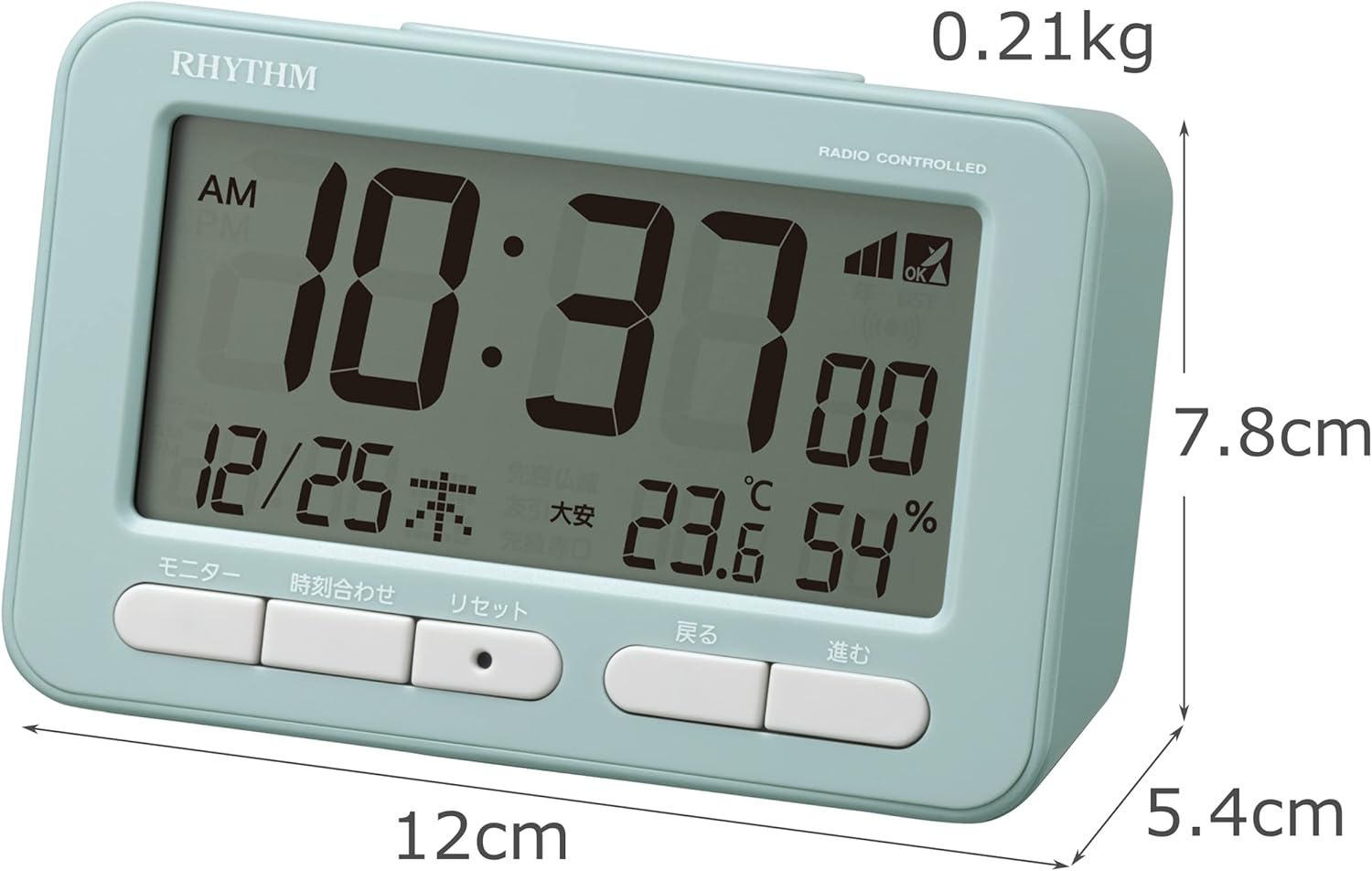
Figuur 4.1: Voorkant view of the RHYTHM D234 8RZ234SR04 Radio Alarm Clock, showing its dimensions (7.8cm H x 12cm W x 5.4cm D) and weight (0.21kg).

Figuur 4.2: Gedetailleerd view of the clock's large LCD display and the front control buttons, including 'Monitor', 'Time Set', 'Reset', 'Back', and 'Forward'.
Vertoon inligting:
- Tyd: Displays current time in AM/PM or 24-hour format.
- Datum: Shows month, day, and day of the week.
- Temperatuur: Displays current ambient temperature in Celsius.
- Humiditeit: Toon huidige persentasie omgewingsvogtigheidtage.
- Radio Wave Reception Indicator: Dui seinsterkte aan.
- Alarm ON/OFF Indicator: Shows if the alarm is active.
Beheerknoppies:
- MONITOR: Activates backlight or cycles display modes.
- TYDSTEL: Enters time/date setting mode.
- HERSTEL: Resets the clock to factory defaults.
- BACK (<): Adjusts settings backward.
- FORWARD (>): Adjusts settings forward.
- SNOOZE/LIG: Activates snooze during alarm or backlight when pressed.
5. Opstelling
5.1 Battery installasie
- Maak die batterykompartement se deksel op die agterkant van die horlosie oop.
- Insert two (2) AA batteries (not included) according to the polarity indicators (+ and -) inside the compartment.
- Maak die batterykompartement se deksel stewig toe.
5.2 Initial Power On and Radio Wave Reception
Upon battery installation, the clock will automatically attempt to receive radio time signals to set the correct time and date. This process may take several minutes.

Figuur 5.1: Illustration of radio wave time signal reception from two transmission stations, ensuring accurate timekeeping.
- Plaas die horlosie naby 'n venster vir optimale seinontvangs.
- Avoid placing it near electronic devices that may cause interference (e.g., TVs, computers, mobile phones).
- A signal strength indicator will appear on the display during reception. Once synchronized, the indicator will show a stable signal.
6. Bedryfsinstruksies
6.1 Handmatige Tyd- en Datuminstelling
If radio signal reception is poor or unavailable, you can set the time and date manually:
- Druk en hou die TYD BEREIK knoppie totdat die tydvertoning begin flikker.
- Gebruik die BACK (<) en FORWARD (>) knoppies om die uur aan te pas. Druk TYD BEREIK om te bevestig en na minute oor te skakel.
- Herhaal die proses vir minute, jaar, maand en dag.
- Druk TYD BEREIK een laaste keer om die instellingsmodus te verlaat.
6.2 Stel die alarm in
- Druk die ALARMSTEL button (usually located on the side or back, if not on front, refer to product diagram). The alarm time will flash.
- Gebruik die BACK (<) en FORWARD (>) knoppies om die verlangde alarmuur in te stel. Druk ALARMSTEL te bevestig.
- Pas die minute aan met behulp van die BACK (<) en FORWARD (>) knoppies. Druk ALARMSTEL om te bevestig en te verlaat.
- Om die alarm te aktiveer/deaktiveer, druk die ALARM AAN / AF switch or button. An alarm icon will appear/disappear on the display.
6.3 Gebruik van die Snooze-funksie
Wanneer die alarm afgaan, druk die groot knoppie SNOOZE / LIG button on the top of the clock. The alarm will pause for approximately 5 minutes and then sound again. This can be repeated multiple times.
6.4 Display Modes and Backlight
The clock continuously displays time, date, temperature, and humidity. To temporarily illuminate the display, press the SNOOZE / LIG knoppie. Die agtergrondbeligting sal vir 'n paar sekondes aktiveer.

Figuur 6.1: The clock's display illuminated by its backlight, showing time, date, temperature, and humidity clearly in low light conditions.
6.5 12/24-uur-formaat
To switch between 12-hour (AM/PM) and 24-hour formats, locate the 12/24H button (often on the back or side) and press it. The display will change accordingly.
7. Onderhoud
7.1 Skoonmaak
Wipe the clock with a soft, dry cloth. Do not use abrasive cleaners, solvents, or spray directly onto the unit, as this may damage the finish or internal components.
7.2 Batteryvervanging
When the display becomes dim or the clock functions irregularly, it is time to replace the batteries. Follow the battery installation steps in Section 5.1. Replace both batteries simultaneously with new ones of the same type.
8. Probleemoplossing
| Probleem | Moontlike oorsaak | Oplossing |
|---|---|---|
| Geen vertoon of dowwe vertoon | Dooie of verkeerd geplaasde batterye. | Vervang batterye met nuwe AA-batterye en maak seker dat die polariteit korrek is. |
| Verkeerde tyd/datum | Poor radio signal reception or manual setting error. | Move the clock to a location with better signal. Perform manual time setting if necessary. |
| Alarm klink nie | Die alarm is nie geaktiveer nie of verkeerd gestel. | Ensure the alarm is turned ON and the alarm time is set correctly. |
| Temperatuur-/humiditeitslesings lyk onakkuraat | Unit placed near heat/cold sources or in extreme conditions. | Relocate the clock to a stable indoor environment away from direct heat, cold, or moisture. Allow time for readings to stabilize. |
9. Spesifikasies
- Modelnommer: 8RZ234SR04
- Afmetings: 7.8 cm (H) x 12 cm (B) x 5.4 cm (D)
- Gewig: Approximately 0.21 kg (7.5 oz)
- Kragbron: 2 x AA batteries (sold separately)
- Beweging: Radio-controlled (Automatic time synchronization)
- Vertoon tipe: LCD
- Alarm: Electronic sound, 4-level volume change, with Snooze function
- Thermometer Range: -9.9°C tot 50°C
- Hygrometer Range: 20% tot 95%
- Kalender: Programs until December 31, 2099
- Materiaal: Plastiek
- Montage tipe: Tafelblad
- Spesiale kenmerke: Backlight, 12/24-hour display option
10. Waarborg en Ondersteuning
For warranty information and customer support, please refer to the documentation provided at the time of purchase or contact your local RHYTHM distributor. Keep your purchase receipt as proof of purchase for any warranty claims.
Ask a question about this manual
Ask about setup, troubleshooting, compatibility, parts, safety, or missing instructions. Manuals+ will review the question and use this page’s manual context to help answer it.