
1. Inleiding
Thank you for choosing the AgfaPhoto Powerstation PPS 600 Pro. This portable power bank is designed to provide reliable power for various devices during outdoor activities, travel, and emergency situations. This manual provides essential information for safe operation, setup, maintenance, and troubleshooting. Please read it thoroughly before using the product.
2. Veiligheidsinstruksies
- Moenie die eenheid uitmekaar haal, herstel of wysig nie. Verkeerde hermontering kan brand of beserings veroorsaak.
- Do not expose the unit to fire or extreme temperatures (above 60°C / 140°F).
- Moenie die eenheid in 'n badkamer of in 'n area wat aan water of vog blootgestel is, gebruik of bêre nie.
- Moenie die eenheid laat val, slaan of aan harde impakte onderwerp nie.
- Hou buite bereik van kinders.
- Gebruik slegs aanbevole bykomstighede en laaikabels.
- Verseker behoorlike ventilasie tydens gebruik en laai om oorverhitting te voorkom.
- In case of leakage from the battery, avoid contact with skin and eyes. Rinse affected areas with water and seek medical attention.
3. Pakketinhoud
Verifieer dat alle items in die boks teenwoordig is:
- AgfaPhoto Powerstation PPS 600 Pro
- Power Cord (for AC charging)
- Car Cigarette Lighter Adapter
- Gebruikershandleiding
4. Produk verbyview
Familiarize yourself with the ports, buttons, and display of your Powerstation PPS 600 Pro.

Image: Front panel of the AgfaPhoto Powerstation PPS 600 Pro, showing the LCD screen, DC output, USB-A ports, USB-C port, and AC output switch.
The unit features a clear LCD display that shows battery level, input power, and output power. Various ports are available for charging different devices simultaneously.
- LCD-skerm: Shows battery status, input/output wattage, en foutaanwysers.
- GS-uitset: For devices requiring DC power.
- USB-A-poorte: Vir die laai van slimfone, tablette en ander USB-aangedrewe toestelle.
- USB-C-poort: For fast charging compatible devices.
- WS-uitset: Standard wall outlet for appliances.
- Invoerpoort: For charging the power station itself.
5. Opstelling
5.1 Aanvanklike laai
Before first use, fully charge your AgfaPhoto Powerstation PPS 600 Pro. This ensures optimal battery performance and longevity.
- Connect the provided power cord to the AC input port on the power station.
- Steek die ander kant van die kragkabel in 'n standaard muuraansluiting.
- The LCD display will show the charging status. The unit is fully charged when the battery indicator shows 100%.
Charging can also be done via a solar panel (sold separately) or a car cigarette lighter adapter.

Image: Illustration of the three charging methods for the power station: via car cigarette lighter, AC wall adapter, and solar panel.
6. Bedryfsinstruksies
6.1 Aan-/afskakel
- To turn on the unit, press and hold the main power button for a few seconds. The LCD display will illuminate.
- To turn off the unit, press and hold the main power button again until the display turns off.
6.2 Laai van eksterne toestelle
The Powerstation PPS 600 Pro offers multiple output options:
- USB-uitset: Connect your USB-powered devices (smartphones, tablets, drones, cameras) to the USB-A or USB-C ports. The unit will automatically detect and begin charging.
- WS-uitset: For devices requiring standard wall power (laptops, mini-refrigerators, LED TVs), press the AC ON/OFF button to activate the AC outlet. Plug your device into the AC outlet. Remember to turn off the AC output when not in use to conserve battery.
- GS-uitset: For 12V DC devices, connect them to the DC output port.

Image: The AgfaPhoto Powerstation PPS 600 Pro connected and charging a laptop, demonstrating its use for portable electronics.

Image: The power station in use during a power outage, providing light and charging a smartphone, highlighting its emergency backup capability.
7. Onderhoud
7.1 Berging
- Store the power station in a cool, dry place, away from direct sunlight and heat sources.
- Vir langtermynberging, laai die eenheid elke 3-6 maande tot ongeveer 50-80% om die battery se gesondheid te handhaaf.
- Avoid storing in environments with high humidity or extreme temperatures.
7.2 Skoonmaak
- Gebruik 'n sagte, droë lap om die buitekant van die eenheid skoon te maak.
- Moenie skuur skoonmaakmiddels of oplosmiddels gebruik nie.
- Maak seker dat alle poorte vry van stof en puin is.
8. Probleemoplossing
If you encounter issues with your Powerstation PPS 600 Pro, refer to the following common problems and solutions:
| Probleem | Moontlike oorsaak | Oplossing |
|---|---|---|
| Eenheid skakel nie aan nie | Die battery is heeltemal ontlaai. | Laai die eenheid met behulp van die wisselstroomadapter. |
| No output from AC port | AC output not activated. Device exceeds power limit. | Press the AC ON/OFF button. Check device wattage against unit specifications. |
| Slow charging of external devices | Device requires higher current. Cable issue. | Ensure you are using the correct USB port (e.g., USB-C PD). Try a different cable. |
| Eenheid is oorverhit | Poor ventilation. Excessive load. | Ensure vents are clear. Reduce the number or power of connected devices. Allow unit to cool down. |
Indien die probleem voortduur, kontak asseblief kliëntediens.
9. Spesifikasies
Technical details for the AgfaPhoto Powerstation PPS 600 Pro:
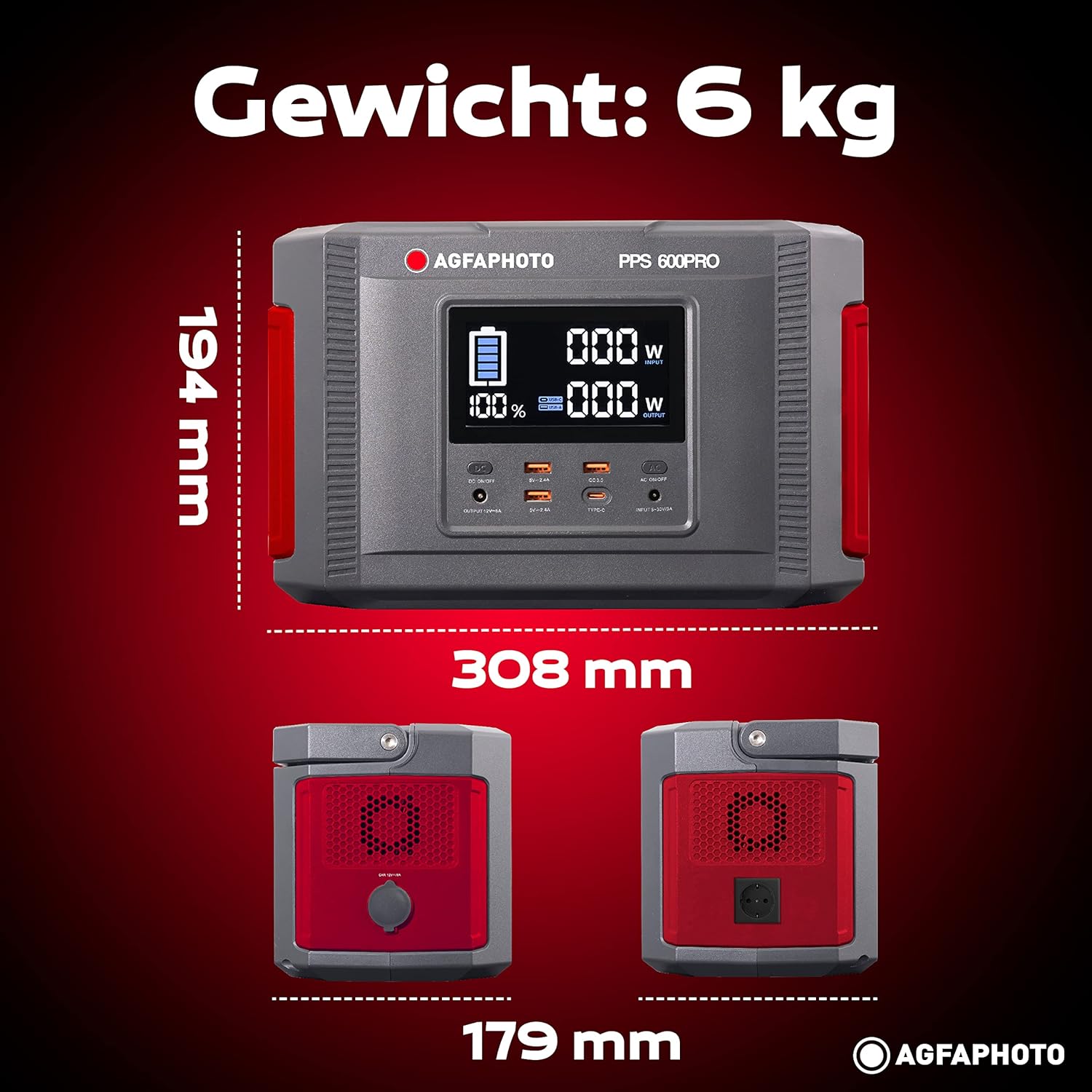
Image: Visual representation of the AgfaPhoto Powerstation PPS 600 Pro's dimensions (308 x 179 x 194 mm) and weight (6 kg).
| Kenmerk | Spesifikasie |
|---|---|
| Handelsmerk | AgfaPhoto |
| Modelnommer | 717-854742 (PPS600) |
| Battery kapasiteit | 644 Wh |
| Uitsetkrag (Deurlopend) | 600 W |
| Uitsetkrag (piek) | 1000 W |
| Voltage | 220 Volt |
| Item gewig | 6.1 kilogram |
| Afmetings (L x B x H) | 308 x 179 x 194 mm |
| Kragbron | Battery Powered (Solaire, électricité) |
| Aanbevole gebruike | Mobile phones, cameras, laptops, tablets |
| Ingesluit komponente | Power cord, USB ports, LCD screen, car cigarette lighter adapter |
| Spesiale kenmerk | Kompakte ontwerp |
10. Waarborg en Ondersteuning
AgfaPhoto products are manufactured to high-quality standards and are covered by a manufacturer's warranty. For specific warranty terms and conditions, please refer to the warranty card included with your product or visit the official AgfaPhoto webwebwerf.
For technical support, troubleshooting assistance, or spare parts inquiries, please contact AgfaPhoto customer service. Contact details can typically be found on the product packaging or the official brand webwebwerf.