
Inleiding
This manual provides comprehensive instructions for the installation, operation, and maintenance of your STRONG SRT 3030 Digital HD Cable Receiver. The SRT 3030 is designed to deliver high-quality digital cable television directly to your home, offering superior image and sound. It features a convenient front USB port for file playback and software updates, an electronic program guide, 32 favorite lists for personalized channel sorting, multilingual audio tracks, and subtitle support. Please read this manual carefully before using the device to ensure optimal performance and safety.
Pakketinhoud
Please check the package contents carefully. If any items are missing or damaged, contact your dealer immediately.
- 1x STRONG SRT 3030 HD Cable Receiver
- 1 x afstandbeheer
- 2x AAA-batterye
- 1x Power Adapter (PSU 12V/1A/12W)
Produk Kenmerke
- Receives free digital SD and HD channels on all cable networks.
- Exceptional image and sound quality.
- Front USB port for media playback, channel list backup, and software updates.
- Electronic Program Guide (EPG) for program information.
- 32 customizable favorite lists for TV and radio stations.
- Supports Dolby Digital Plus audio.
- Parental control features.
- Multilingual menu support.
- 8 event timers with 3 modes.
- 800 program memory capacity.
Produk verbyview
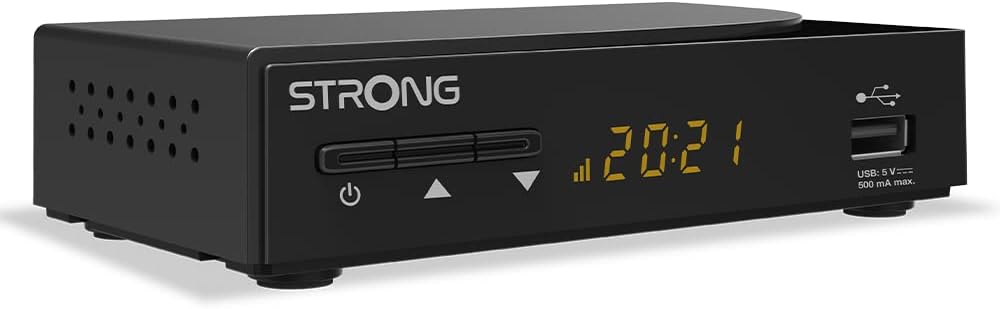
Figuur 1: Algehele view of the STRONG SRT 3030 Digital HD Cable Receiver. This image shows the compact black unit with its front panel display and USB port.

Figuur 2: Voorkant view of the receiver, highlighting the power button, channel navigation buttons, digital display, and the accessible USB port.

Figuur 3: Agter view of the receiver, showing the "CABLE IN" port, HDMI output, TV SCART connector, and the power input.

Figuur 4: Kant view of the receiver, illustrating the ventilation holes designed for heat dissipation.
Opstelling
- Koppel aan TV: Use an HDMI cable to connect the HDMI OUT port on the receiver to an HDMI IN port on your television. Alternatively, use a SCART cable if your TV does not have an HDMI port.
- Connect to Cable Network: Connect your cable network's coaxial cable to the "CABLE IN" port on the back of the receiver.
- Koppel krag: Plug the provided power adapter into the DC IN port on the receiver and then into a wall outlet.
- Krag aan: Press the power button on the front panel of the receiver or on the remote control.
- Aanvanklike Opstelling Wizard: Follow the on-screen instructions for the initial setup, which typically includes language selection, country, and automatic channel scanning. Allow the receiver to complete the channel scan to find all available digital channels.
Bedryfsinstruksies
Basiese funksies
- Krag aan/af: Druk die KRAG knoppie op die afstandbeheer of voorpaneel.
- Kanaalkeuse: Gebruik die CH +/- knoppies om kanale opeenvolgend te verander, of voer die kanaalnommer direk in met behulp van die numeriese sleutelbord.
- Volumebeheer: Gebruik die VOL +/- knoppies om die volume aan te pas.
- Demp: Druk die DEM button to temporarily turn off the sound.
- Elektroniese Programgids (EPG): Druk die EPG knoppie om view program information and schedule recordings.
Spyskaartnavigasie
Druk die SPYSKAART button on the remote control to access the main menu. Use the arrow keys (UP/DOWN/LINKS/REGS) to navigate through options and OK om keuses te bevestig. Druk EXIT om terug te keer na regstreekse TV.
Kanaalbestuur
- Channel Sorting: In the menu, navigate to "Channel Management" to sort channels by name, LCN, or other criteria.
- Favorite Lists: Create and manage up to 32 favorite lists to quickly access your preferred TV and radio stations.
USB-funksies
Insert a USB storage device into the front USB port. You can use it for:
- Mediaspeel: Play back various media files (e.g., photos, music, videos) stored on the USB device.
- Sagteware-opdatering: Update the receiver's firmware by placing the update file on a USB drive and following the instructions in the system settings menu.
- Channel List Backup: Save your customized channel list to the USB device.
Onderhoud
To ensure the longevity and optimal performance of your STRONG SRT 3030 receiver, follow these maintenance guidelines:
- Skoonmaak: Disconnect the power before cleaning. Use a soft, dry cloth to wipe the exterior of the receiver. Do not use liquid cleaners, aerosols, or abrasive materials.
- Ventilasie: Ensure that the ventilation openings on the receiver are not blocked. Do not place the receiver on soft surfaces like carpets or blankets that may obstruct airflow.
- Plasing: Place the receiver in a well-ventilated area, away from direct sunlight, heat sources, and excessive moisture.
Probleemoplossing
Indien u probleme met u ontvanger ondervind, verwys na die tabel hieronder vir algemene probleme en hul oplossings.
| Probleem | Moontlike oorsaak | Oplossing |
|---|---|---|
| Geen beeld of klank nie |
|
|
| "Geen sein"-boodskap |
|
|
| Afstandbeheer werk nie |
|
|
| Cannot play USB media |
|
|
Tegniese spesifikasies
| Kenmerk | Spesifikasie |
|---|---|
| Handelsmerk | Sterk |
| Modelnommer | SRT3030 |
| Kleur | Swart |
| Verbindingstegnologie | HDMI |
| Koppelvlak | HDMI, USB 2.0 |
| Totale HDMI-poorte | 1 |
| Klankuitvoermodus | Stereo |
| Surround Sound Channel-konfigurasie | 2.0 |
| Video-enkodering | H.264, H.265/HEVC, VP9, AV1, MPEG-4 |
| Versoenbare toestelle | TV, personal computer, tablet, smartphone, game console, amplifier, speaker |
| Batterysamestelling (Afstandbeheer) | Alkalies |
| Vervaardiger | STERK |
| Land van oorsprong | China |
Waarborg en Ondersteuning
For warranty information and technical support, please refer to the documentation included with your product or visit the official Strong webwebwerf. Bewaar u aankoopbewys as bewys van aankoop vir waarborgeise.
Aanlyn ondersteuning: For further assistance, FAQs, and software updates, please visit the official Strong support page.