
1. Inleiding
This manual provides comprehensive instructions for the Homsee 70.9" Electric Standing Desk with integrated drawer and cabinet. This height-adjustable desk is designed for home office use, offering a spacious workspace and versatile storage solutions. Please read this manual thoroughly before assembly and operation to ensure safe and correct usage.
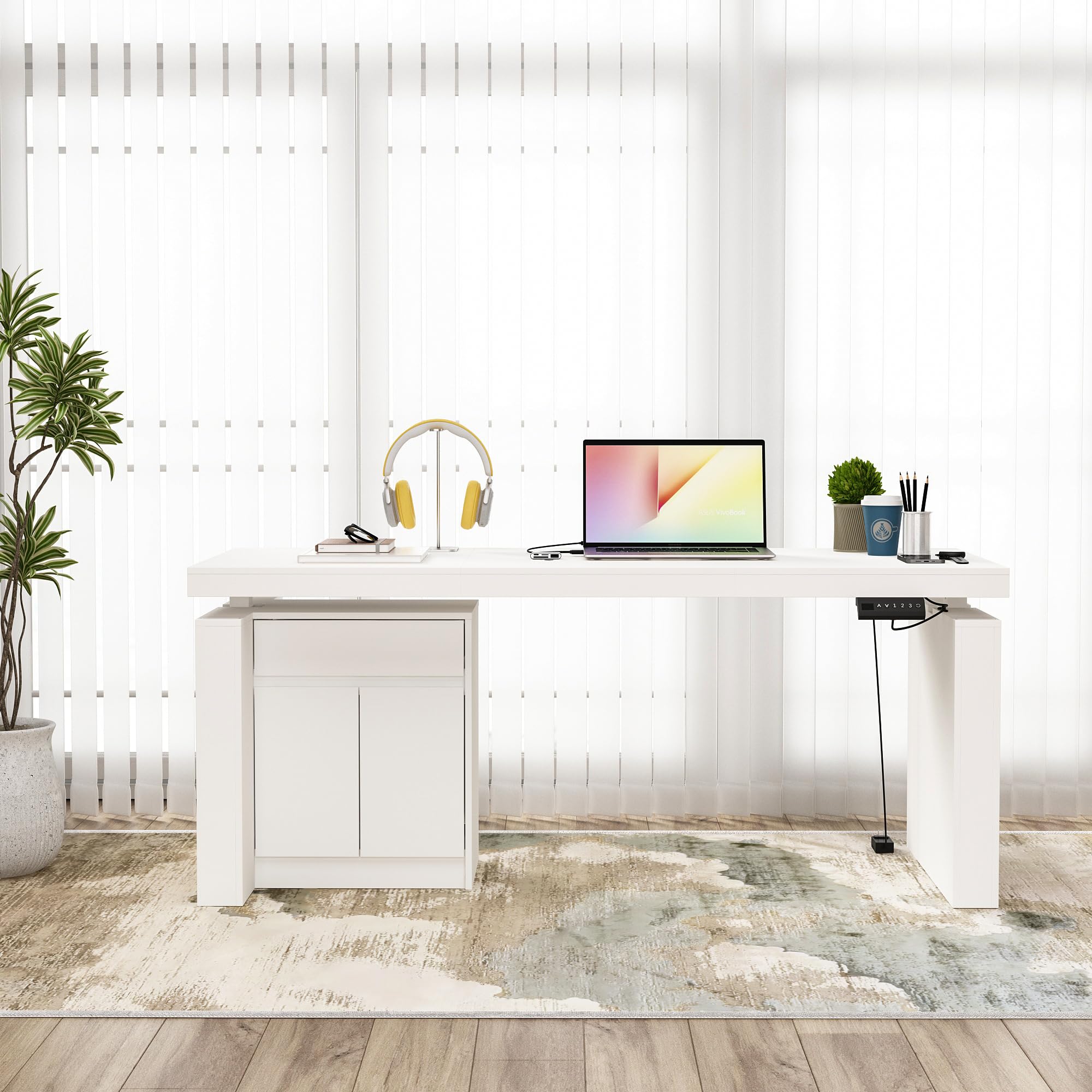
Figure 1: Homsee 70.9" Electric Standing Desk (Grey)
This image displays the Homsee 70.9" Electric Standing Desk in a grey finish, showcasing its L-shape design with a spacious desktop, an integrated side cabinet, and the electric height adjustment mechanism.
2. Veiligheidsinligting
Belangrike veiligheidsinstruksies:
- Always ensure the desk is fully assembled and stable before use.
- Do not exceed the maximum weight limit of 330 lbs (150 kg) on the desktop.
- When adjusting the height, use the preset buttons carefully to avoid collisions with objects above or below the desk.
- Hou kinders en troeteldiere weg van die lessenaar tydens hoogteverstellings.
- Always follow the assembly instructions provided to prevent injuries and ensure proper function.
- Moenie op die lessenaar sit of staan nie.
- Ensure all cables are managed to prevent entanglement during height adjustments.
3. Pakketinhoud
The Homsee Electric Standing Desk is typically shipped in two boxes. Please verify that all components listed below are present and undamaged before beginning assembly.
- Desktop panels
- Electric lifting columns and motor
- Control panel with preset buttons
- Side cabinet components (panels, drawer, doors, shelves)
- All necessary assembly hardware (screws, bolts, tools)
- Detailed installation instructions guide
4. Opstelling en samestelling
Assembly of the Homsee Electric Standing Desk requires careful attention to the provided step-by-step instructions. It is recommended to have two people for assembly due to the size and weight of some components.
- Pak komponente uit: Carefully unpack all parts from both boxes. Lay them out on a clean, soft surface to prevent scratches.
- Review Instruksies: Read the entire assembly guide before starting. Identify all parts and hardware.
- Stel raam bymekaar: Follow the instructions to assemble the industrial-grade steel frame and attach the electric lifting columns.
- Assemble Cabinet: Construct the side cabinet, including the drawer and shelves. Note that the cabinet design is reversible, allowing you to configure it on either the left or right side of the desk.
- Heg lessenaar aan: Securely attach the desktop panels to the assembled frame and cabinet.
- Verbind Elektronika: Connect the motor and control panel according to the wiring diagram in the assembly guide. Ensure all connections are secure.
- Finale tjeks: Before use, ensure all screws are tightened, and the desk is stable.

Figure 2: Desk Dimensions Overview
This diagram illustrates the key dimensions of the Homsee Electric Standing Desk, including the desktop length, depth, and height adjustment range, as well as the dimensions of the integrated drawer and cabinet.
5. Bedryfsinstruksies
The Homsee Electric Standing Desk features an intuitive control panel for height adjustment and memory presets.
5.1. Hoogte aanpassing
- Adjusting Up: Druk en hou die UP (^) button to raise the desk to your desired standing height.
- Adjusting Down: Druk en hou die DOWN (v) button to lower the desk to your desired sitting height.
- The desk's height can be adjusted smoothly between 29.5 inches and 44 inches.
5.2. Geheuevoorinstellings
The control panel includes three preset buttons (1, 2, 3) to store and recall your preferred sitting and standing heights.
- Om 'n hoogte te stoor: Adjust the desk to your desired height. Press the "M" or "STEL" button (if available, otherwise proceed to step 2) followed by one of the preset buttons (1, 2, or 3). The display will show "S-" followed by the number, indicating the height is saved.
- Om 'n hoogte te onthou: Press the corresponding preset button (1, 2, or 3). The desk will automatically move to the saved height.
5.3. Collision Avoidance Feature
The desk is equipped with a collision-avoiding feature. If the desktop encounters an obstruction during adjustment, it will automatically stop and reverse slightly to prevent damage. Clear any obstructions before resuming adjustment.

Figure 3: Control Panel for Height Adjustment
This image shows the desk's control panel, featuring UP/DOWN arrows, three memory preset buttons (1, 2, 3), and a display for current height.
6. Onderhoud
Regular maintenance helps ensure the longevity and optimal performance of your Homsee Electric Standing Desk.
- Skoonmaak: Vee die lessenaaroppervlaktes af met 'n sagte, damp cloth. The engineered MDF with a sleek finish is water-resistant and easy to clean. Avoid using abrasive cleaners or harsh chemicals, which can damage the finish.
- Bevestigingskontroles: Kontroleer gereeld alle skroewe en boute om te verseker dat hulle styf bly. Draai weer vas indien nodig.
- Kabelbestuur: Ensure power cords and other cables are neatly managed and do not interfere with the desk's movement.
- Motorversorging: The electric motor is designed for durability. Avoid overloading the desk, which can strain the motor.
7. Probleemoplossing
If you encounter issues with your Homsee Electric Standing Desk, refer to the following troubleshooting tips:
- Lessenaar beweeg nie:
- Kontroleer of die kragkabel stewig in beide die lessenaar en 'n werkende muurprop ingeprop is.
- Ensure there are no obstructions preventing movement.
- If the control panel display shows an error code, consult the full assembly manual for specific error interpretations.
- Ongelyke beweging:
- Maak seker dat die lessenaar op 'n gelyk oppervlak geplaas is.
- Check that all assembly fasteners are securely tightened.
- Collision Avoidance Activation:
- If the desk stops and reverses, it has detected an obstruction. Remove the obstruction and try adjusting the height again.
- Drawer/Cabinet Issues:
- If drawers are stiff or misaligned, check the drawer slides for proper installation and ensure no objects are blocking their path.
- Ensure cabinet doors are properly hinged and aligned.
For persistent issues or problems not covered here, please contact Homsee customer support.
8. Spesifikasies
| Handelsmerk | Huissee |
| Modelnommer | B0BGPLKPC6 |
| Vorm | L-vorm |
| Desktop Dimensions (L x D x H) | 70.9" x 31.5" x 2.6" |
| Overall Dimensions (L x D x H, adjustable) | 70.9" x 31.5" x 29.5" - 44" |
| Kleur | Grys |
| Styl | Moderne |
| Basis materiaal | Allooi staal |
| Top materiaal tipe | Gemanipuleerde hout |
| Voltooi Tipe | Gelak |
| Spesiale kenmerk | Reversible design, Electric Height Adjustment, Collision Avoidance |
| Hoogteaanpassingsreeks | 29.5" tot 44" |
| Gewig kapasiteit | Tot 330 kg (150 lbs) |
| Ingesluit komponente | Side Cabinet (1 Drawer, 1 Storage Compartment behind doors), Desk Organizer |
| Vergadering benodig | Ja |
9. Waarborg en Ondersteuning
Homsee offers a limited warranty for this product. For specific details regarding warranty coverage, duration, and terms, please refer to the warranty card included with your product or contact Homsee customer service.
For technical support, assembly assistance, or to make a warranty claim, please contact Homsee customer service through their official website or the retailer where the product was purchased. Please have your model number (B0BGPLKPC6) and purchase date available when contacting support.
10. Amptelike produkvideo's
Geen amptelike produkvideo's van die verkoper is tans vir hierdie model beskikbaar nie.