
Inleiding
The IMICE T97 RGB Honeycomb Gaming Mouse is designed to provide a precise and comfortable experience for gaming and general computer use. It features a high-precision 4800 DPI sensor, a durable and ergonomic design, and is compatible with various operating systems. This manual will guide you through the setup, operation, and maintenance of your new gaming mouse.
- Handelsmerk: IMICE
- Tipe: Muis
- Verenigbaarheid: Rekenaars en skootrekenaars
- Sleutel kenmerke: High precision 4800 DPI, comfortable and durable design, anti-sweat design, precise positioning.
- Kleur: Swart
Opstel instruksies
1. Koppel die muis
The IMICE T97 mouse uses a standard USB connection for plug-and-play functionality. No additional drivers are typically required for basic operation on supported operating systems.
- Vind 'n beskikbare USB-poort op jou rekenaar of skootrekenaar.
- Insert the USB connector of the IMICE T97 mouse firmly into the USB port.
- Jou bedryfstelsel behoort outomaties die nodige drywers op te spoor en te installeer. Hierdie proses kan 'n paar oomblikke neem.
- Sodra dit geïnstalleer is, sal die muis gereed wees vir gebruik.
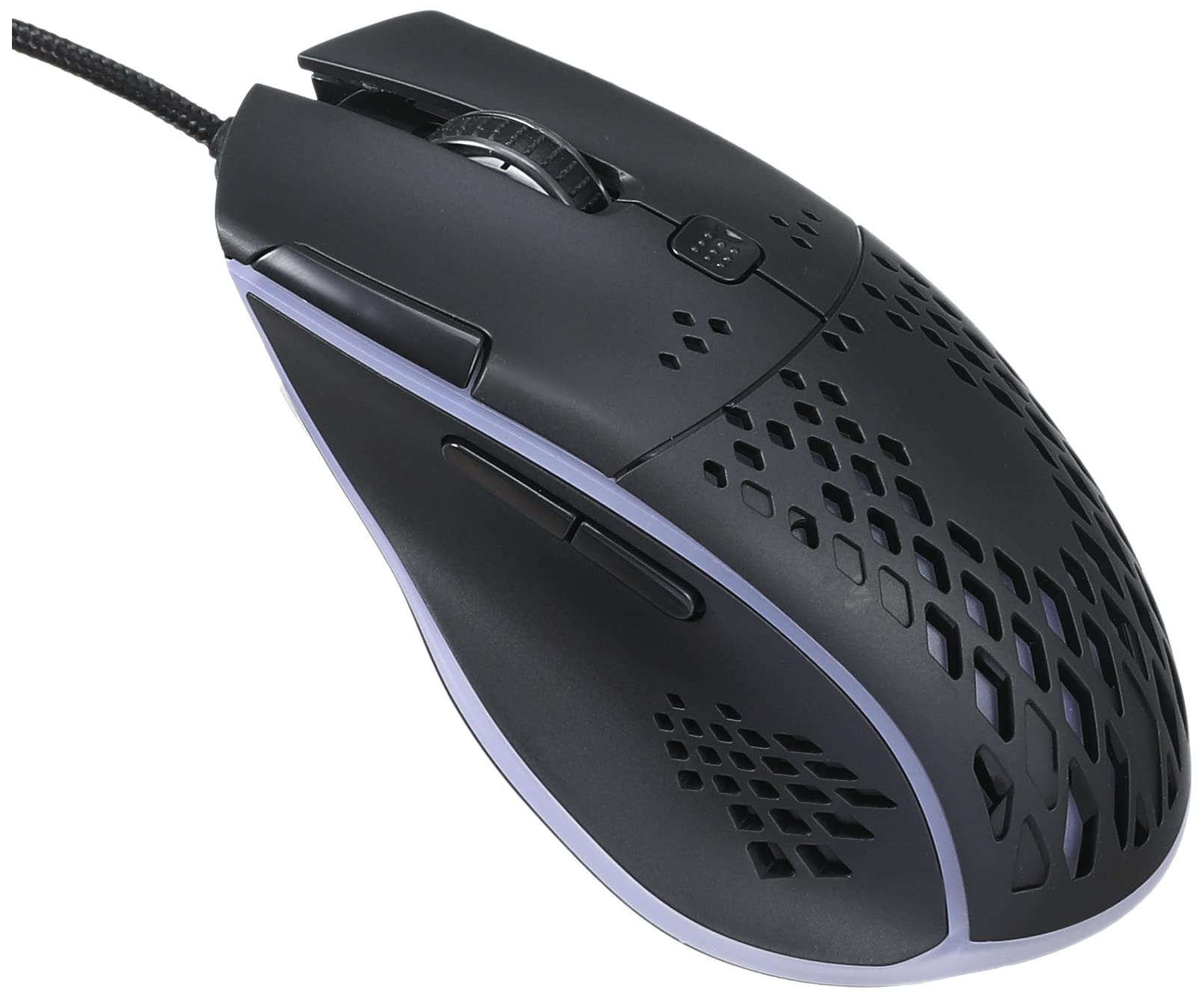
Beeld: Bo-voor view of the IMICE T97 RGB Honeycomb Gaming Mouse, showing its ergonomic shape and honeycomb shell design.
Bediening van die muis
Basiese funksies
- Links klik: Primary action, selection, activation.
- Regs klik: Context menu, secondary actions.
- Rolwiel: Scroll up/down documents and web bladsye. Kan ook geklik word vir middelklik-funksionaliteit.
- Syknoppies: (If present, typically for forward/back navigation in browsers or custom functions in games). The T97 model typically includes two side buttons.
DPI aanpassing
The IMICE T97 mouse features adjustable DPI (Dots Per Inch) settings, allowing you to change the cursor sensitivity. This mouse supports up to 4800 DPI. There is usually a dedicated button, often located behind the scroll wheel, to cycle through different DPI levels. Press this button to switch between sensitivity settings to find your preferred speed.
RGB beligting
The mouse features RGB lighting, which typically cycles through various colors automatically. There may not be user-configurable software for lighting control, and it operates as a default aesthetic feature.

Beeld: Onderkant view of the IMICE T97 RGB Honeycomb Gaming Mouse, showing the optical sensor, product label with model T97, and regulatory marks.
Onderhoud
Skoonmaak
- Ontkoppel die muis van jou rekenaar voordat jy dit skoonmaak.
- Gebruik 'n sagte, droë, pluisvrye lap om die oppervlak van die muis af te vee.
- Vir hardnekkige vuiligheid, effens dampMaak die lap skoon met water of 'n sagte skoonmaakoplossing (vermy harde chemikalieë).
- Use a cotton swab or compressed air to clean around buttons and the scroll wheel.
- Maak seker dat geen vloeistof die muis se interne komponente binnedring nie.
Berging
Bêre die muis op 'n koel, droë plek weg van direkte sonlig en uiterste temperature wanneer dit nie vir lang tye gebruik word nie.
Probleemoplossing
| Probleem | Oplossing |
|---|---|
| Die muis reageer nie. |
|
| Die wyserbeweging is wisselvallig of springerig. |
|
| Buttons or scroll wheel are not working. |
|
| Cannot find software for customization. | The IMICE T97 mouse is primarily designed for plug-and-play operation. Dedicated software for advanced customization (like button remapping or detailed RGB control) may not be available or easily accessible for this model. Most functions are hardware-controlled. |
Spesifikasies
| Handelsmerk | IMICE |
| Model | T97 |
| Kleur | Swart |
| Verbindingstegnologie | USB |
| DPI (Maksimum) | 4800 DPI |
| Spesiale kenmerke | Comfortable design, RGB lighting, honeycomb shell |
| Hand Oriëntasie | Ambidekstrous |
| Aanbevole gebruike | Speletjies |
| Versoenbare toestelle | Persoonlike rekenaar, skootrekenaar |
| Bedryfstelselversoenbaarheid | Linux, Windows XP (en nuwer weergawes) |
| Item gewig | 120 gram |
| Versending Afmetings | 15 x 11 x 5 cm |
| Batterye Ingesluit | No (Wired USB mouse) |
| ASIN | B0BD2DDWNQ |
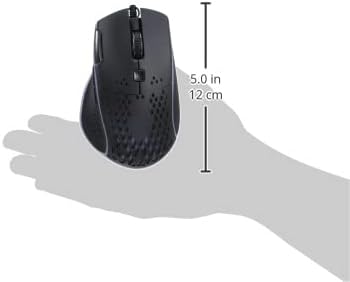
Beeld: Sykant view of the IMICE T97 RGB Honeycomb Gaming Mouse held in a hand, illustrating its compact size (approximately 5.0 inches or 12 cm in length).
Waarborg inligting
Please refer to the retailer or your purchase documentation for specific warranty terms and conditions. IMICE products typically come with a limited warranty against manufacturing defects. Keep your proof of purchase for warranty claims.
Kliënte ondersteuning
For technical assistance or further inquiries, please contact your retailer or visit the official IMICE website for support resources. Ensure you have your product model (T97) and purchase details ready when contacting support.