
1. Inleiding
The CHNADKS HFS-20 is an upgraded portable nuclear radiation detector designed for monitoring X, Beta (β), and Gamma (γ) rays. This handheld instrument features an LCD display, two measurement alert methods, and recording capabilities, making it accessible for various users.
It is widely applicable in environments where ionizing radiation may be present, such as homes, irradiation processing facilities, health and epidemic prevention sectors, and for personal radiation dose supervision and protection.

Image: Wide range of applications for the CHNADKS HFS-20 detector.
2. Pakketinhoud
Nadat u die pakkie oopgemaak het, maak asseblief seker dat al die items wat hieronder gelys word, teenwoordig en in 'n goeie toestand is:
- CHNADKS HFS-20 Nuclear Radiation Detector
- Zippered Carrying Case with foam padding
- USB Type-C laaikabel
- Gebruikershandleiding
- Sertifikaat van ooreenstemming
- Polsband
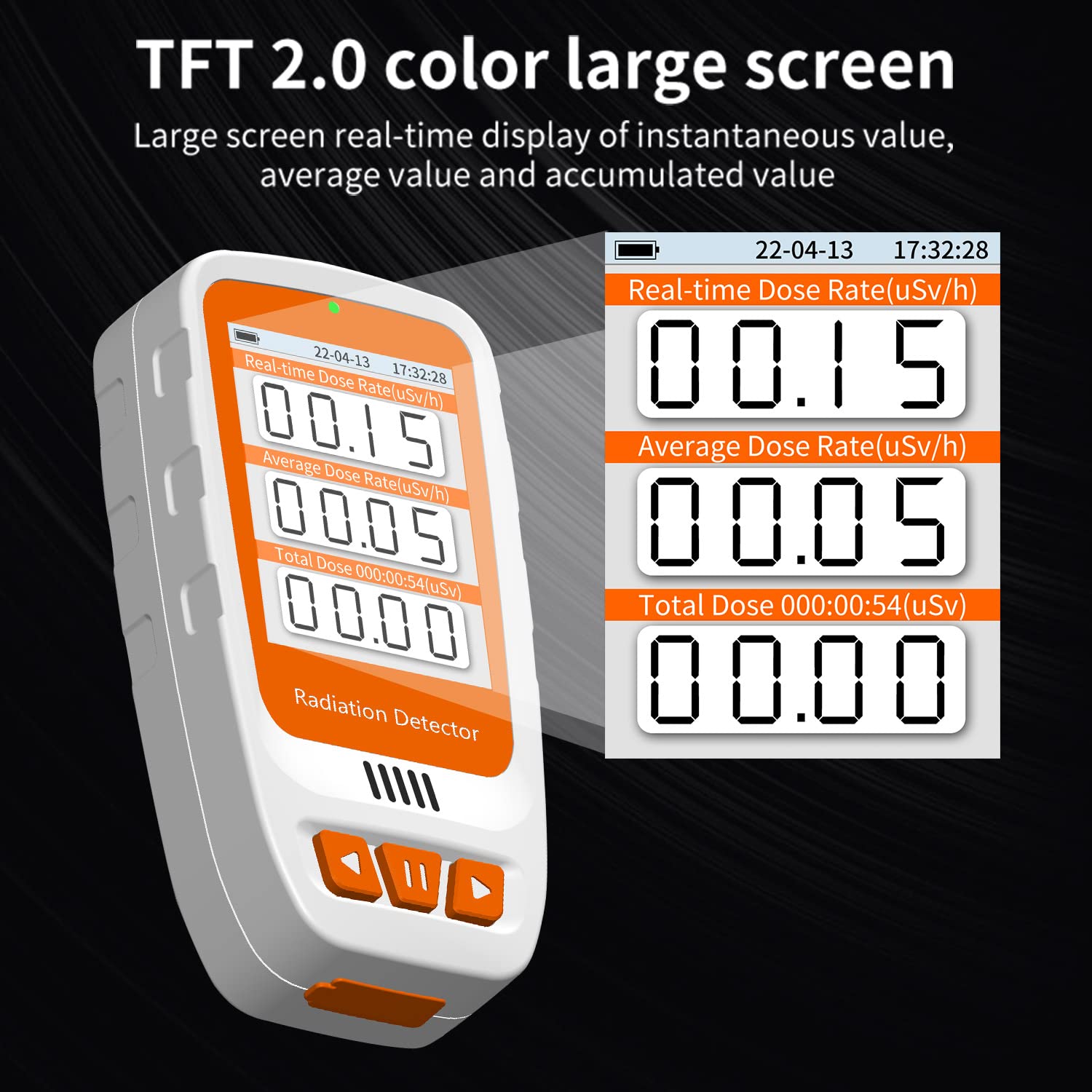
Image: Contents of the CHNADKS HFS-20 product package.
3. Produk verbyview
The HFS-20 detector is a compact, handheld device designed for ease of use and portability. It features a clear display and intuitive controls.
3.1 Toestelkomponente
- Vertoon skerm: TFT 2.0 color large screen for real-time, average, and accumulated value display.
- Beheerknoppies: Intuitive buttons for navigation and selection.
- Gonser: Verskaf hoorbare waarskuwings.
- Light Tips: Visual indicators for alerts.
- Laai-koppelvlak: USB Type-C port located at the bottom for convenient recharging.
- Sensor: The GM counter sensor is located on the right side of the device. For accurate readings, position this side closest to the source being monitored.
- Terug Clamp: For attaching the device to clothing or other surfaces.

Image: Labeled diagram of the CHNADKS HFS-20 device components.

Image: The TFT 2.0 color large screen displaying radiation values.
4. Opstelling
4.1 Laai die toestel
The HFS-20 is equipped with a rechargeable Lithium Ion battery. Connect the provided USB Type-C cable to the charging port at the bottom of the device and to a suitable USB power source. The green light indicates charging, and it turns off when fully charged.
4.2 Krag aan/af
To power on the device, press and hold the pause/select button (center button) for approximately 3 seconds. The device will start up and display the main interface. To power off, press and hold the same button for 3 seconds until the device shuts down.
4.3 Aanvanklike instellings
After powering on, you can access the settings menu by pressing any of the control buttons. Use the left and right arrow buttons to navigate through the menu options. The main menu typically includes options for:
- Taal: Kies jou voorkeurtaal.
- Eenhede: Switch between measurement units such as uSv (microsieverts) and uGy (micrograys).
- Horlosie: Set the current year, month, and day.
5. Bedryfsinstruksies
5.1 Radiation Measurement
From the main interface, the device displays real-time dose rate, average dose rate, and total accumulated dose. The sensor is located on the right side; ensure this side is positioned towards the area or object you wish to monitor for optimal accuracy.
5.2 Tydmetermeting
The timer measurement function allows for scheduled monitoring. In the timer measurement menu, you can set:
- Begin vertraging: Set a delay from 00-99 hours before measurement begins.
- Meting Tyd: Define the duration of the measurement from 00-999 hours.
Each completed timer measurement automatically saves a history record. The device can store up to 10 history records.
5.3 Alarminstellings
The HFS-20 features sound and light dual alarms. You can customize the alarm settings:
- Over-Limit Alarm: Set the instantaneous dose alarm limit (range: 0.1 uSv - 999 uSv).
- Total Dose Alarm: Set the accumulated dose alarm limit (range: 1 uSv - 9999 uSv).
- Alarmvolume: Adjust the volume of the audible alarm.
- Aantal alarms: Configure how many times the alarm sounds.

Image: Sound and light dual alarm system of the HFS-20.
5.4 Viewing and Deleting Records
Navigate to the 'Records' menu to view saved measurement history. You can also access a data deletion interface to clear current data or delete historical records as needed.
5.5 User Interface Demonstration Video
Video: A demonstration of the CHNADKS HFS-20's user interface, including power on/off, menu navigation, and setting adjustments.
6. Onderhoud
To ensure the longevity and accurate performance of your CHNADKS HFS-20 Nuclear Radiation Detector, follow these maintenance guidelines:
- Skoonmaak: Gebruik 'n sagte, droë lap om die toestel skoon te maak. Vermy die gebruik van skuurmiddels of oplosmiddels wat die skerm of ... kan beskadig.asing.
- Berging: Store the device in its protective carrying case when not in use. Keep it in a cool, dry place away from direct sunlight, extreme temperatures, and high humidity.
- Batterysorg: Recharge the device regularly, even if not in frequent use, to maintain battery health. Avoid fully discharging the battery for extended periods.
- Hantering: Handle the device with care to prevent drops or impacts, which could affect the sensitive internal components, especially the GM counter sensor.
7. Probleemoplossing
If you encounter issues with your HFS-20 detector, consider the following common troubleshooting steps:
- Toestel skakel nie aan nie: Ensure the battery is charged. Connect the device to a power source using the USB Type-C cable and allow it to charge for some time before attempting to power on again.
- Inaccurate or Unexpected Readings: Verify that the GM counter sensor (located on the right side of the device) is properly positioned towards the area being measured. Ensure there are no obstructions. Background radiation levels can vary, so compare readings in different known environments.
- Alarm klink nie: Check the alarm volume settings in the device menu. Ensure the alarm limits are set appropriately for the radiation levels you expect to detect.
- Screen Freezes or Malfunctions: Try powering off the device by holding the pause/select button for 3 seconds. If it does not respond, allow the battery to fully discharge and then recharge before attempting to power on again.
Indien hierdie stappe nie die probleem oplos nie, kontak asseblief kliëntediens vir verdere hulp.
8. Spesifikasies
Below are the technical specifications for the CHNADKS HFS-20 Nuclear Radiation Detector:
| Kenmerk | Spesifikasie |
|---|---|
| Sensor | GM counter tube |
| Meetreeks | 0.08 uSv - 50 mSv |
| Meting Akkuraatheid | -17%... +25% (based on 137Cs γ) |
| Measurable Rays | X-ray, Gamma (γ) Ray, and hard Beta (β) radial |
| Battery Tipe | 1 Litium-ioonbattery (ingesluit) |
| Battery kapasiteit | 1800mAh, 6.66Wh |
| Uithouvermoë Tyd | 14 days (continuous measurement without particle sound) |
| Laai-koppelvlak | USB Tipe-C |
| Alarmreaksietyd | <10s |
| Alarm Threshold Deviation | -17%... +25% |
| Produk afmetings | 8.8 x 4.3 x 1.9 cm |
| Produk Gewig | 100 g |

Image: Product parameters and dimensions of the HFS-20.
9. Veiligheidsinligting
Understanding and mitigating the risks associated with nuclear radiation is crucial. This device is designed to help monitor radiation levels, but it does not provide protection against radiation exposure. Always adhere to local safety regulations and guidelines when working in environments with potential radiation hazards.
- Familiarize yourself with the device's alarm settings and respond appropriately to alerts.
- Do not rely solely on this device for critical safety decisions without consulting qualified professionals.
- Keep the device away from strong electromagnetic fields, which may interfere with its operation.

Image: Potential health hazards associated with nuclear radiation exposure.
10. Waarborg en Ondersteuning
For warranty information, technical support, or any inquiries regarding your CHNADKS HFS-20 Nuclear Radiation Detector, please refer to the contact details provided in your product packaging or visit the official CHNADKS webwebwerf. Bewaar asseblief u bewys van aankoop vir waarborgeise.