
Inleiding
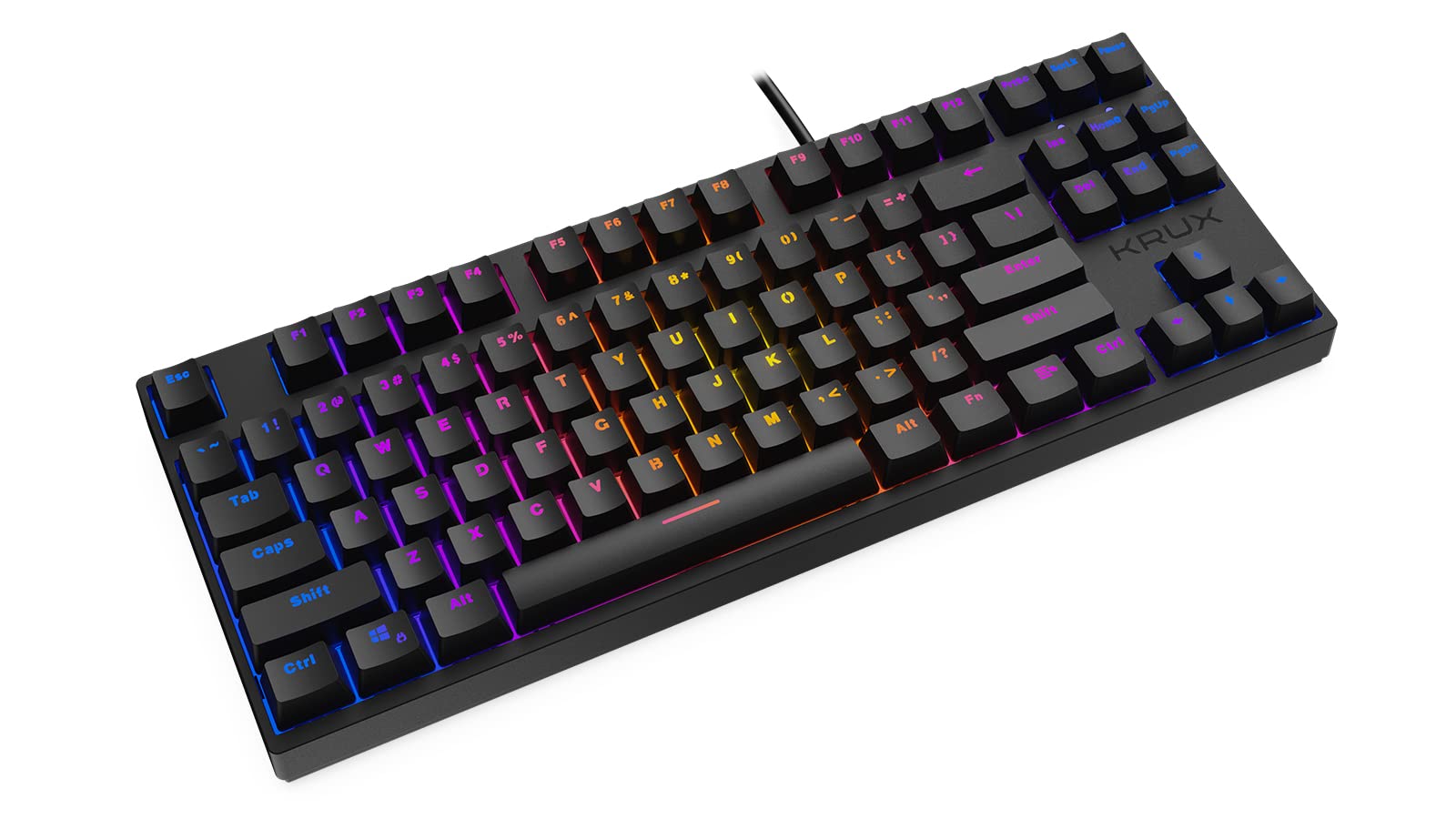
Thank you for choosing the KRUX Atax Pro RGB Outemu Brown KRX0039 Wired Gaming Keyboard. This manual provides essential information for setting up, operating, maintaining, and troubleshooting your new mechanical gaming keyboard. Please read this manual thoroughly before use to ensure optimal performance and longevity of your device.
Opstelling
Follow these steps to set up your KRUX Atax Pro RGB keyboard:
- Pak die sleutelbord uit: Verwyder die sleutelbord versigtig uit die verpakking. Maak seker dat alle komponente teenwoordig is.
- Koppel aan rekenaar: Plug the USB-A connector of the keyboard cable into an available USB-A port on your computer or laptop.
- Bestuurder installasie: The keyboard is plug-and-play. Your operating system (Windows, macOS, Linux) should automatically detect and install the necessary drivers. No additional software installation is typically required for basic functionality.
- Posisionering: Place the keyboard on a stable, flat surface. Adjust the rear feet for your preferred typing angle.
Bedryfsinstruksies
The KRUX Atax Pro RGB keyboard offers various functions beyond standard typing:
Basiese sleutelfunksies
- Standaard sleutels: Alle standaard alfanumeriese en simboolsleutels funksioneer soos verwag.
- Funksiesleutels (F1-F12): These keys perform their standard functions.
- Navigasiegroep: Includes Insert, Home, Page Up, Delete, End, Page Down for document navigation.
- Pyltjie sleutels: Standard directional control.
RGB-agterbeligtingsbeheer
The keyboard features customizable RGB backlighting. Use the following key combinations with the Fn key (located near the right Alt key) to control lighting effects:
- Fn + F1-F12: Specific multimedia or system functions (refer to keycap legends for exact functions).
- Fn + PrtSc: Cycle through various RGB lighting modes.
- Fn + Scrlk: Pas die helderheid van die agtergrond aan.
- Fn + Pause: Change backlight color or direction in certain modes.

Speleienskappe
- N-sleutel oorrol: The keyboard supports N-key rollover, allowing multiple simultaneous key presses to be registered accurately, which is beneficial for gaming.
- Anti-spookbeeld: Prevents unintended key presses from registering when multiple keys are pressed at once.
Onderhoud
Behoorlike onderhoud verseker die lang lewensduur en werkverrigting van jou sleutelbord:
- Skoonmaak van die sleutelkappe: Gebruik 'n sagte, damp cloth with mild soap and water to gently wipe the keycaps. Avoid excessive moisture.
- Cleaning Under Keycaps: For deeper cleaning, you may carefully remove keycaps using a keycap puller (not included) and use compressed air to remove dust and debris from the switches.
- Skoonmaak van die onderstel: Wipe the keyboard chassis with a dry or slightly damp lap.
- Vermy vloeistowwe: Moenie vloeistowwe op die sleutelbord mors nie. Indien 'n gemors plaasvind, ontkoppel die sleutelbord onmiddellik en laat dit heeltemal droog word voordat jy dit weer aansluit.
- Berging: Bêre die sleutelbord op 'n koel, droë plek weg van direkte sonlig en uiterste temperature.

Probleemoplossing
If you encounter issues with your KRUX Atax Pro RGB keyboard, try the following solutions:
- Sleutelbord reageer nie:
- Maak seker dat die USB-kabel stewig in beide die sleutelbord en die rekenaar ingeprop is.
- Probeer om die sleutelbord in 'n ander USB-poort te koppel.
- Herbegin jou rekenaar.
- Toets die sleutelbord op 'n ander rekenaar om 'n stelselspesifieke probleem uit te sluit.
- RGB Backlighting Not Working:
- Check if the backlight brightness is turned down (Fn + Scrlk).
- Cycle through lighting modes (Fn + PrtSc) to see if it reactivates.
- Maak seker dat die sleutelbord voldoende krag van die USB-poort ontvang.
- Spesifieke sleutels registreer nie:
- Remove the keycap and check for any debris or obstruction around the switch. Use compressed air to clean.
- If the issue persists, it may indicate a faulty switch.
- Ghosting or Input Lag:
- Ensure your computer's USB drivers are up to date.
- Avoid connecting the keyboard through unpowered USB hubs.
Spesifikasies
| Kenmerk | Detail |
|---|---|
| Handelsmerk | KRUX |
| Model Naam | Atax PRO RGB Outemu Brown TKL |
| Modelnommer | KRX0039 |
| Verbindingstegnologie | USB-A (Bedraad) |
| Sleutelbordbeskrywing | Meganies |
| Skakel Tipe | Outemu Brown (Tactile) |
| Aantal sleutels | 87 |
| Agterlig | RGB |
| Kleur | Swart |
| Aanbevole gebruike | Speletjies |
| Item gewig | 940 gram |
| Versoenbare toestelle | Skootrekenaar, rekenaar |

Waarborg en Ondersteuning
Waarborg: Hierdie produk kom met 'n 2 jaar vervaardiger se waarborg from the date of purchase. This warranty covers defects in materials and workmanship under normal use. It does not cover damage caused by misuse, accident, modification, or unauthorized repair.
Tegniese ondersteuning: For technical assistance, warranty claims, or further inquiries, please contact KRUX customer support through their official website or the retailer where the product was purchased. Please have your product model number (KRX0039) and proof of purchase ready when contacting support.