
1. Veiligheidsriglyne
Before operating the Hover-1 Highlander Electric Scooter, please read and understand all safety instructions. Failure to follow these guidelines may result in serious injury or property damage.
- Always wear a certified helmet and appropriate safety gear (knee pads, elbow pads) when riding.
- Observe all local traffic laws and regulations regarding electric scooter usage.
- Do not ride in wet conditions, on uneven surfaces, or in areas with poor visibility.
- The maximum weight limit for this scooter is 264 pond (120 kg)Moenie hierdie limiet oorskry nie.
- This scooter is designed for adult use.
- Avoid sudden acceleration, braking, or sharp turns.
- Keep fingers and other body parts away from moving parts such as wheels and the folding mechanism.
2. Produk verbyview
The Hover-1 Highlander is a foldable electric scooter designed for urban commuting. It features a 250W motor, a maximum speed of 15 mph, and a range of up to 9 miles.
2.1. Komponente
- Handvatsels: For steering and control.
- LCD-skerm: Shows speed, battery level, and speed mode.
- smoor: Beheer versnelling.
- Remme: Electric handlebar brake and mechanical rear wheel brake.
- Koplig: For visibility.
- Vou meganisme: Laat kompakte berging en vervoer toe.
- dek: Standing platform.
- Wiele: 6.5-inch solid rubber wheels.
- Skopstand: For parking the scooter.
- Bluetooth-luidspreker: Integrated for audio playback.
2.2. Produkbeelde
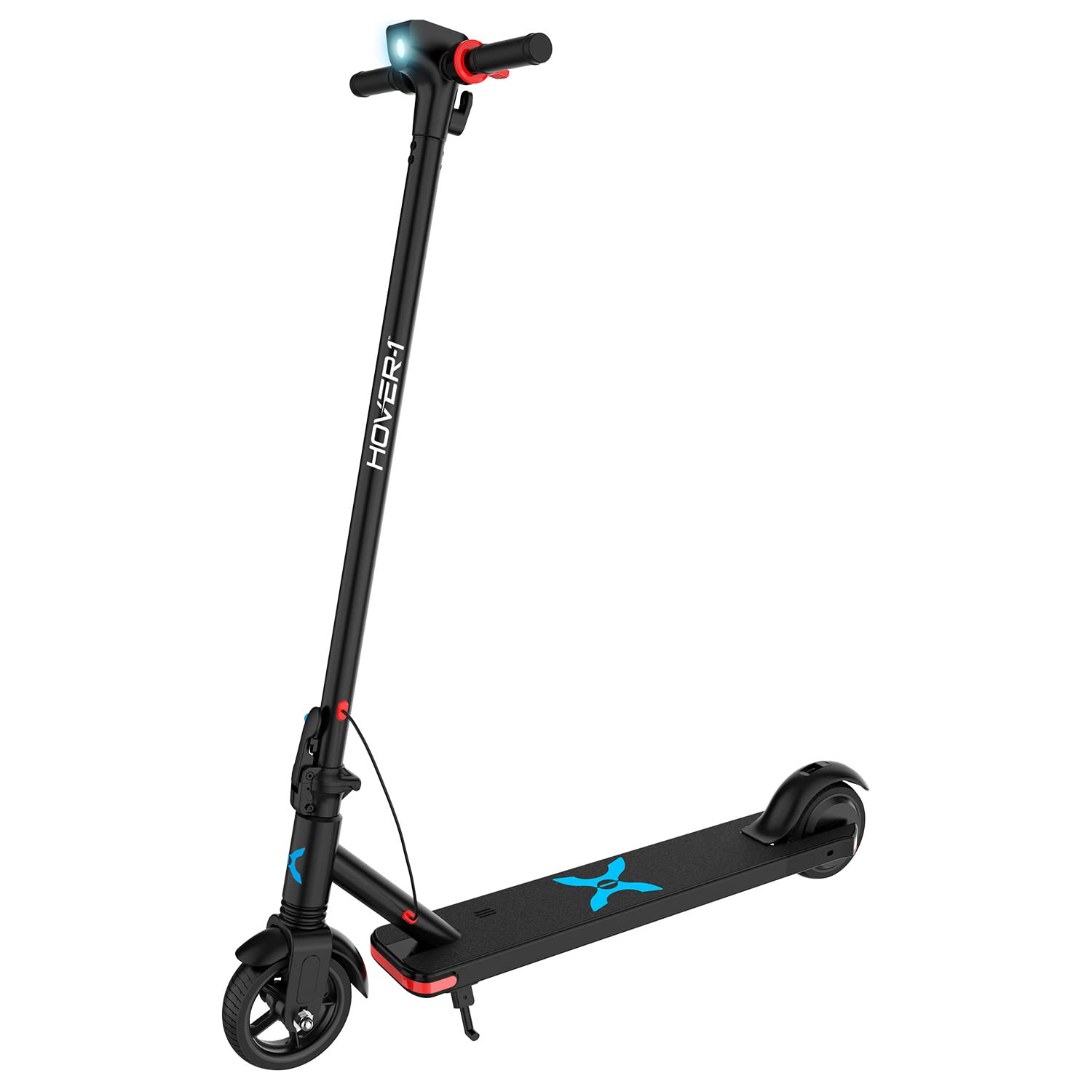
Figure 1: The Hover-1 Highlander Electric Scooter in its unfolded state, showcasing sy slanke swart ontwerp en algehele struktuur.

Figure 2: The Hover-1 Highlander Electric Scooter in its folded configuration, highlighting its portability and compact storage design.

Figuur 3: Close-up view of the Hover-1 Highlander's handlebar, showing the integrated LCD display, power button, and controls.

Figuur 4: Gedetailleerd view of the rear wheel and fender of the Hover-1 Highlander Electric Scooter, including the rear brake mechanism.
3. Opstelling
3.1. Uitpak en aanvanklike inspeksie
Carefully remove all components from the packaging. Verify that all items listed in the 'What's in the Box' section are present and undamaged. Included components are the Highlander Electric Scooter, Charger, and Manual.
3.2. Vergadering
- Vou die bromponie oop: Release the folding mechanism and carefully raise the steering column until it locks into place. Ensure it is securely latched.
- Heg stuurstange aan: Insert the handlebars into the steering column. Ensure they are firmly seated and secured.
3.3. Aanvanklike laai
Before first use, fully charge the scooter's battery. Connect the charger to the charging port on the scooter and then to a power outlet. The charging indicator on the charger will change when charging is complete. A full charge typically takes 3 uur.
4. Operasie
4.1. Skakel aan/af
Press and hold the power button on the LCD display to turn the scooter on or off.
4.2. Ry met die bromponie
- Kick-to-Start: The scooter requires a manual kick-off to initiate movement. Push off with your foot to reach a speed of approximately 3 mph (5 km/h).
- Versnel: Once moving, gently press the thumb throttle to engage the motor and accelerate.
- Remming: Use the electric handlebar brake for controlled deceleration. The scooter also has a mechanical manual brake on the rear wheel for additional stopping power.
4.3. Spoedmodusse
The Highlander offers multiple speed modes, indicated on the LCD display:
- ECO -modus: Up to 7 mph (11 km/h) for extended range.
- NORMALE modus: Up to 11 mph (18 km/h) for balanced performance.
- SPORT-modus: Up to 15 mph (24 km/h) for maximum speed.
Druk die aan/uit-knoppie kortliks om deur die spoedmodusse te blaai.
4.4. LCD Display Functions

Figure 5: Detailed illustration of the Highlander's LCD display, showing various indicators and their meanings.
The mid-mounted LCD display provides essential information:
- Spoedmeter: Displays current speed in MPH.
- Battery aanwyser: Toon die huidige batterylaaivlak.
- Spoedmodus: Indicates the active speed mode (Eco, Normal, Sport).
- Koplig-ikoon: Illuminates when the headlight is active.
- Bluetooth-ikoon: Indicates Bluetooth connectivity status.
4.5. Vou die Scooter
To fold the scooter for storage or transport, locate the quick-release button at the base of the T-handle. Follow the instructions in the manual to safely disengage the locking mechanism and fold the steering column down to the foot deck.
4.6. Bluetooth-luidspreker
The Highlander includes a built-in Bluetooth speaker. To connect, ensure the scooter is powered on and Bluetooth is enabled on your mobile device. Soek vir 'Hover-1 Highlander' in your device's Bluetooth settings and pair. You can then play audio through the scooter's speaker.
5. Onderhoud
Regular maintenance ensures the longevity and safe operation of your Hover-1 Highlander scooter.
5.1. Batteryversorging
- Laai die battery ten volle na elke gebruik.
- Moenie die battery oorlaai nie. Ontkoppel die laaier sodra die laai voltooi is.
- If storing the scooter for an extended period, charge the battery to approximately 50-70% and store in a cool, dry place. Recharge every 30-60 days to prevent deep discharge.
- Vermy om die battery aan uiterste temperature bloot te stel.
5.2. Skoonmaak
Vee die bromponie af met advertensieamp cloth after use. Do not use harsh chemicals or abrasive cleaners. Avoid direct water spray to prevent damage to electronic components.
5.3. Bandversorging
The Highlander uses solid rubber tires, which do not require inflation. Regularly inspect the tires for signs of wear, cracks, or damage. Replace if necessary.
5.4. Algemene inspeksie
Periodically check all screws, bolts, and fasteners to ensure they are tight. Inspect the brakes for proper function and adjust if needed. Ensure the folding mechanism operates smoothly and locks securely.
6. Probleemoplossing
If you encounter issues with your Hover-1 Highlander, refer to the following common solutions:
- Scooter not powering on: Ensure the battery is charged. Press and hold the power button firmly.
- Scooter not moving: Confirm the scooter has been kick-started to at least 3 mph before engaging the throttle. Check battery level.
- Verminderde reikafstand of spoed: This may indicate a low battery charge or riding in a lower speed mode. Ensure the battery is fully charged and select the desired speed mode. Rider weight and terrain can also affect performance.
- Bluetooth verbind nie: Ensure the scooter is powered on and your device's Bluetooth is enabled. Try restarting both devices.
For issues not covered here, please refer to the full operation manual or contact customer support.
7. Spesifikasies
| Kenmerk | Detail |
|---|---|
| Handelsmerk | Beweeg-1 |
| Model Naam | H1-HLNR |
| Motor Krag | 250 W |
| Maksimum spoed | 15 mph (24 km/h) |
| Maksimum reikwydte | 9 myl (14.5 km) |
| Laai tyd | 3 ure |
| Gewigsbeperking | 264 pond (120 kg) |
| Item gewig | 37.5 pond (17 kg) |
| Wiel Grootte | 6.5 duim |
| Wiel Materiaal | Rubber (Solied) |
| Raammateriaal | Aluminium |
| Spesiale kenmerke | Bluetooth speaker, Foldable |
| Remstyl | Rear Braking (Electric & Mechanical) |
| Ouderdomsreeks | Volwasse |
| UPC | 888255264480 |
8. Waarborg en ondersteuning
8.1. Waarborginligting
The Hover-1 Highlander Electric Scooter comes with a 90-dae beperkte waarborg. This warranty covers manufacturing defects under normal use. Please retain your proof of purchase for warranty claims. The warranty does not cover damage due to misuse, accidents, unauthorized modifications, or normal wear and tear.
8.2. Kliëntediens
For technical assistance, warranty inquiries, or to order replacement parts, please refer to the contact information provided in your product packaging or visit the official Hover-1 website. When contacting support, please have your model number (H1-HLNR) and proof of purchase readily available.