
1. Inleiding
The OWON OW18E is a high-precision 4½ digit digital multimeter designed for accurate electrical measurements. With a 20,000-count display and True RMS capability, it provides reliable readings for various waveforms. This device integrates Bluetooth 4.0 for wireless data transfer and logging, enhancing efficiency in diverse applications such as research, manufacturing, and maintenance. Its robust design, safety features, and user-friendly functions make it an essential tool for professionals and enthusiasts.
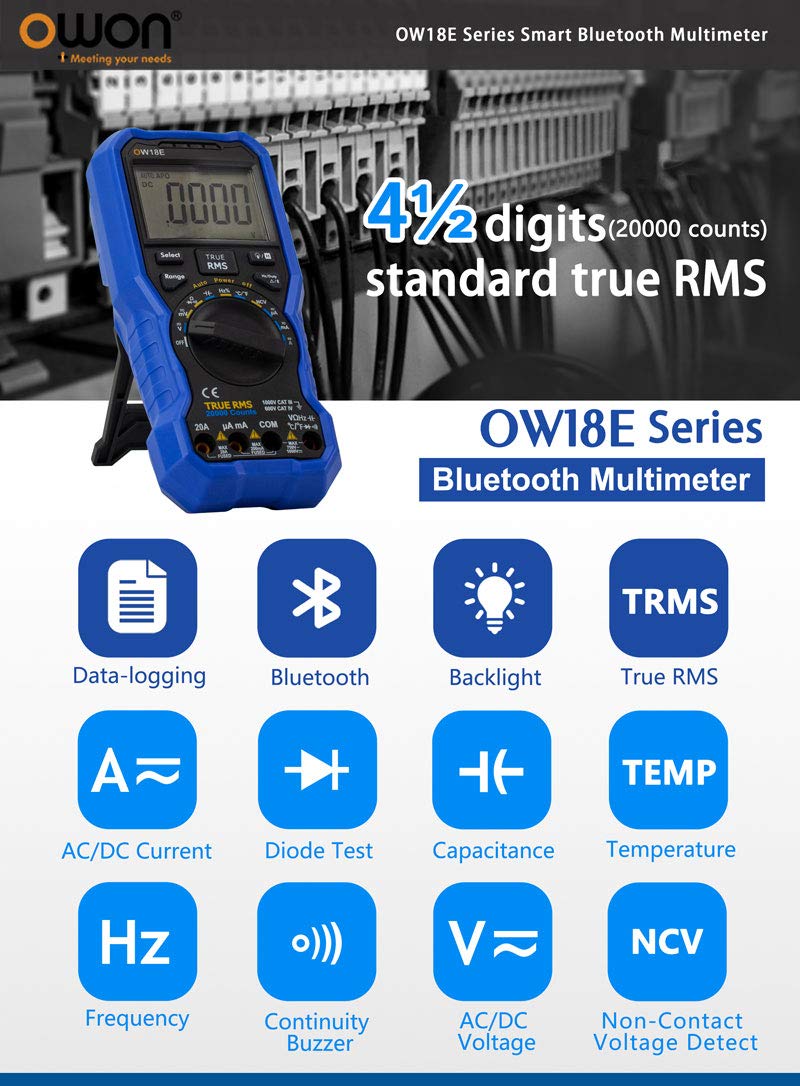
Image 1.1: OWON OW18E Multimeter highlighting its 4½ digit, 20000 counts, True RMS, Bluetooth, Data-logging, AC/DC Current, Diode Test, Capacitance, Temperature, Frequency, Continuity Buzzer, AC/DC Voltage, and Non-Contact Voltage Detect features.
2. Veiligheidsinligting
Always adhere to safety precautions when using the OWON OW18E Digital Multimeter to prevent electric shock or damage to the device. This multimeter is designed to meet safety standards, but improper use can still lead to hazards.
- Do not exceed the maximum input limits for any measurement range.
- Ensure test leads are properly connected and in good condition before making measurements.
- Avoid touching exposed conductors or circuit components while power is applied.
- Use the Non-Contact Voltage (NCV) function to detect live wires before making contact.
- Vervang batterye dadelik when the low battery indicator appears to ensure accurate readings and proper operation.
- Do not operate the multimeter if it appears damaged or if the case is open.
- Refer to the complete safety guidelines in the detailed user manual available on the OWON official webwebwerf.
3. Produk verbyview en komponente
Familiarize yourself with the main components of your OWON OW18E Digital Multimeter.
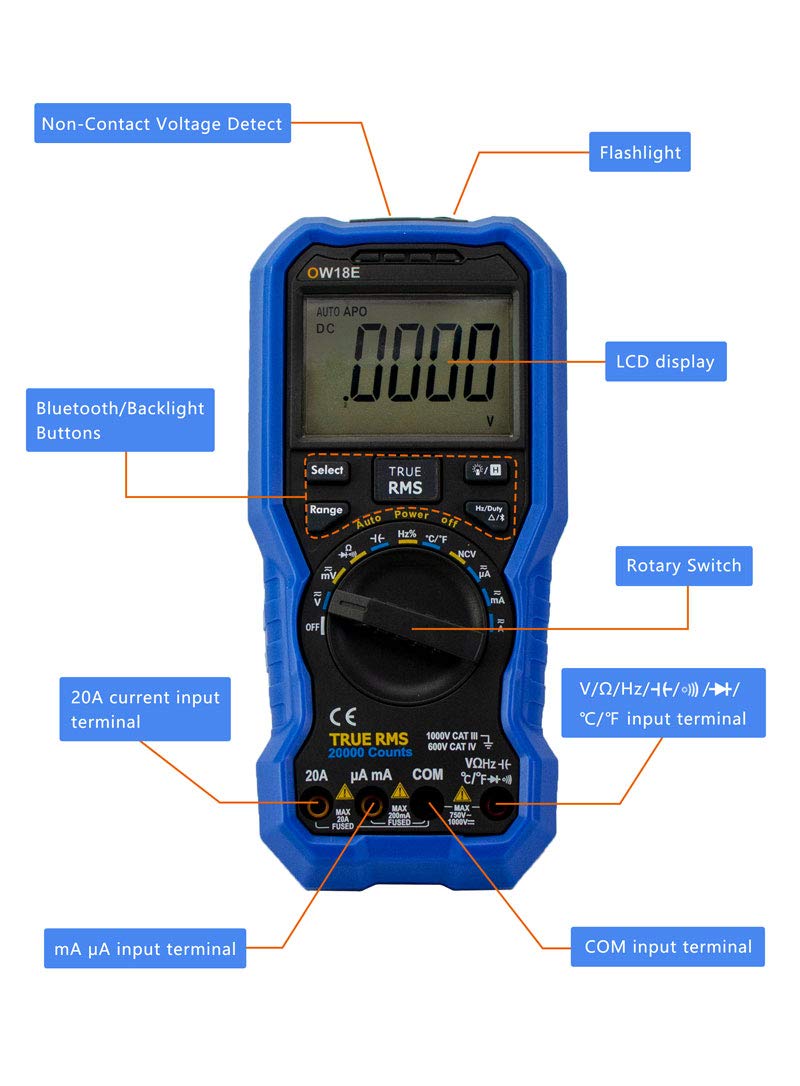
Beeld 3.1: Voorkant view of the OWON OW18E Multimeter, showing the LCD display, Rotary Switch, Bluetooth/Backlight Buttons, Non-Contact Voltage Detect area, Flashlight, 20A current input terminal, mA µA input terminal, V/Ω/Hz/(t)/°C input terminal, and COM input terminal.

Beeld 3.2: Agterkant view of the OWON OW18E Multimeter, illustrating the Insulated non-slip case, Test Lead Slot, Retractable Stand, Fuse and 1.5V battery compartment. Insets show the high definition backlit LCD, rotary switch with accurate scale, smooth and fastened sockets, Non-Contact Voltage Detect area, protective sleeve, and storage slot for test leads.
4. Opstelling
Before using your multimeter, ensure it is properly set up.
4.1 Battery installasie
- Maak seker dat die multimeter AFGESKAKEL is.
- Locate the battery compartment on the back of the device (refer to Image 3.2).
- Gebruik 'n skroewedraaier om die batterydeksel oop te maak.
- Insert the required 1.5V batteries (or 9V battery if applicable, as shown in Image 8.1) according to the polarity markings.
- Maak die batterydeksel stewig toe.
4.2 Toetsdraadverbinding
- Connect the black test lead to the 'COM' input terminal.
- Connect the red test lead to the appropriate input terminal based on the measurement function:
- Vir Voltage, Resistance, Capacitance, Frequency, Diode, Continuity, and Temperature measurements, connect the red lead to the 'V/Ω/Hz/(t)/°C' terminal.
- For mA or µA current measurements, connect the red lead to the 'mA µA' terminal.
- For 20A current measurements, connect the red lead to the '20A' terminal.
- Maak seker dat alle verbindings stewig en veilig is.
5. Bedryfsinstruksies
This section details how to perform various measurements and utilize the multimeter's functions.
5.1 Basiese Metings
- Voltage (WS/GS) Meting:
Draai die draaiskakelaar na die 'V~' (WS Vol.)tage) or 'V-' (DC Voltage) position. Connect the test leads in parallel to the circuit or component to be measured. The reading will appear on the LCD. - Current (AC/DC) Measurement:
Turn the rotary switch to the 'A~' (AC Current) or 'A-' (DC Current) position, selecting the appropriate range (µA, mA, or 20A). Connect the test leads in series with the circuit. - Weerstandmeting:
Turn the rotary switch to the 'Ω' position. Connect the test leads across the component. Ensure the circuit is de-energized before measuring resistance. - Kapasitansiemeting:
Turn the rotary switch to the 'F' (Capacitance) position. Connect the test leads across the capacitor. Ensure the capacitor is discharged before measurement. - Temperatuurmeting:
Turn the rotary switch to the '°C/°F' position. Connect the K-type thermocouple (included) to the input terminals. The temperature will be displayed. - Frequency (Hz) Measurement:
Turn the rotary switch to the 'Hz' position. Connect the test leads to the signal source. - Diode toets:
Turn the rotary switch to the 'Diode' symbol position. Connect the red lead to the anode and the black lead to the cathode of the diode. The forward voltage druppel sal vertoon word. - Kontinuïteitstoets:
Turn the rotary switch to the 'Continuity' symbol position. Connect the test leads across the circuit or component. A buzzer will sound if continuity is detected.
5.2 Spesiale Funksies
- Ware RMS: The OW18E features True RMS measurement, providing accurate readings for both sinusoidal and non-sinusoidal AC waveforms.
- Kontakloos Voltage (NCV) Opsporing: Activate the NCV function to detect the presence of AC voltage without direct contact. The strength indicator will illuminate, and an audible alarm will sound if voltage bespeur word.
- Agterlig: Press the backlight button to illuminate the LCD for improved visibility in low-light conditions.
- Datahou: Druk die 'HOLD'-knoppie om die huidige lesing op die skerm te vries. Druk weer om los te laat.
- Relative Value Measurement: This function allows you to measure the difference between a current reading and a stored reference value.
- Flitslig: The built-in flashlight can be activated to illuminate the work area.
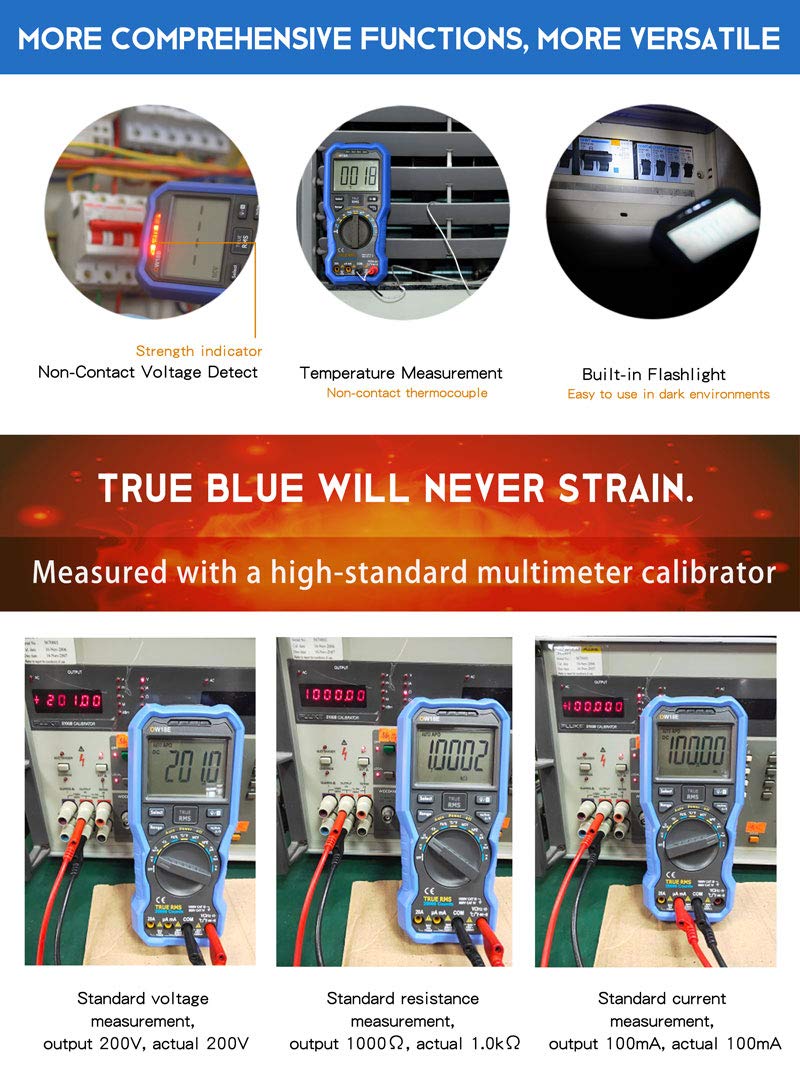
Image 5.1: The OWON OW18E demonstrating Non-Contact Voltage Detect, Temperature Measurement with non-contact thermocouple, and the built-in Flashlight. Also shown are calibration tests for standard voltage, resistance, and current measurements.
5.3 Bluetooth Connectivity and Data Logging
The OW18E supports Bluetooth 4.0 for wireless communication with smartphones or PCs, enabling real-time data transfer and logging.

Image 5.2: Bluetooth function introduction, showing voice broadcast measurement support and stable Bluetooth 4.0 transmission for real-time display on mobile phones and PCs. A Bluetooth USB dongle (optional) may be required for PC connection.

Image 5.3: The OWON OW18E functioning as a data-logger, with its app interface displaying logged values in charts and tables. The record interval can be adjusted (default >0.5s). The image also illustrates simultaneous measurement of multiple data sets for analysis and comparison.
5.3.1 Offline Recording Function

Image 5.4: The app interface for the offline recording function. It shows how to set the sample interval (1 to 4,200,000 seconds) and the number of recording points (0 to 10,000 points). After recording, the data is saved in the multimeter's internal memory and can be downloaded to the mobile app for analysis. If the battery is low, the meter will shut down for data protection before the data is downloaded.
For detailed instructions on using the Bluetooth app, please refer to the App Installation Guide included with your product or download the full user manual from the OWON official webwebwerf: http://www.owon.com.hk/bluetooth4
6. Onderhoud
Behoorlike onderhoud verseker die lang lewensduur en akkuraatheid van jou multimeter.
- Skoonmaak: Gebruik 'n sagte, damp cloth to clean the exterior of the multimeter. Do not use abrasive cleaners or solvents.
- Battery vervanging: Replace batteries as soon as the low battery indicator appears to prevent inaccurate readings or device shutdown during critical measurements. Refer to Section 4.1 for battery installation.
- Sekering vervanging: If the current measurement function fails, the fuse may need replacement. Refer to the detailed manual for instructions on accessing and replacing the fuse. Always use a fuse of the specified type and rating.
- Berging: When not in use for extended periods, remove the batteries and store the multimeter in a cool, dry place away from direct sunlight and extreme temperatures.
7. Probleemoplossing
If you encounter issues with your OWON OW18E, try the following troubleshooting steps:
| Probleem | Moontlike oorsaak | Oplossing |
|---|---|---|
| No display or weak display | Lae battery of geen battery geïnstalleer nie | Replace or install new batteries. |
| Verkeerde lesings | Incorrect range selected, poor test lead connection, or damaged test leads | Ensure correct range, check test lead connections, or replace test leads. |
| Stroommeting werk nie | Gebreekte lont | Replace the fuse with the specified type and rating. |
| Probleme met Bluetooth-verbinding | Bluetooth not enabled, app not installed, or device out of range | Ensure Bluetooth is on, install the OWON app, and keep devices within range. For PC, ensure a Bluetooth dongle is used. |
If the problem persists after attempting these solutions, please contact OWON customer support.
8. Spesifikasies
The OWON OW18E Digital Multimeter offers the following technical specifications:
| Kenmerk | Spesifikasie |
|---|---|
| Vertoon telling | 20,000 counts (4½ digits) |
| Ware RMS | Ja |
| Bluetooth | Bluetooth 4.0 |
| Datalogging | Up to 10,000 points (offline recording) |
| AC/DC Voltage | Measurement capability included |
| AC/DC Stroom | Measurement capability included (up to 20A) |
| Weerstand | Measurement capability included |
| Kapasitansie | Measurement capability included |
| Temperatuur | Measurement capability included (K-type thermocouple) |
| Frekwensie | Measurement capability included |
| Diodetoets | Ja |
| Kontinuïteit Buzzer | Ja |
| Kontakloos Voltage (NCV) | Ja |
| Agterlig | Ja |
| Flitslig | Ja |
| Kragbron | AC (implied by product description, typically battery-powered for handheld) |
| Produkafmetings (L x B x H) | 196 mm x 88.5 mm x 56 mm |
| Produk Netto Gewig | 0.32 kg |
| Bykomstighede ingesluit | Multimeter leads, K-type thermocouple, screwdriver, alligator clips, instructions, app installation guide |

Image 8.1: Product contents and dimensions. Includes the OW18E multimeter, 9V battery (optional), screwdriver, K-type thermocouple, alligator clips, multimeter leads, instructions, and app installation guide. Product dimensions are 196mm x 88.5mm x 56mm, with a net weight of 0.32 kg.
9. Waarborg en Ondersteuning
OWON is committed to providing high-quality products and reliable customer support.
9.1 Waarborginligting
OWON products purchased through Amazon are covered by a standard warranty:
- Hoof Eenheid: 3-year manufacturer's warranty.
- Bykomstighede: 1-year warranty for modules, probes, and batteries.
9.2 Kliëntediens
For any inquiries, technical assistance, calibration services, repair requests, or other support needs, please contact OWON directly.
- Amptelik Webwebwerf: User manuals and additional resources can be downloaded from the OWON official webwebwerf: owon.co.jp
- Kontak vir diens: For calibration, repair, or other service requests, please visit the OWON official website and use the contact form or provided contact information. When requesting repair, please provide your purchase route, purchase date, and model name.
- Bulk Purchases/Demo Units: For corporate customers interested in bulk purchases or borrowing demo units, please contact OWON via their official webwebwerf.