
Swissten SW1010
SWISSTEN Elegant Bluetooth Headphones User Manual
Model: SW1010
Produk verbyview
The SWISSTEN Elegant Bluetooth Headphones are designed for versatile audio playback, offering high-quality sound and multiple connectivity options. These headphones feature Bluetooth wireless connectivity, an integrated FM radio tuner, a microSD card slot for direct music playback, a 3.5mm AUX audio input, and a built-in hands-free microphone. The earcups are pivotable for enhanced comfort during use.

Figuur 1: Voorkant view of the SWISSTEN Elegant Bluetooth Headphones, showcasing the sleek black design and earcups.
Pakketinhoud
Nadat u die verpakking oopgemaak het, maak seker dat alle komponente teenwoordig is:
- SWISSTEN Elegant Bluetooth Headphones
- USB-laaikabel
- 3.5mm-klankkabel (AUX)
- Gebruikershandleiding
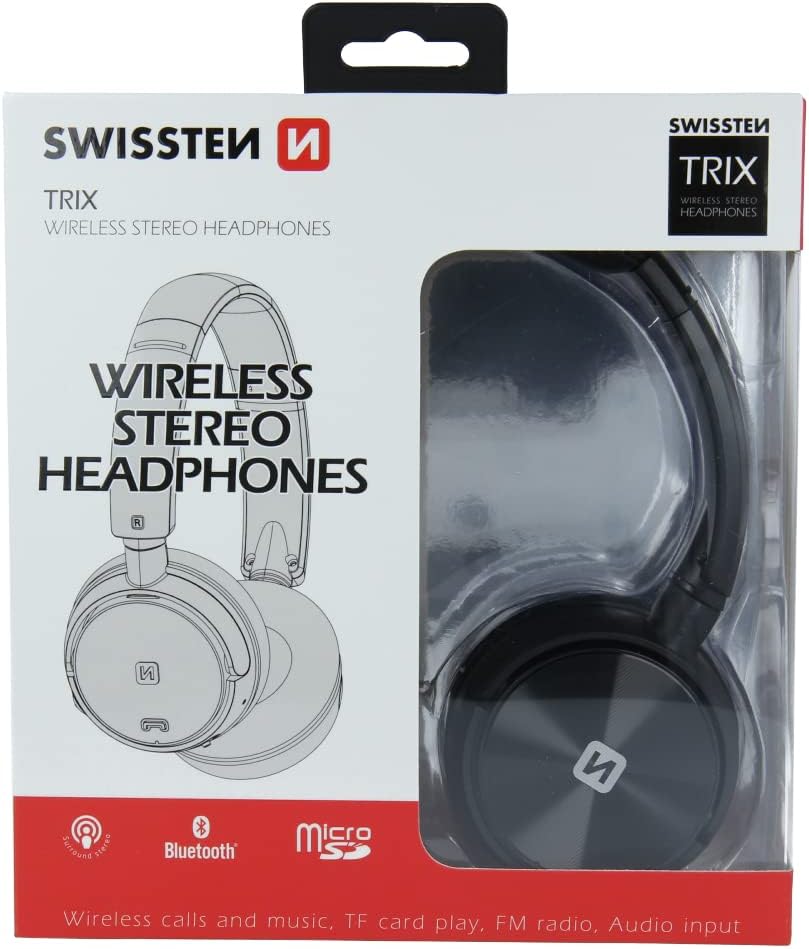
Figuur 2: Retail packaging of the SWISSTEN Elegant Bluetooth Headphones, showing the product and key features.
Opstelling
Laai die oorfone
Before first use, fully charge the headphones. Connect the supplied USB charging cable to the micro USB port on the headphones and the other end to a USB power source (e.g., computer USB port, USB wall adapter). The charging indicator light will illuminate during charging and turn off when fully charged. A full charge takes approximately 2 hours.
Skakel aan/af
- Om aan te skakel: Druk en hou die aan/af-knoppie in totdat die aanwyserliggie flikker.
- Om af te skakel: Druk en hou die aan/af-knoppie in totdat die aanwyserliggie afskakel.

Figuur 3: Close-up view of the headphone earcup, highlighting the control buttons, charging port, and 3.5mm audio jack.
Bedryfsinstruksies
Bluetooth-koppeling
- Maak seker dat die oorfone afgeskakel is.
- Druk en hou die aan/af-knoppie vir ongeveer 5-7 sekondes totdat die aanwyserliggie afwisselend blou en rooi flikker, wat paringsmodus aandui.
- Aktiveer Bluetooth op jou toestel (slimfoon, tablet, rekenaar) en soek vir beskikbare toestelle.
- Select "SWISSTEN SW1010" (or similar name) from the list of found devices.
- Sodra dit gekoppel is, sal die aanwyserliggie stadig blou flikker.
Die Bluetooth-reikwydte is ongeveer 10 meter (33 voet).
Music Playback (Bluetooth/MicroSD/AUX)
- Bluetooth-modus: After successful pairing, play music from your connected device. Use the headphone controls for Play/Pause, Next/Previous Track, and Volume adjustment.
- MicroSD-kaartmodus: Insert a microSD card (up to 32GB) with MP3, WMA, or WAV audio files into the designated slot. The headphones will automatically switch to microSD mode and begin playback.
- AUX-modus: Connect one end of the 3.5mm audio cable to the headphone's AUX port and the other end to your audio source. The headphones will automatically switch to AUX mode. Note: In AUX mode, controls on the headphones may be limited; control playback from your audio source.
FM-radio werking
- Skakel die oorfone aan.
- Press the Mode button (often labeled 'M' or similar) to switch to FM Radio mode.
- Press the Play/Pause button once to auto-scan and save available FM stations.
- Gebruik die Volgende/Vorige Snit-knoppies om tussen gestoorde stasies te navigeer.
The FM frequency range is 87.5-108 MHz.
Handvrye oproepe
- Beantwoord oproep: Druk die Speel/Pause-knoppie een keer.
- Beëindig oproep: Druk die Speel/Pause-knoppie een keer tydens 'n oproep.
- Verwerp oproep: Druk en hou die Speel/Pause-knoppie vir 2 sekondes in.
- Herbel laaste nommer: Dubbeldruk die Speel/Pause-knoppie.

Figuur 4: A person wearing the SWISSTEN Elegant Bluetooth Headphones, demonstrating their comfortable fit.
Onderhoud
- Skoonmaak: Gebruik 'n sagte, droë lap om die oorfone skoon te maak. Moenie skuurmiddels of oplosmiddels gebruik nie.
- Berging: Bêre die oorfone op 'n koel, droë plek weg van direkte sonlig en uiterste temperature.
- Batterysorg: Om die batterylewe te verleng, vermy om die battery gereeld heeltemal te ontlaai. Laai die oorfone gereeld, selfs al word dit nie vir lang tye gebruik nie.
- Waterblootstelling: Hierdie oorfone is nie waterdig nie. Vermy blootstelling aan water of oormatige vog.
Probleemoplossing
| Probleem | Moontlike oorsaak | Oplossing |
|---|---|---|
| Oorfone skakel nie aan nie. | Lae battery. | Laai die oorfone ten volle. |
| Kan nie via Bluetooth koppel nie. | Oorfone nie in paringsmodus nie; toestel Bluetooth af; te ver van toestel. | Maak seker dat oorfone in paringsmodus is (flikker blou/rooi). Skakel Bluetooth op jou toestel aan. Beweeg oorfone nader aan die toestel (binne 10 m). |
| Geen klank nie. | Volume too low; incorrect mode selected; AUX cable not fully inserted. | Increase volume on headphones and connected device. Ensure correct mode (Bluetooth, MicroSD, AUX, FM) is selected. Re-insert AUX cable firmly. |
| Swak FM-radio-ontvangs. | Swak sein; interferensie. | Move to an area with better signal. Re-scan stations. |
Spesifikasies
| Kenmerk | Detail |
|---|---|
| Modelnommer | SW1010 |
| Bluetooth weergawe | V4.2 |
| Ondersteunde Bluetooth Profiles | A2DP, AVRCP |
| Supported Audio Formats (MicroSD) | MP3 (8-320 Kbps), WMA (5-320 Kbps), WAV (16-1536 Kbps) |
| FM-radiofrekwensiereeks | 87.5-108 MHz |
| Luidspreker deursnee | 40 mm |
| Impedansie | 32 ohm |
| Sensitiwiteit | 108 +/- 3 dB |
| Frekwensierespons | 20 – 20,000 XNUMX Hz |
| Bedryfsreeks | 10 m |
| Laai tyd | 2 uur |
| Bedryfstyd | 6 – 8 uur |
| Konnektiwiteit | Wireless Bluetooth, 3.5mm Jack |
| Spesiale kenmerke | Microphone included, FM Radio, MicroSD slot |
| Vormfaktor | Over-Ear (Supra-Auriculaire) |
| Materiaal | Faux Leather (Simili cuir) |
Waarborg en Ondersteuning
For warranty information and technical support, please refer to the official SWISSTEN webwebwerf of kontak jou kleinhandelaar. Bewaar jou bewys van aankoop vir waarborgeise.
Vervaardiger: SWISSTEN
ASIN: B0BC9F9LWM
Ask a question about this manual
Ask about setup, troubleshooting, compatibility, parts, safety, or missing instructions. Manuals+ will review the question and use this page’s manual context to help answer it.