
OTL Technologies PK0980
OTL Technologies Pokemon Pikachu Draadlose Bluetooth Kinderkoptelefoon PK0980 Instruksiehandleiding
Model: PK0980
1. Inleiding
This manual provides essential information for the safe and effective use of your OTL Technologies Pokemon Pikachu Wireless Bluetooth Kids Headphones, model PK0980. Please read this manual thoroughly before using the product and retain it for future reference.
2. Veiligheidsinligting
Om veilige werking te verseker en skade te voorkom, neem die volgende voorsorgmaatreëls:
- Ouderdom geskiktheid: Hierdie oorfone is geskik vir kinders van 3 jaar en ouer.
- Volumebeheer: The headphones feature two safe volume settings: 85 dB and 95 dB. Always select the appropriate volume level for the listening environment to protect hearing. Prolonged exposure to loud noise may cause hearing damage.
- Waterweerstand: Hierdie produk is nie waterbestand nie. Avoid exposure to water or moisture to prevent damage.
- Skoonmaak: Do not use harsh chemicals or strong detergents to clean the headphones. Use a soft, dry cloth.
- demontage: Do not attempt to disassemble, repair, or modify the headphones. This will void the warranty and may cause damage or injury.
- Omgewingsbewustheid: Do not use headphones in situations where an inability to hear surrounding noise may present a danger (e.g., while cycling, driving, or near operating machinery).
- Batteryveiligheid: The headphones contain a Lithium-ion battery. Do not expose to extreme temperatures or dispose of in fire.
3. Pakketinhoud
Verifieer dat alle items in die pakket teenwoordig is:
- 1x OTL Technologies Pokemon Pikachu Wireless Bluetooth Kids Headphones
- 1x USB Tipe C-laaikabel
- 1x 3.5mm Audio Sharing Cable
- 1x Instruction Leaflet (this manual)

Image: Headphones and accessories neatly packaged in the box.
4. Produk verbyview
Maak jouself vertroud met die komponente en kontroles van jou oorfone.
4.1 Headphone Structure

Beeld: Voorkant view van die oorfone, wysasing the Pikachu design on the earcups and the adjustable headband.

Beeld: Bo view of the headphones, showing the foldable design and the headband's cushioning.
4.2 Kontroles en Poorts

Image: Close-up of the right earcup, displaying the power button, volume controls, and charging port.

Beeld: Gedetailleerd view of the volume limit switch, allowing selection between 85 dB and 95 dB.
- Kragknoppie: Used to turn the headphones on/off and for Bluetooth pairing.
- Volume knoppies: Pas die luistervolume aan.
- Volume Limit Switch: Toggle between 85 dB and 95 dB maximum volume levels.
- USB Tipe C-poort: Vir die laai van die oorfone.
- 3.5 mm oudio-aansluiting: Vir bedrade verbinding met behulp van die ingeslote klankkabel.
- Mikrofoon: Geïntegreerd vir handvrye oproepe.
4.3 Verstelbare Hoofband

Image: Close-up of the extendable headband, showing numbered adjustment points for a customized fit.
The headband is extendable to provide a flexible and customized fit for various head sizes. Adjust both sides evenly for optimal comfort.
5. Opstelling
5.1 Laai die oorfone
Laai die oorfone volledig voor die eerste gebruik.
- Koppel die USB Tipe-C-laaikabel aan die laaipoort op die oorfone.
- Koppel die ander kant van die USB-kabel aan 'n versoenbare USB-kragbron (bv. 'n rekenaar se USB-poort, USB-muuradapter).
- The LED indicator will show the charging status. A full charge takes approximately 2 hours.
- Once fully charged, the LED indicator will change (refer to the instruction leaflet for specific LED behavior) and the headphones will provide up to 24 hours of playback time.
5.2 Bluetooth -koppeling
Om jou oorfone draadloos aan 'n toestel te koppel:
- Maak seker dat die oorfone gelaai is.
- Press and hold the Power button until the LED indicator flashes, indicating pairing mode.
- On your device (e.g., smartphone, tablet, laptop), enable Bluetooth and search for available devices.
- Select "OTL Pikachu" or a similar name from the list of found devices.
- Once connected, the LED indicator will change (e.g., solid blue) and a confirmation tone may sound.
- The headphones have a working distance of up to 10 meters from the paired device.
5.3 Wired Connection (Optional)
You can use the headphones with the included 3.5mm audio cable for devices without Bluetooth or when the battery is depleted.
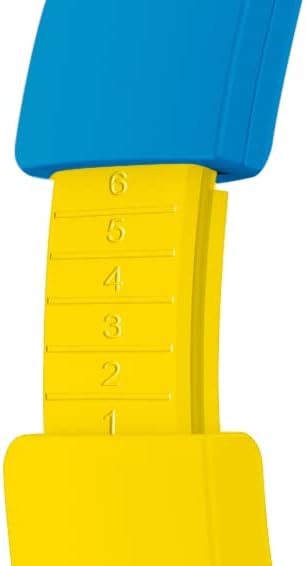
Image: The included 3.5mm audio cable for direct connection to devices.
- Steek die een kant van die 3.5 mm-klankkabel in die klankaansluiting op die oorfone.
- Steek die ander kant in die 3.5 mm-klankuitvoer van jou toestel.
- The headphones will operate in passive mode, and Bluetooth functionality will be disabled.
6. Bediening van die oorfone
6.1 Krag aan/af
- Om aan te skakel: Press and hold the Power button for approximately 3 seconds. The LED indicator will light up.
- Om af te skakel: Press and hold the Power button for approximately 3 seconds. The LED indicator will turn off.
6.2 Aanpassing van volume
- Volume op: Druk die '+'-knoppie.
- Volume af: Druk die '-' knoppie.
- Setting Maximum Volume: Use the volume limit switch (85 dB / 95 dB) located on the earcup to set the desired maximum safe listening level.
6.3 Musiekterugspeel en oproepe
- Speel/pouse: Press the Power button once during music playback.
- Volgende snit: Druk en hou die '+'-knoppie in.
- Vorige snit: Druk en hou die '-' knoppie in.
- Beantwoord/beëindig oproep: Press the Power button once during an incoming call or to end an active call.
- Verwerp oproep: Press and hold the Power button during an incoming call.
6.4 Using the Sharing Cable
The included sharing cable allows two pairs of headphones to listen to the same audio source simultaneously.
- Connect the main 3.5mm audio cable from your audio source to the first pair of headphones.
- Connect one end of the sharing cable to the available 3.5mm audio jack on the first pair of headphones.
- Connect the other end of the sharing cable to the 3.5mm audio jack on the second pair of headphones.
- Both headphones will now receive audio from the same source.
7. Onderhoud
- Skoonmaak: Wipe the headphones with a soft, dry, lint-free cloth. Do not use liquid cleaners or aerosols.
- Berging: Wanneer dit nie gebruik word nie, bêre die oorfone op 'n koel, droë plek, weg van direkte sonlig en uiterste temperature. Die opvoubare ontwerp maak kompakte berging moontlik.
- Batterysorg: To prolong battery life, avoid fully discharging the battery frequently. Charge the headphones regularly, even if not in constant use.
8. Probleemoplossing
| Probleem | Moontlike oorsaak | Oplossing |
|---|---|---|
| Oorfone skakel nie aan nie. | Battery is leeg. | Charge the headphones using the provided USB Type-C cable. |
| Kan nie via Bluetooth koppel nie. | Oorfone nie in paringsmodus nie; toestel Bluetooth af; te ver van toestel. | Ensure headphones are in pairing mode (flashing LED). Turn Bluetooth on your device. Move headphones closer to the device (within 10 meters). Try restarting both devices. |
| No sound when connected. | Volume too low; incorrect audio source selected; wired cable not fully inserted. | Increase headphone and device volume. Check if the correct audio output is selected on your device. Ensure the 3.5mm cable is fully inserted if using wired mode. Check the volume limit switch. |
| Sound is distorted or cuts out. | Low battery; interference; too far from device. | Charge the headphones. Move away from other wireless devices. Reduce distance to the paired device. |
9. Spesifikasies
| Modelnommer | PK0980 |
| Verbindingstegnologie | Draadloos (Bluetooth) |
| Draadlose kommunikasietegnologie | Bluetooth |
| Ouderdomsreeks (beskrywing) | Children (3+ years) |
| Materiaal | Plastiek |
| Laai tyd | Ongeveer 2 ure |
| Aanbevole gebruik | Personal Audio |
| Versoenbare toestelle | Laptop, Smartphones, Tablets (Bluetooth enabled) |
| Tipe beheer | Volumebeheer, Afstandbeheer |
| Item gewig | 160 gram |
| Waterweerstandvlak | Nie waterbestand nie |
| Bykomende kenmerke | Microphone included, Foldable design |
| Gemiddelde batterylewe | 24 ure |
| Battery sel samestelling | Litium-ioon |
| Kleur | Geel |
| Oorplasing | Op-oor |
| Vormfaktor | Oor-oor |
| Impedansie | 32 ohm |
| Geraasbeheer | Ruisisolasie |
| Frekwensierespons | 20000 Hz |
| Sensitiwiteit | 85 dB |
| Koptelefoonaansluiting | 3.5 mm domkrag |
| Produk afmetings | 16 x 7 x 17 cm |
Ask a question about this manual
Ask about setup, troubleshooting, compatibility, parts, safety, or missing instructions. Manuals+ will review the question and use this page’s manual context to help answer it.