
1. Inleiding en Veiligheidsinligting
This manual provides essential instructions for the safe and effective operation, maintenance, and troubleshooting of your VOLTCRAFT VC851 Digital Multimeter. Please read this manual thoroughly before using the device and keep it for future reference.
1.1 Algemene Veiligheidswaarskuwings
Always adhere to the following safety precautions to prevent electric shock, injury, or damage to the meter or equipment under test:
- The VOLTCRAFT VC851 is rated for CAT III 1000 V and CAT IV 600 V. Ensure you understand these categories and their implications for safe measurement.
- Moenie meer as die gegradeerde voltage, soos op die meter gemerk, tussen terminale of tussen enige terminaal en aarde.
- Wees versigtig wanneer u met voltagbo 30 V AC RMS, 42 V piek, of 60 V DC. Hierdie volumestagdit hou 'n skokgevaar in.
- Before each use, inspect the test leads for damaged insulation or exposed metal. Replace damaged leads immediately.
- Maak seker dat die draaiskakelaar in die korrekte posisie is vir die verlangde meting voordat die toetsdrade aan die stroombaan gekoppel word.
- Never use the meter if it appears damaged or if the case is open.
- Moenie die meter in plofbare gas-, damp- of stofomgewings gebruik nie.
- Always disconnect the test leads from the circuit before changing the function or range.
- Vervang die battery sodra die lae battery-aanwyser verskyn om akkurate lesings te verseker.
2. Produk verbyview
The VOLTCRAFT VC851 is a versatile digital multimeter designed for precise electrical measurements. It features a 6000-count display, auto-ranging capabilities, and integrated flashlight and screen illumination for use in various environments.
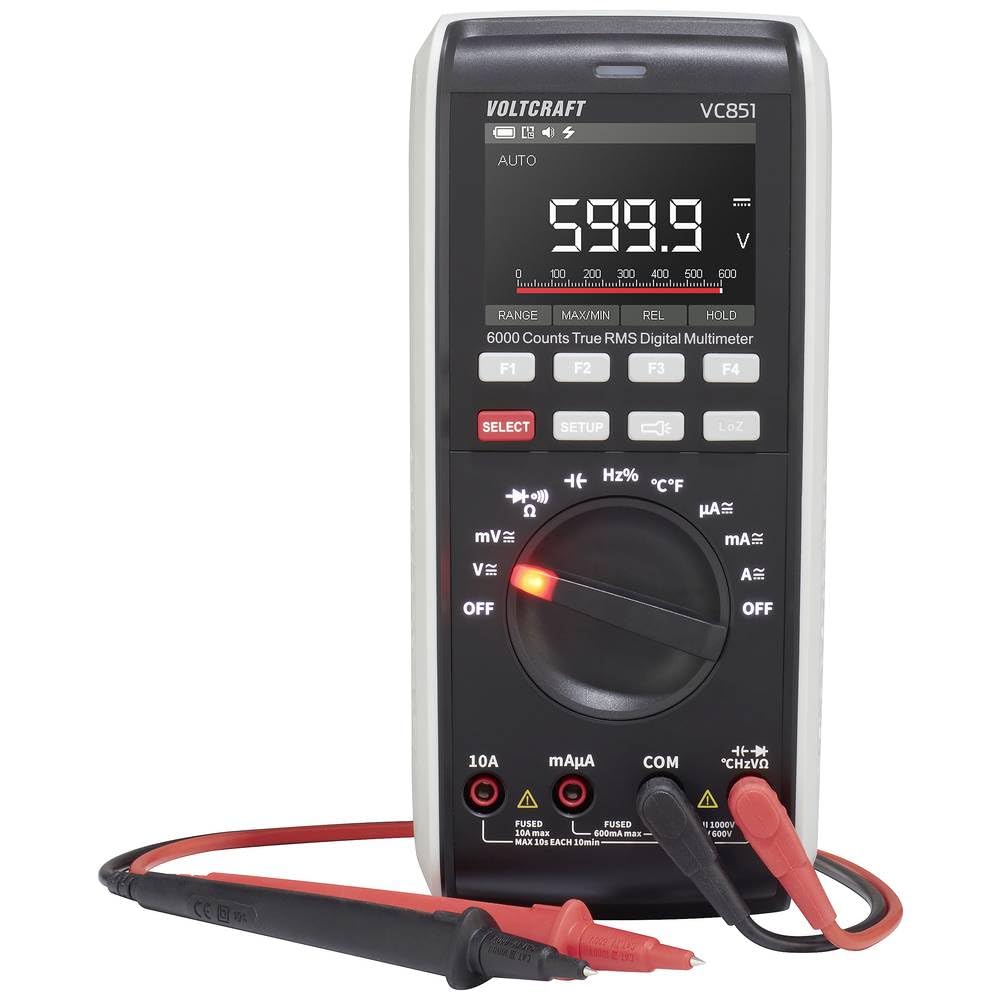
Figuur 2.1: Voorkant view of the VOLTCRAFT VC851 Digital Multimeter with connected test leads. This image shows the display, rotary dial, function buttons, and input jacks.

Figuur 2.2: Agter view of the VOLTCRAFT VC851 Digital Multimeter, illustrating the integrated test lead storage and kickstand.
3. Opstelling en aanvanklike werking
3.1 Battery installasie
The VOLTCRAFT VC851 is powered by batteries. To install or replace batteries:
- Maak seker dat die multimeter AFGESKAKEL is en ontkoppel alle toetsdrade.
- Vind die batteryklepdeksel aan die agterkant van die toestel.
- Gebruik 'n skroewedraaier om die batterykompartement oop te maak.
- Insert new batteries, observing the correct polarity (+/-).
- Sluit die deksel van die batterykas veilig.

Figuur 3.1: Terug view of the multimeter, highlighting the battery compartment for installation or replacement.
3.2 Verbinding van toetsdrade
To prepare for measurements:
- Steek die swart toetsdraad in die "COM" (algemene) invoeraansluiting.
- Insert the red test lead into the appropriate input jack for your measurement:
- "VΩHz" for voltage, resistance, frequency, capacitance, and diode tests.
- "mAµA" for milliampere en mikroampere huidige metings.
- "10A" for high current (up to 10A) measurements.

Figure 3.2: The multimeter with test leads properly connected to the input jacks, ready for use.
4. Bedryfsinstruksies
The VOLTCRAFT VC851 features a rotary dial for selecting primary measurement functions and buttons for secondary functions and settings.
4.1 Funksiekeuse
Turn the central rotary dial to select the desired measurement function (e.g., V for voltage, A for current, Ω for resistance). The meter will automatically select the appropriate range (Auto-Range) for most measurements.
4.2 Meetmodusse
- Voltage (V~ / V-): Measure AC or DC voltage. Select the appropriate voltage range using the rotary dial.
- Current (A~ / A-): Measure AC or DC current. Ensure test leads are connected to the correct current input jacks (mAµA or 10A) and the rotary dial is set to the corresponding current range.
- Weerstand (Ω): Measure resistance in ohms.
- Kontinuïteit: Test for continuity with an audible buzzer.
- Diode toets: Test diodes for proper function.
- Kapasitansie (F): Measure capacitance in farads.
- Frekwensie (Hz): Measure frequency in hertz.
- Temperatuur (°C/°F): Measure temperature using the included temperature probe.
4.3 Spesiale kenmerke
- Flitslig: Press the dedicated flashlight button to illuminate the work area.
- Skermbeligting: The display features backlighting for improved visibility in low-light conditions.
- Datahou: Press the "HOLD" button to freeze the current reading on the display.
- Min/Maks: Use the "MIN/MAX" function to record the minimum and maximum values during a measurement session.

Figure 4.1: The multimeter in use, demonstrating its application in an electrical panel for voltage or current checks.

Figure 4.2: The multimeter being used for precise measurements on a circuit board, showcasing its versatility for electronics work.
5. Onderhoud
Proper maintenance ensures the longevity and accuracy of your VOLTCRAFT VC851 Digital Multimeter.
5.1 Skoonmaak
- Always turn off the meter and disconnect test leads before cleaning.
- Vee die omhulsel af met advertensieamp lap en sagte skoonmaakmiddel. Moenie skuurmiddels of oplosmiddels gebruik nie.
- Ensure no moisture enters the case.
5.2 Batteryvervanging
Refer to Section 3.1 for detailed instructions on battery replacement. Replace batteries promptly when the low battery indicator appears to maintain measurement accuracy.
5.3 Sekeringvervanging
If the current measurement function stops working, the fuse may need replacement. Fuses are critical safety components. Always replace with a fuse of the specified type and rating.
- Maak seker dat die multimeter AFGESKAKEL is en ontkoppel alle toetsdrade.
- Open the battery compartment cover (refer to Section 3.1).
- Verwyder die ou sekering versigtig.
- Install a new fuse of the exact same type and rating. Refer to the specifications section for fuse details.
- Sluit die deksel van die batterykas veilig.
6. Probleemoplossing
If you encounter issues with your VOLTCRAFT VC851, consult the following table for common problems and solutions.
| Probleem | Moontlike oorsaak | Oplossing |
|---|---|---|
| Geen vertoon of dowwe vertoon | Lae of leë batterye | Replace batteries (see Section 3.1). |
| Verkeerde lesings | Incorrect function/range selected; Damaged test leads; External interference | Verify rotary switch position; Inspect and replace test leads if damaged; Move away from strong electromagnetic fields. |
| Stroommeting werk nie | Blown fuse; Incorrect lead connection | Replace fuse (see Section 5.3); Ensure leads are in the correct current input jacks. |
| "OL" (Oorlading) word vertoon | Meting oorskry gekose reeks of meter se maksimum kapasiteit | Switch to a higher range if available, or ensure the measured value is within the meter's specifications. |
7. Tegniese spesifikasies
| Kenmerk | Spesifikasie |
|---|---|
| Modelnommer | VC-12884325 |
| Veiligheidsgradering | CAT III 1000V, CAT IV 600V |
| Vertoon tellings | 6000 tellings |
| Reeks | Outo-reeks |
| Funksies | AC/DC Voltage, AC/DC Current, Resistance, Continuity, Diode, Capacitance, Frequency, Temperature |
| Spesiale kenmerke | Flashlight, Screen Illumination, Data Hold, Min/Max |
| Afmetings (L x B x H) | 4.3 x 9.1 x 20 cm (1.7 x 3.6 x 7.9 duim) |
| Gewig | 430 gram (0.95 lbs) |
| Kragbron | Battery aangedrewe |
| Onderdele Beskikbaarheid | 1 Jaar |
8. Waarborg en Ondersteuning
VOLTCRAFT products are designed for reliability and performance. This product comes with a standard warranty. For specific warranty terms and conditions, please refer to the documentation included with your purchase or visit the official VOLTCRAFT webwebwerf.
Spare parts are available for 1 year from the date of purchase. For technical support, service, or inquiries regarding spare parts, please contact VOLTCRAFT customer service through their official channels.
Behou asseblief jou aankoopbewys vir waarborgeise.