Dankie vir die aankoopasing the OFANTOP 132cm Modern Ceiling Fan. This manual provides detailed instructions for safe installation, operation, and maintenance of your new ceiling fan. Please read this manual thoroughly before installation and keep it for future reference.
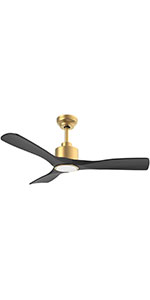
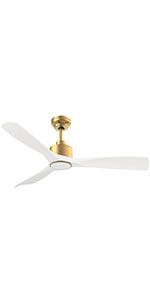
Image 1.1: The OFANTOP 132cm Modern Ceiling Fan, featuring a sleek black motor housing and three dark wood-grain blades, with an integrated LED light kit.
2. Veiligheidsinstruksies
Volg altyd basiese veiligheidsmaatreëls wanneer u elektriese toestelle installeer en gebruik om die risiko van brand, elektriese skok en persoonlike besering te verminder.
Lees alle instruksies voordat u met die installasie begin.
Maak seker dat die krag by die stroombreker afgeskakel is voor installasie of onderhoud.
Alle bedrading moet in ooreenstemming wees met nasionale en plaaslike elektriese kodes. Raadpleeg 'n gekwalifiseerde elektrisiën as u onseker is oor die bedrading.
Die monteringsstruktuur moet die waaier se gewig (ongeveer 7.91 kg) kan dra.
Moenie die waaier met beskadigde lemme of behuising gebruik nie.
Hou hande, klere en ander voorwerpe weg van die waaierlemme wanneer die waaier in werking is.
This fan is suitable for both indoor and outdoor (patio/porch) use, with an IP44 rating for protection against splashing water.
3. Pakketinhoud
Verifieer dat alle komponente teenwoordig is voordat u met die installasie begin:
Motor Housing Assembly (with integrated LED light)
Fan lemme (3)
Downrods (15cm and 25cm options)
Montagebeugel
Afstandbeheer met muurbevestiging
Hardewarepak (skroewe, wassers, draadmoere)
Gebruikershandleiding
4. Opstelling en installering
Follow these steps for proper installation of your ceiling fan.
4.1 Voorinstallasie
Before installation, ensure the electrical box is securely mounted to the building structure and can support the fan's weight. Confirm that the power supply is turned off at the main circuit breaker.
4.2 Monteer die bracket
Attach the mounting bracket to the ceiling electrical box using the provided screws. Ensure the bracket is firmly secured.
Image 4.1: Diagram illustrating flat ceiling mounting for the fan.
Image 4.2: Diagram illustrating sloped ceiling mounting, supporting angles up to 15 degrees.
4.3 Assembling the Fan
Insert the chosen downrod (15cm or 25cm) into the motor housing.
Lig die waaiereenheid versigtig op en hang dit aan die monteerbeugel.
Connect the electrical wires according to the wiring diagram (typically black to black, white to white, and green/bare copper to ground).
Heg die waaierlemme aan die motorhuis vas met die meegeleverde skroewe. Maak seker dat alle skroewe stewig vasgedraai is.
Image 4.3: Detailed dimensions of the ceiling fan, showing its 132cm (52 inch) span and various height options with different downrods.
5. Bedryfsinstruksies
Your OFANTOP ceiling fan offers multiple control options for convenience.
5.1 Afstandbeheer werking
The included remote control allows full functionality of the fan and light. Install 2 AAA batteries (not included) into the remote.
Fan Spoed: Select from 6 wind speeds (1-6) to adjust airflow.
Ligbeheer: Turn the LED light ON/OFF.
verduistering: Pas die helderheid van die LED-lig aan.
Kleur temperatuur: Cycle through Cool White (6000K), Natural Light (4500K), and Warm Light (3000K).
Afteller: Stel die waaier om outomaties af te skakel na 1, 4 of 8 uur.
Omgekeerde funksie: Toggle between summer (downward airflow) and winter (upward airflow) modes.
Image 5.1: The ceiling fan in a living room setting, highlighting the remote control and its key features: 6 wind speeds, reversible function, and timer settings.
Image 5.2: Illustration of the dimmable LED light feature, showing the fan's light output at Cool White (6000K), Natural Light (4500K), and Warm Light (3000K).
5.2 Slimbeheer (App en stem)
This smart ceiling fan can be controlled via a dedicated mobile application and voice commands through Amazon Alexa or Google Assistant. Ensure your fan is connected to a 2.4GHz Wi-Fi network for initial setup. After setup, it can operate on 5GHz.
Programbeheer: Download the OFANTOP smart home app (refer to the app store for specific app name). Follow in-app instructions to pair your fan.
Stembeheer: Once paired with the app, enable the OFANTOP skill/action in your Alexa or Google Home app to control the fan with voice commands.
Image 5.3: Visual representation of the multiple control options available for the fan, including remote control, smart app, and voice control via Alexa and Google Assistant.
5.3 Reverse Function Explained
The reversible function allows you to optimize air circulation for different seasons.
Somermodus: Blades rotate counter-clockwise, pushing cool air downwards, creating a refreshing breeze.
Wintermodus: Blades rotate clockwise, drawing cool air up towards the ceiling and circulating warm air downwards, helping to distribute heat more evenly.
Image 5.4: Diagram illustrating the fan's reversible function, showing downward airflow for summer cooling and upward airflow for winter heat circulation.
6. Onderhoud
Gereelde onderhoud verseker optimale werkverrigting en lang lewensduur van jou plafonwaaier.
Skoonmaak: Om te verhoed dat die afwerking gekrap word, maak die waaier skoon met 'n sagte, damp lap. Moenie skuur skoonmaakmiddels of oplosmiddels gebruik nie.
Lemme skoonmaak: Dust the blades regularly to prevent dust buildup, which can affect balance and performance.
Draai skroewe: Periodically check all screws on the fan and mounting hardware to ensure they are tight. Loose connections can cause noise or wobbling.
Ligbron: The integrated LED light source is designed for long life. If replacement is ever needed, consult a qualified technician.
7. Probleemoplossing
As jy probleme met jou waaier ondervind, raadpleeg die volgende algemene probleme en oplossings:
Probleem
Moontlike oorsaak
Oplossing
Waaier begin nie
Geen krag na die waaier nie Los draadverbindings Afstandbeheerbattery laag/dood
Kontroleer die stroombreker en muurskakelaar. Verifieer dat alle draadverbindings stewig is (maak seker dat die krag eers afgeskakel is). Vervang afstandbeheerbatterye.
Fan wiebel
Los lemskroewe Ongebalanseerde lemme Los monteerbeugel
Draai alle lemskroewe vas. Ensure blades are installed correctly and are not bent. Use a balancing kit if necessary. Draai die skroewe van die monteringsbeugel vas.
Lawaaierige operasie
Los skroewe Motor hum Blades hitting an obstruction
Kontroleer en draai alle skroewe vas. A slight hum from the DC motor is normal, especially at higher speeds. Ensure fan is securely mounted. Ensure nothing is obstructing the blades' path.
Lig werk nie
Los draadverbinding Ligskakelaar af LED module issue
Check light wire connections. Ensure light is turned on via remote or app. Indien die probleem voortduur, kontak kliëntediens.
Afstandbeheer werk nie
Batteries dead/incorrectly inserted Afstandbeheer nie saamgebind nie
Vervang batterye en maak seker dat die polariteit korrek is. Refer to pairing instructions in the full manual (if applicable).
8. Spesifikasies
Kenmerk
Spesifikasie
Handelsmerk
OFANTOP
Modelnommer
7068
Afmetings (L x B x H)
132 x 132 x 29.5 cm (52 inch diameter)
Gewig
7.91 kilogram
Krag
35 Watt
Voltage
230 Volt (DC)
Geraasvlak
30 dB
Aantal lemme
3
Motor tipe
DC Motor
Spoedinstellings
6 snelhede
Ligte tipe
Dimmable LED (3000K/4500K/6000K)
Beheer Metodes
Remote Control, Smart APP, Voice (Alexa, Google Assistant)
Timer funksie
1H, 4H, 8H
Omkeerbare funksie
Yes (Summer/Winter Mode)
IP-gradering
IP44 (Suitable for outdoor patios/porches)
Lugvloei (CFM)
Up to 6335 CFM (High Speed)
Ceiling Mount Type
Flat or Sloped (up to 15°)
9. Waarborg en Ondersteuning
OFANTOP is committed to providing high-quality products. For any questions, technical assistance, or warranty claims, please contact OFANTOP customer support through the retailer's platform or the official brand website. Please have your model number (7068) and purchase information ready when contacting support.
Ask a question about this manual
Ask about setup, troubleshooting, compatibility, parts, safety, or missing instructions. Manuals+ will review the question and use this page’s manual context to help answer it.