
Wiko T10
WIKO T10 Smartphone User Manual
Model: T10
Inleiding
This manual provides comprehensive instructions for the safe and efficient use of your WIKO T10 smartphone. Please read this manual carefully before using your device to ensure optimal performance and longevity. Keep this manual for future reference.
Belangrike veiligheidsinligting
- Moenie die toestel blootstel aan uiterste temperature, direkte sonlig of hoë humiditeit nie.
- Use only WIKO-approved chargers and accessories.
- Vermy om die toestel te laat val of aan ernstige impakte bloot te stel.
- Moenie probeer om die toestel self uitmekaar te haal of te herstel nie. Raadpleeg gemagtigde dienspersoneel.
- Gooi die toestel en sy battery verantwoordelik weg volgens plaaslike regulasies.
Pakketinhoud
Ensure all items are present in your WIKO T10 package:
- WIKO T10-slimfoon
- Lader
- USB Type-C kabel
- SIM -uitwerperhulpmiddel
- Vinnige Begingids
- Inligting oor veiligheid en waarborg
Produk verbyview
Familiarize yourself with the physical components of your WIKO T10 smartphone.

Figuur 1: Voor en agter View of the WIKO T10 Smartphone. The front features a large display with a dewdrop notch, and the rear shows the camera module and WIKO branding.
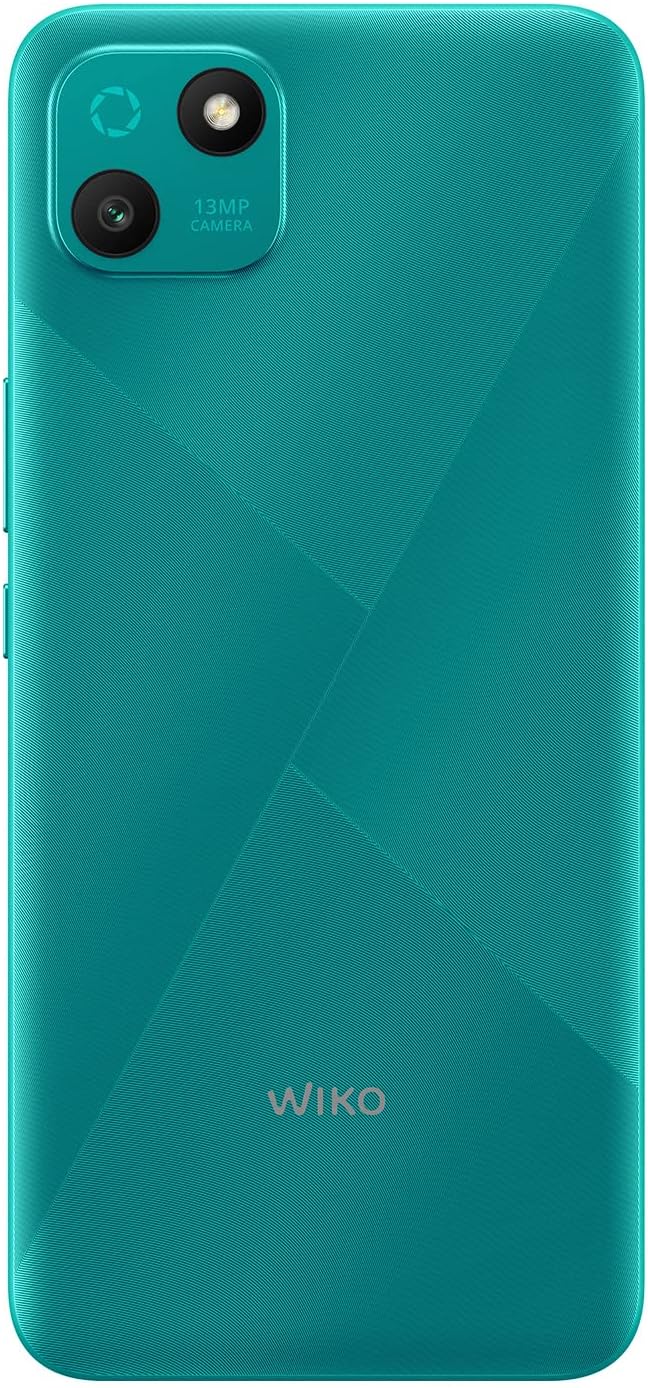
Figuur 2: Gedetailleerde agterkant view of the WIKO T10, highlighting the 13MP camera module and textured back panel.

Figuur 3: Side profile of the WIKO T10, illustrating its slim design and button placement.
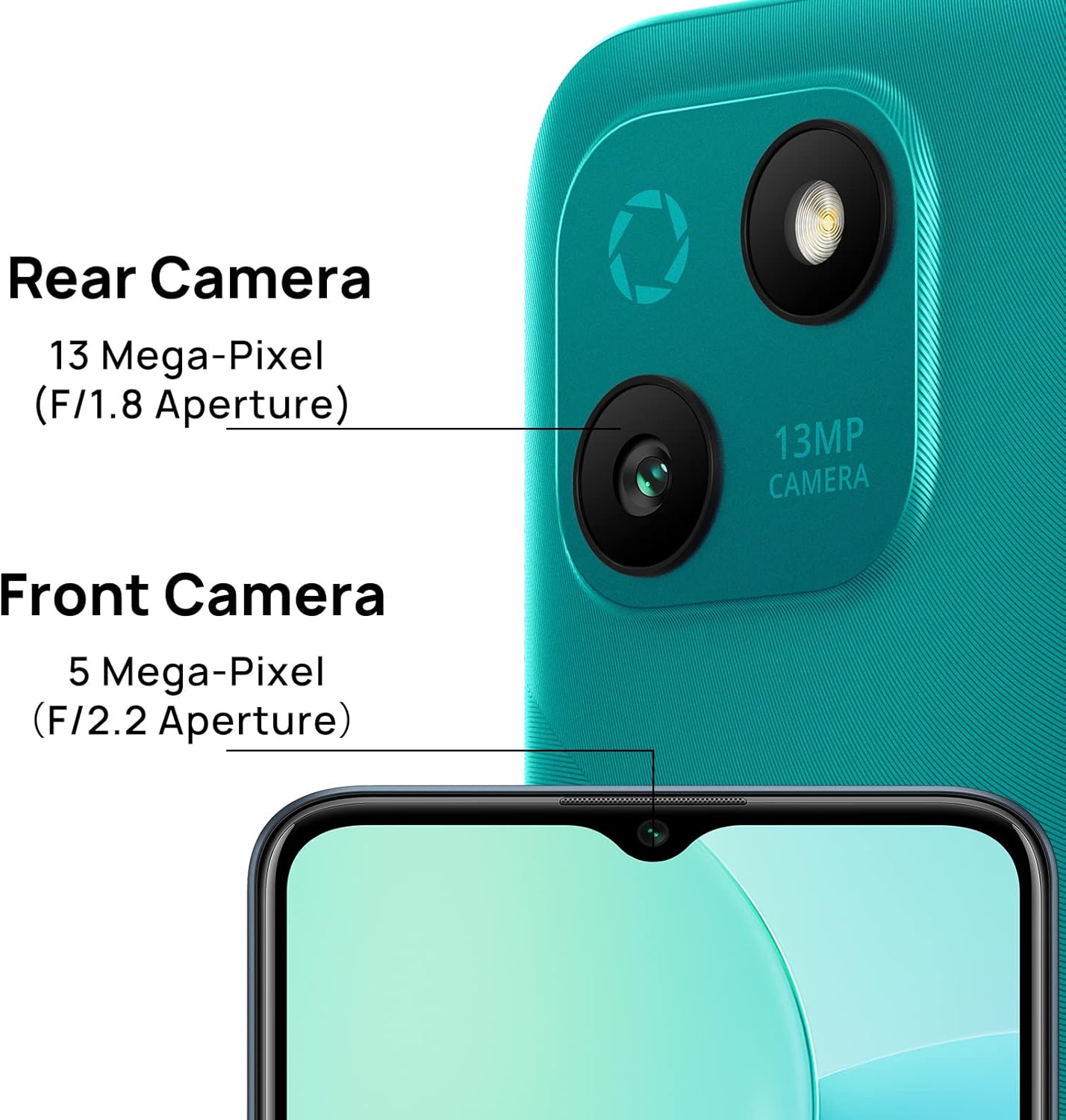
Figuur 4: Camera specifications for the WIKO T10, indicating a 13 Mega-Pixel Rear Camera (F/1.8 Aperture) and a 5 Mega-Pixel Front Camera (F/2.2 Aperture).

Figuur 5: The WIKO T10 features a 6.5-inch Dewdrop Display, offering an immersive visual experience with minimal bezels.
Opstelgids
7.1 SIM- en SD-kaart insit
The WIKO T10 supports Dual SIM functionality. Follow these steps to insert your SIM card(s) and an optional microSD card for expanded storage:
- Vind die SIM-laai aan die kant van die toestel.
- Plaas die SIM-uitwerpgereedskap in die klein gaatjie langs die laai en druk liggies totdat die laai uitspring.
- Plaas jou Nano-SIM-kaart(e) en/of microSD-kaart in die aangewese gleuwe op die skinkbord, en maak seker dat die goue kontakte na onder wys.
- Druk die laai versigtig terug in die gleuf totdat dit gelyk is met die foon se liggaam.
7.2 Aanvanklike aanskakeling en opstelling
To power on your WIKO T10 for the first time:
- Press and hold the Power button (usually on the right side) until the WIKO logo appears.
- Follow the on-screen prompts to select your language, connect to Wi-Fi, set up your Google account, and configure other initial settings.
7.3 Laai die toestel
Before first use, it is recommended to fully charge your WIKO T10.
- Koppel die USB Tipe-C-kabel aan die laaipoort aan die onderkant van die foon.
- Koppel die ander kant van die kabel aan die kragadapter, en steek dan die adapter in 'n kragaansluiting.
- Die laai-aanwyser sal op die skerm verskyn. Ontkoppel die laaier sodra die battery vol is.
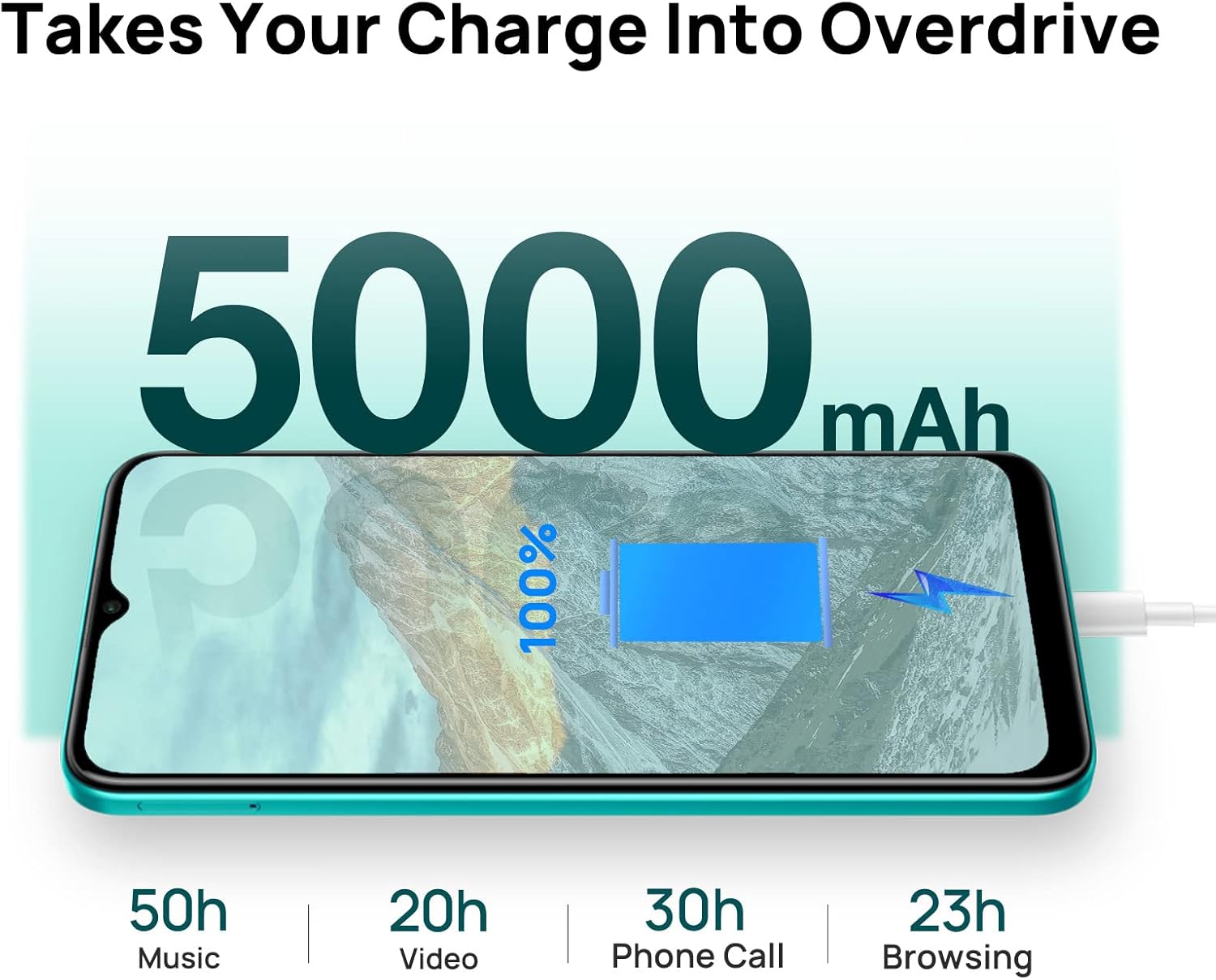
Figuur 6: The WIKO T10 features a 5000mAh battery, providing extended usage times such as 50 hours of music, 20 hours of video, 30 hours of phone calls, and 23 hours of browsing on a full charge.
Operating Your WIKO T10
8.1 Basiese navigasie
Your WIKO T10 uses a capacitive touchscreen for interaction:
- Tik: Om programme oop te maak, kies items of druk knoppies op die skerm.
- Raak en hou: Om toegang tot kontekstuele kieslyste te verkry of items te skuif.
- Swiep: To scroll through lists, switch between home screens, or navigate through photos.
- Knyp: Om in of uit te zoem op beelde en web bladsye.
8.2 Oproepe maak en boodskappe stuur
To make a call, open the Phone app and dial the number or select a contact. To send a message, open the Messages app, start a new conversation, and type your text.
8.3 Verbinding met netwerke
Your WIKO T10 supports Wi-Fi and 4G cellular networks.
- Wi-Fi: Gaan na Instellings > Netwerk en internet > Wi-Fi, skakel Wi-Fi aan en kies jou verlangde netwerk.
- Mobiele data (4G): Gaan na Instellings > Netwerk en internet > Mobiele netwerk and ensure Mobile data is enabled.
8.4 Gebruik van die kamera
The WIKO T10 features a 13MP rear camera and a 5MP front camera. Open the Camera app to capture photos and videos.
- Tik die sluiterknoppie om 'n foto te neem.
- Wissel tussen foto- en videomodusse.
- Use the front/rear camera toggle for selfies or main shots.
8.5 Batterybestuur
Die 5000 mAh-battery bied langer gebruik. Om batterylewe te optimaliseer:
- Pas die helderheid van die skerm aan.
- Aktiveer Batterybesparingsmodus in Instellings > Battery.
- Maak ongebruikte toepassings wat in die agtergrond loop toe.
8.6 Bergingbestuur
Your WIKO T10 comes with 64GB of internal storage. You can expand this using a microSD card.
- Om stoorplekgebruik na te gaan, gaan na Instellings > Berging.
- Maak gereeld kasgeheue en onnodige items skoon files om spasie vry te maak.

Figuur 7: Key features of the WIKO T10, including its 5000mAh Mega Battery, 6.5" Edgeless Dewdrop Display, 13MP Rear Camera, 64GB Large Storage, and Android 11 operating system.
Onderhoud
9.1 Skoonmaak van jou toestel
To keep your WIKO T10 clean and in good condition:
- Gebruik 'n sagte, pluisvrye lap om die skerm en liggaam af te vee.
- Vermy die gebruik van harde chemikalieë, skuurmiddels of aërosolspuitmiddels.
- Moenie toelaat dat vog in openinge inkom nie.
9.2 Sagteware-opdaterings
Kontroleer gereeld vir sagteware-opdaterings om te verseker dat jou toestel die nuutste kenmerke en sekuriteitsopdaterings het. Gaan na Instellings > Stelsel > Stelselopdatering.
9.3 Batterysorg
Om die lewensduur van jou battery te verleng:
- Vermy om die battery gereeld heeltemal te ontlaai.
- Do not leave the phone charging for extended periods after it's full.
- Hou die toestel binne die aanbevole bedryfstemperature.
Probleemoplossing
| Probleem | Moontlike Oplossing |
|---|---|
| Toestel skakel nie aan nie | Maak seker dat die battery gelaai is. Druk en hou die aan/af-knoppie vir ten minste 10 sekondes in om herbegin te forseer. |
| Kan nie aan Wi-Fi koppel nie | Kontroleer of Wi-Fi geaktiveer is. Herbegin jou router. Vergeet die netwerk en koppel weer aan. |
| Programme is stadig of stort vas | Maak agtergrondprogramme toe. Maak programkas skoon. Herbegin die toestel. Maak seker dat daar genoeg stoorplek is. |
| Swak batterylewe | Reduce screen brightness. Disable unused features (Bluetooth, GPS). Enable Battery Saver mode. |
| Kan nie oproepe maak of ontvang nie | Check SIM card insertion. Ensure mobile data is enabled. Contact your network provider. |
Spesifikasies
| Kenmerk | Detail |
|---|---|
| Handelsmerk | Wiko |
| Model Naam | T10 |
| Bedryfstelsel | Android 11.0 (Go-weergawe) |
| Skerm grootte | 6.5 duim |
| Resolusie | 2340 x 1080 (HD+) |
| RAM grootte | 2 GB |
| Berging kapasiteit | 64 GB |
| Agterkamera-resolusie | 13 MP |
| Voorkamera-resolusie | 5 MP |
| Battery kapasiteit | 5000 mAh (Litium-polimeer) |
| Sellulêre Tegnologie | 4G |
| Konnektiwiteit | Cellular, USB Type C |
| Spesiale kenmerke | Integrated GPS, Dual SIM |
| Kleur | Smaraggroen |
Waarborg en Ondersteuning
For warranty information and customer support, please refer to the warranty card included in your product package or visit the official WIKO webwebwerf. Bewaar u bewys van aankoop vir waarborgeise.
For further assistance, you may contact WIKO customer service through their official channels.
Ask a question about this manual
Ask about setup, troubleshooting, compatibility, parts, safety, or missing instructions. Manuals+ will review the question and use this page’s manual context to help answer it.