
1. Inleiding
This manual provides detailed instructions for the installation, operation, and maintenance of your PGST PG103-4G Wireless Home Security Alarm System. This advanced system offers comprehensive protection for your home or business, featuring WiFi, GSM, and 4G connectivity, smart home integration with Alexa and Google Assistant, and a user-friendly interface. Please read this manual thoroughly before using the system to ensure proper functionality and safety.
2. Pakketinhoud
Nadat u die pakket uitgepak het, maak asseblief seker dat al die volgende komponente ingesluit is:
- PGST PG103-4G Main Alarm Panel
- PIR Bewegingsmelder
- Door/Window Sensors (multiple units)
- Afstandbeheerders (2 eenhede)
- RFID Tags (2 eenhede)
- Bedrade sirene
- Kragadapter
- Monteer hardeware
- Gebruikershandleiding

This image displays the full contents of the PGST PG103-4G alarm system kit, including the central control panel, a passive infrared (PIR) motion detector, several magnetic door/window sensors, two remote controls, two RFID key fobs, and the necessary power and mounting accessories.
3. Sleutel kenmerke
The PGST PG103-4G system is designed with advanced features for robust home security:
- Multi-Network Connectivity: Supports WiFi, GSM, and 4G for reliable communication and remote control.
- Gebruikersvriendelike koppelvlak: 2.4-inch TFT display with real-time status, date, and clock.
- Slim huis-integrasie: Compatible with Amazon Alexa and Google Assistant for voice control.
- Afstandbeheer: Arm and disarm via SMS, voice calls, or the dedicated mobile application.
- Uitbreidbare stelsel: Supports up to 100 wireless detectors, remote controls, and RFID cards.
- Two-Way Voice Intercom: Communicate directly through the main panel.
- Geskeduleerde Bewapening/Ontwapening: Automate security routines based on your daily schedule.
- Anti-Tamper Alarm: Alerts if the main unit or sensors are tampered met.
- Low Battery & Power Failure Alerts: Notifies you of critical power status.
- SOS-funksie: Dedicated emergency button for immediate assistance.
4. Opstelgids
4.1 Hoofpaneelinstallasie
- Kragverbinding: Connect the main alarm panel to a power outlet using the provided adapter. The panel has a built-in backup battery for power outages.
- SIM-kaart invoeging (opsioneel): If using GSM/4G features, carefully insert a compatible SIM card into the designated slot on the side of the main panel. Ensure it clicks into place.
- Montering: Choose a central location in your home, away from direct sunlight and heat sources. Use the provided mounting hardware to secure the panel to a wall at an accessible height.

This image shows the main control panel of the PGST alarm system, highlighting its modern design and digital display. It serves as the central hub for all security operations.
4.2 App-aflaai en -verbinding
- Laai die app af: Soek vir 'Smart Life' or 'Tuya Smart' in your smartphone's app store (iOS or Android) and install it.
- Registreer/Teken aan: Skep 'n rekening of meld aan by jou bestaande rekening.
- Voeg toestel by: Follow the in-app instructions to add your PGST PG103-4G alarm panel. Ensure your phone is connected to a 2.4GHz Wi-Fi network during the pairing process.

This image illustrates the intelligent alarm host, which is the main panel of the PGST system. It features a clear display showing system status, time, and temperature, along with a numeric keypad for operation.
4.3 Koppeling van sensors
The system supports various wireless sensors. Follow these general steps to pair them:
- Voer paringsmodus in: On the main panel, navigate to the 'Sensor Pairing' or 'Add Device' menu.
- Aktiveer sensor: For door/window sensors, separate the two parts. For PIR detectors, trigger motion. The panel will confirm successful pairing.
- Name Sensor: Assign a descriptive name (e.g., 'Front Door', 'Living Room PIR') to each sensor for easy identification.
- Installeer sensors: Mount door/window sensors on frames ensuring the two parts are aligned and within 1cm when closed. Install PIR detectors in corners or high traffic areas, avoiding direct heat sources or windows.

This image shows a PGST door sensor installed on a window frame. When the window is opened, separating the two magnetic parts of the sensor, an alarm is triggered, providing immediate notification of unauthorized access.

This image displays the PGST PIR (Passive Infrared) motion detector, which offers 110-degree detection and high sensitivity. It is designed to alert users to abnormal movement within its detection range.
5. Bedryfsinstruksies
5.1 Aan- en ontwapen
The system can be armed or disarmed using several methods:
- Hoofpaneel: Enter your password and press the 'Arm' or 'Disarm' button.
- Afstandbeheer: Press the 'Arm' or 'Disarm' button on your remote.
- Mobiele toepassing: Use the 'Smart Life' or 'Tuya Smart' app to remotely arm or disarm the system.
- Geskeduleerde Bewapening/Ontwapening: Stel spesifieke tye in vir die stelsel om outomaties te aktiveer of te deaktiveer.
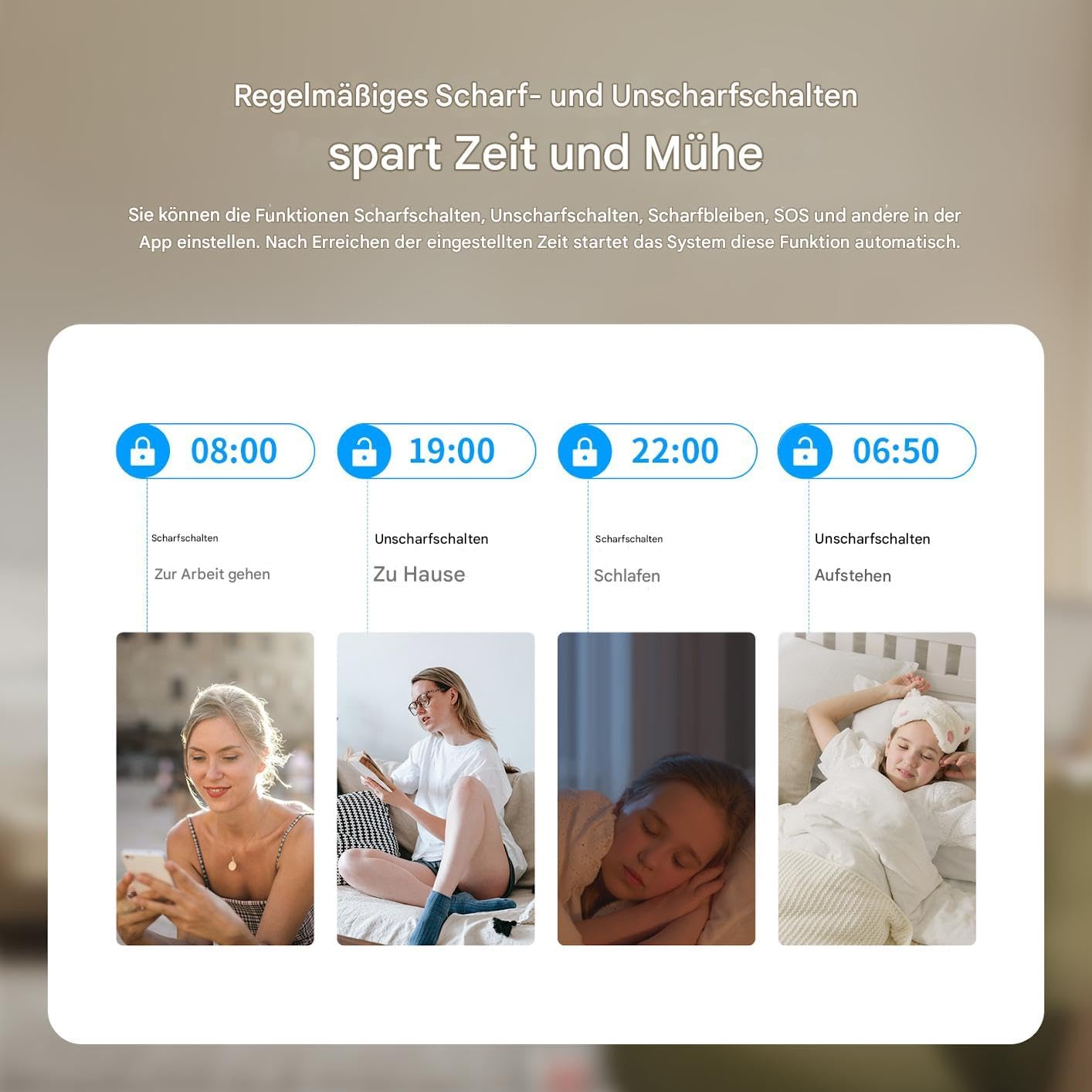
This graphic illustrates the convenience of setting regular schedules for arming and disarming your PGST alarm system, such as arming when leaving for work and disarming upon returning home, or arming at bedtime and disarming in the morning.
5.2 Stembeheer
Integrate your PGST system with smart assistants for hands-free control:
- Amazon Alexa: Enable the 'Smart Life' or 'Tuya Smart' skill in the Alexa app and link your account. You can then use commands like "Alexa, arm my home security."
- Google Assistent: Link your 'Smart Life' or 'Tuya Smart' account in the Google Home app. Use commands such as "Hey Google, disarm the alarm."

This image demonstrates the voice control capability of the PGST alarm system, showing a user disarming the system using an Alexa voice command, highlighting its compatibility with smart home platforms.
5.3 Tweerigting-stemkommunikasie
The main panel supports two-way voice calls, allowing you to communicate with individuals at home directly through the alarm system.

This image illustrates the two-way voice communication feature of the PGST alarm panel, enabling interaction between a remote user via phone and someone near the panel, such as a child playing at home. It also highlights app push notifications and SMS capabilities.
5.4 SOS-funksie
In case of an emergency, press the SOS button on the main panel or remote control. The system will immediately trigger an alarm and notify pre-set emergency contacts.

This image depicts a person activating the SOS function by pressing the dedicated button on a remote control, signifying the immediate emergency alert capability of the PGST alarm system.
6. Onderhoud
6.1 Batterybestuur
The main panel has a built-in lithium-polymer battery for backup power. Sensors are typically battery-powered. The system will notify you of low battery levels for both the main unit and connected sensors.
- Hoofpaneel: Ensure the main panel is always connected to power. The backup battery provides temporary operation during power outages.
- Sensorbatterye: Replace sensor batteries promptly when low battery alerts are received to ensure continuous protection. Refer to individual sensor manuals for specific battery types and replacement procedures.

This image illustrates the PGST alarm panel's built-in battery feature, indicating its ability to provide alerts for low battery status and power blackouts, ensuring continuous operation even during power interruptions.
6.2 Skoonmaak
Vee die hoofpaneel en sensors af met 'n sagte, droë lap. Vermy die gebruik van skuurmiddels of oplosmiddels, wat die toestelle kan beskadig.
7. Probleemoplossing
Indien u probleme met u PGST-alarmstelsel ondervind, verwys na die volgende algemene probleme en oplossings:
| Probleem | Moontlike oorsaak | Oplossing |
|---|---|---|
| Stelsel koppel nie aan Wi-Fi nie | Incorrect Wi-Fi password, 5GHz network, weak signal | Ensure correct 2.4GHz Wi-Fi network and password. Move panel closer to router. Restart router and panel. |
| Sensors koppel nie | Sensor too far, low battery, not in pairing mode | Bring sensor closer to panel. Replace sensor battery. Ensure panel is in pairing mode. |
| Valse alarms | Improper sensor placement, pets, drafts | Adjust PIR sensor sensitivity. Reposition sensors away from direct heat or moving objects. Ensure doors/windows are fully closed. |
| No GSM/4G connection | SIM card not inserted correctly, no signal, expired plan | Reinsert SIM card. Check SIM card balance and plan. Move panel to an area with better cellular reception. |
| Probleme met programbeheer | App not updated, network issues, incorrect account linking | Update the app. Check phone's internet connection. Relink your Smart Life/Tuya account. |
If the problem persists, please contact PGST customer support for further assistance.
8. Spesifikasies
| Kenmerk | Detail |
|---|---|
| Modelnommer | PG103-4G |
| Verbindingstegnologie | WiFi, GSM, 4G |
| Vertoon | 2.4-duim TFT-skerm |
| Kragbron | AC Powered with Lithium-Polymer Backup Battery |
| Versoenbare toestelle | Smartphone, Tablet (via Smart Life/Tuya App) |
| Beheer metode | Voice, App, Remote Control, Keypad |
| Installasie metode | Self-adhesive / Wall Mount |
| Alerttipe | Audio Only (Siren) |
| Produk afmetings | 32 x 18 x 10 cm; 900 gram |
| Vervaardiger | PGST |
9. Waarborg en Ondersteuning
PGST products are designed for reliability and performance. For warranty information, please refer to the documentation included with your purchase or visit the official PGST website. If you require technical assistance, troubleshooting, or have questions about your PGST PG103-4G system, please contact PGST customer support through the contact information provided on their webwebwerf of jou aankoopplatform.