
Produk verbyview
The Ratakee Digital AM/FM Radio Alarm Clock (Model RA01SA) is designed for ease of use and clear readability, featuring large 1.4-inch LED digits. This versatile alarm clock offers multiple alarm sound options, an AM/FM radio with preset capabilities, a dimmable display, sleep timer, and snooze function. It operates via AC power with a battery backup for continued functionality during power outages.
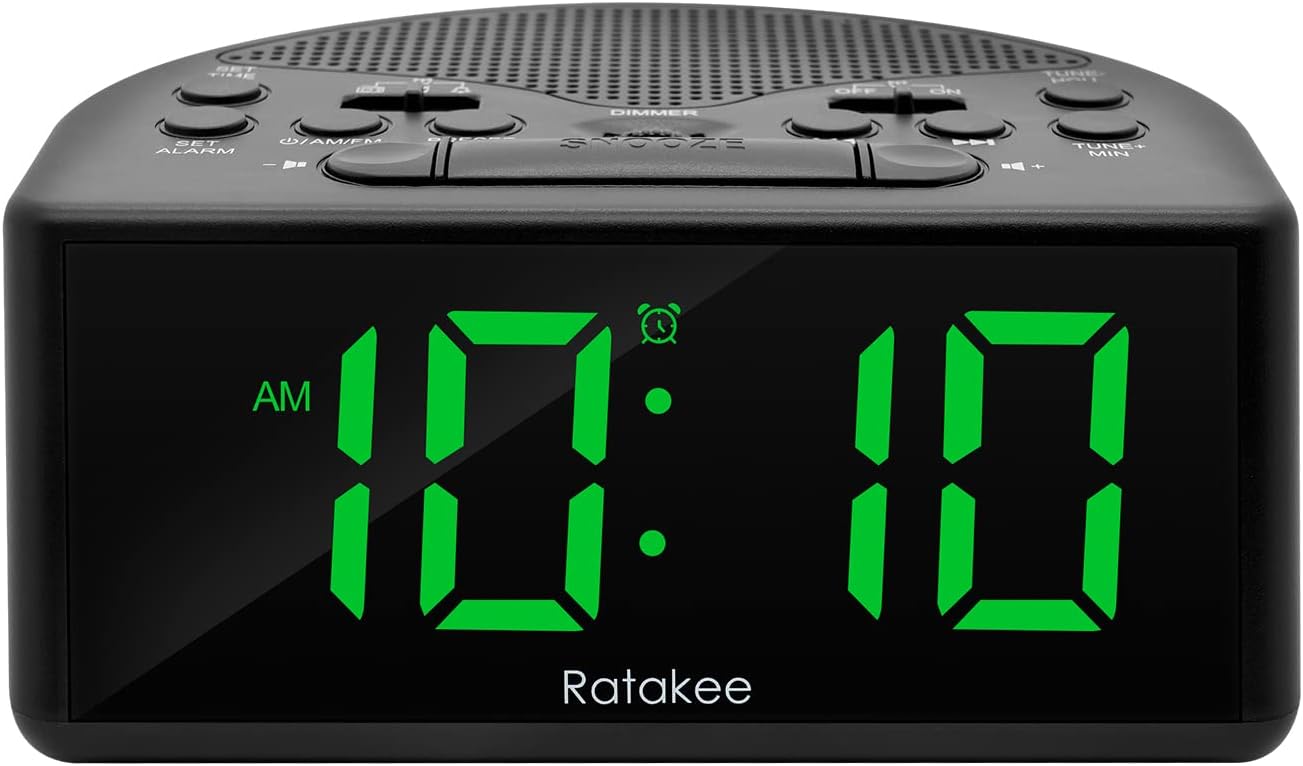
Figuur 1: Voorkant view of the Ratakee Digital AM/FM Radio Alarm Clock displaying 10:10 AM.
Opstelling
Skakel die wekker aan
The alarm clock can be powered by an AC outlet or by batteries for backup.
- AC krag: Connect the included power cord to the AC120V outlet and plug it into a wall socket. The display will light up, and the radio will be operational.
- Battery-rugsteun: Vir krag outage protection, insert 3 AA batteries (not included) into the battery compartment located on the bottom of the unit. When powered by batteries, the display will auto-dim after 20 seconds of no operation to conserve power, but the clock, alarm, and radio functions will remain active.

Figure 2: Illustration of the dual power methods: AC cord connection and battery compartment for 3 AA batteries.
Bedryfsinstruksies
This section details the operation of your Ratakee alarm clock. Refer to Figure 3 for button and switch locations.

Figure 3: Top panel controls of the Ratakee Digital AM/FM Radio Alarm Clock.
Stel die tyd in
- Druk en hou die VASGESTELDE TYD button for 2 seconds. The hour digits will begin to flash.
- Gebruik die TUNE+ HOU knoppie om die uur aan te pas.
- Gebruik die TUNE- MIN knoppie om die minuut aan te pas.
- Druk die VASGESTELDE TYD knoppie weer om te bevestig en die tydinstellingsmodus te verlaat.
Stel die alarm
The alarm clock offers three selectable alarm sounds: AM/FM radio, music, or a classic beep.

Figure 4: The alarm clock offers three distinct alarm sound options.
- Druk en hou die STEL ALARM knoppie vir 2 sekondes ingedruk. Die alarm se uursyfers sal flikker.
- Gebruik die TUNE+ HOU knoppie om die alarmuur in te stel.
- Gebruik die TUNE- MIN knoppie om die alarmminuut in te stel.
- Slide the alarm tone switch (located near the STEL ALARM button) to select your desired alarm sound: radio, music, or beep.
- Druk die STEL ALARM button again to confirm the alarm time and sound.
- To turn the alarm ON or OFF, use the dedicated ON/OFF slide switch for the alarm (located on the top panel, near the right side).
Pas alarmvolume aan: The alarm volume is adjustable from 5 to 15 levels. When using the radio as an alarm, the clock will play the last station you listened to at the set volume level.
AM/FM-radiowerking
The radio allows you to store up to 20 AM and 20 FM stations.

Figure 5: The alarm clock features AM/FM radio with strong reception capabilities.
- Turn Radio On/Off: Druk die ON/AM/FM knoppie om die radio aan of af te skakel.
- Switch Bands: Terwyl die radio aan is, druk die ON/AM/FM knoppie om tussen AM- en FM-bande te wissel.
- Handmatige instelling: Gebruik die TUNE+ HOU en TUNE- MIN buttons to manually tune to your desired frequency.
- Outomatiese skandering/voorafinstelling: Druk die VOORINSTEL button to scan and store available stations automatically.
- Herroep voorafinstellings: Gebruik die VOORINSTEL button to cycle through stored stations.
- Pas volume aan: Gebruik die VOLUME + en VOLUME - buttons to adjust the radio volume (1-16 levels).
Let wel: When listening to FM stations with earphones (via the earphone jack), stereo mode will automatically activate for enhanced sound.
Vertoon dimmer
The alarm clock features a full-range dimmable LED display (0-100% brightness).

Figure 6: Adjusting the display brightness from 0% to 100% for optimal viewing.
Draai die DOWWER knob (located on the top panel) to adjust the display brightness to your preferred level.
Slaap Timer
Die slaaptimer laat die radio toe om vir 'n vasgestelde duur te speel voordat dit outomaties afskakel.
To activate the sleep timer, press the SLAAP button. Each press will cycle through available sleep timer durations (e.g., 10, 20, 30, 60, 90 minutes). The radio will turn off automatically after the selected time.
Sluimer funksie
Wanneer die alarm afgaan, druk die groot knoppie SLUIMER button (located on the top center) to temporarily silence the alarm for an additional 9 minutes of sleep.

Figure 7: Easily activate the snooze function for a short delay in your alarm.
Oorfoonaansluiting
A 3.5mm earphone jack is provided on the side of the unit for private listening. Plug in your earphones to enjoy radio content without disturbing others.
Onderhoud
- Skoonmaak: To clean the unit, wipe it with a soft, dry cloth. Do not use abrasive cleaners or solvents.
- Battery vervanging: If using battery backup, replace the 3 AA batteries when the display dims significantly or the clock functions become unreliable during a power outage. Maak seker dat die polariteit korrek is wanneer nuwe batterye ingesit word.
- Berging: Indien die eenheid vir 'n lang tydperk gestoor word, verwyder die batterye om lekkasie te voorkom.
Probleemoplossing
| Probleem | Moontlike oorsaak/oplossing |
|---|---|
| Die skerm is dof of af. |
|
| Die alarm lui nie. |
|
| Swak radio-ontvangs of staties. |
|
| Cannot set radio presets. |
|
Spesifikasies
| Kenmerk | Detail |
|---|---|
| Handelsmerk | Ratakee |
| Modelnommer | RA01SA |
| Tipe vertoon | Digital LED (Green Digits) |
| Vertoon grootte | 1.4 inches (LED Digits) |
| Kragbron | Corded Electric (AC120V) / Battery Powered (3 AA batteries, not included) |
| Produk afmetings | 5.4"B x 2.4"H |
| Item gewig | 0.4 kilogram (14 onse) |
| Radio Bands | AM/FM (20 AM, 20 FM presets) |
| Alarm luitone | 3 (AM/FM Radio, Music, Beep) |
| Alarmvolume | Adjustable (5-15 levels) |
| Vertoon dimmer | 0-100% (Rotary Knob) |
| Slaap Timer | 10-90 minute |
| Sluimer Duur | 9 minute |
| Oorfoonaansluiting | Ja |
| Materiaal | Plastiek |
| Binne/buiteluggebruik | Binneshuise |
Waarborg en Ondersteuning
Waarborg tipe: Lewenslange waarborg
For technical support, troubleshooting assistance, or warranty claims, please contact Ratakee customer service. Refer to the product packaging or the official Ratakee webwebwerf vir die mees onlangse kontakinligting.
You may also find helpful resources and frequently asked questions on the manufacturer's support page.