
1. Inleiding
Thank you for choosing the ICON Morpheus GX 66 Wired Gaming Mouse. This manual provides essential information for setting up, operating, and maintaining your new gaming mouse. Please read this guide thoroughly to ensure optimal performance and longevity of your device.
The ICON Morpheus GX 66 is a high-performance wired gaming mouse featuring customizable LED lighting and a precise 7200 DPI optical sensor, designed for an optimal gaming experience. It offers a modern style and ambidextrous design, compatible with Windows 7, Windows XP, and Linux operating systems.
2. Produkkenmerke
- Hoë presisie sensor: Equipped with a 7200 DPI optical sensor for accurate tracking and responsiveness.
- Aanpasbare LED-beligting: Dynamic LED illumination enhances your gaming setup.
- 7 programmeerbare knoppies: Offers extensive customization for various gaming commands.
- Bedrade verbinding: Ensures a stable and lag-free connection.
- Ambidekstrous ontwerp: Comfortable for both left and right-handed users.
- Duursame bou: Designed for long-lasting use in intense gaming sessions.
- Wye verenigbaarheid: Supports Windows 7, Windows XP, and Linux operating systems.

3. Opstelling
- Pak die muis uit: Carefully remove the ICON Morpheus GX 66 mouse from its packaging.
- Koppel aan rekenaar: Locate an available USB port on your computer. Plug the USB connector of the mouse firmly into the USB port.
- Bestuurder installasie: The mouse is plug-and-play. Your operating system (Windows 7, Windows XP, or Linux) should automatically detect and install the necessary drivers. This process may take a few moments.
- Toetsfunksionaliteit: Once installed, move the mouse and click the buttons to ensure it is working correctly.
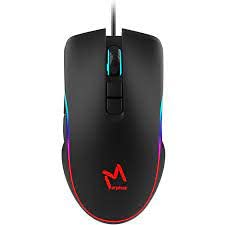
4. Bedryfsinstruksies
4.1 Basiese Funksies
- Links klik: Primary action, selection, activation.
- Regs klik: Context menu, secondary actions.
- Rolwiel: Blaai op/af, middelklik vir spesifieke funksies.
4.2 DPI-aanpassing
The mouse features a dedicated DPI button (often located behind the scroll wheel) to cycle through different sensitivity levels. Press this button to adjust the DPI (Dots Per Inch) to your preferred setting for various tasks or games. The LED lighting may change color to indicate the current DPI level.
4.3 LED beligting
The ICON Morpheus GX 66 features dynamic LED lighting. The lighting patterns and colors are typically pre-programmed and may change based on the selected DPI setting or cycle automatically. There are no user-configurable software controls for the LED lighting on this model.

5. Onderhoud
- Skoonmaak: Gebruik 'n sagte, droë lap om die oppervlak van die muis af te vee. Vir hardnekkige vuiligheid, vee dit effens af.ampMaak die lap met water skoon. Vermy die gebruik van harde chemikalieë of skuurmiddels.
- Sensor skoonmaak: Occasionally, dust or debris may accumulate around the optical sensor. Use a cotton swab or compressed air to gently clean the sensor area on the underside of the mouse.
- Kabelversorging: Avoid sharp bends or excessive pulling on the mouse cable to prevent damage. Store the cable neatly when not in use.
- Berging: Wanneer dit nie vir lang tye gebruik word nie, bêre die muis in 'n skoon, droë omgewing weg van direkte sonlig en uiterste temperature.

6. Probleemoplossing
- Muis reageer nie:
- Maak seker dat die USB-kabel stewig in die rekenaar se USB-poort ingeprop is.
- Probeer om die muis in 'n ander USB-poort te koppel.
- Herbegin jou rekenaar.
- Onreëlmatige wyserbeweging:
- Maak die optiese sensor aan die onderkant van die muis skoon.
- Maak seker dat jy die muis op 'n skoon, nie-reflektiewe en eenvormige oppervlak gebruik. Vermy glas of hoogs reflektiewe oppervlaktes.
- LED Lighting Not Working:
- Gaan die USB-verbinding na.
- The LED lighting is typically powered directly via USB. If the mouse functions but LEDs do not, contact support.
- Knoppe wat nie werk nie:
- Maak seker dat die muis behoorlik gekoppel is.
- Toets die muis op 'n ander rekenaar om sagtewareprobleme uit te sluit.
7. Spesifikasies
| Vervaardiger | IKOON |
| Model | Morpheus GX 66 |
| ASIN | B0B5PLWQXC |
| Spesiale kenmerke | LED Beligting |
| Bewegingsopsporingstegnologie | Opties |
| DPI | 7200 |
| Hand Oriëntasie | Ambidekstrous |
| Aanbevole gebruike | Speletjies |
| Bedryfstelselversoenbaarheid | Linux, Windows 7, Windows XP |
| Styl | Moderne |
| Voltooi Tipe | Mat |
| Kragbron | Elektries met koord (USB) |
| Kleur | Veelkleurig |
8. Waarborg en Ondersteuning
The ICON Morpheus GX 66 Wired Gaming Mouse comes with a standard manufacturer's warranty. For specific warranty terms and conditions, please refer to the warranty card included with your product or visit the official ICON webwebwerf.
For technical support, troubleshooting assistance, or to inquire about replacement parts, please contact ICON customer service through their official support channels. Keep your purchase receipt and product model information (GX 66) handy when contacting support.