
Inrico B01
Inrico B01 Draadlose Bluetooth-luidsprekermikrofoon Gebruikershandleiding
Model: B01
1. Inleiding
The Inrico B01 Wireless Bluetooth Speaker Microphone is designed to enhance communication for users of Android and iOS smart devices. This device pairs easily via Bluetooth 4.2 and offers features such as Push-to-Talk (PTT) and volume control, making it ideal for use with applications like Zello and RealPTT. Full functionality may vary depending on the specific application and its support for external devices.
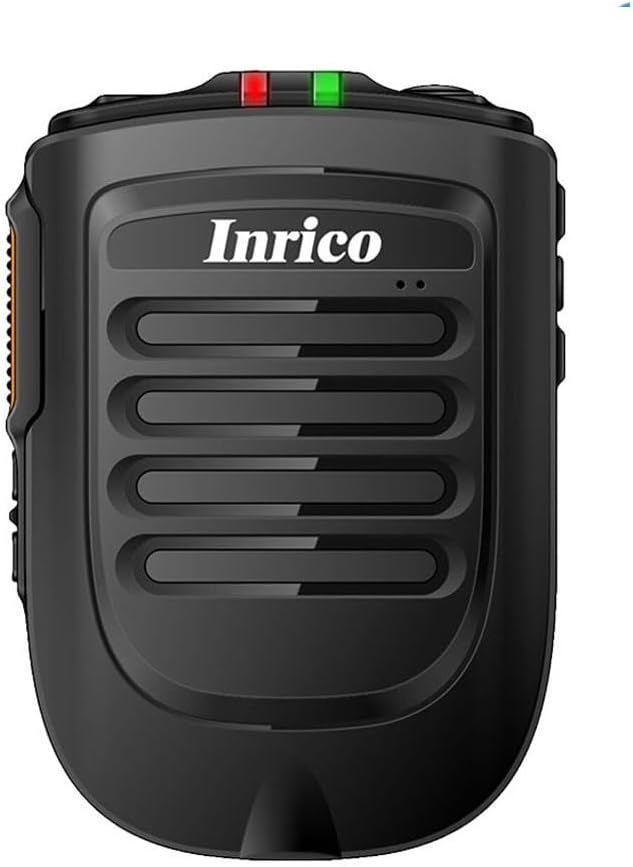
Figuur 1: Voorkant view of the Inrico B01 Wireless Bluetooth Speaker Microphone. This image shows the sleek black design with the Inrico logo and speaker grille.
2. Produkkenmerke
- Embedded PTT and Volume Control Buttons: Designed for easy access and operation, compatible with applications like Zello and other popular communication platforms.
- 3.5 mm oorfoonaansluiting: Allows for connection of external listen-only earpieces for private audio.
- LED-aanwyser: A discreet LED on the top of the speaker provides visual status in various environments.
- Aansoekversoenbaarheid: Works effectively with Zello and RealPTT. Note that some features may not be fully supported by other applications.
- Desktop Charger Compatibility: Designed to be compatible with the B01 Desktop Charger (sold separately).
- Ingesluit komponente: Comes with a Micro USB Cable for charging.
3. Pakketinhoud
Nadat u die pakkie oopgemaak het, maak asseblief seker dat al die volgende items ingesluit is:
- Inrico B01 Wireless Bluetooth Speaker Microphone
- USB-laaier
- USB-datakabel
- Instructiehandleiding (hierdie dokument)
- Gordelklem
- Litiumioonbattery (vooraf geïnstalleer of apart)
4. Toesteluitleg en -kontroles
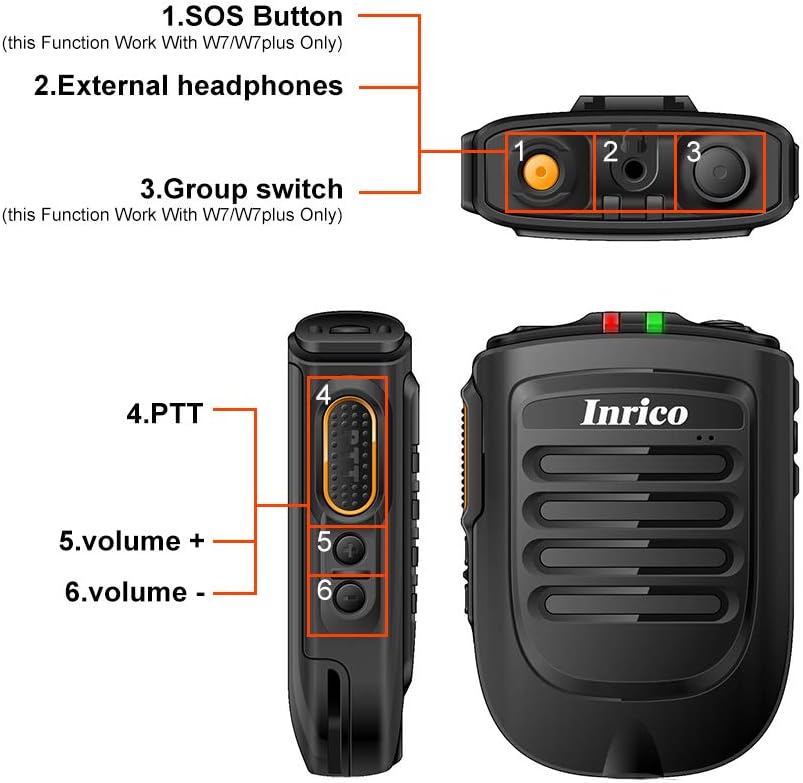
Figure 2: Detailed diagram illustrating the various buttons and ports on the Inrico B01.
- 1. SOS Button: (Functionality may depend on application and device compatibility, e.g., W7/W7plus).
- 2. External Headphones Jack: 3.5mm port for connecting an external earpiece.
- 3. Group Switch: (Functionality may depend on application and device compatibility, e.g., W7/W7plus).
- 4. PTT (Push-to-Talk) Button: Main communication button.
- 5. Volume + Button: Verhoog klankvolume.
- 6. Volume - Button: Verlaag klankvolume.
5. Opstelling
5.1 Laai die toestel
Before initial use, fully charge the Inrico B01. Connect the provided USB data cable to the device's charging port and the other end to a USB charger or a computer's USB port. The LED indicator will show charging status (refer to LED indicator section for details).

Figure 3: Illustration of the Inrico B01's 2000mAh battery capacity and estimated usage times. The image shows battery level indicators and approximate talking, PTT, and standby times.
| Metrieke | Geskatte tyd |
|---|---|
| Geselstyd | ≈14 uur |
| PTT time | ≈14 uur |
| Bystandtyd | >90 XNUMX uur |
5.2 Bluetooth -koppeling
- Ensure the Inrico B01 is powered on and in pairing mode (refer to device's LED indicator for pairing status, usually a blinking blue light).
- On your smartphone (Android or iOS), navigate to the Bluetooth settings.
- Soek vir available devices. The Inrico B01 should appear in the list (e.g., "Inrico B01" or similar).
- Select the Inrico B01 to initiate pairing. If prompted for a passcode, enter "0000" (four zeros).
- Once paired, the LED indicator on the B01 will change to a solid blue light, indicating a successful connection.
6. Bedryfsinstruksies
6.1 Using Push-to-Talk (PTT)
After successfully pairing the device with your smartphone and configuring it within your chosen communication application (e.g., Zello, RealPTT):
- Open your communication application on your smartphone.
- To transmit, press and hold the PTT button (labeled '4' in Figure 2) on the Inrico B01. Speak clearly into the microphone.
- Release the PTT button to stop transmitting and listen for replies.
6.2 Aanpassing van volume
Use the Volume + (labeled '5' in Figure 2) and Volume - (labeled '6' in Figure 2) buttons on the side of the device to adjust the speaker's output volume.
6.3 Using the Earphone Jack
For private listening, connect a 3.5mm listen-only earpiece to the external headphones jack (labeled '2' in Figure 2) on the top of the device. Audio will be routed to the earpiece instead of the internal speaker.
6.4 LED-aanwyserstatus
- Blou LED wat flikker: Device is in pairing mode or waiting for connection.
- Blue LED Solid: Device is successfully connected via Bluetooth.
- Red LED Solid: Toestel laai.
- Groen LED solied: Toestel is ten volle gelaai.
- Rooi LED wat flikker: Waarskuwing vir lae battery.
7. Onderhoud
- Skoonmaak: Vee die toestel af met 'n sagte, droë lap. Moenie harde chemikalieë of skuurmiddels gebruik nie.
- Berging: Bêre die toestel op 'n koel, droë plek weg van direkte sonlig en uiterste temperature.
- Batterysorg: Om die batterylewe te verleng, vermy om die battery gereeld heeltemal te ontlaai. Laai die toestel gereeld, selfs al word dit nie vir lang tye gebruik nie.
- Waterweerstand: Hierdie toestel is nie waterdig nie. Vermy blootstelling aan water of oormatige vog.

Figure 4: Image showing the metal sheet on the battery cover, designed for compatibility with magnetic car holders. This feature allows for convenient mounting in vehicles.
8. Probleemoplossing
| Probleem | Moontlike oorsaak | Oplossing |
|---|---|---|
| Toestel skakel nie aan nie. | Lae of geen batterylading nie. | Charge the device fully using the provided USB cable and charger. |
| Kan nie met slimfoon koppel nie. | Bluetooth is off on smartphone; device not in pairing mode; too far from smartphone. | Ensure Bluetooth is enabled on your phone. Put the B01 into pairing mode. Keep devices within 10 meters. Try restarting both devices. |
| No audio from speaker/earpiece. | Volume too low; device not connected; application not configured correctly. | Increase volume. Verify Bluetooth connection. Check audio settings within your communication application. |
| PTT button not working. | Application not running or not configured to recognize the PTT button. | Ensure your communication application is active and properly configured to use the external PTT button. Some applications may require specific settings. |
9. Spesifikasies

Figure 5: Physical dimensions and weight of the Inrico B01. The image provides measurements in both millimeters and feet, and weight in grams and ounces.
| Parameter | Waarde |
|---|---|
| Handelsmerk | Inrico |
| Model Naam | B01 |
| Bluetooth weergawe | 4.2 |
| Bluetooth-protokol | HFP / HSP / A2DP / AVRCP / SPP |
| Versendingsreeks | 10m |
| Transmissie Krag | KLAS 2, 4dbm |
| Sensitiwiteit | 80dBm < 0.1%BER |
| Oudioprestasie | SBC Decode |
| Audio to Noise Ratio | ≥75dB |
| Spreker Krag | 1W/8R (116dB) |
| LED aanwyser | Blue/Green LED Indicator |
| Oorfoonaansluiting | 3.5 mm |
| Battery kapasiteit | 2000mA @ 3.7V (Lithium Ion) |
| Afmetings (L*B*H) | 90 x 63 x 25.6 mm (ongeveer 3.54 x 2.48 x 1.01 duim) |
| Item gewig | 8.8 onse (ongeveer 249 gram) |
| Versoenbare toestelle | Slimfoon (Android en iOS) |
| UPC | 785582409181 |

Figure 6: The Inrico B01 is compatible with various mobile radios, such as the TM-7 7plus, expanding its utility beyond just smartphones.
10. Waarborg en Ondersteuning
For warranty information and technical support, please refer to the official Inrico webwebwerf of kontak u aankooppunt. Bewaar u aankoopbewys as bewys van aankoop vir waarborgeise.
Vir verdere hulp kan u ook verwys na die produkbladsy op Amazon.
Verwante Dokumente - B01
 |
Built-in/Insert Range Hood Installation and User Manual Comprehensive installation and user manual for Built-in/Insert Range Hoods, covering safety precautions, product specifications, installation steps, operating instructions, maintenance, troubleshooting, and warranty information for models B01-G, B02-G, B01-K, and B02-K series. |
 |
Ingeboude/Insteek-afzuigkap Installasie- en gebruikershandleiding Installasie- en gebruikershandleiding vir ingeboude/plaasafzuigkappe, wat veiligheid, spesifikasies, installasiestappe, werking, onderhoud, probleemoplossing en waarborg vir modelle B01-G, B02-G, B01-K en B02-K reeks dek. |
 |
Installation Guide & User Manual for Built-In/Inserted Series Mount Range Hood Comprehensive installation guide and user manual for the Built-In/Inserted Series Mount Range Hood (B01/B02). Covers safety instructions, installation procedures for B01 and B02 series, operation via gesture and button controls, maintenance, troubleshooting, specifications, and warranty information. |
 |
Zello Gateway Cable Manual - MobilitySound User manual for the MobilitySound Zello Gateway Cable, detailing its connections, requirements, available models, and setup instructions for enabling VOX on both the radio and Zello app. |
 |
Elite™ iOS Quick Start Guide for Zello Speaker-Microphone Concise guide for setting up the Stone Mountain Elite™ iOS Speaker-Microphone with the Zello app. Learn configuration steps and settings for optimal use. |
 |
Throes Range Hood Installation Guide: B01, B02 Series Detailed installation instructions for Throes range hoods, covering B01 and B02 series models. This guide provides step-by-step procedures for preparation, tool requirements, ducted and ductless installation, and venting methods. |
Ask a question about this manual
Ask about setup, troubleshooting, compatibility, parts, safety, or missing instructions. Manuals+ will review the question and use this page’s manual context to help answer it.