
1. Inleiding
Thank you for choosing the OREiN Motion Sensor Outdoor Lights. This manual provides essential information for the proper installation, operation, and maintenance of your new flood light. Please read it thoroughly before use and retain it for future reference.

The OREiN Motion Sensor Outdoor Light in White.
Sleutel kenmerke:
- Dimmable Dusk to Dawn Modes: Offers Manual, Security, and Dimmable Dusk to Dawn modes for versatile lighting control.
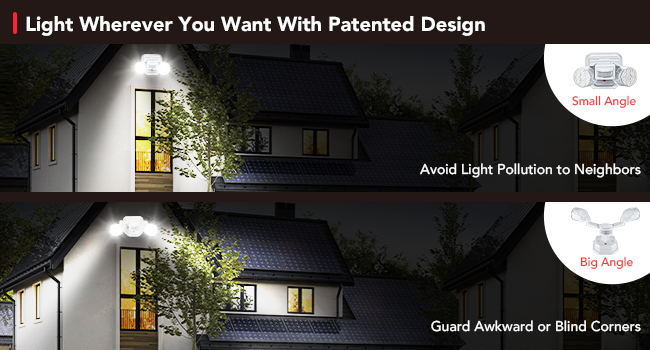
- 450° Superwide Adjustment: Allows precise aiming of light heads and sensor to cover desired areas and avoid light pollution.
- Bright & Efficient LED Spotlights: Provides 1600LM brightness with only 12W power consumption, covering up to 1250 sq.ft.
- Certified and Durable: IP65 waterproof rating and robust Polycarbonate material ensure long-lasting outdoor performance.
- Hardbedrade verbinding: Designed for secure, permanent installation to a standard junction box.
2. Opstelling en installering
Wat is ingesluit:
- OREiN Motion Sensor Outdoor Light
- Montagebeugel
- Skroewe
- Draadmoere
- Instruksie Handleiding
Installasie stappe:
This flood light is designed for hardwired installation to a standard junction box (not included). Ensure power is turned off at the circuit breaker before beginning installation.

verbyview of the light's dimensions and hardwired connection components.
- Berei die aansluitkas voor: Ensure your standard junction box (featuring five 1/2-in knockouts and 16 cu. in. capacity) is securely installed and accessible.
- Heg monteringsbeugel aan: Screw the provided mounting bracket to the junction box.
- Koppel bedrading: Carefully connect the live wire (black) and neutral wire (white) from the light fixture to the corresponding wires in your junction box using the provided wire nuts. This product is made of solid ABS insulation material and does not require a ground wire.
- Beveilig die lig: Align the light fixture with the mounting bracket and secure it with the provided screws.
- Verstel ligkoppe: Once secured, adjust the two light heads and the motion sensor to your desired angles.
For a visual guide on installation, please refer to the following videos:
Video: Using Instruction of OREiN Flood Light. This video demonstrates the step-by-step process of installing the flood light, including wiring connections and mounting.
Video: Easy to Install. A quick guide showing the ease of installation for the OREiN flood light.
3. Bedryfsmodusse en aanpassings
Understanding Operating Modes:
Your OREiN flood light offers three distinct working modes:
- 1. Handmatige modus: The light turns on/off by manual switch control.
- 2. Security Mode: The light turns on only at night after detecting motion.
- 3. Dimmable Dusk to Dawn Mode: The light automatically turns on at 30% brightness at night and increases to 100% brightness upon detecting motion.

Visual representation of the three operating modes.
Aanpassing van sensorinstellings:
The motion sensor has three adjustable knobs: TIME, SENS, and LUX.

Adjustable sensor settings for TIME, SENS, and LUX.
- TYD: Adjusts how long the light stays on after motion is detected (e.g., 8 minutes, 10 seconds).
- SENS (Sensitiwiteit): Beheer die opsporingsbereik van die bewegingsensor (tot 40 voet).
- LUX (Ligsensitiwiteit): Determines the ambient light level at which the sensor activates. For night-only operation, set the LUX to the 'moon' end for minimum setting.
For a demonstration of the sensor's sensitivity and brightness, watch this video:
Video: Sensitive Detection and Super Bright. This video highlights the motion sensor's responsiveness and the light's powerful illumination.
Adjusting Lighting Angles:
The light features 450° wide adjustment with 3 flexible joints on each light arm, allowing you to direct the light precisely where needed. This helps avoid light pollution to neighbors and illuminates awkward or unreachable directions.

Gedetailleerd view of the adjustable joints for precise light direction.

Examples of wide light adjustment for various lighting needs.
See the flexibility of the light's adjustment in this video:
Video: Bright LED Light with Flexible Adjustment. This video showcases the extensive adjustability of the light heads.
4. Onderhoud
The OREiN Motion Sensor Outdoor Light is designed for durability and minimal maintenance. Its IP65 waterproof rating ensures protection against various weather conditions, including snow, wind, and rain.
The IP65 waterproof design ensures durability in outdoor conditions.
- Skoonmaak: Vee die ligtoestel gereeld af met 'n sagte, damp lap om stof en puin te verwyder. Vermy die gebruik van harde chemikalieë of skuurmiddels.
- Inspeksie: Regularly check the wiring and mounting for any signs of wear or damage. Ensure all connections remain secure.
- Materiaal duursaamheid: The Polycarbonate material is resistant to high temperatures, frost, UV radiation, and breakage, contributing to a long service life of 50,000 hours.
5. Probleemoplossing
If you encounter issues with your OREiN Motion Sensor Outdoor Light, please refer to the following common troubleshooting tips:
- Light Not Turning On at Night:
- Check the LUX setting on the sensor. Ensure it is set to the 'moon' (minimum) position for night-only operation.
- Verify that the power supply to the light is active.
- Confirm the operating mode is correctly selected (Security Mode or Dimmable Dusk to Dawn Mode).
- Lig bly aanhoudend aan:
- In Manual Mode, the light will remain on until manually switched off.
- In Security or Dimmable Dusk to Dawn modes, check the TIME setting. If set to maximum, the light will stay on longer.
- Ensure there are no constant motion sources within the sensor's detection range.
- Motion Sensor Not Detecting:
- Adjust the SENS (Sensitivity) knob to a higher setting.
- Ensure the sensor is not obstructed by objects or debris.
- Verify the sensor's angle is appropriate for the desired detection area.
- Light Flashes or Behaves Erratically:
- Check for stable power supply. Fluctuations can cause erratic behavior.
- Ensure the light is securely mounted and connections are tight.
- As probleme voortduur, kontak kliëntediens.
6. Spesifikasies
| Kenmerk | Spesifikasie |
|---|---|
| Handelsmerk | OREiN |
| Model Naam | OL3600140 |
| Modelnommer | OL36001-A |
| Kleur | Wit |
| Materiaal | Akrielnitril Butadieen Styreen, Polikarbonaat |
| Kragbron | Koordelektries (WS) |
| Voltage | 120 Volt |
| Wattage | 12 watt |
| Helderheid | 1600 Lumen |
| Ligte kleurtemperatuur | 5000K |
| Dekkingsgebied | 1250 vk. |
| Waterweerstandvlak | IP65 Waterdig |
| Item gewig | 1.34 pond |
| Produk afmetings | 6.3 cm L x 7 cm B x 3.94 cm H |
| Installasie tipe | Surface Mount (Wall and Soffit Mount) |
| Spesiale kenmerk | Dimbaar, bewegingsensor |
| Lewensverwagting | 50,000 uur |
7. Waarborg en Ondersteuning
Waarborginligting:
The OREiN Motion Sensor Outdoor Light comes with a 2 jaar vervaardiger se waarborg.
Kliëntediens:
For any questions, issues, or support needs, please contact OREiN customer service:
- Telefoonondersteuning: 1-844-506-1530 (available during working hours)
- Aanlyn hulp: 7*24 hrs online help is available.
- Gebruikersgids (PDF): For a detailed user guide, you can download the PDF version hier.