
Inleiding
This manual provides essential instructions for setting up, operating, and maintaining your Epson EcoTank L121 A4 Ink Tank Printer. Please read this guide thoroughly before using the printer to ensure correct operation and to maximize its lifespan.

Beeld: Voorkant view of the Epson EcoTank L121 A4 Ink Tank Printer. This image shows the compact design and the front paper output tray.
1. Opstelling
1.1 Uitpak
Carefully remove the printer from its packaging. Ensure all protective tapes and materials are removed from the exterior and interior of the printer. Keep the packaging materials for future transport if needed.
1.2 Vul van inktenks
The EcoTank L121 uses refillable ink tanks. Use only genuine Epson 664 series ink bottles (6641 Black, 6642 Cyan, 6643 Magenta, 6644 Yellow) for optimal performance and to prevent damage.
- Maak die deksel van die inktenk-eenheid aan die kant van die drukker oop.
- Open the cap for the corresponding color ink tank you wish to fill.
- Carefully uncap the ink bottle and insert it into the filling port. The ink will automatically start to fill the tank. Do not squeeze the bottle.
- Once the tank is full, remove the ink bottle and securely close the ink tank cap.
- Repeat for all other colors.
- Maak die deksel van die inktenk-eenheid toe.
After filling, press and hold the Onderhoud button (often depicted as a droplet or triangle with a lightning bolt) for 3 seconds to initiate ink charging. This process takes approximately 20 minutes. Do not turn off the printer during ink charging.
1.3 Koppel aan 'n rekenaar
The Epson EcoTank L121 connects via USB 2.0.
- Ensure the printer is powered on and ink charging is complete.
- Koppel die een kant van die USB-kabel aan die drukker se USB-poort.
- Koppel die ander kant van die USB-kabel aan 'n beskikbare USB-poort op jou rekenaar.
1.4 Sagteware-installasie
Insert the provided software CD into your computer's CD-ROM drive. If the installer does not start automatically, browse the CD and run the setup file. Follow the on-screen instructions to install the printer drivers and utility software. If you do not have a CD drive, download the latest drivers from the official Epson support webwebwerf.
2. Bediening van die drukker
2.1 Laai papier
The printer supports A4 paper size.
- Open the paper support and pull it up.
- Skuif die randgidse na die breedte van jou papier.
- Load paper print-side up into the rear paper feeder. Ensure the stack is even and does not exceed the maximum load line.
- Pas die randgidse teen die kante van die papier aan.
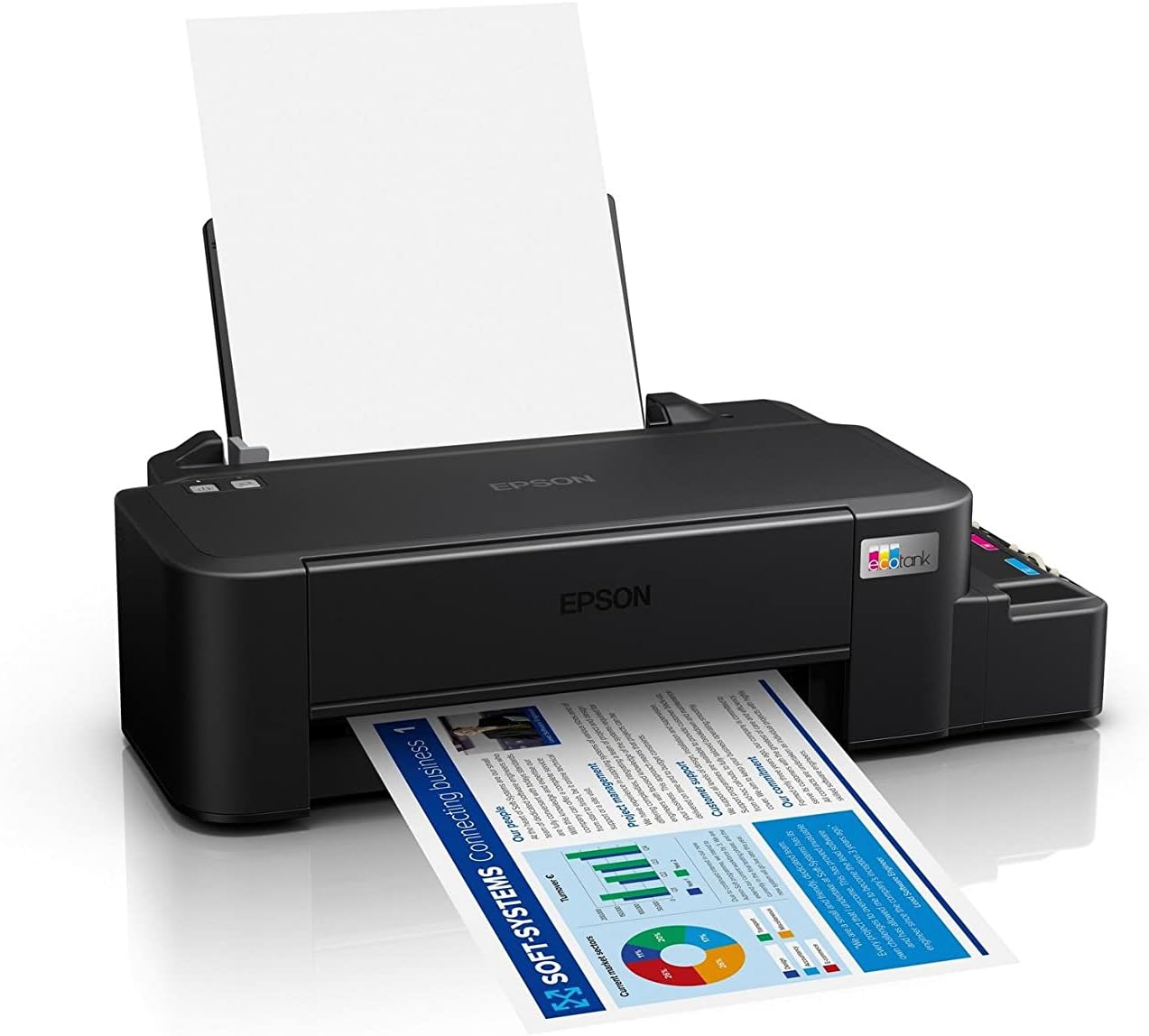
Image: The Epson EcoTank L121 printer actively printing a document. This illustrates paper being fed from the rear tray and exiting the front output tray.
2.2 Basiese drukwerk
To print a document or image from your computer:
- Maak die dokument of beeld oop wat jy wil druk.
- Kies Druk vanaf die toepassing se spyskaart (bv. File > Druk).
- Choose your Epson EcoTank L121 printer from the list of available printers.
- Pas drukinstellings soos papiergrootte, drukkwaliteit en aantal kopieë aan soos nodig.
- Klik Druk.
3. Onderhoud
3.1 Kontrole van inkvlakke
Visually inspect the ink tanks on the side of the printer. The transparent tanks allow you to monitor ink levels. Refill ink when levels approach the lower line to prevent air from entering the system, which can affect print quality.

Beeld: Hoekig view of the Epson EcoTank L121 printer, highlighting the external ink tanks. This view clearly shows the four color ink reservoirs.
3.2 Skoonmaak van die drukkop
If print quality declines (e.g., missing lines, incorrect colors), perform a print head cleaning. This can be done through the printer utility software on your computer:
- Open the Epson printer utility on your computer.
- Navigeer na die Onderhoud or Nut oortjie.
- Kies Kop skoonmaak en volg die instruksies op die skerm.
Alternatively, you can perform a head cleaning by holding down the Onderhoud button on the printer for 3 seconds until the power light starts flashing. Release the button and wait for the cleaning cycle to complete.
3.3 Spuitstukkontrole
After a head cleaning, or if you suspect print quality issues, perform a nozzle check to verify if all nozzles are firing correctly. This can also be done via the printer utility software or by holding the Onderhoud button for a shorter duration (e.g., 1 second) to print a nozzle check pattern.
4. Probleemoplossing
Hierdie afdeling bespreek algemene probleme wat u met u Epson EcoTank L121-drukker kan teëkom.
- Drukker reageer nie:
- Ensure the printer is powered on and connected securely via USB.
- Check if the printer drivers are correctly installed on your computer.
- Herbegin beide die drukker en jou rekenaar.
- Swak drukgehalte:
- Voer 'n spuitstukkontrole uit om verstopte spuitstukke te identifiseer.
- Run a print head cleaning cycle if nozzles are clogged.
- Kontroleer inkvlakke en hervul indien nodig.
- Maak seker dat jy egte Epson-ink gebruik.
- Papierstoppe:
- Skakel die drukker af en verwyder enige vasgesteekte papier versigtig uit die invoerbak, uitvoerbak of binne-in die drukker.
- Maak seker dat die papier korrek gelaai is en nie gekreukel of gekreukel is nieurled.
- Moenie die papierbak oorlaai nie.
- Ink Light Flashing:
- This usually indicates low ink. Check the ink tanks and refill any low colors.
- After refilling, press the Onderhoud button to reset the ink level indicator.
Vir meer gedetailleerde probleemoplossing, verwys na die Epson-ondersteuning webwebwerf of die volledige elektroniese handleiding.
5. Spesifikasies
| Kenmerk | Detail |
|---|---|
| Handelsmerk | Epson |
| Model Naam | EcoTank L121 |
| Druk tegnologie | Inkjet |
| Verbindingstegnologie | USB 2.0 |
| Drukker Uitset | Kleur |
| Maksimum drukresolusie (kleur) | 720 x 720 dpi |
| Maksimum drukspoed (swart) | 9 dpm (ISO) |
| Maksimum drukspoed (kleur) | 4.8 dpm (ISO) |
| Spesiale kenmerke | Hervulbare inktenk |
| Item gewig | 2.4 kilogram |
| Itemafmetings (D x B x H) | 21.5D x 46.1W x 13H sentimeter |
| Maksimum mediagrootte | A4 |
| Versoenbare ink | Epson 664 series (6641/6642/6643/6644) |
| Dupleks druk | Handleiding |
6. Waarborginligting
The Epson EcoTank L121 printer comes with a warranty of 2-years or 20,000 pages, whichever comes first. Please retain your proof of purchase for warranty claims. For full terms and conditions, refer to the official Epson warranty documentation included with your product or visit the Epson support webwebwerf.
7. Ondersteuning
For further assistance, driver downloads, FAQs, and additional support resources, please visit the official Epson support webwebwerf:
Hou asseblief u drukkermodel (L121) en reeksnommer gereed wanneer u ondersteuning kontak.