
1. oorview
The Hoco ES61 Manner Sports Wireless Bluetooth Headset is designed for active lifestyles, offering a blend of comfort, long battery life, and versatile connectivity. This manual provides detailed instructions to help you get the most out of your headset.
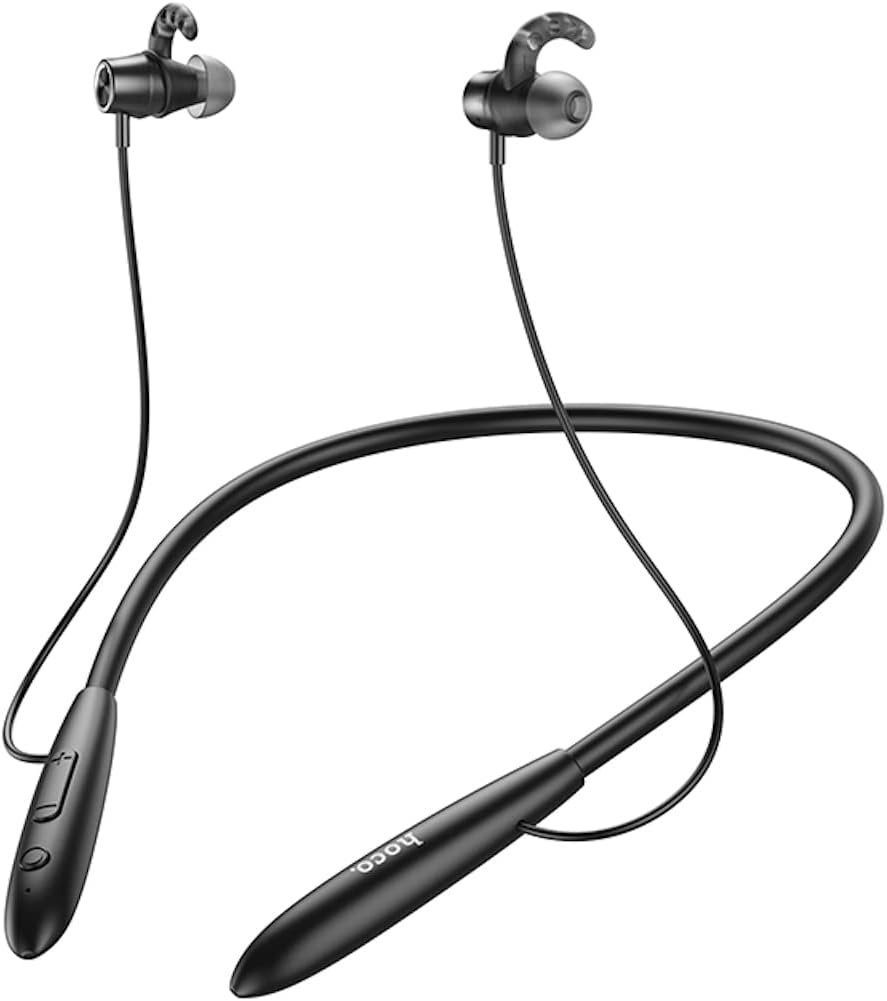
Beeld: Voorkant view of the Hoco ES61 headset, showcasing its neckband design and in-ear earbuds.
2. Produkkenmerke
- Bluetooth 5.1-verbinding: Equipped with JL AC7006 chip for stable and efficient wireless connection.
- Verlengde batterylewe: Features a 200mAh battery, providing up to 20 hours of music/talk time and an impressive 330 hours of standby time.
- Vinnige laai: Laai ten volle binne ongeveer 2 uur.
- Liggewig en gemaklike ontwerp: The earphone cord measures 85cm in length, and the headset weighs only 22g, ensuring comfort during extended wear.
- Veelsydige afspeelopsies: Supports Bluetooth audio streaming and TF card playback (up to 32GB) for direct music listening.
- Multi-language Voice Prompts: Offers voice prompts in both Chinese and English for user convenience.
- Wye verenigbaarheid: Compatible with a broad range of devices including iPhone, Samsung, OnePlus, Huawei, Xiaomi, and Oppo smartphones.

Beeld: Nabyskoot view of the Hoco ES61 headset, highlighting the integrated TF card slot for direct music playback.
Video: 'n Amptelike produkvideovertoningasing the Hoco ES61 Bluetooth Headset's features, including its 20-hour battery life, voice prompts, and compatibility with iOS and Android devices.
3. Opstelgids
3.1 Laai die oorfone
Before first use, fully charge the headset. Use a standard USB charger (not included) to connect the charging port on the headset to a power source.
- The LED indicator will typically show a red light during charging.
- Once fully charged (approximately 2 hours), the LED indicator will turn blue or off.
3.2 Bluetooth -koppeling
To connect your Hoco ES61 headset to a Bluetooth-enabled device:
- Verseker dat die koptelefoon afgeskakel is.
- Press and hold the multi-function button (usually the power button) for approximately 3-5 seconds until the LED indicator flashes red and blue alternately. This indicates pairing mode.
- Aktiveer Bluetooth op jou toestel (slimfoon, tablet, ens.) en soek vir beskikbare toestelle.
- Select "Hoco ES61" from the list of found devices.
- Once connected, the LED indicator on the headset will typically flash blue slowly or turn off, and you will hear a voice prompt confirming the connection.
3.3 TF-kaartterugspeel
The Hoco ES61 supports direct music playback from a TF (MicroSD) card.
- Carefully insert a TF card (up to 32GB) with your music files into the designated TF card slot on the headset.
- The headset will automatically switch to TF card playback mode if a card is detected and contains playable audio files.
- Use the headset controls to manage playback (play, pause, skip tracks).
4. Bedryfsinstruksies
4.1 Basiese kontroles
| Knoppie/aksie | Funksie |
|---|---|
| Multifunksie-knoppie (MFB) | Power On/Off, Play/Pause, Answer/End Call |
| Volume op (+) | Increase Volume, Next Track (long press) |
| Volume af (-) | Decrease Volume, Previous Track (long press) |
4.2 Musiekweergawe
- Speel/pouse: Druk kort op die MFB.
- Volgende snit: Druk die Volume Op (+) knoppie lank.
- Vorige snit: Druk die Volume Verlaag (-) knoppie lank.
- Volume aanpassing: Druk kort op die Volume Op (+) of Volume Af (-) knoppies.
4.3 Oproepbestuur
- Beantwoord/beëindig oproep: Druk kort op die MFB tydens 'n inkomende oproep.
- Verwerp oproep: Druk die MFB lank tydens 'n inkomende oproep.
- Herbel laaste nommer: Double-click the MFB when not on a call.

Image: The Hoco ES61 headset resting on a smartphone, illustrating its use with mobile devices for music and calls.
5. Onderhoud en versorging
- Keep the headset dry. Do not expose it to extreme temperatures or humidity.
- Clean the earbuds and charging port regularly with a soft, dry cloth to prevent dust and debris buildup.
- Vermy die gebruik van harde chemikalieë of skuur skoonmakers.
- Berg die headset op 'n koel, droë plek wanneer dit nie gebruik word nie.
- Do not attempt to disassemble or modify the headset, as this will void the warranty and may cause damage.

Image: The Hoco ES61 headset shown with different sizes of silicone ear tips, emphasizing the importance of proper fit for comfort and sound quality.
6. Probleemoplossing
6.1 Headset Not Turning On
- Ensure the headset is fully charged. Connect it to a charger and check the LED indicator.
- Press and hold the multi-function button for a few seconds to power on.
6.2 Kan nie met toestel koppel nie
- Make sure the headset is in pairing mode (LED flashing red and blue alternately).
- Ensure Bluetooth is enabled on your device and it is within range (typically 10 meters).
- Forget/delete "Hoco ES61" from your device's Bluetooth list and try pairing again.
- Herbegin beide die oorfone en jou toestel.
6.3 Geen geluid of lae volume
- Verhoog die volume op beide die oorfone en jou gekoppelde toestel.
- Maak seker dat die oorfone behoorlik aan jou toestel gekoppel is.
- If using TF card, ensure the card is inserted correctly and contains playable audio files.
- Check for any obstructions in the earbud nozzles and clean if necessary.
6.4 Kort batterylewe
- Maak seker dat die headset ten volle gelaai is voor gebruik.
- Batterylewe kan wissel na gelang van die volumevlak en gebruikspatrone.
- Vermy om die battery aan uiterste temperature bloot te stel.
7. Spesifikasies
| Kenmerk | Detail |
|---|---|
| Bluetooth weergawe | 5.1 |
| Bluetooth-skyfie | JL AC7006 |
| Battery kapasiteit | 200mAh |
| Laai tyd | Ongeveer. 2 uur |
| Musiek / Gesprekstyd | Tot 20 uur |
| Bystandtyd | Tot 330 uur |
| Earphone Cord Length | 85 cm |
| Gewig | 22g |
| TF-kaartondersteuning | Ja, tot 32 GB |
| Stemaanwysings | Chinees en Engels |
| Verenigbaarheid | iPhone, Samsung, OnePlus, Huawei, Xiaomi, Oppo |
8. Waarborg en Ondersteuning
For warranty information and customer support, please refer to the product packaging or contact your retailer. Keep your purchase receipt as proof of purchase for any warranty claims.