
1. Inleiding
Thank you for choosing the NUBWO USB C Headset, Model HW02. This headset is designed for clear communication and comfortable use in various environments, including office, home, and call centers. It features a noise-cancelling microphone, in-line controls, and broad compatibility with USB-C enabled devices. This manual provides essential information for setting up, operating, maintaining, and troubleshooting your headset to ensure optimal performance.
2. Pakketinhoud
Verifieer asseblief dat alle items in u pakket teenwoordig is:
- NUBWO USB C Headset (Model HW02)
- USB-C Cable (integrated with in-line control)
- Gebruikershandleiding (hierdie dokument)
3. Opstelinstruksies
Follow these steps to set up your NUBWO USB C Headset:
- Koppel die oorfone: Plug the USB-C connector of the headset directly into an available USB-C port on your laptop, phone, or computer. The headset is plug-and-play, requiring no additional drivers for most operating systems (Windows 7/8/10, Android, iOS).

Image: NUBWO USB C Headset connected to a laptop, illustrating its wide compatibility with PC, laptop, tablet, and smartphone devices running Android, iOS, Windows 7, Windows 8, and Windows 10.
- Pas vir gemak: Adjust the headband to fit comfortably on your head. The headset features an adjustable headband and breathable ear muffs for extended wear.

Image: Diagram highlighting the comfortable design elements of the headset, including a 180-degree rotatable microphone, breathable earmuffs, and an adjustable headband for personalized fit.
- Plaas die mikrofoon: Rotate the microphone boom to position it optimally near your mouth for clear voice capture. The microphone is 180-degree rotatable.
Opstel Demonstrasie Video
Video: 'n Gedetailleerde oorsigview of the NUBWO USB C Headset, demonstrating its lightweight design, in-line controls, and overall comfort for various uses. This video is provided by a seller and offers practical insights into the product's features.
4. Bedryfsinstruksies
The NUBWO HW02 headset features convenient in-line controls for easy management of audio and microphone functions:
- Volumebeheer: Use the '+' and '-' buttons on the in-line control unit to adjust the speaker volume.
- Mikrofoondemp: Press the microphone icon button to mute or unmute the microphone. A red indicator light will typically show when the microphone is muted.
- Luidsprekerdemp: Press the speaker icon button to mute or unmute the headset speakers. A red indicator light will typically show when the speakers are muted.
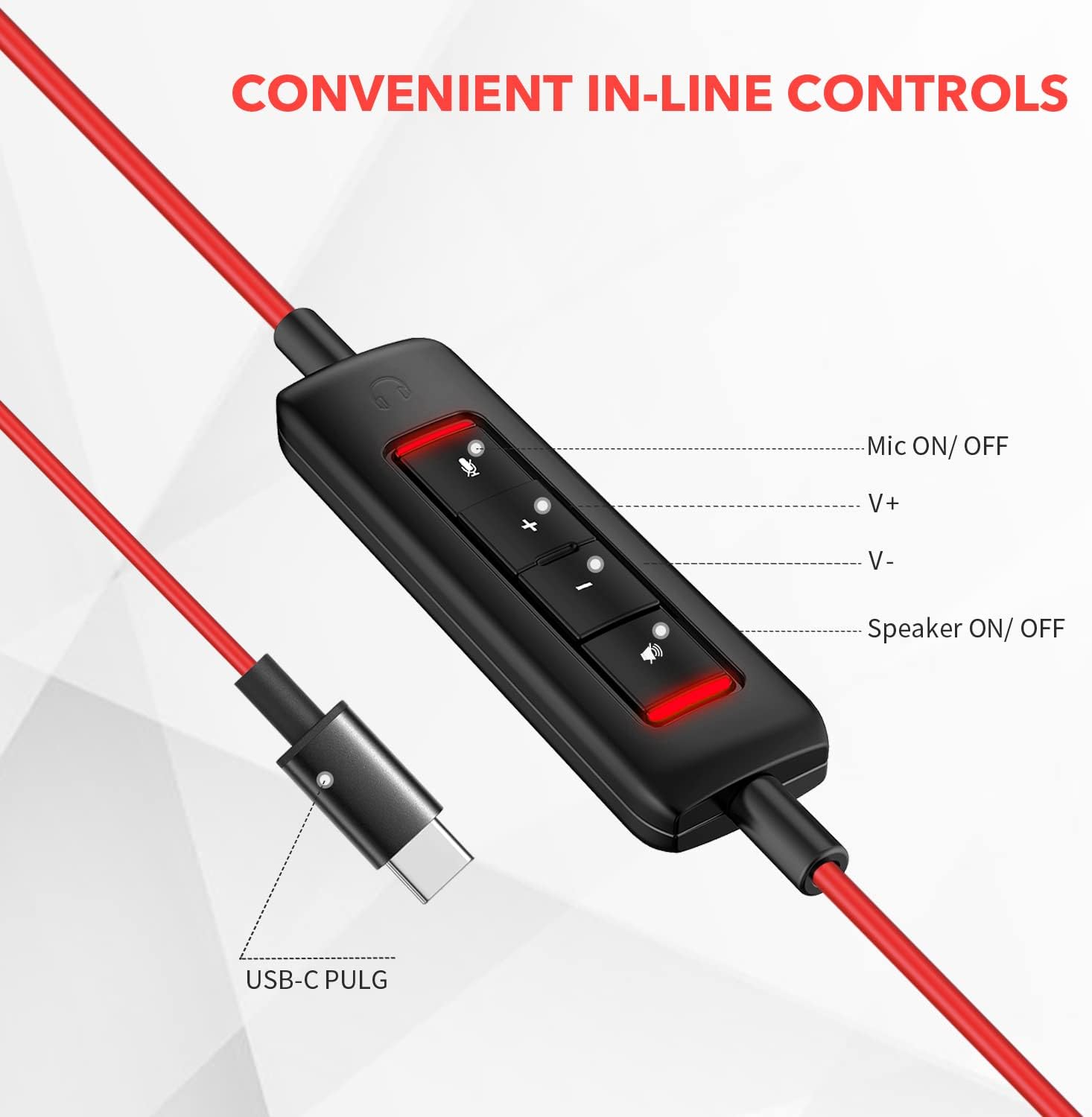
Beeld: Nabyskoot view of the in-line control unit, detailing the buttons for microphone mute/unmute, volume up, volume down, and speaker mute/unmute. The USB-C plug is also shown.
5. Onderhoud
To ensure the longevity and optimal performance of your NUBWO USB C Headset, follow these maintenance guidelines:
- Skoonmaak: Use a soft, dry cloth to wipe down the headset and cable. Avoid using harsh chemicals or abrasive materials.
- Berging: When not in use, store the headset in a clean, dry place, preferably in the provided velvet bag, to protect it from dust and damage.
- Kabelversorging: Vermy skerp buigings of oormatige trek aan die kabel om interne draadskade te voorkom.
- Omgewingstoestande: Moenie die oorfone aan uiterste temperature, humiditeit of direkte sonlig blootstel nie. Die oorfone is nie waterbestand nie.
6. Probleemoplossing
If you encounter issues with your NUBWO USB C Headset, refer to the following common solutions:
- Geen klank vanaf koptelefoon nie:
- Maak seker dat die USB-C-aansluiting volledig in die toestel se poort geplaas is.
- Check the in-line control unit to ensure the speaker is not muted (red indicator light off).
- Increase the volume using the '+' button on the in-line control and your device's system volume settings.
- Verifieer dat die oorfone as die standaard oudio-uitvoertoestel in jou rekenaar se klankinstellings gekies is.
- Mikrofoon werk nie:
- Ensure the microphone is not muted on the in-line control unit (red indicator light off).
- Check that the microphone boom is correctly positioned.
- Verify that the headset microphone is selected as the default input device in your device's sound settings or communication application settings.
- Test the microphone with another application or device to rule out software-specific issues.
- Swak oudiogehalte:
- Maak seker dat die verbinding veilig en vry van puin is.
- Avoid using the headset in environments with high electromagnetic interference.
- Adjust the audio settings on your device.
7. Spesifikasies
| Kenmerk | Spesifikasie |
|---|---|
| Handelsmerk | NUBWO |
| Modelnommer | HW02 |
| Verbindingstegnologie | Bedraad (USB-C) |
| Oorplasing | Op Oor |
| Impedansie | 32 ohm |
| Frekwensiereeks | 20 Hz - 20 000 Hz |
| Tipe beheer | Volume Control, Microphone Mute, Speaker Mute (in-line) |
| Geraasbeheer | Aktiewe geraasonderdrukking (mikrofoon) |
| Item gewig | 0.17 kilogram |
| Materiaal | Plastiek |
| Bykomende kenmerke | Adjustable Headband, Lightweight, Microphone Included |
| Versoenbare toestelle | Laptops, Phones, Computers (with USB-C) |
8. Waarborginligting
The NUBWO USB C Headset (Model HW02) comes with a 2-jaar vervaardigerwaarborg. For details regarding warranty claims and coverage, please refer to the official NUBWO webwebwerf of kontak kliëntediens.
Additionally, products purchased through Amazon may be eligible for a 30-day refund/replacement return policy, subject to Amazon's terms and conditions.
9. Ondersteuning
For further assistance, technical support, or inquiries regarding your NUBWO USB C Headset, please visit the official NUBWO webwebwerf of kontak hul kliëntediensafdeling. Kontakbesonderhede kan tipies op die produkverpakking of die handelsmerk se amptelike aanlyn teenwoordigheid gevind word.